The easiest app builder may not be the best long-term choice. Yes, you can build an app without coding: no-code app builders for entrepreneurs use graphical interfaces instead of requiring you to write code. They can help you get a first version running in days or weeks, depending on the app’s complexity, but a highly specialized product may need more flexibility than a no-code platform offers.
Choosing a free plan is only part of the decision. You’ll also want to know what you can publish, whether you can export the code, and whether self-hosting is an option. This comparison helps you weigh those trade-offs across no-code app builders for entrepreneurs and find a fit for your project, budget, and growth plans. Look for a platform that lets you test your idea without creating avoidable constraints later.
Key Takeaways
- You can build an app without coding, but the right tool depends on your app’s purpose and how much customization it needs.
- Compare free plans by the features and publishing options they include, not just by the word “free.”
- Code export and self-hosting can affect how easily you move or control your app later.
- Use a side-by-side comparison of templates, reusable components, and built-in features to narrow your shortlist.
Can I Build an App If I Don’t Know How to Code?
Yes. No-code platforms use visual tools instead of complex code, making app creation accessible to entrepreneurs. Start with your app’s purpose, then compare scalability, data handling, security, and updates.
| App option | Purpose | Scalability criterion | Key check |
|---|---|---|---|
| Booking app | Appointments | More users and bookings | Payment and calendar connections |
| Customer portal | Account access | Growing records | Authentication and data controls |
| Internal workflow | Team processes | More steps and users | Business-tool integrations |
| Content app | Published information | Frequent updates | Reusable layouts and editing |
Data Handling and API Access
Database capacity, record structure, and API access shape how an app can grow. A booking app, for example, needs organized appointment data, while a customer portal may connect account records to external business tools. Check whether a platform’s integrations cover your payment processor, database, and essential tools, either natively or through APIs.
Give security the same attention as capacity. Review access controls and data permissions before storing customer details. A free plan may suit a small test, but growth can expose limits on records, integrations, or user access. Choose a platform that lets you update the app without rebuilding it from scratch.
Building and Launching an App
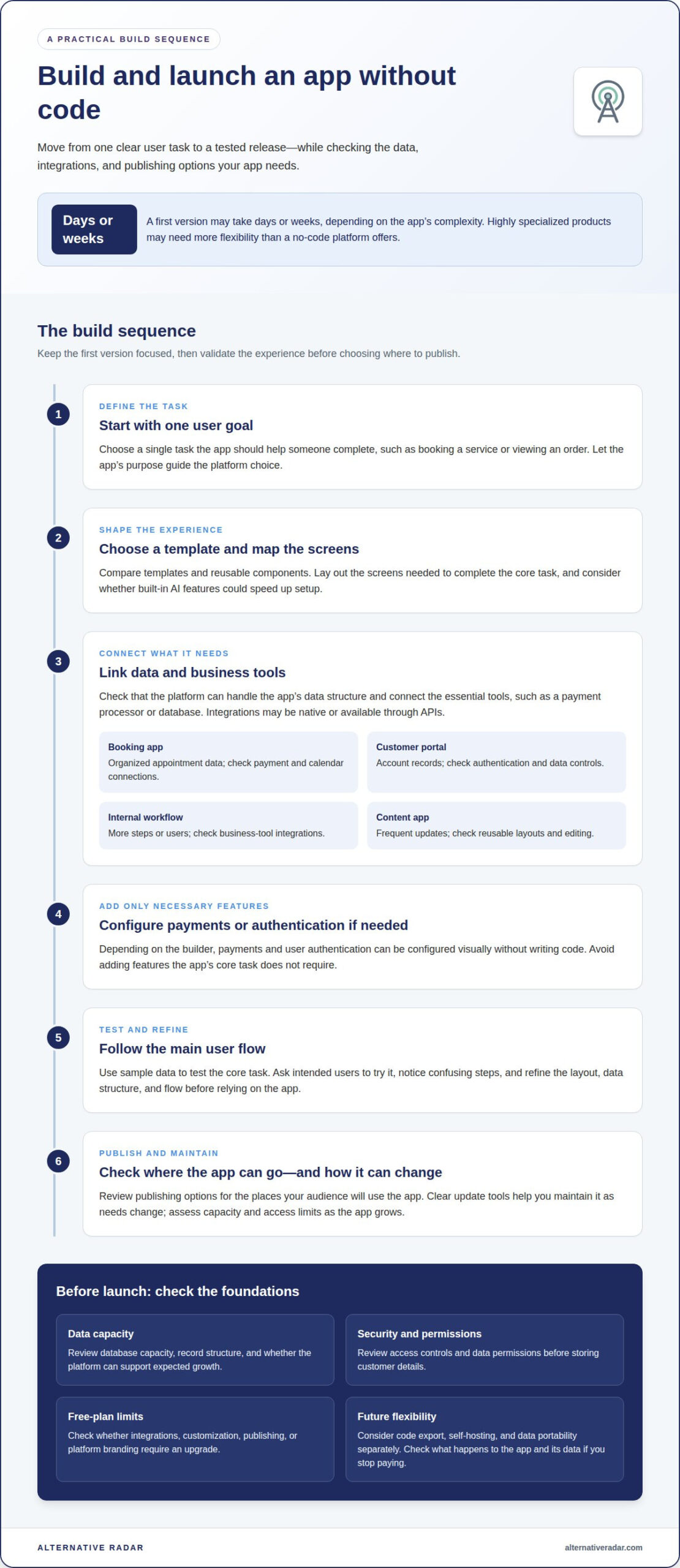
Start by defining one user task, such as booking a service or viewing an order. Choose a template, map the screens, and connect the necessary data and business tools. Add payments or user authentication only if the app needs them. Depending on the builder, you can configure these features without writing code.
Test the main user flow and fix confusing steps before launch. Then review the platform’s publishing options and deploy where your audience will use the app. Compare builders by templates, reusable components, and AI features, which can speed up setup. Clear update tools also make it easier to maintain the app as your needs change.
Choose a platform whose data handling, security, integrations, and publishing options suit your app’s purpose and expected growth.
Free no-code app builder options
A free plan can help you test an app idea before committing to paid software. Compare what each platform lets you build, connect, and publish.
Free Plans and Paid Features
Treat a free plan as a way to prototype, not proof that every launch feature is included. Build a sample screen, connect a database, and test a core task, such as submitting a booking. Then check which features require an upgrade, including integrations, customization, publishing, or removing platform branding. These differences matter more than the plan label.
Free AI app builders offer another route: describe the app and let the tool generate a working first version in a few hours. Then refine its layout and functions visually, without writing code. AI can speed up initial development, but review the generated screens, data structure, and user flow before relying on them.
Pricing and Free-Plan Limits
Free plans differ in practical limits, so compare the features that matter for your use case. A simple directory may need templates and a basic database; a paid app may also need payments, user accounts, or external integrations. Identify what blocks your next step instead of upgrading for tools your app doesn’t use.
Test with sample data before moving real customer information into a prototype. Ask a few intended users to complete one task, then use their feedback to decide whether the free setup works. If you need more customization or capacity, compare the paid tier’s added features with those specific needs.
To build a focused shortlist, compare software recommendations and sponsored placements by their features and plan differences. This can help you distinguish a useful free starting point from a platform suited to your next stage.
Code export, self-hosting, and platform lock-in
A visual editor is only one part of an app’s portability. Before choosing a no-code platform, consider three separate questions: can you export source code, host the app yourself, and move its data? A downloadable interface, for example, may not include the database or connected services. Evaluate each item separately rather than treating portability as a single feature.
Code export matters if you expect internal developers to continue programming the app later. Self-hosting means running the app on infrastructure you control instead of relying solely on the builder’s hosting. These are different options: a platform may support one, both, or neither. Review what happens to your app and data if you stop paying its subscription, including whether an export preserves the parts you need.
No-code and low-code platforms differ in how much programming they require. No-code emphasizes visual configuration, while low-code combines visual tools with the option to add code. A solo founder building a simple customer portal may prefer visual workflows; a product with specialized logic may benefit from low-code flexibility. The trade-off is the technical work needed to build and maintain customizations.
Compare web and mobile app support separately. Some builders focus on browser-based experiences; others support mobile apps or app-store publishing. If Google Play and Apple Store are your target destinations, check that the builder supports publishing to both. Then compare the web version, mobile experience, and update process. Choose based on where customers will use the app and how much control you need over hosting, code, and future changes.
Comparing no-code app builders for solo entrepreneurs
A solo entrepreneur needs a builder suited to one clear use case, with room to adapt. Compare setup, core features, integrations, and where customers will use the app instead of choosing by popularity.
| Builder approach | Best fit | Compare | Potential advantage |
|---|---|---|---|
| Template-led | Common app flows | Reusable components and editing flexibility | Faster setup from a starting layout |
| AI-assisted | Turning a written idea into a prototype | Generated screens and revision controls | Quick first draft without coding |
| Integration-focused | Apps tied to business tools | Database, payment, and authentication connections | Can connect existing workflows |
| Mobile-focused | Customers using phones | Mobile experience and store publishing | Designed around app use on the go |
Use the table to create a shortlist, then test one real task in each platform. For a booking app, try selecting a time, submitting details, and completing payment. For a customer portal, test sign-in and access to account information. These flows can reveal gaps that a feature list may hide.
Next, compare the work involved after launch. Templates and reusable components can simplify changes, while integrations may reduce duplicate data entry. AI can speed up a draft, but revising its output still takes work. Code tools may add flexibility while requiring more technical knowledge.
Finally, match your choice to the next stage of the business. A prototype for gathering feedback has different needs from a scalable app serving paying customers. Confirm that the platform supports the channels you need, including app stores when relevant. Explore software builder comparisons to narrow your options by practical fit.
Integration-focused builders connect apps with business tools, databases, payment services, and authentication systems.
Alternative Radar
Alternative Radar helps entrepreneurs discover and compare software options as they narrow down app builders. Use its product insights to weigh features, pricing, and pros and cons against your needs, such as a free starting plan, app-store publishing, or code export. This is useful when similar platforms differ in details that could shape your decision.
Some recommendations may appear as sponsored software placements or affiliate-linked recommendations. Keep those relationships in mind as you compare options, and focus on how each builder fits your project, workflow, and growth plans.
Contact Alternative Radar to discuss software discovery and comparison.
Turn your shortlist into a confident next step
Your first app doesn’t need to solve every future problem. Choose a clear purpose, then let real user behavior guide what you build next. Start by writing down the decision your app should make easier, such as booking, ordering, or accessing account information. That goal gives your prototype a practical way to measure success.
The best no-code app builders for entrepreneurs are those suited to the work ahead, not simply those with the longest feature list. Keep your priorities visible as you test options, and revisit them when your needs change. A focused choice can help you learn from users before expanding the app’s scope.
If you’re ready to explore software options and comparisons, send Alternative Radar a message. Take the next step at your own pace, with a clearer idea of what your app needs to do.
Frequently Asked Questions
Is there a free AI app builder without coding?
Yes, free AI app builders can help you create an app without writing code. Describe the app’s purpose and main user actions, then review the generated first version. An AI builder can produce a working initial app in a few hours. Treat the draft as a starting point: test its key flow, fix errors, and confirm the free tier supports the features you need.
What is no-code app development?
No-code app development means creating software through visual interfaces rather than writing application code. You arrange screens, configure workflows, and connect data sources using a builder’s tools. For example, a small business could create a service-request form and route submissions into a database. The platform handles much of the technical setup, while you decide how the app is structured and behaves.
What are the best no-code app builders for entrepreneurs in 2026?
The best no-code app builders for entrepreneurs in 2026 are those that match a specific product goal and operating plan. Startups validating an idea can prioritize quick prototyping and user feedback; businesses handling transactions may need payment processing and authentication. Compare suitable builders by supported workflows, publishing destinations, data controls, and export options. A feature that solves your immediate bottleneck matters more than a long list of extras.
How much do popular no-code app builders cost, including paid plans and usage fees?
Builder costs vary by plan and usage, so compare subscription charges, feature limits, and any fees tied to activity or transactions. Include both builder expenses and publishing fees in your launch budget instead of comparing plan prices alone.
Which no-code platforms can build web apps, mobile apps, or both?
Some platforms focus on web apps, others on mobile apps, and some support both. Start with where customers need to use the product: a desktop-oriented reporting tool may suit the web, while a field-service workflow may need mobile access. Then compare publishing options, including support for Google Play and Apple Store. Check whether one build can serve both audiences or whether you need separate versions.
How do you choose a no-code app builder for a startup idea?
Turn your idea into one testable user task, such as requesting a quote or tracking an order. Build that flow, then assess the learning curve, integrations, data handling, and publishing path. Ask potential users to try the prototype and note where they hesitate. Their feedback can show whether the builder supports the core experience before you invest time in secondary features.