
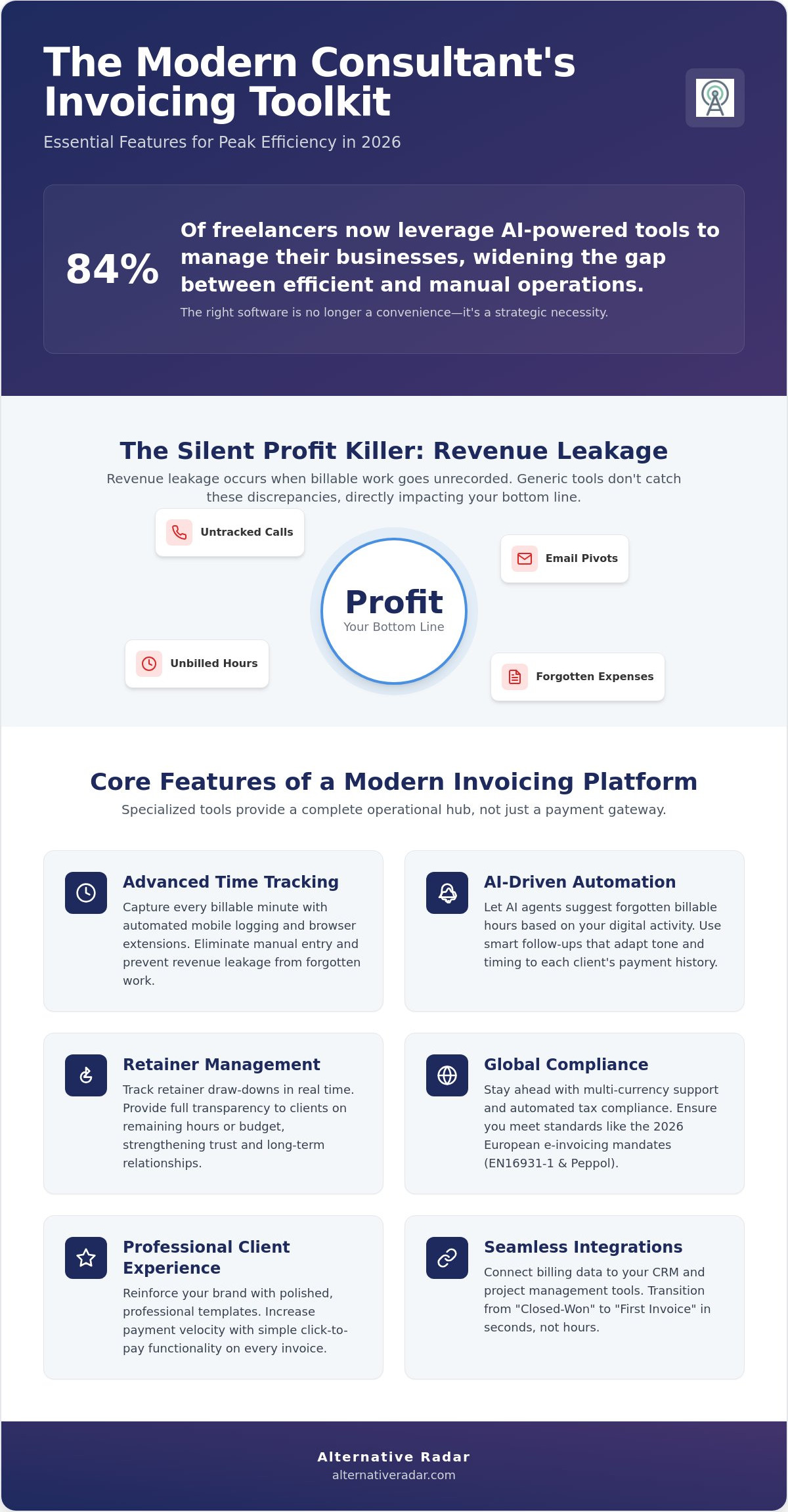
With 84% of freelancers now leveraging AI-powered tools to manage their businesses, the gap between the modern consultant and the one still manually chasing payments has never been wider. You likely entered consulting to share your expertise, not to become a part-time billing clerk. Yet, revenue leakage from untracked hours and the friction of manual follow-ups remain the two biggest drains on your productivity. Selecting the best invoicing software for consultants is a strategic move to protect your billable time and reinforce your brand authority with every client interaction.
We agree that your software should adapt to your specific revenue architecture, not the other way around. Whether you are a solo practitioner needing simple, professional templates or a scaling agency requiring deep time-tracking integration, the right tool exists to eliminate administrative drag. This article provides a clear comparison of the most efficient invoicing solutions for 2026, including the latest AI-driven automation from QuickBooks and the streamlined project features of Plutio. You will discover how to automate your payment reminders and select a platform that scales alongside your client list while ensuring full compliance with the latest global e-invoicing standards.
Key Takeaways
- Identify the specific features like retainer draw-downs and automated mobile time-logging that separate professional consulting tools from generic accounting software.
- Navigate our curated list of the best invoicing software for consultants to find a tailored match for your operational scale, from solo agility to agency-level profitability reporting.
- Streamline your workflow by connecting your billing data to CRM and project management platforms for a “Closed-Won” to “First Invoice” transition that takes seconds, not hours.
- Evaluate the long-term ROI of your tech stack by calculating total cost of ownership against the efficiency gains of automated payment follow-ups.
- Prepare your business for the 2026 global e-invoicing mandates by selecting a platform that prioritizes structured digital reporting and cross-border compliance.
The Consultant’s Billing Dilemma: Why Generic Tools Fall Short
Consultants often mistake basic accounting software for a complete billing solution. While these tools handle the fundamental requirements of what is an invoice, they rarely account for the non-linear nature of professional services. A retail business sells a static product and moves on. Your consulting practice manages a fluid relationship involving retainers, sudden pivots, and variable hourly rates. When you use generic software, you’re forced to manually bridge the gap between your calendar and your ledger. This manual bridge is where the hidden costs live. Every hour spent reconciling spreadsheets is an hour you can’t bill to a high-ticket client.
The best invoicing software for consultants moves beyond simple data entry. It acts as a proactive assistant. In 2026, the industry has shifted toward automated revenue leakage detection. Generic tools don’t alert you when a project exceeds its estimated hours before you hit the limit; they only tell you after the profit has vanished. High-quality consultant tools identify these discrepancies in real time. This ensures your billing reflects the actual value delivered rather than just what you remembered to write down at the end of the week.
Revenue Leakage: The Silent Profit Killer
Revenue leakage occurs when billable work goes unrecorded. It’s the five-minute quick call that turns into thirty minutes, or the late-night email pivot that never makes it to the timesheet. Modern platforms now use AI to scan your digital footprint. For instance, the June 2026 QuickBooks update introduced AI agents that suggest forgotten billable hours based on bank feeds and integrated activity. For travel-heavy consultants, the ability to rebill expenses instantly via mobile scanning is vital. If an expense isn’t logged the moment the receipt is printed, it’s often forgotten, leading to a direct hit on your margins.
Client Experience and Payment Velocity
Your invoice is often the final touchpoint of a project. If it’s clunky, confusing, or difficult to pay, it erodes the professional authority you worked hard to build. Click-to-pay functionality is no longer a luxury; it’s a requirement for maintaining high payment velocity. When clients can settle a high-ticket invoice via a single link, the friction of manual bank transfers disappears. The best invoicing software for consultants balances this functional clarity with brand aesthetics. A professional, branded template reinforces your value and signals that you run a sophisticated operation. This directly impacts long-term client retention and how quickly you see funds in your account.
Essential Features of Consultant Invoicing Software in 2026
In 2026, the best invoicing software for consultants functions as a specialized operational hub rather than a simple payment gateway. It moves beyond the basic recording of transactions to actively manage the consulting lifecycle. Advanced time tracking is the foundation of this shift. Modern tools have moved past manual stopwatches, offering integrated browser extensions and automated mobile logging that capture billable activity as it happens. This level of precision is necessary to prevent the revenue leakage discussed previously, ensuring that every minute of expertise is accounted for without manual data entry.
Retainer management has also become more sophisticated. Your software must track draw-downs in real time, providing both you and the client with a clear view of remaining hours or budget. This transparency is vital in a global market where the management consulting sector is projected to reach $1.46 trillion by 2030. To compete at this scale, multi-currency support and automated tax compliance are mandatory. You need a system that understands the July 2026 revisions to the European e-invoicing standard EN16931-1 and the August 2026 Peppol network updates. To find the right fit for your specific workflow, you can compare specialized tools that prioritize these high-efficiency features.
Automation Beyond Reminders
Automation now extends to smart follow-ups that analyze client behavior. If a client historically pays on day 15, the system won’t send an aggressive nudge on day three. It adjusts the tone and timing based on historical payment velocity. Additionally, automated tax calculations handle the complexities of cross-border engagements, applying the correct VAT or sales tax based on the buyer’s jurisdiction. Conditional Logic Invoicing is a 2026 standard where invoice terms, tax rates, and payment methods dynamically update based on the client’s geographic location and project type. This ensures compliance without requiring you to be a global tax expert.
The Rise of the Integrated Client Portal
Client portals reduce administrative friction by providing a self-service environment. Instead of answering repetitive “status update” emails, you give clients access to a dashboard showing project progress, payment history, and upcoming milestones. Linking project deliverables directly to invoice line items builds immediate clarity. It proves exactly what was delivered for the fee charged, which is particularly effective for long-term retainers where value can sometimes feel abstract. These portals act as a trust-building tool, reinforcing your professional authority while allowing you to focus on high-level strategy instead of administrative support.
Top Invoicing Platforms Categorized by Consulting Model
Identifying the best invoicing software for consultants requires you to look beyond generic feature lists. Your software must align with your specific revenue architecture. A solo developer’s billing needs differ significantly from those of a multi-disciplinary boutique agency. If your software doesn’t mirror your workflow, it becomes a hurdle rather than a tool for efficiency. Categorizing platforms by consulting model ensures that you select a solution that supports your current scale while allowing for future growth.
Best for Solo Consultants: Agility and Ease
Solo consultants prioritize simplicity and mobile agility. You need to log hours and send invoices between meetings without a steep learning curve. Harvest and FreshBooks are the leading choices for this model. As of May 2026, FreshBooks offers a Lite plan for $19 per month, which is ideal for shops with up to five billable clients. Harvest provides a free plan for small operations, with a Pro version priced at $11 per user per month. While completely free options like Zoho Invoice exist, they often lack the advanced automation found in paid tiers. If you feel restricted by these market leaders, you should explore our guide on Finding the Best Alternative to Popular Software in 2026 to identify tools that offer more personalized suitability.
Best for Agencies: Scalability and Oversight
Agencies require deep oversight into team permissions and resource allocation. You aren’t just tracking your own time; you’re managing the profitability of multiple consultants across various projects. Platforms like Teamwork and Paymo are designed for multi-user environments. These tools allow you to monitor “billable vs. non-billable” internal ratios in real time. This metric is essential for understanding your true overhead and ensuring that your boutique agency remains profitable. To maximize efficiency, many agencies integrate their billing with an open source CRM software comparison. This creates a “single source of truth” that tracks the client lifecycle from the first contact to the final payment.
Retainer-Based and Project-Based Needs
If your model relies on recurring revenue, your software must handle retainer draw-downs automatically. You need a system that tracks prepaid balances and notifies you when a client’s budget is nearly exhausted. For project-based experts, milestone billing is the priority. Your tool should support deposit management and allow you to trigger invoices based on specific deliverables. This ensures that cash flow remains steady throughout long-term engagements. By choosing a platform that matches your specific billing model, you eliminate the friction of manual workarounds and protect your most valuable asset: your time.
The Tech Stack: Integrating Invoicing with CRM and PM Tools
Fragmented data is the primary cause of administrative friction in a scaling consultancy. If your billing process exists in a vacuum, you’re forced into a cycle of manual data entry that invites error and delays payment. Adopting a “Single Source of Truth” philosophy means your invoicing software doesn’t just record transactions; it pulls data directly from your sales and project delivery tools. This integration ensures that the best invoicing software for consultants acts as the operational heartbeat of your business, rather than just another tab on your browser.
Selecting the best invoicing software for consultants requires looking at how well it communicates with your existing ecosystem. A seamless tech stack allows data to flow from a lead in your CRM to a project in your management tool, and finally to a line item on an invoice. This connectivity eliminates the “hidden costs” of manual reconciliation discussed earlier, allowing you to focus on client delivery rather than data management. You can view our full software comparison guides to see which platforms offer the strongest native integrations for your specific setup.
CRM to Invoice: Eliminating Data Entry
Mapping client data from a CRM directly into your billing templates is a foundational efficiency gain. When a deal moves to “Closed-Won,” your system should automatically generate a draft invoice or a retainer request based on the contract terms. This reduces human error and ensures that the contract-to-invoice pipeline remains unbroken. For 2026, look for tools that offer robust native integrations or well-documented Zapier hooks to connect platforms like HubSpot or Pipedrive. Automating this transition ensures that your billing details are always accurate and consistent with the agreed-upon scope.
Project Management Sync
Turning “Tasks Completed” into “Invoice Lines” with a single click is the ultimate goal for project-based consultants. When your invoicing tool syncs with project management software, you can trigger billing based on specific milestones or deliverable approvals. This creates a transparent link between the work performed and the fee charged. You can even set up notifications so that when an invoice is paid, your team receives an alert via Slack alternatives to kick off the next phase of the project.
Profitability tracking becomes much simpler when labor costs are linked directly to billing. By syncing these systems, you can see in real-time whether a project is staying within budget or if the scope is creeping beyond the original agreement. Finally, ensure your stack includes a reliable sync with accounting software like QuickBooks or Xero. This keeps your bookkeeper happy by providing a clean, reconciled trail of all consulting revenue without requiring manual exports or spreadsheet uploads at the end of every month.
Evaluating the Best Alternative: How to Choose Your Tool
Don’t let a minor learning curve deter you from long-term efficiency gains. Some tools feel complex during the initial setup because they offer the depth necessary for professional consulting workflows. Balance the immediate ease of use with the platform’s ability to handle your revenue architecture two years from now. Additionally, prioritize “Exportability.” In a landscape of shifting regulations, you cannot afford to be locked into a proprietary format. Ensure the software allows for clean CSV or XML exports of all time logs and financial history so you remain the owner of your business data.
Use your 14-day free trial window as a rigorous stress test. Don’t just click through the interface; import a live project and attempt to set up a complex retainer draw-down. Test the mobile logging features while you’re away from your desk to see if they actually reduce your administrative load. If the workflow feels clunky during the trial, it will become a major bottleneck once you’re managing a full client load.
Future-Proofing Your Choice
Look for AI features that provide tangible utility rather than marketing hype. The best tools in 2026 use AI for predictive revenue leakage detection and automated expense categorization, similar to the updates seen in QuickBooks earlier this year. API robustness is also a non-negotiable factor. Your invoicing software must be able to adapt to custom consulting workflows as you integrate new tools into your stack. Finally, evaluate the vendor’s roadmap. Ensure they are prepared for global mandates, such as the French e-invoicing requirements starting September 1, 2026, to avoid a forced migration later.
Making the Transition
Migrating from spreadsheets to a dedicated tool requires a structured approach. Follow this three-step checklist to ensure a seamless transition:
- Data Audit: Clean your client records and close out completed projects before importing any data to the new system.
- Field Mapping: Verify that your CRM data fields align with your new invoicing templates to prevent sync errors.
- Shadow Billing: Run your new software alongside your old system for one full billing cycle to verify accuracy before decommissioning the old process.
For a more tailored selection process, visit Alternative Radar to discover personalized software recommendations that match your specific consulting model and scale.
Scale Your Consulting Practice with Automated Billing
You’ve seen how generic tools create administrative drag and why 2026 demands a more integrated approach to revenue management. From automating revenue leakage detection to providing transparent client portals, your choice of software directly impacts your payment velocity and professional authority. The best invoicing software for consultants is the one that maps perfectly to your specific billing model, whether you’re a solo practitioner or a scaling agency. Prioritize tools that offer a low total cost of ownership and ensure your data remains exportable as you grow.
Our team of software experts has done the heavy lifting so you don’t have to. We provide objective, data-driven comparisons focused entirely on maximizing your efficiency and ROI. Find your perfect invoicing tool on Alternative Radar and take the first step toward a frictionless billing cycle. You’ve built the expertise; now let the right technology protect your time and profit. Your business deserves a system that works as hard as you do.
Frequently Asked Questions
What is the best free invoicing software for consultants in 2026?
Zoho Invoice is a completely free service as of June 2026, making it a top choice for those with zero budget. Kiaro and Harvest also offer free-forever tiers that provide essential functionality for solo practitioners. These tools are ideal if you’re just starting, but remember that free plans often limit the number of billable clients or advanced automation features you can access.
How do I handle international clients and multi-currency invoicing?
Handling international clients requires software with multi-currency support and localized tax compliance. The best invoicing software for consultants in 2026 should automatically update exchange rates and support structured formats like ZUGFeRD 2.5. This ensures you meet global standards, such as the mandatory electronic invoice reception requirement for all French companies starting September 1, 2026.
Should I use a standalone invoicing tool or a full CRM suite?
Standalone tools like FreshBooks or Zoho provide deep, specialized invoicing features that generic CRM suites often lack. However, a full CRM suite is better if you want to eliminate data silos between your sales pipeline and your billing department. Evaluate whether you need the specialized time-tracking depth of a dedicated tool or the navigational speed of an all-in-one platform.
How does automated time tracking improve billing accuracy for consultants?
Automated time tracking improves accuracy by capturing billable activity in real time through browser extensions and mobile apps. This method eliminates the revenue leakage caused by manual end-of-week entries where small tasks are often forgotten. By linking labor directly to invoice line items, you provide clients with transparent proof of work, which often leads to faster payment settlement.
Is open-source invoicing software safe for professional consulting?
Open-source invoicing software is safe for professional use provided you have the technical resources to manage security updates. It offers unmatched customization for unique consulting workflows but lacks the convenience of SaaS platforms. If you choose this route, ensure the software is compatible with the July 2026 revisions to the European e-invoicing standard EN16931-1 to maintain regulatory compliance.
What features are essential for retainer-based consulting billing?
Retainer-based billing requires automated draw-down tracking and recurring invoice generation. Your software must monitor prepaid balances and alert you when a client’s funds are nearly exhausted. This prevents you from performing unbilled work and ensures a steady cash flow. Look for platforms that allow you to roll over unused hours or automate monthly top-up requests without manual intervention.
How can I automate my late payment follow-ups without sounding unprofessional?
You can automate follow-ups professionally by using conditional logic to vary the message tone based on the client’s payment history. Set the system to send a neutral reminder three days before the due date and a more direct notice only after a payment is significantly overdue. This approach removes the emotional friction of manual chasing while reinforcing your brand’s commitment to efficiency.
What is the average cost of invoicing software for a solo consultant?
The average cost for the best invoicing software for consultants at the solo level ranges from $10 to $30 per month. For example, Bonsai’s Starter plan is $10 per month, while Plutio’s Core plan is $19 per month as of February 2026. If you have more than 50 billable clients, expect to pay between $38 and $65 per month for premium features and unlimited capacity.