
Your “free” productivity suite shouldn’t come with a monthly invoice or a mandatory AI assistant that scans your private documents. Most users are tired of the subscription trap and the constant push toward cloud-only features that compromise data sovereignty. You want to open a spreadsheet, edit a presentation, and share a document without worrying if the formatting will break or if your data is being used to train a corporate model. It’s entirely possible to find free microsoft office alternatives that offer 100% file fidelity without the overhead of a recurring fee.
We’ve done the heavy lifting of testing the latest 2026 software releases to ensure you don’t have to. You’ll discover how to regain control over your local data while maintaining professional standards. Whether you need the privacy-focused power of LibreOffice 26.8 or the seamless OOXML compatibility of ONLYOFFICE, this guide provides a logical roadmap to your next office suite. We’ll compare the top contenders based on performance, licensing, and real-world usability so you can make an informed switch today.
Key Takeaways
- Eliminate recurring costs and regain document privacy by moving away from suites that force AI features on your local data.
- Choose the right workflow path by comparing the trade-offs between real-time cloud collaboration and high-performance desktop installations.
- Discover which free microsoft office alternatives currently lead the market in OOXML compatibility and open-source stability.
- Fix common formatting errors and font-related layout breaks to ensure your documents look professional when shared with legacy Office users.
- Follow a structured migration plan to audit your data and transition to a permanent, cost-free productivity solution without losing essential files.
The 2026 Productivity Shift: Why Users are Ditching Microsoft Office
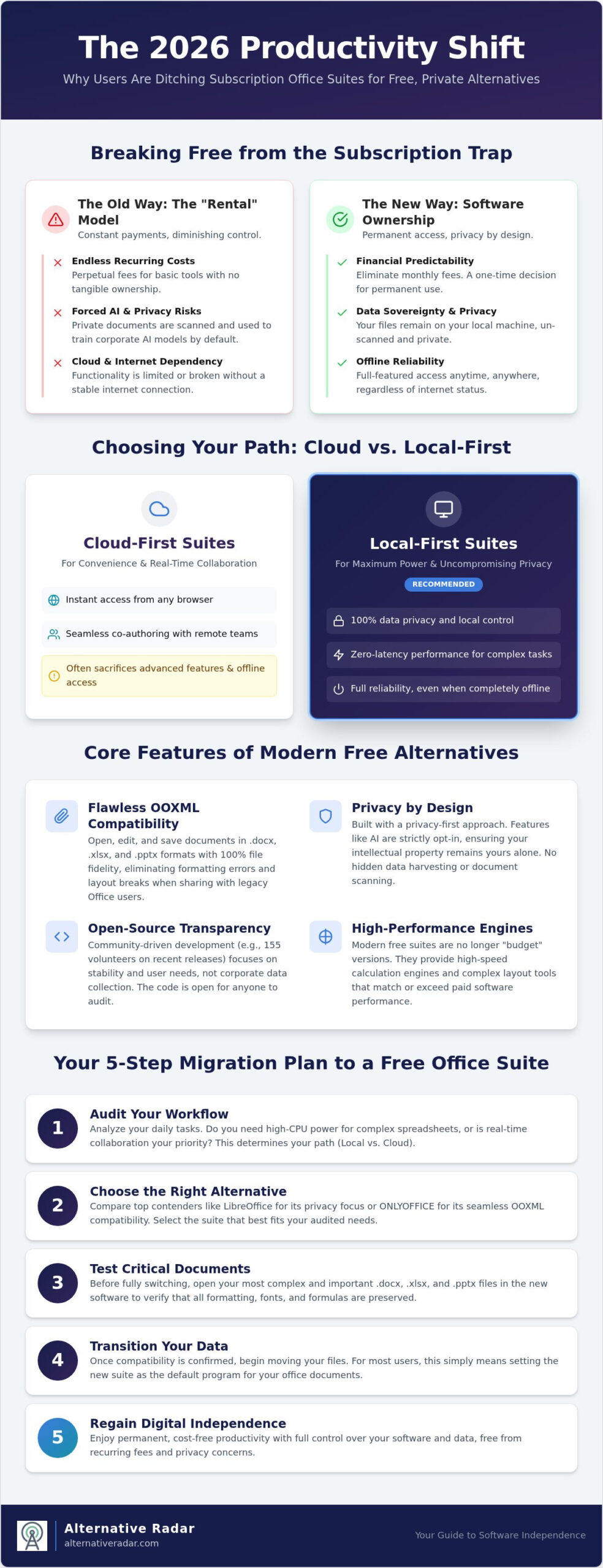
Software ownership is making a definitive comeback. By mid-2026, the novelty of “everything as a service” has worn off, replaced by a logical demand for stability and data sovereignty. Users are no longer content being passive subscribers; they’ve adopted a scout’s mindset, valuing utility and technical precision over legacy brand names. This shift is driven by a realization that the tools we use to create should belong to us, not be rented from a cloud provider that can change terms or pricing at will.
Subscription Fatigue and the Cost of ‘Rental’ Software
The cumulative financial impact of the 365 model has reached a breaking point for many professionals. Paying a perpetual fee for basic word processing or spreadsheet functions feels increasingly inefficient, especially when those costs don’t result in tangible ownership. This has sparked a migration toward local-first software that offers superior performance and reliability without an active internet connection. Subscription-free productivity is the strategic decision to prioritize permanent access and local data control over recurring licensing fees.
- Financial Predictability: Eliminating monthly overhead allows for better long-term resource allocation.
- Operational Reliability: Local applications don’t suffer from cloud service outages or login authentication errors.
- Asset Control: Your software remains functional regardless of your current subscription status or internet speed.
Forced AI and the Privacy Crisis
Privacy has become the primary differentiator in the 2026 software market. While legacy suites are aggressively integrating generative AI that often processes sensitive data in the cloud, professional users are pushing back. The August 26, 2026, release of LibreOffice 26.8 highlights this trend; the developers deliberately excluded generative AI features to ensure user privacy and data locality. This stands in stark contrast to the “opt-out” models seen elsewhere, where user documents are frequently used to train large language models by default.
Open-source transparency builds a level of trust that proprietary systems cannot match. When you examine a comprehensive comparison of office suites, the advantage of community-driven development becomes clear. With 155 volunteers contributing to the latest stable releases, these free microsoft office alternatives focus on technical accuracy rather than data harvesting. Choosing a suite with opt-in features ensures that your professional work remains your intellectual property alone.
Performance parity is no longer a goal; it’s a reality. Modern free microsoft office alternatives provide the same high-speed calculation engines and complex layout tools found in paid software. They are no longer “budget” versions, but rather high-performance tools built for a new era of digital independence.
Choosing Your Path: Cloud-First vs. Local-First Productivity
Selecting the right productivity tool starts with a cold audit of your daily tasks. Are you drafting complex financial models that require every ounce of your CPU, or are you co-authoring brief memos with a remote team? Selecting from the available free microsoft office alternatives isn’t just about saving money; it’s about matching software architecture to your specific environment. You can see how this aligns with finding the best alternative to popular software in 2026 to ensure your choice fits your broader digital strategy.
The trade-off between browser-based suites and installed desktop applications involves a fundamental choice between convenience and control. Browser apps offer instant access but often sacrifice advanced features and offline reliability. Desktop suites provide the full breadth of professional tools but require manual updates and local storage management. Understanding where your work happens is the first step in regaining your digital independence.
The Case for Local-First: Power and Privacy
Desktop applications remain the gold standard for high-fidelity work. If you handle massive datasets in spreadsheets or documents with intricate layering, browser-based tools often lag or crash under the pressure. Local-first software provides zero-latency editing, ensuring that your typing and formatting happen in real-time without server delays. You aren’t dependent on a stable internet connection to remain productive, which is vital for travelers or those in areas with spotty connectivity. Organizations like The Document Foundation champion this model because it puts the user in total control of their own hardware and data.
Security is a primary differentiator here. When you work locally, you manage your own encryption and physical backups. You don’t have to trust a cloud provider’s server-side security or worry about service-wide data breaches that could expose your sensitive intellectual property. For the privacy-conscious professional, local-first is the only logical path to data sovereignty.
The Case for Cloud-First: Collaboration and Mobility
Cloud-first suites excel when mobility and teamwork are the priorities. If your workflow involves jumping between a tablet, a smartphone, and a laptop, browser-based apps offer seamless cross-device syncing without manual file transfers. Tools like consumer-grade Google apps or iCloud web apps are built for real-time collaboration. They allow multiple users to edit the same file simultaneously, eliminating the “versioning hell” often associated with emailed attachments and local file copies.
Many modern workers now adopt a hybrid approach. They use local tools for deep, focused work and third-party secure cloud storage services for sharing and distribution. This allows you to maintain the performance of a desktop suite while enjoying the accessibility of the cloud. For more tailored results, you can explore our curated software comparisons to see which hybrid setup best suits your specific professional needs.
The Top 5 Free Microsoft Office Alternatives Evaluated
Finding the right software requires moving beyond surface-level feature lists. In 2026, the best free microsoft office alternatives are defined by their ability to handle complex file structures while respecting user data. Whether you need a local powerhouse or a collaborative cloud hub, these five options represent the current peak of productivity engineering. Alternative Radar acts as your digital scout, filtering through hundreds of sub-par clones to identify the tools that actually deliver professional results.
LibreOffice: The Open-Source Powerhouse
LibreOffice 26.8, released on August 26, 2026, remains the gold standard for users who prioritize privacy and local processing. This version includes significant performance improvements across Writer, Calc, and Impress, specifically targeting multilingual writing and typography. With a development team of 206 contributors, 155 of whom are volunteers, the suite remains entirely free of generative AI features that compromise document security. It’s a robust choice for those who want to explore more popular open source business software to build a fully independent workstation.
- Writer: Offers advanced desktop publishing tools that rival Word’s layout capabilities.
- Calc: Handles massive datasets with improved preservation for newer OOXML chart types.
- Impress: Provides a clean presentation environment without the clutter of forced cloud integrations.
OnlyOffice: Maximum Compatibility
OnlyOffice is the strategic choice for professionals who frequently share files with Microsoft 365 users. Unlike other suites that translate file formats, OnlyOffice utilizes a native OOXML engine, ensuring that document layouts, fonts, and spacing remain 100% identical when opened in Word, Excel, or PowerPoint. The interface is clean and tabbed, making it the fastest transition for longtime Microsoft users who don’t want to relearn their workflow. OnlyOffice achieves near-perfect file fidelity by using a JavaScript-based macro system, though users should be aware that Excel’s VBA macros will not run directly without conversion.
Google Workspace vs. WPS: Collaboration vs. Familiarity
Google Workspace remains the dominant choice for real-time collaboration, though its free tier is limited to consumer @gmail.com accounts. While businesses are restricted to a 14-day trial for paid tiers, the consumer apps provide a stable, browser-based environment for small teams and students. It’s the most reliable option for cross-device syncing, allowing you to move from a desktop browser to a mobile app without manual saving.
WPS Office offers a different value proposition by mimicking the Microsoft “Ribbon” interface almost perfectly. It includes powerful PDF editing tools and a highly optimized mobile app that handles complex document editing better than most competitors. However, the free version is ad-supported, which may distract users during deep work sessions. If your priority is on-the-go productivity and PDF manipulation, WPS is the superior mobile-first choice.
For macOS and iCloud users, Apple iWork (Pages, Numbers, and Keynote) provides a high-design alternative. It’s fast, lightweight, and pre-installed on Apple hardware, making it a “zero-effort” entry point for high-quality document creation.
The Compatibility Check: Handling .docx, .xlsx, and .pptx
The biggest hurdle for users moving to free microsoft office alternatives is the technical gap between proprietary formats and open standards. Microsoft’s OOXML (.docx, .xlsx, .pptx) is technically an open standard, but its implementation remains difficult for third-party developers to replicate perfectly. While your text usually transfers without issue, complex elements like floating text boxes, nested tables, and specific chart types can shift during the conversion process. Understanding how to manage these technical nuances is the difference between a professional document and a broken one.
The “Font Trap” is responsible for nearly 90% of reported layout breaks. When you open a document created in Word that uses Calibri or Arial, your system must have those exact fonts installed to render the page correctly. If they’re missing, your software will substitute them with fonts that have different character widths, causing lines to wrap and pages to overflow. For Linux and Mac users, installing the Microsoft Core Fonts package is a mandatory first step toward maintaining file fidelity.
Solving the Formatting Puzzle
OnlyOffice addresses the compatibility issue by using a native OOXML engine. Instead of converting a .docx file into an internal format and then back again, it works directly within the Microsoft structure. This approach, combined with its familiar tabbed interface, ensures that document layouts remain stable when shared between different suites. For long-term archiving, you should consider the Open Document Format (ODF). ODF acts as a universal standard that guarantees your files will remain readable across any software suite decades from now, regardless of corporate licensing changes.
When sharing documents, your strategy should depend on the recipient’s needs. If you’re sending a final version for review, always export to PDF to lock in the formatting. Only use native editable formats like .docx when collaborative editing is strictly required. You can browse our full software library to find tools that include one-click PDF optimization for better file sharing.
Spreadsheets and Data Integrity
Moving data from Excel to LibreOffice Calc requires a logical approach to formula mapping. Most standard arithmetic and statistical functions work identically, but advanced features like pivot tables and specific array formulas may need manual adjustment. The August 2026 release of LibreOffice 26.8 significantly improved compatibility with newer Microsoft Office chart formats, making it easier to migrate data-heavy presentations without losing visual accuracy.
Massive datasets remain a challenge for most free suites. While they handle thousands of rows with ease, files exceeding several hundred megabytes may experience performance lag compared to paid versions. Additionally, OnlyOffice uses a JavaScript-based macro system, which is more secure but means your existing Excel VBA macros won’t run without a complete rewrite. If your workflow relies heavily on automated data processing, you might want to compare these tools to open source CRM software to see how integrated data management can replace complex spreadsheet dependencies.
Migration Strategy: How to Switch Without Losing Data
Transitioning to free microsoft office alternatives requires a systematic approach to ensure zero data loss and minimal workflow disruption. It’s not a simple case of deleting one app and installing another; it’s a strategic migration that involves reclaiming your data from proprietary ecosystems. By following a structured five-step plan, you can move your professional life into a subscription-free environment without compromising the integrity of your legacy files.
- Step 1: Data Audit. Catalog your current files across local drives and cloud storage. Identify which documents require active editing and which are purely for archival purposes.
- Step 2: Path Selection. Refer to the ‘Path’ framework established earlier in this guide. Decide if your workflow requires a local-first powerhouse like LibreOffice or a collaborative cloud hub.
- Step 3: Fidelity Testing. Batch test your most complex .xlsx and .docx files in your new suite. Check for the “Font Trap” issues mentioned in section four and install missing Microsoft-equivalent fonts immediately.
- Step 4: Sync Setup. Establish a secure, non-Microsoft backup routine. Use encrypted cloud providers or local hardware to ensure you maintain version control without a 365 login.
- Step 5: Interface Adaptation. Spend thirty minutes customizing the UI. Most modern alternatives allow you to toggle between a traditional menu bar and a “Ribbon” style layout to match your muscle memory.
Breaking Free from OneDrive
The most critical part of the migration is moving your library out of Microsoft’s cloud. Start by downloading your entire OneDrive library as a local archive rather than syncing folder by folder. This ensures you have a clean, offline master copy before you terminate your subscription. For continued cloud functionality, consider privacy-centric options like Proton Drive or a self-hosted Nextcloud instance. If you’ve chosen a local-first path, a Network Attached Storage (NAS) device provides the best balance of multi-device access and total data ownership. Ensure your new sync tool supports file versioning so you can roll back changes if a formatting error occurs during the initial move.
The Final Checklist for a Clean Break
Before you commit to the switch, verify your access rights. Most legacy Microsoft files will remain in a “Read-Only” state even after your subscription expires, but you shouldn’t rely on this for active work. Set your new suite as the default handler for all .docx, .xlsx, and .pptx file types in your system settings. This prevents your computer from accidentally launching a deactivated version of Office when you double-click a document. Finally, disable your auto-renew settings and confirm the cancellation in writing to avoid unexpected charges. Transitioning to a high-performance free office suite in 2026 provides an immediate return on investment by removing recurring subscription overhead and ensuring your document privacy is no longer a negotiable corporate asset.
Reclaiming Your Digital Independence in 2026
Regaining control over your productivity tools is a strategic necessity. The shift toward subscription-free software isn’t just a cost-saving measure; it’s a move toward data sovereignty and operational stability. By identifying whether your workflow requires the offline power of a local-first suite or the mobility of a cloud-first hub, you can eliminate recurring fees without losing file fidelity. Success hinges on a clean migration strategy and a commitment to maintaining font compatibility across platforms.
The landscape of free microsoft office alternatives is vast, but you don’t have to navigate it alone. Our scouts have already done the heavy lifting by testing the latest releases for performance and privacy standards. You can discover more software alternatives with Alternative Radar’s digital scouts through our expert-curated lists and in-depth technical comparisons. We maintain 100% objective editorial standards to ensure you find the tools that fit your specific professional requirements.
Take the first step toward a permanent, cost-free productivity solution today. Your documents and your data belong to you.
Frequently Asked Questions
Is LibreOffice really compatible with Microsoft Word files?
Yes, LibreOffice 26.8 provides high compatibility with .docx files, especially after the August 2026 updates to its OOXML engine. While standard text and tables transfer perfectly, you might notice minor shifts in floating objects or specific Microsoft-proprietary fonts. To ensure total fidelity, always install the Microsoft Core Fonts on your system. This suite remains a reliable choice for those seeking free microsoft office alternatives without sacrificing the ability to collaborate with legacy users.
Can I use Google Docs offline if I don’t have Microsoft Office?
Yes, you can edit documents offline by installing the Google Docs Offline extension in your browser. This feature allows you to create, open, and edit files without an active internet connection; changes sync automatically once you reconnect. It’s a vital tool for mobile workers who prefer browser-based suites but need a safety net for travel. You must enable this setting while you still have an active connection to cache your files on your local drive.
What is the best free office suite for Mac users in 2026?
Apple iWork remains the most efficient native choice because it’s pre-installed and optimized for macOS hardware. For users who require strict compatibility with Windows colleagues, LibreOffice 26.8 is the preferred alternative. It handles complex Excel formulas and Word layouts more effectively than Pages or Numbers. Choosing between them depends on whether you value Apple’s high-design interface or the technical precision of open-source software built for universal file standards.
Do free office alternatives have AI features like Microsoft Copilot?
Most open-source free microsoft office alternatives, such as LibreOffice, have made a strategic decision to exclude generative AI to protect user data privacy. In contrast, cloud-based suites like Google Workspace integrate AI tools for drafting and data analysis within their trial and consumer tiers. If your priority is keeping your intellectual property off corporate servers, stick to local-first applications. These tools focus on core productivity rather than processing your private documents through external language models.
Is OnlyOffice safer than Google Workspace for private documents?
OnlyOffice offers a significant security advantage because you can use its Desktop Editors entirely offline. This ensures your documents never leave your local hardware unless you manually move them. Google Workspace is a cloud-native platform, meaning your data is stored on external servers and subject to their privacy policies. For professionals handling confidential legal or financial data, the ability to maintain a 100% local workflow makes OnlyOffice a more secure choice for document management.
Will my Excel macros work in LibreOffice Calc?
Basic Excel VBA macros may function in LibreOffice Calc if you enable the VBA Support option, but complex automation usually fails. Calc uses its own scripting language, and while compatibility has improved in the 26.8 release, it isn’t a 1:1 replacement for advanced Excel workbooks. If your business relies on mission-critical macros, you should expect to rewrite or adjust them. OnlyOffice uses a JavaScript-based system, which provides a more modern but entirely different architecture.
Are there any free office suites that don’t require an account?
Both LibreOffice and OnlyOffice Desktop Editors allow you to remain completely anonymous. You can download, install, and use the full feature set without creating an account or providing an email address. This is a major benefit for users who want to avoid marketing tracking and data harvesting. Unlike Google Workspace or Microsoft 365, these tools don’t link your document activity to a digital identity, providing a truly private environment for your professional work.
How does Alternative Radar maintain objectivity in its software reviews?
Alternative Radar operates as an independent curator managed by Madunet, experts in software lead generation since 2012. While we earn revenue through programmatic ads and affiliate commissions, our editorial standards remain focused on technical accuracy. We prioritize open-source and free-to-use categories to empower users to make smarter choices. Our scouts test software based on performance metrics and licensing classifications, ensuring our recommendations are based on logic and user needs rather than payout amounts.