Your small business could be spending between $500 and $2,000 every month on a handful of SaaS subscriptions that you don’t even own. As major cloud providers increase infrastructure spending by 36% this year, those monthly seats are becoming a financial liability rather than a growth asset. Identifying the best self-hosted software for small business is no longer a niche hobby for IT enthusiasts; it’s a strategic necessity for maintaining healthy margins in 2026.
It’s exhausting to watch your overhead rise while your control over sensitive customer data shrinks under new regulations like the updated CCPA and CTDPA. You need tools that work for your specific workflow, not platforms that harvest your information or change their pricing models overnight. This guide provides a clear comparison of high-performance, self-hosted alternatives designed to replace expensive proprietary tools. We’ve vetted the most stable solutions available today, from Nextcloud Hub 26 to Zammad 7.0, so you can transition to a more secure and cost-effective infrastructure without the need for a massive DevOps team.
Key Takeaways
- Reclaim operational control by migrating critical workflows from restrictive SaaS platforms to private, sovereign infrastructure.
- Identify the best self-hosted software for small business to replace high-cost tools like Slack and Microsoft 365 with high-performance alternatives.
- Evaluate the total cost of ownership by weighing VPS hosting and domain fees against the hidden expenses of SaaS tier-walling and annual price hikes.
- Execute a stable deployment strategy using Docker or Snap to ensure your software remains manageable without the need for a large IT department.
- Use Alternative Radar’s filtering tools to verify community activity and update frequency before committing to a specific open-source stack.
What is Self-Hosted Business Software and Why Does it Matter in 2026?
Self-hosting is the practice of running applications on a private server or Virtual Private Server (VPS) that you manage, rather than renting access from a third-party provider. To understand the technical foundations of this setup, you can explore What is Self-Hosting as a network concept. In a commercial context, it shifts your company from being a perpetual tenant to being an owner. Instead of paying for “seats” in a cloud environment you don’t control, you deploy software onto infrastructure you own. This distinction is the foundation of digital independence.
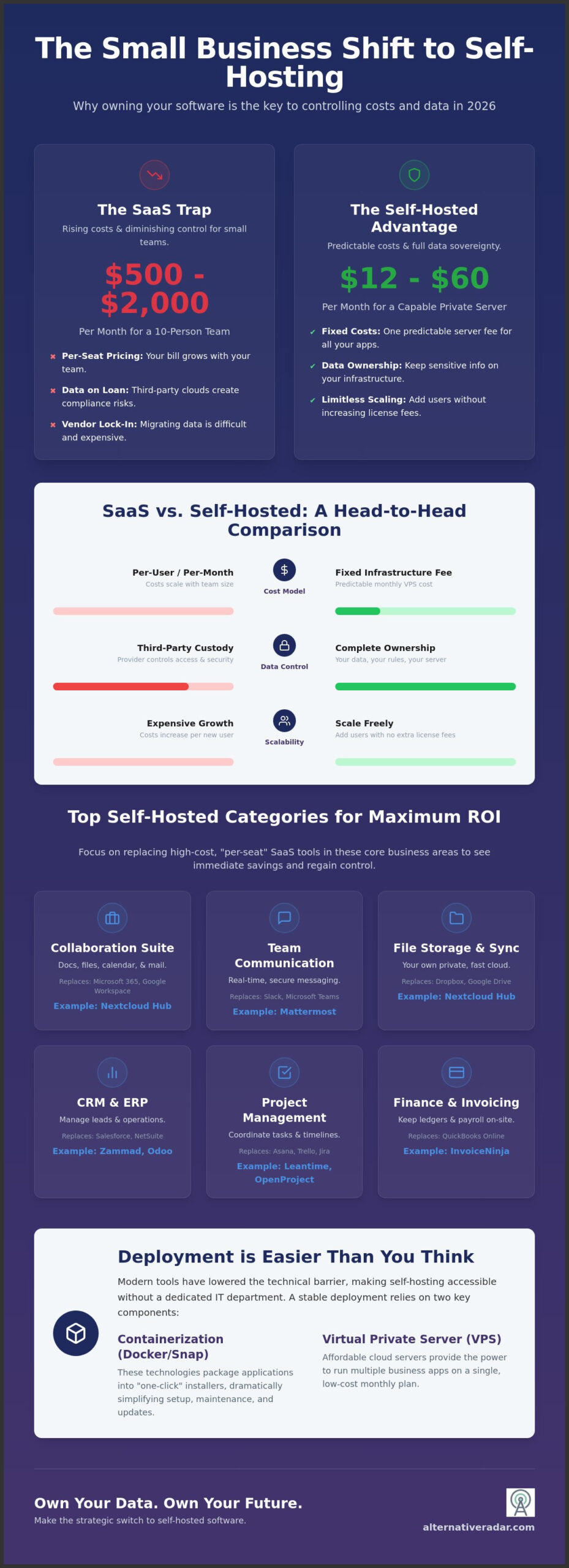
By mid-2026, the average 10-person team spends between $500 and $2,000 monthly on various SaaS tools. This financial drain, often called “SaaS fatigue,” is driven by consistent annual price hikes and aggressive feature tier-walling. Implementing the best self-hosted software for small business allows you to consolidate these fragmented costs into a single, predictable VPS fee. Research indicates that a robust configuration capable of running multiple business apps can cost as little as $12 to $60 per month, representing a massive reduction in long-term overhead.
It’s vital to distinguish between “Open Source” and “Self-Hosted” models. Open source refers to the software’s license, which allows you to inspect and modify the code. Self-hosting refers to the deployment method. While most self-hosted tools are open source, the primary benefit for your business is the ability to customize the environment and ensure your data never leaves your control. You gain zero monthly per-user fees and the freedom to scale without a corresponding increase in licensing costs.
The Rise of Data Sovereignty for Small Teams
Relying on third-party clouds has become a significant compliance risk. As of January 2026, new consumer data privacy laws in states like Indiana, Rhode Island, and Kentucky have created a complex regulatory environment. Self-hosting helps you meet these standards by keeping sensitive information within your direct jurisdiction. Beyond compliance, there is a clear psychological benefit; owning your business data ensures that an external provider’s service outage or policy change cannot paralyze your operations.
SaaS vs. Self-Hosted: The 2026 Landscape
The maturity of popular open source business software 2026 has reached a tipping point where ease of use rivals proprietary giants. Modern “one-click” installers and containerization have lowered the technical barrier to entry. When you evaluate the best self-hosted software for small business, you’ll find that the “lock-in” effect of major SaaS providers is their greatest weakness. Transitioning to private infrastructure breaks this cycle, providing the operational agility needed to pivot your tech stack as your business grows.
Top Self-Hosted Software Categories for Maximum ROI
Selecting the best self-hosted software for small business requires a focus on production-ready stability rather than experimental features. To maximize your return on investment, you should target the high-cost SaaS categories that currently drain your budget through “per-seat” pricing models. By moving these core functions to a private server, you eliminate the financial penalty for growing your team. If you’re new to this transition, learning how to self-host your own website or internal portal is a practical first step toward full infrastructure ownership.
- Collaboration: Replace Microsoft 365 and Google Workspace with integrated suites that handle documents, calendars, and mail.
- CRM and ERP: Manage your entire lead pipeline and back-office operations without external data access.
- Project Management: Coordinate tasks and timelines using tools that scale with your project volume, not your headcount.
- File Storage: Build a private cloud for secure file sharing that rivals the speed and utility of Dropbox.
- Finance: Keep your sensitive ledgers and payroll data on-site to minimize exposure.
Communication Tools: Nextcloud and Mattermost
Nextcloud Hub 26, released in June 2026, remains the gold standard for self-hosted office suites. It provides a comprehensive ecosystem for file sync, document editing, and video conferencing. For real-time team messaging, Mattermost offers a robust, secure environment that functions as a powerful slack alternative. This platform allows you to retain full chat logs and internal attachments, which is critical for both compliance and long-term knowledge management.
CRM and Sales: SuiteCRM vs. Odoo
Owning your lead pipeline is essential for business continuity. An open source crm software comparison reveals that Odoo 19.2 is currently the preferred choice for businesses needing integrated ERP functionality alongside sales tracking. It’s a modular system that grows with you. Conversely, SuiteCRM is ideal for teams that require deep, Salesforce-style customization without the restrictive licensing fees. This makes it a top contender for the best self-hosted software for small business in the sales category.
Marketing and Creative: Self-Hosting the Workflow
You don’t need to pay monthly platform fees to manage a professional web presence. Ghost and WordPress provide elite content management capabilities on your own hardware. For design teams, integrating a self-hosted digital asset management (DAM) system ensures your creative files are always accessible and secure. When building your local creative stack, you can also leverage the best free alternatives to photoshop to handle professional image editing without recurring subscriptions. You can find more tailored results by filtering for specific licenses on Alternative Radar to ensure your creative tools remain truly independent.
Calculating the Real Cost: SaaS vs. Self-Hosted TCO
Understanding the Total Cost of Ownership (TCO) is the only way to determine if a platform is truly sustainable for your operation. While SaaS providers market low entry prices, they often obscure the long-term impact of annual price hikes and aggressive feature tier-walling. Choosing the best self-hosted software for small business requires looking beyond the download button and evaluating the infrastructure and labor required to keep it running. You’re trading a high monthly rent for a manageable maintenance responsibility.
SaaS costs are predictable but inflationary. If a provider raises prices by 10% annually, your five-year expenditure balloons significantly. Conversely, self-hosting has visible, stable costs: a Virtual Private Server (VPS), off-site backup storage, and domain registration. You must also account for the “time tax.” Budgeting two to four hours a month for security patches and updates is a realistic baseline for a small team stack. For most, the break-even point occurs within the first 12 to 18 months of operation.
The 5-Year Financial Outlook
Consider a 10-user team. A standard SaaS productivity suite at $12 per user costs $1,440 per year. Over five years, that’s $7,200, excluding any price increases. Running Nextcloud on a high-performance managed VPS at $40 per month totals $480 per year, or $2,400 over five years. The savings exceed $4,800. Because self-hosting uses a flat-fee model, adding an 11th or 12th user costs you nothing in licensing, whereas SaaS costs scale linearly with your headcount. This makes it the best self-hosted software for small business strategy for teams planning to grow.
The Intangible ROI: Security and Customisation
The financial benefits extend into security and customization. By isolating your business data, you reduce the “blast radius” of large-scale provider breaches. Aligning your infrastructure with a recognized FCC cybersecurity strategy provides a framework for protecting your intellectual property on your own terms. Custom plugins and local integrations can also eliminate the need for expensive third-party “connector” services that charge per task or automation. In the context of digital sovereignty, TCO is the sum of all financial and operational investments required to maintain absolute control over your business data and tools.
Implementation Strategy: How to Deploy Without Breaking Your Business
Transitioning to the best self-hosted software for small business doesn’t require a computer science degree, but it does demand a structured approach. Most implementation failures happen because teams skip the planning phase or choose overly complex deployment methods. To ensure your business operations remain stable, you must follow a logical roadmap that prioritizes security and data redundancy from day one.
- Select Infrastructure: Decide between a cloud-based Virtual Private Server (VPS) or physical hardware located in your office.
- Choose Deployment Method: Use modern containerization like Docker or Snaps to simplify updates and isolate applications.
- Establish Redundancy: Implement a 3-2-1 backup strategy. This means keeping three copies of your data, on two different media types, with one copy stored off-site.
- Harden Security: Enforce 2FA across all platforms and use SSL certificates to encrypt traffic.
- Train Your Team: Successful adoption depends on clear onboarding and demonstrating the efficiency gains of the new tools.
Cloud VPS vs. Bare Metal: Which is Right for You?
For most teams, a Cloud VPS from providers like DigitalOcean or Linode offers the best balance of performance and ease. However, you must remain mindful of market shifts. In June 2026, Hetzner increased prices for some cloud instances by more than 2.5 times. This price hike highlights why multi-cloud or hybrid strategies are becoming a strategic necessity. Buying a physical server only makes sense if you have massive storage needs or strict local compliance requirements. If you want the benefits of self-hosting without the server management, look for “Managed Hosting” options that handle the technical backend while giving you full data ownership.
Optimizing your digital infrastructure often highlights the need for better physical organization. To complement your streamlined software stack, using an udoq German design multiple charging station for any mobile device can help manage the various devices your team uses to access self-hosted applications without the chaos of tangled cables.
The “Must-Have” Security Checklist
Security is your responsibility when you leave the SaaS walled garden. You should never expose a login page directly to the public internet. Instead, set up a private network using Tailscale or WireGuard. This ensures that only authorized team members can access your business applications. Automating security patches is also vital. Leaving a server unpatched for even a few weeks can expose you to known vulnerabilities. This risk was recently highlighted by the critical security updates released for Vaultwarden and Zammad in mid-2026. To find the most secure and stable tools for your specific industry, you can compare self-hosted software licenses on Alternative Radar to ensure you are choosing production-ready solutions.
Finding the Right Fit with Alternative Radar
Identifying the best self-hosted software for small business is often a matter of filtering out the noise. Alternative Radar acts as your digital scout, providing a structured way to compare tools based on your specific operational needs. Use the platform’s filtering system to isolate “Self-Hosted” and “Open Source” licenses immediately. This ensures you only evaluate applications that grant you the data sovereignty discussed in previous sections. You can categorize items using clear technical labels and licensing classifications, making it easier for both casual users and professional buyers to find a match that avoids the “per-seat” tax common in traditional SaaS models.
Never commit to a tool without checking its pulse. Community activity and update frequency are the primary indicators of a software’s longevity. A project that hasn’t seen a commit in six months is a liability, not an asset. Look for frequent maintenance releases, such as the June 2026 updates for Zammad and FreeScout, or critical security patches like Vaultwarden 1.36.0 released in May 2026. These signals prove the developers are actively patching vulnerabilities and improving performance. Alternative Radar tracks these metrics so you don’t have to manually hunt through GitHub repositories. It provides a high-quality filter for information that prioritizes utility and precision over marketing hype.
Our Methodology for Software Comparison
We evaluate every platform through a lens of stability and deployment efficiency. Our comparison guides prioritize tools with comprehensive documentation and active security auditing. We look for projects that have undergone third-party reviews, particularly those handling sensitive financial or customer data. This objective approach ensures you aren’t just following market leaders, but making smarter choices based on logic and performance data. We want you to feel empowered to build a tech stack that serves your interests, not the interests of a cloud provider’s shareholders. Our research focuses on the total cost of ownership, ensuring that the software you choose today remains affordable as your team grows.
We encourage you to “test-drive” any new application in a sandbox environment before migrating your live production data. This precautionary step prevents configuration errors from disrupting your daily workflow and allows you to verify that the tool fits your specific team culture and technical capacity. Moving from discovery to implementation is the final step in taking back control of your tech stack. Our curated guides simplify this transition by providing direct comparisons between market leaders and their sovereign counterparts. We’ve done the hard work of searching and testing so you can focus on growth. Start your search for the perfect alternative to bloated SaaS today. By choosing tools that fit your specific requirements, you ensure your business remains agile and independent in an increasingly expensive cloud market.
Reclaiming Your Digital Autonomy
Transitioning to private infrastructure is no longer a technical luxury; it’s a strategic defense against rising SaaS costs and increasing data privacy risks. You’ve seen how a 10-person team can save thousands over a five-year period by moving to a managed VPS. You also understand that modern deployment tools have significantly lowered the technical barrier to entry. Finding the best self-hosted software for small business is the most effective way to ensure your tools serve your specific goals rather than an external provider’s bottom line.
As you prepare your business for the technological shifts of the coming years, including the rapid advancement of AI, you can find out more about ensuring your infrastructure is ready for the next major industry milestone.
Stop letting bloated subscriptions dictate your monthly overhead. Our independent curators have analyzed detailed pros and cons for over 500 apps to help you make an objective decision based on verified 2026 tech standards. Explore the best self-hosted alternatives on Alternative Radar to identify the specific tools that will empower your team and secure your data. We update our database constantly to ensure you have the most current information on stability and licensing.
You now have the resources and the roadmap required to build a sovereign tech stack. Start with one critical application and scale your private infrastructure as your confidence grows. Building a more resilient business starts with owning the tools you use every day.
Frequently Asked Questions
Is self-hosted software really more secure than SaaS?
Self-hosted software provides superior data sovereignty, but security depends on your maintenance habits. While SaaS providers manage the backend, they also represent a larger target for mass breaches. By keeping your data local, you reduce your exposure to global attacks. You must apply patches quickly to maintain this defensive advantage over shared cloud environments, ensuring your internal configurations align with the security standards discussed in our implementation guide.
Do I need a full-time IT person to manage self-hosted apps?
You don’t need a full-time IT professional if you choose tools with streamlined deployment methods. Most of the best self-hosted software for small business can be managed in a few hours per month using containerized systems like Docker. For teams without any technical staff, managed self-hosting providers offer a middle ground by handling the server maintenance while giving you full ownership of the application data and user permissions.
What happens if my self-hosted server goes down?
If your server goes down, your applications will be inaccessible until the issue is resolved. This is why a robust 3-2-1 backup strategy and choosing a reliable VPS provider are essential. Most cloud-based servers offer high uptime guarantees, but you should also utilize automated snapshots. These allow you to restore your entire environment to a previous state within minutes if a configuration error or hardware failure occurs.
Can I migrate my data from SaaS tools like Slack or Trello to self-hosted versions?
Most mature self-hosted platforms include built-in migration tools for popular SaaS equivalents. For instance, Nextcloud Hub 26 includes importers for Google Workspace, while Mattermost provides comprehensive scripts to move channels and history from proprietary chat apps. These tools are designed to minimize downtime during your transition, though you should always verify the integrity of your imported data in a sandbox environment before finalizing the migration.
What is the best hardware for a small business to host their own apps?
A Cloud VPS is the most efficient hardware choice for the majority of small teams. It provides better uptime and scalability than a physical server in your office. While hardware costs are a factor, a Virtual Private Server offers the best performance to cost ratio for running the best self-hosted software for small business. Physical mini-PCs or “Bare Metal” servers are only recommended if you have massive local storage needs or strict on-site compliance requirements.
Is self-hosted software free to use?
The software license is frequently free under an open-source agreement, but running the applications involves infrastructure costs. You must budget for visible expenses like VPS hosting, which typically ranges from $12 to $60 per month depending on your resource needs. Identifying the right fit involves comparing these stable infrastructure costs against the inflationary per-user fees of SaaS platforms to determine your total long-term savings.
How do I handle software updates for self-hosted tools?
You should handle updates using automated container management tools or built-in update scripts. Keeping your stack current is vital for security, as seen with the major releases of Zammad and Odoo earlier this year. Most modern self-hosted apps notify you of new versions within the admin dashboard. You should schedule regular maintenance windows to apply these patches and ensure your backups are functional before you proceed with any major version changes.
Can my remote team access self-hosted software securely?
Remote teams can access your apps securely by using a Virtual Private Network or a secure reverse proxy. This creates an encrypted tunnel between the user and your server, ensuring that your login pages are never exposed to the public internet. This setup provides the same level of accessibility as a SaaS platform while maintaining the high security standards required for modern data protection compliance and team productivity.