Why are you still paying a monthly subscription for a tool that locks your fourth diagram behind a paywall? It’s a common trap where “free” often means “trial with heavy restrictions.” Most professionals just want a reliable way to map out logic without hitting a shape limit or dealing with watermarked exports. If you’re tired of hidden costs, finding the right free diagramming software for flowcharts is the only way to regain control over your digital workspace.
We agree that a diagramming tool should simplify your work, not hold your data hostage. You deserve unlimited creation capabilities and professional export formats like SVG or PDF without reaching for a credit card. This comparison breaks down the top tools for 2026, distinguishing between truly open platforms like Draw.io and limited freemium models from Miro or Lucidchart. We evaluate each contender on its interface, security standards, and ability to handle complex logic so you can choose the best fit for your specific needs.
Key Takeaways
- Avoid the “three-board trap” by identifying which tools offer unlimited diagram creation without hidden subscription fees.
- Evaluate free diagramming software for flowcharts through the lens of data portability to ensure you aren’t locked into a proprietary ecosystem.
- Discover specialized alternatives tailored for specific roles, from project managers needing BPMN support to developers utilizing Mermaid.js for versioning.
- Streamline your decision-making process with a selection framework that prioritizes intuitive drag-and-drop interfaces and secure data handling.
- Gain a competitive edge by using our Alternative Radar methodology to filter for tools that offer professional-grade exports without watermarks.
Evaluating Free Diagramming Software: Why Free Isn’t Always Equal
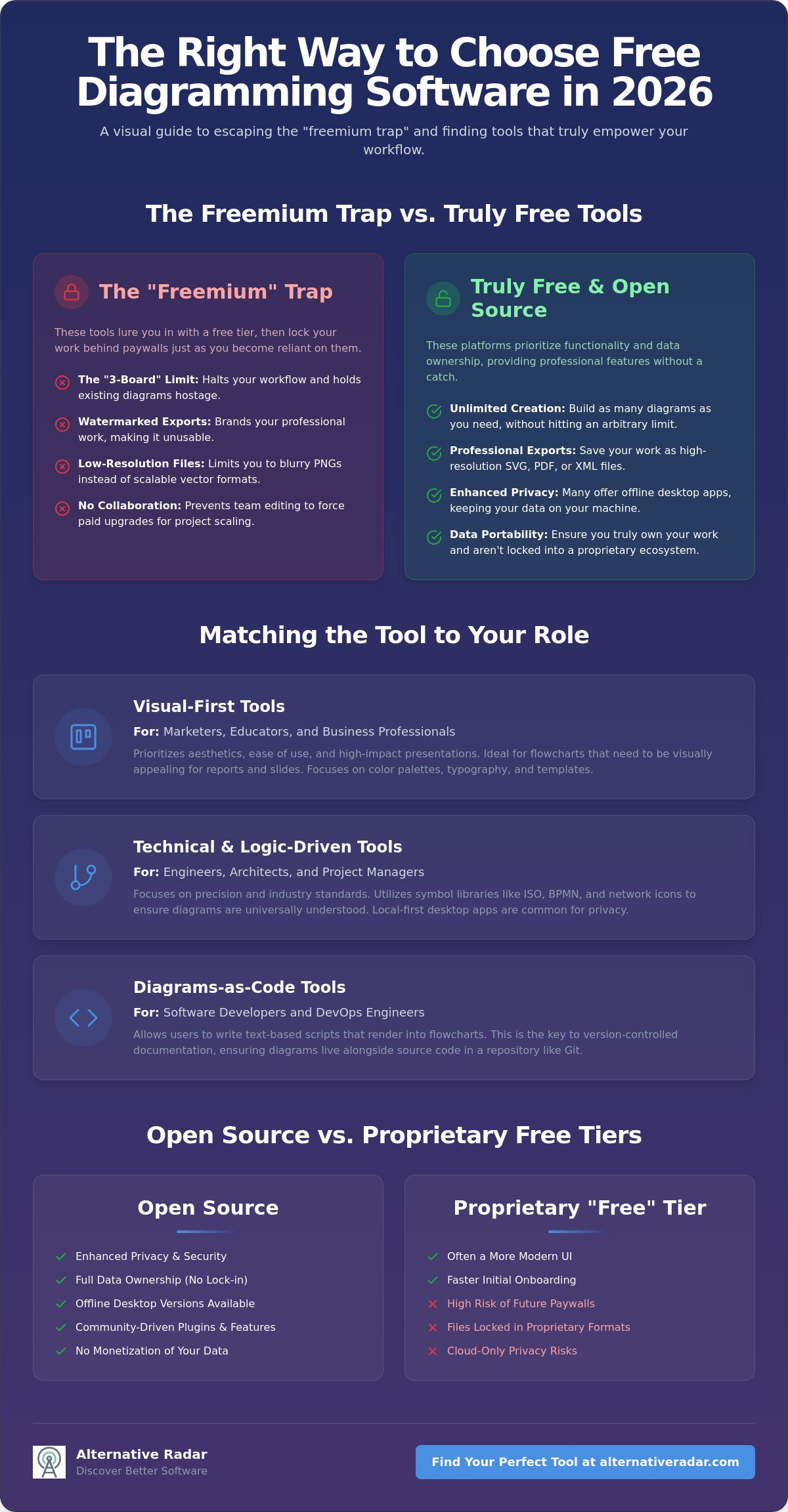
Selecting the right free diagramming software for flowcharts requires a discerning eye for licensing fine print. In 2026, the distinction between “True Free” and “Freemium” has become the most important factor for long-term productivity. A True Free tool allows you to create unlimited documents and export them in high-fidelity formats without a subscription. Freemium models, however, often implement a three-board limit that halts your workflow just as you become reliant on the software. This 3-board trap is designed to convert users into paying customers by holding their existing work hostage.
Technical efficiency depends on data portability. Professional users must ensure they can export diagrams as XML or SVG files to maintain ownership of their logic flows. Before committing to a platform, evaluate its adherence to industry standards. Understanding what is a flowchart in a technical sense helps you identify if a tool provides the necessary ISO-standard symbols or just generic shapes. 2026 is the year of browser-based open-source diagramming because these tools offer the same power as desktop software without the privacy risks associated with cloud-only proprietary storage. Professional-grade free software must provide high-resolution export quality, expansive shape libraries, and support for complex layers to be truly viable.
The Freemium Trap: Identifying Hidden Paywalls
Hidden paywalls often manifest at the most critical moment: the export. You might spend hours perfecting a complex logic flow only to find that the free version only allows low-resolution PNG exports or adds a large watermark. This is “Free-to-Try” marketing disguised as a functional product. Many “Free for Individuals” tiers also strip away essential collaboration features. You can build the diagram, but you can’t invite a colleague to edit it without upgrading. This limitation forces a subscription once your project scales beyond a solo endeavor. Look for tools that offer SVG or PDF exports as standard features to avoid these restrictive traps.
Open Source vs. Proprietary Free Tiers
Open-source tools offer distinct advantages including enhanced privacy, offline desktop versions, and a library of community-driven plugins. These platforms don’t monetize your data or lock your files behind a proprietary format. Proprietary free tiers usually offer a more modern UI and faster onboarding, but they carry a higher risk of future paywalls as companies seek to increase revenue. Open Source diagramming is the gold standard for privacy and long-term data security. Choose these if you work with sensitive internal processes or require permanent access to your source files without relying on a third-party server’s uptime.
Core Categories of Free Flowchart Tools for Every User
Not all free diagramming software for flowcharts serves the same purpose. A marketing manager needs a different feature set than a network engineer. To find the right tool, you must first identify which category fits your daily output. Visual design tools prioritize aesthetics, while technical engineering tools focus on logic and industry standards. Whiteboard collaboration tools excel during real-time brainstorming sessions; meanwhile, diagrams-as-code platforms allow developers to treat visual assets like software source code.
Visual-First Tools for Business and Education
When your primary goal is a high-impact presentation, visual-first tools like Canva or the open-source Penpot are superior to technical software. These platforms focus on color palettes, typography, and drag-and-drop ease. However, be cautious with template libraries. Many “free” templates are often bait for premium upgrades. Truly useful free options should offer deep customization without hidden costs. These tools also tend to integrate seamlessly with Google Workspace or Microsoft 365.
Technical and Logic-Driven Software
For engineers and architects, precision is more important than polish. Technical tools leverage standard libraries such as ISO, BPMN, and Cisco icon sets to ensure diagrams are globally understood. Features like automatic layout and grid snapping save time by keeping complex connections organized. Local-first desktop applications are regaining popularity in 2026 because they provide superior privacy and speed compared to cloud-based alternatives. These tools often allow for custom CSS styling for complete control.
Developers often skip the mouse entirely. Diagrams-as-code tools like Mermaid.js or PlantUML allow you to write text-based scripts that render into clean flowcharts. This approach is the secret to version-controlled documentation. It ensures your diagrams live alongside your code in a repository, making updates as simple as a git commit. If you need something more fluid, whiteboard tools like Miro or Boardmix are better for the messy, early stages of a project where sticky notes and freeform drawing take priority.
Finding the right balance between these categories is essential for efficiency. If you’re still searching for a tool that matches your specific technical requirements, you can explore curated software comparisons to see how these categories perform in real-world testing. Choosing based on your persona ensures you don’t end up with a tool that’s either too simple for your logic or too complex for your presentation.
Top-Rated Free Diagramming Alternatives for 2026
Selecting the right free diagramming software for flowcharts involves more than just checking a price tag. It requires finding a tool that aligns with your specific workflow without imposing arbitrary document limits. While many market leaders have tightened their free tiers in 2026, several robust alternatives provide professional-grade features for zero cost. These winners excel in data portability, security, and specialized utility.
Diagrams.net: The Professional Standard
Diagrams.net, formerly known as Draw.io, remains the undisputed leader for users who need a “True Free” experience. It doesn’t require an account to start, which is a massive win for privacy-conscious professionals. Unlike freemium competitors that lock your work behind a paywall after three files, this platform offers unlimited diagram creation. You maintain complete control over your data by saving files directly to GitHub, GitLab, Google Drive, or your local disk. Its advanced support for UML and ERD libraries makes it a powerful replacement for expensive enterprise software.
Excalidraw and the Rise of Minimalist Sketching
Sometimes high-fidelity diagrams feel too “finished” for early-stage brainstorming. Excalidraw has gained significant traction in 2026 because its hand-drawn aesthetic encourages feedback rather than finality. It’s the best minimalist tool for teams that value speed and collaboration. Every session is protected by end-to-end encryption, ensuring your proprietary logic remains private. Many power users now integrate Excalidraw directly into documentation hubs like Obsidian or Notion to keep their visual notes alongside their text.
For designers who need more control than a standard flowchart maker provides, Penpot offers a compelling open-source alternative to Figma. It’s built for scale and allows you to create custom design systems for your diagrams. If you prefer a text-based approach, Mermaid.js is the gold standard for documentation-integrated flowcharts. It allows you to generate complex diagrams using simple scripts, which is ideal for version control in developer environments. Finally, Inkscape remains a viable option for those who need total vector graphics control to create unique, non-standard visual assets.
- Diagrams.net: Best for technical logic and unlimited document storage.
- Excalidraw: Best for real-time collaborative sketching and low-fidelity ideation.
- Penpot: Best for designers who require advanced styling and open-source flexibility.
- Mermaid.js: Best for developers who want to manage diagrams as code.
- Inkscape: Best for custom vector-based diagramming that requires granular control.
Choosing between these tools depends on whether you value logic-first structures or design-first aesthetics. Most users find that a combination of Diagrams.net for technical documentation and Excalidraw for quick meetings covers every requirement. By avoiding proprietary free tiers, you ensure your work remains accessible and editable regardless of future pricing changes in the software market.
Selection Framework: Matching Tools to Your Specific Workflow
Efficiency requires alignment between your tool and your professional output. A project manager mapping a complex supply chain has different requirements than a software engineer documenting a microservices architecture. Choosing the right free diagramming software for flowcharts depends entirely on your professional persona. If you select a tool that doesn’t integrate with your existing stack, you’ll spend more time managing the software than mapping your logic.
- Project Managers: Prioritize platforms with native Jira or Confluence integrations. Focus on tools that support Business Process Model and Notation (BPMN) to ensure your maps meet industry standards.
- Software Developers: Look for text-based solutions like Mermaid.js or PlantUML. These allow for seamless version control within your existing code repositories.
- Students and Educators: Seek out Google Classroom integration and simple cloud-sharing permissions to facilitate collaborative learning.
- UX/UI Designers: Use design-centric tools like Penpot or the free tier of Figma. These provide the granular styling control that standard flowchart tools lack.
The Developer Workflow: Diagrams-as-Code
Text-based diagramming is more efficient than drag-and-drop because it eliminates the time-consuming manual alignment of shapes and lines. By using Mermaid.js within your Markdown files, you can treat your visual documentation exactly like source code. This method enables you to automate diagram updates through CI/CD pipelines. It ensures that your technical architecture stays in sync with your codebase without requiring a manual export every time a variable changes.
The Business Workflow: Speed and Clarity
In a fast-paced business environment, finding a free diagramming software for flowcharts that prioritizes speed is essential for maintaining momentum. You need “smart connectors” that automatically re-route when you move objects to prevent the frustration of fixing broken lines during a live meeting. When preparing for high-stakes presentations, the choice of export format is critical. Always opt for Vector (SVG) exports to maintain crispness on large screens, as Raster (PNG) files often pixelate when scaled. If your workflow involves heavy visual editing beyond simple charts, you might also benefit from reviewing the best free alternatives to Photoshop to round out your creative suite.
Finding the right balance between technical depth and ease of use is the key to long-term productivity. To see how these tools compare across different professional benchmarks, check out our full comparison at Alternative Radar. Selecting based on your specific workflow ensures you don’t end up with a tool that hinders your speed.
Discovering Better Software with Alternative Radar
Finding the right free diagramming software for flowcharts shouldn’t feel like a full-time job. We curate these lists because high-intent users need clarity, not marketing noise. Most search results are cluttered with sponsored content from platforms that lock your data behind a paywall. Alternative Radar acts as a digital scout. We’ve done the testing so you don’t have to. Our methodology focuses on three rigorous pillars: privacy, actual cost, and practical utility. We dig into the documentation to find the details that companies often hide in their pricing tables.
We prioritize “hidden gem” alternatives that the average search engine often misses. These are frequently community-supported or open-source projects that offer professional-grade features without the overhead of a massive marketing budget. By providing objective, data-driven lists, we empower you to make smarter choices for your business or personal projects. You deserve a tool that works for you, not one that views you as a lead to be converted. Moving beyond market leaders allows you to find software that respects your data and your time.
Our Commitment to Objective Comparison
Identifying “Freemium” traps is our specialty. We look past the “Free” label to see if export formats are restricted or if essential collaboration features are disabled. It’s frustrating to build a complex system only to find you can’t share it. Our process involves a deep dive into license agreements and export capabilities. If you want to understand how we filter the noise, read our guide on finding the best alternative to popular software. We stay ahead of 2026 software trends to ensure our recommendations remain relevant as the market shifts toward browser-based, local-first solutions.
Next Steps: Find Your Perfect Match
Start your search on Alternative Radar to save both time and your budget. Don’t waste hours on software that will eventually demand a credit card for basic functionality. If you’re ready to transition to a more transparent ecosystem, explore our Open Source Business Software Guide. This resource helps you identify tools that offer long-term stability and data ownership. Join our community of smart software switchers who prioritize efficiency and logic over brand recognition. Make your next software choice based on data, not just the first result in a search engine.
Reclaiming Your Productivity Workflow
Success in 2026 depends on choosing tools that respect your data and your time. You’ve now identified the critical differences between “True Free” platforms and the restrictive traps of freemium models. By matching your specific role to the right category of free diagramming software for flowcharts, you eliminate the friction of hidden paywalls and proprietary file formats. It’s time to stop letting software limitations—or even a cramped physical workspace—dictate your project’s scale or budget; for those looking to optimize their home environment, Bowkirk Kitchens & Bedrooms offers bespoke furniture solutions that elevate any professional setup.
Efficiency is about making informed decisions without the marketing hype. We provide expert-curated lists for 2026 that focus on privacy and open-source ethics. Our detailed feature-by-feature comparisons help you find the “hidden gem” alternatives that market leaders often obscure. If you’re ready to switch to a more transparent ecosystem, find more high-quality software alternatives on Alternative Radar. Empower your workflow with tools designed for your specific needs. You have the knowledge to make a smarter choice; now it’s time to put it into practice.
Frequently Asked Questions
Is there a truly free flowchart maker with no limitations?
Diagrams.net is the most reliable truly free flowchart maker available in 2026. It provides an unlimited number of diagrams, shapes, and export options without requiring a credit card or account. While freemium competitors like Miro or Lucidchart cap your work at three editable boards, this open-source alternative remains completely unrestricted for both personal and professional use. It’s the gold standard for users who want to avoid hidden subscription costs.
Can I open Lucidchart or Visio files in free software?
Most high-quality free tools support importing standard industry formats to ensure data portability. Diagrams.net allows you to open .vsdx (Visio) and .nsl (Lucidchart) files directly through its interface. This compatibility ensures you can migrate your legacy work into a free ecosystem without losing your logic flows or being forced to pay for a license just to view your existing documents.
What is the best free diagramming tool for Mac and Windows?
Diagrams.net provides dedicated desktop applications for both Mac and Windows, offering a consistent experience across operating systems. These local-first versions are excellent for users who need offline access and enhanced privacy. If you prefer a browser-based workflow, Excalidraw works seamlessly on any system. Both options provide professional-grade features without the hardware-specific limitations often found in proprietary software suites.
How do I create a flowchart without an account?
You can create a flowchart without an account by using privacy-focused tools like Diagrams.net or Excalidraw. These platforms allow you to start mapping immediately upon landing on their website. You maintain ownership of your data by saving your files directly to your local drive or a third-party cloud provider like GitHub. This approach eliminates the risk of your data being harvested or locked behind a future login requirement.
Is Canva or Diagrams.net better for professional flowcharts?
Diagrams.net is superior for technical logic because it includes standard libraries for BPMN, UML, and network architecture. It’s designed for precision and complex systems mapping. Canva is better suited for marketing presentations where visual aesthetics and branding are more important than technical accuracy. Choose Diagrams.net for engineering and process documentation, but stick to Canva for high-impact slides and simple educational visuals.
Are free online diagramming tools secure for sensitive data?
Security varies significantly between platforms. Using free diagramming software for flowcharts that supports local-first storage, such as the desktop version of Diagrams.net, ensures your data never leaves your machine. For collaborative sessions, tools like Excalidraw use end-to-end encryption to protect your logic. Always verify if a tool stores your diagrams on their servers or allows you to maintain full ownership of the storage location before inputting proprietary data.
What is Mermaid.js and should I use it for flowcharts?
Mermaid.js is a JavaScript-based tool that renders simple text scripts into visual diagrams. You should use it if you want to manage your flowcharts like software code. It’s ideal for developers who need version control and documentation that lives directly in Markdown files. This “diagrams-as-code” approach ensures your visuals stay updated alongside your codebase without the need for manual drag-and-drop editing.
Can I use free diagramming software for commercial purposes?
Most truly free and open-source tools allow for unrestricted commercial use. Platforms like Diagrams.net and Penpot are licensed for any purpose, including professional business projects and client deliverables. However, always check the specific software license, such as Apache 2.0 or MIT, to confirm there aren’t usage restrictions. Choosing free diagramming software for flowcharts with an open-source license is the safest way to ensure long-term legal compliance for your business.