
Your free slack workspace is a 90 day countdown timer rather than a permanent digital office. While it remains a top rated tool for new teams, the reality is that the free tier functions more like an extended trial than a long term home for growing businesses. You likely value the immediate setup and clean interface, but the sudden disappearance of critical project data once it hits the three month mark is a recurring frustration that disrupts your workflow.
This guide clarifies exactly what the 2026 free version offers so you can stop guessing about your data’s security. You’ll discover how to navigate the 10 app integration limit and identify the specific indicators that suggest it’s time to switch. We compare the current features against high quality alternatives to help you decide if staying put or moving your team is the most efficient choice for your resources.
Key Takeaways
- Identify the specific collaboration milestones that signal when your team has officially outgrown the 90-day data retention window.
- Learn how to maximize the utility of the free slack tier for short-term projects and community-focused workspaces.
- Evaluate the impact of the 10-app integration limit on your team’s workflow efficiency and automation potential.
- Discover top-rated alternatives that offer unlimited message history and group video calls without the premium price tag.
What is the Free Slack Plan? Features and 2026 Reality
The free slack tier is a limited SaaS collaboration tool designed to provide small teams with a high quality entry point into professional messaging. It isn’t a scaled down version of a social app; it’s a structured environment for work. In 2026, Slack has maintained its position as the industry standard by offering a superior user experience, even as competitors like Microsoft Teams and Discord push for more generous feature sets. While the limits are strict, the platform’s reliability keeps it at the top of the list for startups and individual project leads.
Choosing this plan means accepting a trade off between premium features and cost efficiency. It works best for teams that don’t need a deep archive of past conversations but require a polished interface for daily operations. Slack has adjusted its 2026 strategy to focus on individual productivity tools, ensuring that even users on the lowest tier can access the basic building blocks of modern project management. This focus on the trial like experience forces users to evaluate their needs early in the growth cycle.
Core Capabilities Included for Zero Dollars
You get access to several fundamental features that help organize your team’s thoughts and files. These tools provide the basic structure needed to move away from messy email threads and into organized workflows. Even at the zero dollar level, the interface remains identical to the paid versions, ensuring no learning curve if you eventually upgrade.
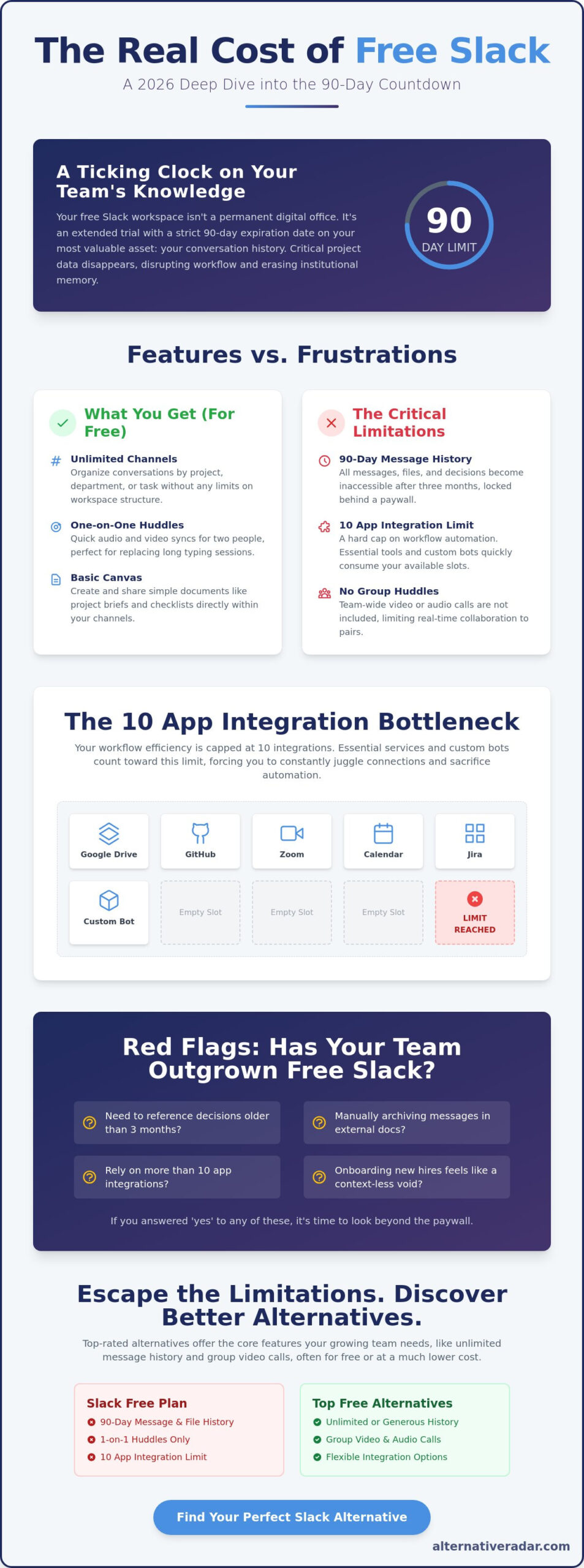
- Unlimited Channels: You can create as many public and private channels as you need. This allows for granular organization by department, project, or specific task without hitting a ceiling on workspace structure.
- One-on-One Huddles: Free workspaces include audio and video huddles for exactly two people. These are designed for quick syncs that replace long typing sessions, though they lack the multi person capabilities found in paid tiers.
- Basic Canvas: This feature allows teams to create documents directly within Slack to store project briefs or checklists, keeping essential information close to the conversation.
The App Integration Landscape
Efficiency often depends on how well your tools talk to each other. On the free slack plan, you are limited to exactly 10 active integrations. This number includes both standard third party apps from the Slack App Directory and any custom internal tools your team develops. It’s a tight limit because essential services like Google Drive, Zoom, and GitHub quickly fill those slots. Once you hit the tenth app, you must deactivate an existing integration to add a new one, which can create significant friction in more complex workflows.
You should distinguish between standard integrations, which are pre built by vendors, and custom apps built via the API. Both types consume one of your ten available slots. As of 2026, free users retain access to the Slack API for building basic custom bots and workflows, though these count toward the total 10 integration cap.
The 90-Day Wall: Understanding Slack Message and File Retention
The most significant constraint of a free slack workspace is the 90 day rolling retention window. This isn’t a storage cap based on volume; it’s a strict chronological cutoff. When your workspace reaches day 91, the very first message sent on day one becomes invisible. This includes all associated files, images, and code snippets. Slack doesn’t delete this data immediately, but they lock it behind a paywall, effectively holding your institutional history hostage until you pay for a Pro plan.
Losing access to past conversations creates a massive gap in project tracking. If a team member agreed to a specific deadline or a client approved a design change 92 days ago, that record is now gone. This creates psychological friction for managers who feel they’re constantly racing against a clock. You can’t simply search for a specific project name and see the full history. You only see the most recent three months, which is often insufficient for projects that span a full fiscal quarter or longer.
Institutional knowledge is your team’s most valuable asset. On the free slack plan, this knowledge is transient. New employees suffer the most. When a new hire joins, they enter a vacuum where they can’t see the context of previous decisions. They see the “now” but none of the “why” that led there. While some competitors offer a 10,000 message limit, Slack’s time based approach is more aggressive for active teams that communicate frequently.
Why the 90-Day Limit is the Ultimate Dealbreaker
Finding specific information becomes an impossible chore once it passes the three month mark. If you need to verify a client’s request from last quarter, you’re out of luck. This lack of searchability forces teams to duplicate their work in external documents. If you find yourself constantly copying Slack messages into a separate doc just to save them, you should probably start finding the best alternative to your current setup.
Managing Your Data Within the Limits
You can mitigate some loss by pinning critical information to a Slack Canvas. Canvases currently exist outside the standard message retention rules, making them a safe harbor for project briefs and checklists. However, don’t fall for the myth of archiving channels to save data. Archiving a channel on the free plan doesn’t stop the 90 day clock. Once that time passes, the content within the archived channel is still hidden. Third party bots that used to scrape and archive messages have largely been blocked by Slack’s API updates, leaving external documentation as your only reliable fallback.
Slack Free vs. Paid: When Does Upgrading Become Mandatory?
Upgrading isn’t just about unlocking old messages. It’s about operational functionality that changes how your team interacts. While free slack serves as a reliable base for small groups, the gap between it and the Pro tier is wider than most users realize. The Pro plan introduces unlimited message history and group huddles, while the Business+ tier adds 99.99% uptime guarantees and mandatory data exports for legal compliance. Choosing between them requires a clear understanding of your team’s growth trajectory and security needs.
The most immediate restriction for collaborative teams is the huddle limit. If your team consists of three or more people, the free version’s restriction to 1-on-1 huddles forces you to use external video tools. This friction breaks the “all in one” promise of the platform. The absence of the Workflow Builder in the free tier means you cannot automate routine tasks like onboarding or request approvals. This lack of automation often results in manual work that slows down your entire production cycle.
The Tipping Point: Indicators You Need to Pay
There is a specific threshold where the cost of the free plan exceeds the price of a subscription. Once your team reaches 10 members, the volume of communication usually triples. At this scale, the 90 day retention limit mentioned earlier becomes a daily obstacle rather than a minor inconvenience. You’ll also find that external collaboration becomes necessary. Without Slack Connect, which is a paid feature, you cannot securely share channels with clients or vendors, leading to fragmented communication across email and other apps. If you require Single Sign-On (SSO) or detailed audit logs for security audits, the free plan is no longer a viable option.
Cost Analysis: Is Slack Pro Worth the Per-User Price?
Slack uses a per seat pricing model in 2026. This means your monthly bill scales directly with your headcount. For a team of 20 people, the investment is significant, but you must weigh this against the hidden costs of staying on the free plan. If an employee spends 15 minutes each day searching for information that was hidden by the 90 day wall, you are losing over an hour of productivity per person every week. For teams that find this math unfavorable, reviewing a Slack Alternative in Brief: The Best Team Communication Tools for 2026 is a smart move to find a better fit for your budget. Teams frustrated by the per-user pricing model will also find value in this strategic guide to Slack AlternativeTo options that categorizes replacements by privacy, cost, and functionality.
Is the Free Version of Slack Right for Your Team?
A free slack workspace serves specific niches exceptionally well, but it becomes a liability for others. It excels in environments where the 90 day data loss is irrelevant or where professional appearance outweighs historical search. For many, it’s a high quality starting point that eventually requires a strategic exit. You need to determine if your team is a “forever” free user or just passing through on the way to a more robust platform.
Short term projects, such as a six week marketing campaign or a three day industry event, are ideal for this tier. These “transient teams” don’t need a year of message history; they only need a reliable place to coordinate in real time. Similarly, professional communities often choose Slack over Discord because its threaded UI is 40% more effective at maintaining focused discussions. However, startups often fall into a trap by building their entire culture on a free plan, only to find the cost of upgrading 50+ employees prohibitive later on.
Use this 5 point checklist to see if you can stay on the free tier:
- Your projects consistently conclude within a 90 day window.
- Your team size remains under 5 active members.
- You use an external wiki like Notion to document all final decisions.
- One on one audio huddles meet all your meeting requirements.
- You only need to connect essential tools like Google Drive or GitHub.
Who Should Stay on Slack Free
Freelancers who work with clients on a one on one basis can thrive here. It provides a professional interface without the overhead of a subscription. Small social clubs or hobbyist groups also benefit, as their communication is usually casual and doesn’t require “institutional memory.” If your organization already maintains a rigorous documentation habit in external tools, the 90 day wipe becomes a non issue since your “source of truth” lives elsewhere.
How to Migrate Away Before You Lose Your Data
If you’ve failed the checklist, you should plan your offboarding before your most valuable data disappears. Slack allows you to export your workspace data in a JSON format, which includes public channel history and links to files. While you can’t easily re-import this into another free Slack workspace, it is compatible with popular open source business software 2025 like Mattermost or Zulip. Many teams opt for a “Clean Break” strategy; they start their new platform on the first day of a new quarter and keep the old Slack as a secondary reference until the 90 day limit hides the remaining messages. If you find the migration process daunting, you can explore our comparison tools to find a platform with a simpler import process.
Beyond the Paywall: Top Free Slack Alternatives to Consider
If the 90 day data wall remains a non negotiable obstacle, searching for an alternative to Slack is the most productive move your team can make. Transitioning away from a free slack workspace allows you to reclaim your message history and expand your collaboration tools without immediate financial pressure. While Slack sets the standard for UI, several competitors have spent the last 24 months closing the feature gap to attract budget conscious organizations that need more than a 90 day memory.
Discord has evolved into a powerhouse for professional communities that don’t require corporate compliance. Its primary advantage is the total lack of a message retention limit. You can search for a post from three years ago as easily as one from yesterday. This makes it a 100% more effective tool for groups that rely on long term archives but can’t justify a per seat subscription. While the interface is more social than Slack, the underlying technology for voice and video stability is often superior for remote teams.
Microsoft Teams Free serves as the logical entry point for businesses already embedded in the Office 365 ecosystem. In 2026, the free version offers 5GB of cloud storage per user and supports group meetings of up to 100 participants for 60 minutes. This significantly outperforms the 1-on-1 huddle restriction found in the free slack tier, making it a better fit for teams that rely heavily on synchronous video collaboration. For a comprehensive breakdown of these and other options, the best Slack alternatives for 2026 covers privacy-first competitors and open-source solutions that address the specific limitations of the free tier.
The Open Source Advantage for Privacy and History
Mattermost represents the self hosted path to total control. Much like the logic found in an open source crm software comparison, the value here lies in data sovereignty and the removal of artificial limits. You trade the convenience of a managed cloud for the freedom of zero licensing fees and unlimited history. For small tech teams, maintaining an internal server ensures that sensitive intellectual property never leaves your private infrastructure. Teams concerned about the growing “Slack tax” will find a detailed breakdown of self-hosted and cloud-based options in this Slack AlternativeTo strategic guide for 2026 that compares platforms by privacy controls and total cost of ownership.
Picking the Right Fit for Your Specific Workflow
Selecting a replacement requires matching the tool’s architecture to your team’s communication style. Don’t just follow the market leader; choose based on your daily output requirements.
- Zulip: Its unique topic based threading model is a top rated choice for developers who need to manage multiple complex conversations without losing context.
- Discord: This is the right fit for large communities that require a robust permission system to manage hundreds of users across dozens of public channels.
- Microsoft Teams: This remains the standard for corporate compliance, offering built in encryption and easier integration with existing enterprise security protocols.
Choosing the Right Communication Path for Your Team
The 90 day data wall is the most critical factor in determining if a free slack workspace remains a viable tool for your team. You’ve seen how the 10 app integration limit and the restriction to 1-on-1 huddles create bottlenecks as your headcount grows beyond 5 active members. While Slack’s interface remains a top rated choice for professional polish, its transient nature means you must eventually choose between paying for history or migrating to a more open ecosystem.
Stop wasting time searching for workarounds to artificial limits. You can now discover the best Slack alternatives for your team on Alternative Radar. Our digital scouts provide independent software comparisons updated for the 2026 landscape, with a specific focus on open source and free forever tools. Making a smarter choice today ensures your team’s institutional knowledge remains accessible for years rather than weeks. Take control of your workflow and find the right fit for your specific needs.
Frequently Asked Questions
Is Slack free forever for small teams?
Yes, the plan itself does not have an expiration date. Small teams can use the platform indefinitely without paying a subscription fee. However, you must accept that your access is limited to a rolling 90 day window of message history and a restricted set of features. It remains a viable long term solution only if your team doesn’t rely on historical data or group video calls.
Does Slack delete messages after 90 days on the free plan?
No, Slack hides your messages rather than deleting them from their servers. Once a message is 91 days old, it becomes invisible in a free slack workspace. If you choose to upgrade to a Pro or Business+ plan at any point in the future, all of those hidden messages and files will immediately reappear in your channels and search results.
How many apps can I add to a free Slack workspace?
You can add exactly 10 integrations to your workspace. This limit includes both third party apps from the Slack App Directory and any custom bots or internal tools built by your team. If you reach this ceiling and need to add a new service, you must deactivate one of your existing 10 integrations to clear a slot for the new one.
Can I do group video calls on the free version of Slack?
No, the free version restricts huddles to exactly two participants. You can start a 1-on-1 audio or video call, but you cannot add a third person to the conversation. For larger team meetings, you’ll need to use an external integration like Zoom or Google Meet, which will count as one of your 10 allowed apps.
What is the limit for file storage in Slack free?
Slack applies the 90 day retention rule to files instead of a specific gigabyte storage cap. Any document, image, or PDF shared in your free slack workspace will disappear from view exactly 90 days after it was uploaded. This means you don’t have to monitor a 5GB or 10GB limit, but you must maintain external backups of all critical project assets.
Can I recover deleted messages if I upgrade to a paid Slack plan?
You can recover hidden messages, but you cannot restore messages that were manually deleted by a user. Upgrading to a paid plan restores visibility to all history that was hidden by the 90 day retention policy. However, if a team member chose to “delete” a specific post, that data is permanently purged from the system and cannot be retrieved regardless of your plan level.
Is there a free alternative to Slack with unlimited message history?
Yes, Discord and Mattermost are the top rated options that provide unlimited history without a subscription. Discord offers a permanent archive of all text communication for free, while Mattermost provides unlimited history if you choose to self host the software on your own hardware. These are excellent choices for teams that prioritize long term documentation over Slack’s specific enterprise ecosystem.
Does Slack free include end-to-end encryption?
No, Slack does not offer end-to-end encryption (E2EE) on any of its plans, including the free tier. Your data is encrypted at rest and in transit using industry standard TLS 1.2 protocols. If your team handles highly sensitive data that requires E2EE for total privacy, you should explore specialized alternatives like Signal or platforms based on the Matrix protocol.