
The best tool for a recurring task may be the one with fewer features. A task that repeats every Monday sounds simple, until it should recur only after completion, a holiday shifts the schedule, or ownership changes. Tools for managing recurring tasks can make routines more reliable, but only when their recurrence rules match how the work actually happens.
Those differences are easy to miss when comparing feature lists. Reminder options, integrations, and plan limits vary, while a full project platform may add more setup than a routine checklist needs. The right fit depends on who does the work and how much structure the routine requires.
This guide compares popular tools by schedule flexibility, reminders, integrations, and pricing model, so you can weigh practical trade-offs before choosing. It also highlights options for personal routines, team checklists, and recurring work within larger projects.
As you compare, focus on how each tool handles repetition, exceptions, and ownership, not just how many features it offers. That’s the difference between a routine you can rely on and one you still have to manage manually.
Key Takeaways
- Choose tools for managing recurring tasks by how they handle schedule changes, skipped occurrences, and task ownership, not just by feature count.
- Compare calendar reminders, reusable checklists, and tasks that regenerate automatically to identify the right approach for your routine.
- Match your shortlist to your needs: personal task managers may suit individual routines, while team and project platforms offer more collaboration structure.
- Keep adoption simple by starting with a few frequent tasks, then defining an owner, recurrence rule, reminder, and completion criteria for each.
- Use a short decision process based on task volume and collaboration needs to avoid software complexity that outweighs the time it saves.
What tools for managing recurring tasks should actually do
Recurring-task software should do more than remind you that work exists. It should let you schedule repeat work, assign responsibility, and track whether each occurrence is complete. That might mean generating a fresh task every week, preserving a checklist of routine steps, or notifying you about a date on your calendar. These are different functions, so identify what the work requires before comparing tools.
Task management covers the process of organizing and tracking work. For repeat tasks, the key question is how the system handles each new occurrence. A simple reminder may be enough for watering plants or taking out recycling. Weekly reporting or equipment checks may need repeatable steps, a named owner, and a clear completion record.
Recurrence rules matter when schedules don’t follow a perfect pattern. If a task is skipped, should the next occurrence stay on its original date or shift? If someone completes a task late, should the next one appear immediately or follow the usual schedule? If ownership changes, should responsibility transfer for future occurrences? Tools handle these situations differently, so compare the behavior that fits your workflow rather than assuming every “repeat” setting works the same way.
Which recurring work benefits most from dedicated software?
Use a dedicated task tool when a routine needs more than a date and an alert. A personal routine may need only a repeating task and reminder. A weekly report may require several steps and a reviewer, while an equipment check may need a checklist and completion record. Shared ownership also favors a team task tool: colleagues can see who’s responsible, what’s done, and what still needs attention.
How task recurrence differs from calendar events
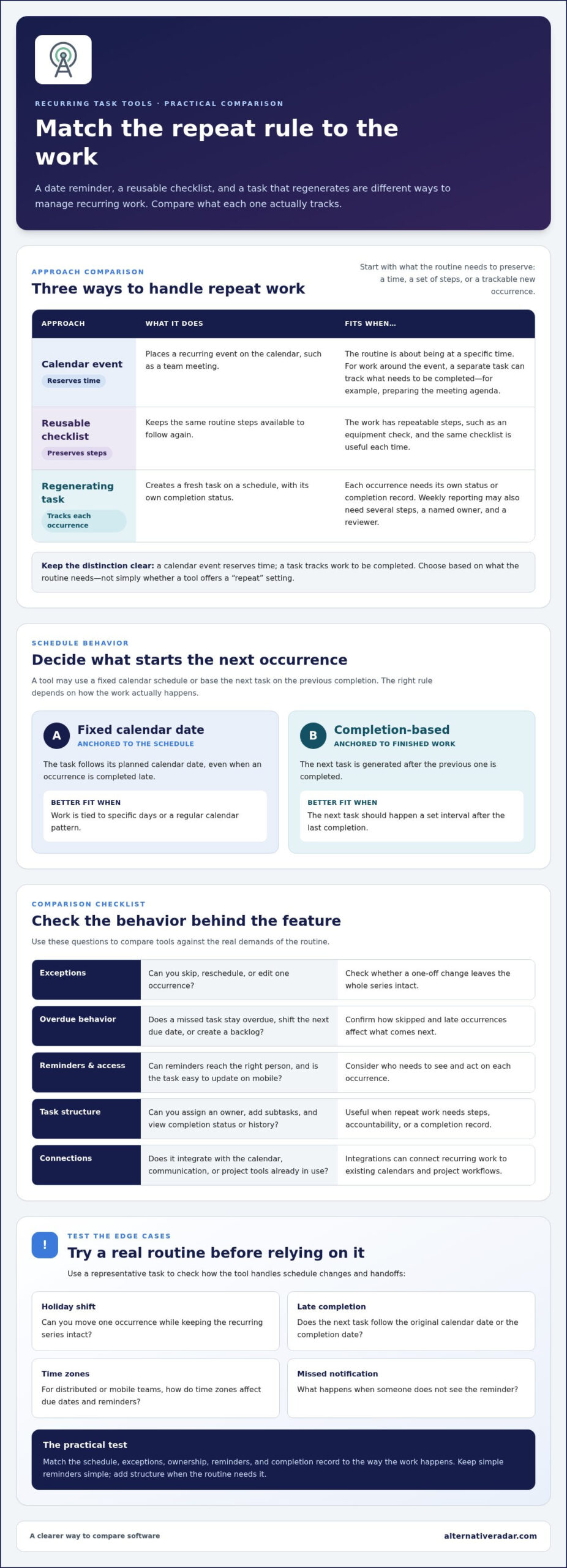
A calendar event reserves time, such as a recurring team meeting. A task tracks work to be completed, such as preparing the meeting agenda. Reusable checklists preserve the same steps, while a task that regenerates on a schedule can create a new occurrence with its own status. Owners, checklists, and completion history may carry forward differently between products. Compare those details before relying on a tool for important routines.
The best fit depends on task complexity, collaboration, and the tools your workflow already uses. Keep simple reminders simple; choose a more structured system when repeat work needs steps, accountability, or a dependable completion trail.
Recurring-task features to compare before choosing a tool
Compare what happens to each task occurrence, not just whether a tool has a “repeat” option. Look for daily, weekly, monthly, and custom intervals. Then check whether the next task is based on a fixed calendar date or generated after the previous one is completed. A fixed schedule suits work tied to specific days. Completion-based repetition can fit tasks that should happen a set interval after the last completion.
Use this checklist to compare tools for managing recurring tasks against your actual workflow:
- Exceptions: Can you skip one occurrence, reschedule it, or edit it without changing the entire series?
- Overdue behavior: Does a missed task stay overdue, shift the next due date, or create a backlog of occurrences?
- Reminders and access: Can reminders reach the right person, and is the task easy to update on mobile?
- Task structure: Can you assign an owner, add subtasks, and see completion status or history?
- Connections: Does it integrate with the calendar, communication, or project tools your team already uses?
Which recurrence rules and exceptions matter?
Test edge cases before building a routine around a tool. If a weekly task falls on a holiday, can you move just that occurrence while keeping the series intact? If someone completes a monthly task late, does the next one follow the original calendar date or the completion date? For distributed or mobile teams, consider how time zones affect due dates and reminders, and what happens when someone misses a notification. Test these cases with a representative task, since behavior can vary by product and plan.
When do collaboration and integrations justify a broader platform?
A personal list may be enough when one person owns the work and there are no handoffs. Shared assignment, comments, permissions, and visible completion status become more useful when several people contribute or someone needs to review the result. Integrations can connect recurring work to calendars or project workflows; task automation can also reduce repeated manual steps. Broader platforms may take more effort to configure, so weigh those capabilities against interface complexity.
Compare plan details alongside features. Free tiers may cap projects, task volume, or useful controls; Todoist’s Beginner plan, for example, is limited to five active projects. Consider whether the recurrence and collaboration functions you need fit within the relevant plan. Alternative Radar brings together software comparisons covering features, pricing, and pros and cons at software comparison resources.
Tools for managing recurring tasks: a use-case-based shortlist
The right shortlist depends on whether repeat work is personal, shared, or part of a larger project. The table separates editorial fit from plan facts. Recurrence rules, reminders, integrations, and feature limits can differ by plan and change over time, so treat them as part of your comparison.
| Tool | Best fit to assess | Free option and verified plan details | Recurrence and integrations |
|---|---|---|---|
| Todoist | Personal routines and lightweight lists | Free Beginner plan has a five-active-project limit. Pro is $5 per month billed annually or $7 monthly. | Check how schedules, reminders, and exceptions work on the plan you choose; confirm required integrations. |
| TickTick | Personal task lists where quick capture matters | Free plan has limits, including nine lists and 99 tasks per list. Premium pricing varies across current sources, so verify the vendor’s rate. | Confirm recurrence options, reminders, and which controls require Premium. |
| Microsoft To Do | A lightweight personal list workflow | Verify current plan availability and limits for your account. | Check repeat-task behavior and whether its connections fit your calendar and work apps. |
| Asana | Shared routines connected to team projects | Starter is $10.99 per user/month billed annually or $13.49 monthly. | Assess assignment and project visibility against setup effort; confirm recurrence controls and integrations on the selected plan. |
| ClickUp | Teams that want recurring work within a broader project workspace | Free Forever includes unlimited tasks and users, with a 100 MB storage limit. Unlimited is $7 per user/month billed annually or $10 monthly. | Compare the extra project scope with the administration it adds; verify recurrence and integration limits by plan. |
Which tools suit personal routines and lightweight task lists?
Todoist, TickTick, and Microsoft To Do are candidates to assess for individual routines and small lists. Focus on the daily experience: how quickly you can add a task on mobile, set a repeat pattern, and act on a reminder. A compact interface is useful only if its free or paid tier includes the controls your routine needs.
Which tools suit shared team routines and project workflows?
Asana and ClickUp are broader platforms to consider when recurring tasks need team ownership or project context. That added scope can help centralize work, but it may also mean more setup and ongoing administration than a simple checklist requires. Start with the collaboration need, then compare platforms. Alternative Radar helps readers weigh features, pricing, and trade-offs across free, open-source, and premium software options. It is a software comparison resource, not a task manager.
How to choose recurring-task software without overcomplicating work
Software should remove steps, not add another routine to maintain. Start by identifying where your current approach breaks down: tasks get forgotten, ownership is unclear, or a missed date disrupts the next cycle. Then choose tools for managing recurring tasks based on those specific gaps, rather than moving every reminder into a new platform.
A five-step test for matching tools to your routine
- List the work. Note each recurring task, its schedule, owner, and what counts as proof of completion, such as a checked list or review.
- Choose representative tasks. Test one personal routine and, if relevant, one shared workflow with handoffs or approvals. Avoid importing your whole task history.
- Compare the behavior. Check recurrence rules, reminders, skipped or overdue tasks, one-off schedule changes, integrations, and plan limits against your shortlist.
- Run a focused trial. Use the tasks through a normal cycle. Notice missed reminders, confusing settings, duplicate work, and whether the next occurrence appears as expected.
- Review the effort. Compare time spent setting up and maintaining the system with the work it removes. Ask teammates whether ownership and completion status are clear before inviting a wider group.
This small test reveals practical friction that feature lists can miss. A tool may support a schedule but make exceptions awkward, or offer collaboration features your routine doesn’t need. Keep the trial narrow until the recurrence behavior feels dependable.
When is a basic task list enough?
A basic list can be the sensible choice for a few predictable personal reminders with one owner and no reporting needs. If you can see what’s due and mark it complete without effort, more structure may not help. Step up to dedicated task software when missed occurrences create a backlog, the schedule changes often, work passes between people, or someone needs to confirm completion.
Use that threshold to avoid overbuilding. If the trial takes more setup than the routine itself, simplify the workflow or choose a lighter option. If it prevents repeated manual recreation and makes responsibility visible, the added structure may be worthwhile.
Once you know your must-haves, compare shortlisted options by features, pricing, and trade-offs. Explore software alternatives on Alternative Radar to narrow the field around your schedule and collaboration needs.
Set up recurring tasks and make the right tool stick
A new system works only if people can follow it without extra reminders or repeated setup. Start small: add a few frequent tasks with clear instructions, then see how they behave through a normal cycle before moving more work into the tool.
For each shared task, define an owner, recurrence rule, reminder, and completion criteria. That makes responsibility visible and helps distinguish a finished task from one that was simply opened or acknowledged. Add a checklist when the work has repeatable steps, not just to make the task look more complete.
How to create a reliable recurring-task workflow
Write instructions so someone else could complete the task without relying on undocumented context. State the expected result, any required steps, and what counts as done. Set the schedule to match the real work cycle rather than choosing a default interval for convenience.
Before activating a shared routine, agree on how to handle skipped dates, late completion, and owner changes. For example, decide whether a missed occurrence should stay overdue or move to a new date, and whether reassignment applies only to the current task or future ones too. Clear rules prevent duplicate work and confusion when the routine changes hands.
How to evaluate the tool after setup
After the first few occurrences, review the results. Are tasks completed on time? Do reminders prompt useful action, or do users ignore them? Look for duplicate occurrences, missed tasks, and unnecessary setup steps. If the next task appears at the wrong time, adjust the recurrence rule before adding more routines.
For shared workflows, ask users whether the owner, next step, and completion status are easy to understand. A system that technically supports recurring tasks but leaves people unsure what to do won’t save much effort. Keep the workflow only as structured as the work requires.
As your routines or team needs change, revisit whether your current tool still fits. Compare your shortlist by recurrence controls, collaboration features, plan limits, and pricing before switching or expanding. Compare recurring-task software options on Alternative Radar to weigh the trade-offs and find a better fit for your workflow.
Choose a routine you can rely on
The right tools for managing recurring tasks should fit the way work repeats, not force every routine into the same pattern. Compare fixed schedules with completion-based repetition, and consider how each option handles missed dates, ownership changes, reminders, and shared visibility.
Keep the choice practical. A basic list may work for a few predictable personal reminders, while shared tasks or repeatable project steps may need clearer ownership and completion tracking. Test a small set of real routines before moving everything over, then adjust rules that create missed or duplicate tasks.
Ready to narrow your shortlist? Compare tools for managing recurring tasks on Alternative Radar. Explore free, open-source, and premium options, with comparisons of software features, pricing, pros, and cons to help weigh each fit against your workflow.
Start with the routine that causes the most friction. A simpler, clearer system can make repeat work easier to manage.
Frequently Asked Questions
Is there a free tool for managing recurring tasks?
Yes, a free plan may cover personal routines or a small set of shared tasks, but included features and limits vary. For example, Todoist’s free Beginner plan is capped at five active projects, while TickTick’s free plan has limits such as nine lists and 99 tasks per list. Compare recurrence controls, reminders, integrations, and collaboration features, and review plan details before relying on a free tier.
Can recurring tasks repeat after completion instead of on a fixed date?
Some tools may let a task recur a set time after completion, while others use fixed calendar schedules. That distinction matters if the next task should depend on when someone finishes the current one. Compare how each option handles late completion, overdue tasks, and skipped occurrences. Test a representative task before using completion-based recurrence for an important workflow, since behavior can differ between products and plans.
How do I choose the best tool for recurring tasks?
Start by listing the work that repeats, its schedule, and who owns each task. Then compare tools for managing recurring tasks by recurrence rules, exceptions, reminders, collaboration features, integrations, and plan limits. Test one representative routine before moving everything over. A personal list may suit simple reminders; shared processes may call for assignment and completion visibility. Choose the simplest option that reliably supports the work.
What happens if I miss a recurring task?
It depends on the tool’s recurrence rules. A missed occurrence might remain overdue, appear alongside the next scheduled task, or require you to choose what happens next. Test the behavior by skipping a task or completing it late. Check whether the next due date changes and whether the missed occurrence stays visible in the task history. Choose settings that make the next action clear and avoid duplicate work.
Are recurring tasks better than calendar reminders?
Neither is universally better. A calendar reminder helps reserve or remember a time, while a task records work that needs completion. For example, a recurring review meeting belongs on a calendar, while its preparation checklist can be tracked as a task. Some routines need both. Choose based on whether you need a time slot, completion status, assigned ownership, repeatable steps, or a record of finished work.
Do teams need project management software for recurring tasks?
No, not always. A shared task list may be enough for predictable routines with few participants and simple handoffs. Broader project software can help when work needs clear owners, repeatable checklists, dependencies, or reporting. Compare those benefits with the setup and administration involved. Before inviting the whole team, test one shared recurring workflow and see whether the added visibility makes responsibilities and next steps easier to follow.
How many recurring tasks should I add when setting up a new tool?
Begin with a small group of frequent, high-value tasks rather than importing every routine. Prioritize work that’s often missed or needs clear ownership, then use it through a normal cycle. Review whether reminders help, schedules behave as expected, and duplicate occurrences appear. This focused rollout makes confusing rules and unnecessary features easier to spot before expanding the system to more tasks or inviting additional teammates.