
Your team’s most sensitive data shouldn’t be locked behind a proprietary paywall that limits your access and scales your costs without warning. With Slack’s Business+ plan now reaching $15 per user each month, many organizations are realizing that convenience comes at a steep price. You likely value the streamlined interface of major SaaS tools, but you’re probably tired of losing message history or struggling to integrate custom developer workflows into a closed system.
This guide helps you break free from those limitations by identifying the most reliable, privacy-focused open source slack alternatives available in 2026. These platforms give your team full control over data storage and communication workflows while significantly reducing long-term overhead through self-hosting. We’ve acted as your digital scout, testing these tools to ensure they meet modern security standards and technical needs. You’ll discover which options offer the best balance of user experience and data sovereignty, allowing you to build a workspace that belongs entirely to you.
Key Takeaways
- Understand why data sovereignty is driving the 2026 shift toward self-hosted communication to protect mission-critical information.
- Evaluate leading open source slack alternatives using a technical framework that balances user experience with your team’s maintenance capacity.
- Compare specialized platforms like Mattermost for DevOps workflows against Rocket.Chat’s omnichannel support features to find your ideal fit.
- Identify the infrastructure requirements and security responsibilities, such as managing encryption keys, necessary for a successful deployment.
- Learn how to execute a seamless transition from Slack by auditing current usage and utilizing automated data migration tools.
Why Teams are Migrating to Open Source Slack Alternatives in 2026
Scaling a team on proprietary software often feels like renting your own productivity. Open source Slack alternatives are collaborative platforms where the source code is accessible for modification and self-hosting, offering a permanent solution to the limitations of closed-source SaaS. In 2026, the shift toward these tools is no longer a niche preference for developers; it’s a strategic move for organizations that prioritize long-term stability and data control.
The primary driver for this migration is the “Data Sovereignty” movement. Modern businesses refuse to store mission-critical intellectual property on third-party servers where they have zero visibility into backend operations. By self-hosting, you ensure that your communication history remains within your private cloud or on-premise hardware. This removes the risk of a third-party provider changing their terms of service or experiencing a catastrophic breach that compromises your entire message archive.
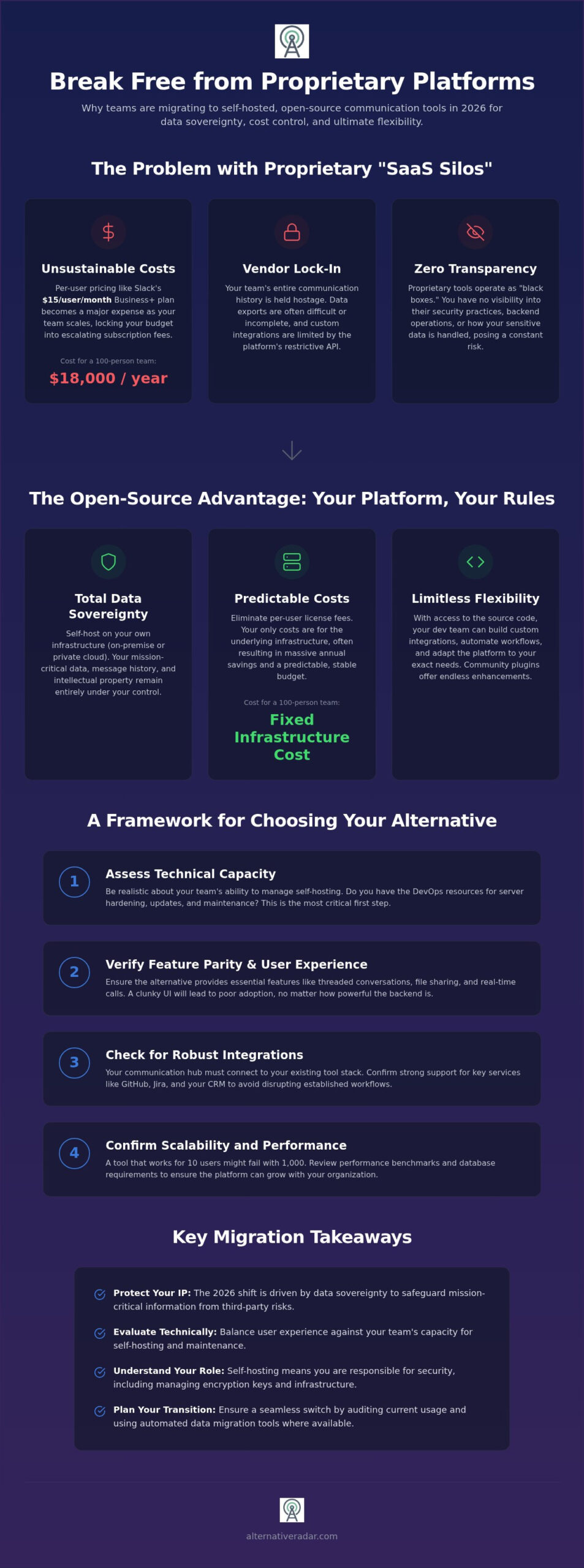
Cost efficiency also plays a significant role in this transition. As of 2026, Slack’s Business+ plan costs $15 per user monthly, a price point that becomes unsustainable as teams grow into the hundreds or thousands. Open source platforms allow you to pay for the underlying infrastructure rather than per-seat licenses, which often results in thousands of dollars in annual savings. This financial predictability allows technical leads to allocate budgets toward innovation instead of subscription fees.
The Problem with Proprietary SaaS Silos
Proprietary platforms often function as “black boxes” that create significant vendor lock-in. Retrieving your data in a usable format is frequently difficult, as export tools are often restricted or designed to be incompatible with other systems. These closed environments also limit the depth of your custom integrations. You’re forced to work within the confines of pre-approved APIs that might not support the specific automation your developer workflow requires. Data silos are isolated repositories of information that remain inaccessible or difficult to integrate with other organizational systems and tools.
The Open Source Advantage: More Than Just Free
Choosing a platform from a list of open-source groupware provides a level of transparency that proprietary tools cannot match. Public code audits allow your internal security team to verify encryption standards and data handling protocols personally. This transparency is vital for staying compliant with regional privacy regulations like GDPR, as you maintain absolute control over where your data lives and who can access it.
Community-driven development ensures these tools evolve based on actual user needs rather than corporate profit margins. This collaborative ecosystem results in faster bug fixes and a wider array of community-built plugins. For technical teams, the ability to customize the platform at the code level means the communication tool finally adapts to the workflow, rather than forcing the team to adapt to the tool.
Evaluating the Best Open Source Collaboration Tools: A Decision Framework
Selecting the right platform requires more than a simple feature comparison. You must first identify your team’s technical threshold. If your IT department is comfortable managing Docker containers or Kubernetes clusters, self-hosting provides maximum control. However, for teams without dedicated DevOps resources, the maintenance burden of open source slack alternatives can quickly outweigh the benefits. You need to be honest about whether your team can handle server hardening and manual version updates before migrating away from a managed service.
Feature parity is the next hurdle. You shouldn’t sacrifice essential tools like threaded conversations, real-time “huddles,” or secure file sharing. Beyond internal chat, your chosen tool must talk to your existing stack. Look for robust integration ecosystems that support GitHub, Jira, and your CRM to avoid breaking established workflows. Scalability also matters. A tool that works for 10 people might lag when handling 2,000 concurrent users. Always verify the platform’s performance benchmarks and database requirements before committing to a full-scale rollout.
Technical vs. Non-Technical User Needs
Developer-centric teams often prioritize command-line interfaces and deep API access. General business teams, such as Marketing or HR, require a polished UI and intuitive navigation. If the interface is too clunky, adoption will fail regardless of how secure the backend is. Mobile app availability is equally critical. Ensure the platform offers high-quality iOS and Android apps to maintain productivity on the go. For a deeper dive into selection criteria, consult our guide on finding the best alternative to popular software.
Total Cost of Ownership (TCO) Analysis
The “free” label on open source software is often misleading. While you avoid per-user subscription fees, you inherit costs for server infrastructure, security updates, and internal support time. For a team of 100, Slack Business+ costs $1,500 monthly, totaling $18,000 annually. A self-hosted instance might only cost $200 in monthly server fees but could require five hours of engineering maintenance. You must calculate the hourly rate of your staff to find the true break-even point.
Deciding between self-hosting for absolute data sovereignty or choosing a vendor-managed cloud version is your final step. Managed versions offer the benefits of open source code with the convenience of traditional SaaS. If you’re still weighing your options, you can compare these tools against the broader market using our centralized directory. This allows you to balance long-term savings against your immediate operational capacity.
Top 7 Open Source Slack Alternatives for Every Team Size
Selecting from the available open source slack alternatives requires matching software architecture to your specific operational needs. We have analyzed the market to identify the most stable, feature-rich platforms that offer genuine data sovereignty in 2026. These tools range from enterprise-grade heavyweights to lightweight, privacy-first protocols that eliminate the risks of third-party data silos.
Enterprise-Grade Solutions: Mattermost and Nextcloud Talk
Mattermost remains the primary choice for DevOps and high-security environments. As of August 14, 2026, the platform release 11.10.0 provides deep integration with technical stacks like GitLab and Bitbucket. It offers a familiar interface but adds granular control over data residency and compliance auditing. Technical teams favor Mattermost because it allows for custom plugin development that mirrors complex engineering workflows without exposing data to third-party cloud providers.
Nextcloud Talk provides a comprehensive alternative for organizations that need more than just chat. It integrates directly with file storage, calendars, and contacts, creating a unified workspace. This makes it an ideal companion for teams already utilizing an open source CRM software comparison to build a fully transparent tech stack. It effectively eliminates the need for separate customer service and internal chat licenses by keeping all collaboration within a single, self-hosted ecosystem.
Niche and Lightweight Alternatives: Zulip and Gitter
Zulip solves the problem of “chat noise” through a unique topic-based threading model. While traditional platforms use linear channels, Zulip (server version 12.0) organizes every message into a specific topic. This structure reduces context switching and allows users to catch up on specific discussions without scrolling through thousands of unrelated messages. It’s highly effective for distributed teams working across multiple time zones who need to maintain asynchronous productivity.
Gitter serves as a specialized, lightweight option for developer communities and public-facing projects. It’s built for high-velocity technical discussion and integrates seamlessly with GitHub repositories. While it lacks some of the bloated “enterprise” features of larger suites, its ease of deployment and focus on community-driven collaboration make it a strong candidate for open-source initiatives. For teams focused purely on product feedback, tools like Fider can supplement these chat platforms to organize user suggestions.
Privacy-First and Decentralized: Element and Jami
Element is the flagship client for the Matrix protocol, providing decentralized communication. It utilizes end-to-end encryption (E2EE) by default, ensuring that even server administrators cannot read message contents. This architecture prevents any single entity from owning the entire network. Jami takes this further by operating without any central servers at all, using a distributed hash table for peer-to-peer connectivity. These tools are essential for organizations handling highly sensitive legal or financial data.
Alternative Radar: Your Software Scout
Alternative Radar serves as your digital scout in the software market. Rather than testing dozens of platforms yourself, you can use our centralized directory to filter tools by licensing, technical requirements, and user reviews. We provide the objective data necessary to make an informed transition, ensuring you select a platform that fits your specific team size and security posture. Don’t settle for market leaders just because they are familiar; choose the tool that actually fits your workflow.
The Technical Reality of Self-Hosting Your Communication Platform
Adopting open source slack alternatives shifts the operational burden of uptime and data integrity from a third-party vendor directly to your internal IT team. While you gain absolute data sovereignty, you also inherit the responsibility of sysadmin duties. You’re no longer just managing a user list; you’re managing a production-grade server environment. This requires a clear understanding of your infrastructure capabilities before you initiate a migration.
Most modern platforms require a standard Linux environment, typically Ubuntu or Debian, to run reliably. You must also decide on your storage backend. Whether you use local block storage or an S3-compatible service like MinIO, your data plan must include automated, off-site backups. If your communication database fails without a recent dump, your team loses years of institutional knowledge in seconds. For many, the “Managed Open Source” model provides a middle ground, offering the transparency of open code with the convenience of vendor-handled maintenance.
Deployment Models: Docker vs. Bare Metal
Containerization via Docker or Kubernetes is the preferred deployment method in 2026. It allows for environment consistency and makes version updates as simple as pulling a new image and restarting the service. Bare metal installations are increasingly rare, generally reserved for high-performance scenarios where every millisecond of latency in video huddles matters. This containerized approach is a common thread among popular open source business software 2026, as it simplifies the orchestration of complex tech stacks.
Maintaining Security and Compliance
Security in an open source environment is a proactive process. You must manage your own SSL certificates through services like Let’s Encrypt and handle the rotation of encryption keys. Regular patching is mandatory; because the source code is public, vulnerabilities are often discovered and exploited quickly if you fall behind on updates. Implementing Multi-Factor Authentication (MFA) through OIDC or SAML integrations is essential to prevent unauthorized access. A Zero Trust architecture ensures that every access request is verified based on identity and device health rather than assuming the internal network is safe.
To determine which deployment model fits your team’s current technical capacity, you can compare self-hosted versus cloud-managed tools using our objective data filters. This helps you balance the desire for control against the reality of your daily maintenance budget.
Navigating Your Transition: From Slack to an Open Source Ecosystem
Migrating to open source slack alternatives is as much a cultural shift as it is a technical one. Success depends on a structured approach that prioritizes data integrity and user adoption. Before touching any server settings, perform a comprehensive audit of your current Slack workspace. Identify which channels are mission-critical and which have been dormant for months. Most organizations find that only a fraction of their channels require active migration, while the rest can be archived to save on storage and reduce clutter in the new environment.
The technical migration involves using Slack’s export tools to generate an archive of your message history and files. Be aware that in 2026, Slack’s export limitations often restrict the retrieval of certain metadata or private channel history depending on your subscription tier. Once you have the data, use the native importers provided by platforms like Mattermost or Rocket.Chat. Always run a pilot phase with a small, technical subgroup first. This allows your IT team to iron out any self-hosting friction before the general staff joins the platform.
The Step-by-Step Migration Plan
A successful import requires more than just moving text; you must verify that user permissions and file attachments remained intact. Use a checklist to validate data integrity across various departments. Mapping your Slack “Apps” to open source “Integrations” or “Webhooks” is often the most time-consuming step. While proprietary tools rely on a closed marketplace, open-source platforms often use standard webhooks to connect with your stack. For a broader perspective on selecting your next platform, consult our guide on the best Slack alternatives for 2026.
- Verify that all private channel memberships were preserved during the import process.
- Test core webhooks for Jira and GitHub to ensure notification parity.
- Confirm that mobile push notifications are functioning for all user groups.
Winning Team Buy-In
Non-technical users often resist change due to the UI friction of a new tool. To overcome this, focus your internal messaging on the “Why”: data privacy, permanent message history, and tool longevity. Create simple “cheat sheets” that compare Slack keyboard shortcuts to the new platform’s equivalents. We recommend a “dual-run” period of roughly 14 days where both systems remain active. This minimizes work disruption while users adjust. Once the transition is complete, archive your Slack data for long-term compliance and shut down the legacy workspace to eliminate redundant costs.
Take Control of Your Team’s Digital Sovereignty
Migrating to open source slack alternatives is a strategic decision that prioritizes data ownership and operational autonomy over proprietary convenience. In 2026, the ability to self-host and customize your communication stack is the most effective way to avoid restrictive pricing and third-party data silos. While the technical transition requires careful planning and a clear understanding of your infrastructure, the long-term benefits of lower costs and enhanced security are undeniable.
You don’t have to manage this search alone. Our digital scouts have analyzed the market to provide you with the objective data needed for a confident transition. To find your ideal setup, explore more professional software comparisons on Alternative Radar. Our platform offers expert-led reviews of open source and premium apps across 500+ categories, providing data-driven insights for 2026 software trends. Use these high-quality filters to bypass marketing hype and select the tools that truly align with your technical requirements. Empower your team with a workspace that you own and control.
Frequently Asked Questions
Is there a completely free open source alternative to Slack?
Yes, several platforms offer free community editions. Mattermost Starter and Zulip’s self-hosted community version are $0 for the software itself. You must factor in the cost of your own server infrastructure and maintenance time. These open source slack alternatives provide the full source code without licensing fees, unlike proprietary SaaS models that charge per user. This allows your organization to scale without facing the per-seat costs associated with Big Tech platforms.
Can I import my Slack message history into Mattermost or Zulip?
Yes, platforms like Mattermost and Zulip include built-in Slack import tools. You first export your data from Slack as a JSON zip file through the administration panel. Mattermost uses a dedicated “mexport” tool for large datasets, while Zulip offers a comprehensive import script. Be aware that Slack’s export limitations in 2026 might restrict private channel data depending on your current subscription tier, so verify your data integrity immediately after the transfer.
Which open source Slack alternative is best for small teams?
Zulip is often the best choice for small teams that prioritize organized communication. It offers a unique threading model that prevents information overload without the complex enterprise setup required by larger suites. Alternatively, Nextcloud Talk is excellent for teams that already use the Nextcloud ecosystem for file storage. These choices allow smaller groups to maintain high productivity without the restrictive pricing tiers common in proprietary software.
What are the risks of self-hosting a team communication tool?
The primary risks include data loss from improper backups and security vulnerabilities if you fail to patch the server. Unlike SaaS, you are responsible for managing encryption keys and SSL certificates. If your server goes offline, your team loses all communication until you fix the issue. You must implement a robust disaster recovery plan and regular security audits to protect your mission-critical data from unauthorized access or hardware failure.
Do open source Slack alternatives have mobile apps for iOS and Android?
Yes, all major open source slack alternatives provide native or cross-platform mobile apps. Mattermost, Zulip, and Element have polished applications available on the Apple App Store and Google Play Store. These apps support push notifications, although self-hosted users may need to configure a push proxy or use the vendor’s hosted gateway. This ensures your team stays connected across all devices without sacrificing the data sovereignty discussed earlier in this guide.
Is Zulip better than Slack for large, busy teams?
Zulip is often superior for large teams because its topic-based threading significantly reduces chat noise. In Slack, busy channels become a wall of text that is difficult to navigate. Zulip requires every message to have a specific topic, allowing users to ignore irrelevant discussions and focus on what matters. This structure minimizes context switching and makes catching up on hundreds of messages much faster for distributed organizations working across multiple time zones.
Does Element support video calls and screen sharing?
Yes, Element supports end-to-end encrypted video calls and screen sharing through the Matrix protocol. It often integrates with Jitsi Meet or uses native Matrix VoIP capabilities to handle multi-party conferencing. Because it uses decentralized architecture, your calls don’t pass through a central corporate server. This makes it a high-security choice for sensitive business discussions where privacy and encryption are the top priorities for the organization.
How much technical knowledge is required to set up a self-hosted chat server?
You need a solid understanding of Linux terminal commands and server administration. Most modern deployments use Docker or Kubernetes, so familiarity with container orchestration is highly beneficial. You must be comfortable configuring DNS records, managing firewall rules, and setting up reverse proxies like Nginx. If these tasks are outside your team’s expertise, many vendors offer managed cloud versions that provide open-source benefits without the manual server maintenance.