
The most expensive part of finding free video editing software without watermark isn’t the subscription fee; it’s the time you waste exporting a project only to find a giant logo blocking your work. It’s a common trap in the software market. You spend hours cutting clips and syncing audio, but the final file is held hostage behind a sudden paywall or a forced low-resolution limit. We understand the frustration of discovering that “free” often comes with strings attached that compromise your professional output.
You deserve a tool that respects your time and your hardware. This guide cuts through the marketing noise to highlight the best editors for 2026 that actually deliver high-quality, clean exports. We’ve tested these platforms for stability on standard laptops and verified their licensing terms to ensure there are no hidden surprises at the finish line.
In the following sections, you’ll discover which open source and cloud-based tools offer 1080p or 4K exports for free. We’ll break down the technical requirements for each option and explain exactly why some famous brands aren’t worth your download. You’ll leave with a clear understanding of which software fits your specific editing style and computer specs.
Key Takeaways
- Learn to distinguish between truly open-source tools and freemium platforms that hide watermarks behind export paywalls.
- Discover why open-source software remains the most reliable way to access professional features without licensing restrictions.
- Evaluate the best free video editing software without watermark to ensure your 2026 projects maintain a clean, high-resolution finish.
- Assess your hardware capacity against professional-grade suites like DaVinci Resolve to avoid system instability during the rendering process.
- Use our decision matrix to choose between fast, browser-based editors and advanced desktop tools based on your specific skill level.
The ‘No-Watermark’ Landscape: Understanding Free vs. Freemium Software
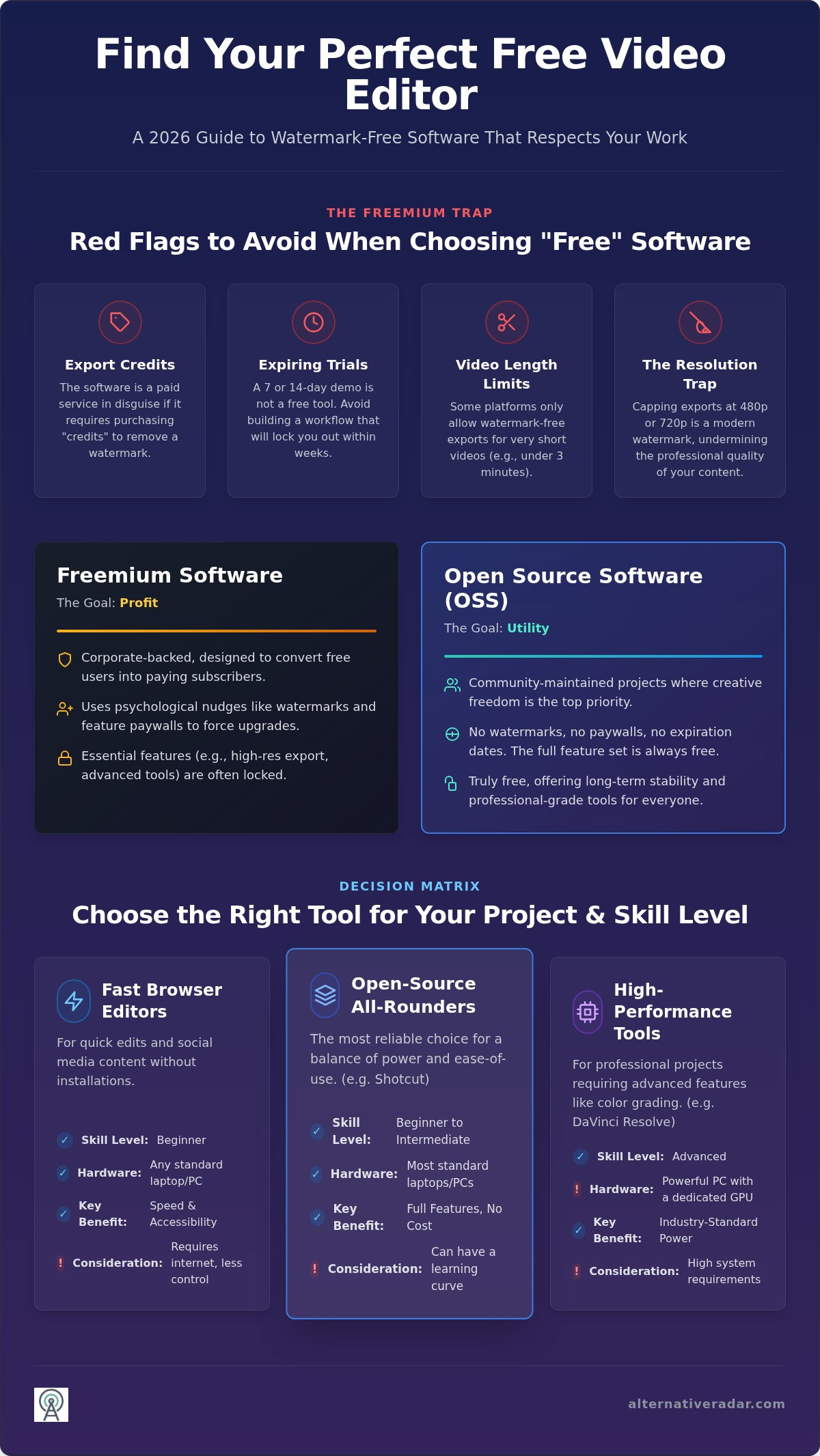
In 2026, the definition of “watermark-free” has evolved. It no longer simply describes the absence of a corporate logo in the corner of your video. For a tool to be truly useful, a clean export must also meet modern resolution standards. Many developers offer free video editing software without watermark as a lead magnet to pull you into an ecosystem where essential features are locked behind a monthly subscription. This is the “freemium” trap. These companies give you the canvas for free but charge you for the paint.
The core of the issue lies in the monetization model. Software development is expensive, and companies use watermarks as a psychological nudge to force an upgrade. When you spend ten hours on a project only to find it’s unshareable due to a giant logo, you’re more likely to pay out of frustration. Understanding the difference between these corporate freemium products and open-source software (OSS) is your best defense. Open-source tools are maintained by communities rather than corporations. They offer the full feature set for free because their goal is utility, not profit. Choosing an open-source license often provides the most long-term stability for your creative workflow.
Beware of the resolution trap. Some platforms claim to provide free video editing software without watermark but restrict free users to 480p or 720p exports. In a market where 1080p is the baseline and 4K is the standard for professional content, a low-resolution export is effectively a watermark of its own. It signals to your audience that you’re using limited tools, which can undermine your credibility as a creator.
What to Look for in a Truly Free Editor
To ensure you’re getting a professional-grade tool, prioritize these three technical pillars:
- Export resolution: Demand at least 1080p. If a tool caps your quality at 720p, it won’t satisfy 2026 viewing expectations on high-density displays.
- Feature parity: Verify that basic transitions, color grading, and text overlays are included in the free tier. Some tools lock the most common creative effects behind a paywall.
- Privacy and data: Determine if your footage is processed locally on your machine or uploaded to a cloud server. Local processing is generally faster and keeps your raw data secure.
Common Red Flags to Avoid
Marketing departments are clever, but you can spot a “fake” free tool by looking for these specific warning signs:
- Export credits: If a platform requires you to earn or buy “credits” to remove a logo, it’s a paid service in disguise.
- Expiring trials: A 7-day or 14-day trial isn’t a free tool; it’s a temporary demo. Avoid building a workflow around software that will lock you out in a week.
- Length limits: Some software allows watermark-free exports only for videos under three or five minutes. This is a major bottleneck for long-form creators or educators.
Top Open-Source Picks: Truly Free Editing with No Strings Attached
Open-source software (OSS) represents the only category where “free” is a permanent state rather than a marketing tactic. Because these projects are developed under licenses like the GNU General Public License, they don’t have shareholders demanding monetization through watermarks. This makes them the ultimate choice for creators searching for free video editing software without watermark. You get full access to the source code’s capabilities without an expiration date. It’s a transparent model that prioritizes your creative freedom over corporate profit margins.
At Alternative Radar, we prioritize these open-source solutions because they align with our mission of efficiency and objective comparison. We’ve tested these tools across various operating systems to ensure they deliver professional results for anyone seeking free video editing software without watermark without the bloat of traditional paid suites.
Shotcut: The All-Rounder for 2026
Shotcut remains a top recommendation due to its extensive format support. By leveraging the FFmpeg framework, it can ingest almost any file type you throw at it, from legacy formats to modern 4K codecs. It doesn’t require a high-end subscription to unlock native 4K editing or hardware acceleration. For those new to the platform, Shotcut uses a non-linear editing (NLE) workflow where you arrange clips on multiple tracks and apply filters directly to the timeline. This direct approach eliminates the need for complex sub-menus. It’s a cross-platform powerhouse that works identically on Windows, Mac, and Linux, ensuring your project files stay portable.
Kdenlive and OpenShot: Choosing Your Complexity
If you’re a beginner, OpenShot is your best starting point. It prioritizes a drag-and-drop interface that’s perfect for assembling quick social media clips or simple YouTube vlogs. It lacks the deep technical complexity of professional suites, but it’s incredibly stable for basic cuts and transitions. You won’t find yourself buried in technical settings just to trim a clip.
On the other end of the spectrum, Kdenlive provides professional-level features that rival paid industry leaders. It includes advanced tools like motion tracking, keyframing, and sophisticated color correction scopes. While Kdenlive has historically faced stability issues on Windows, the 2026 builds have significantly improved performance for PC users. It’s now a viable alternative for those who need a multi-track timeline with complex nesting capabilities. If you’re looking to expand your toolkit beyond video, you should check out our guide on popular open source business software 2026 to see how OSS can optimize your entire production pipeline. These tools empower you to build a professional studio environment without the burden of recurring monthly fees.
Online and Browser-Based Editors: Fast Watermark-Free Results
Browser-based non-linear editors (NLEs) have removed the hardware barrier for millions of creators. You don’t need a powerful workstation to produce clean content; you just need a stable internet connection. These platforms process video on remote servers, making them an ideal choice for users with older laptops or limited storage. Finding free video editing software without watermark that runs in a browser is now a standard expectation for 2026 workflows.
Since its acquisition by Microsoft, Clipchamp has become the default solution for Windows users. It’s accessible via any modern browser and avoids the typical “freemium” logo by offering unlimited 1080p exports. While other tools try to upsell you at every turn, Clipchamp maintains a functional free tier that handles most social media needs without intrusive branding.
CapCut Online and Adobe Express offer alternative paths for quick edits. CapCut is famous for its AI-driven features, but you must be careful with the “end-screen” logo. It’s not a permanent watermark over your footage, but a short branded clip added to the end of the timeline that you can manually delete before exporting. Adobe Express provides a more curated experience. It’s high-quality and watermark-free, but it lacks the multi-track depth found in dedicated desktop NLEs. It’s best suited for graphic-heavy content rather than complex storytelling.
Clipchamp: The Standard for Quick Social Content
Clipchamp excels at asset management. It integrates directly with OneDrive and Google Drive, allowing you to pull footage from the cloud without manual uploads. This saves significant time when working across multiple devices. Use the prebuilt templates for TikTok and Instagram Reels to maintain a consistent posting schedule without starting from scratch. To keep your export free, always select the 1080p option. Selecting 4K often triggers a prompt for a paid subscription, so stick to Full HD for clean, cost-free results.
Browser Limitations and Privacy
Cloud editing comes with trade-offs. Editing 4K footage in a browser requires high upload speeds, usually 20 Mbps or higher, to prevent lag. If your connection is unstable, your editing experience will suffer. Privacy is another critical factor. When you upload media to a browser editor, you’re often granting the platform specific usage rights. Read the terms of service to understand who owns the data. Our team at Alternative Radar recommends keeping local backups of all raw footage. Don’t rely on a cloud platform as your primary storage, as service outages could lock you out of your own creative assets.
High-Performance Tools: Pro-Level Editing for Zero Dollars
If you’re looking for free video editing software without watermark that matches the capabilities of paid industry leaders, high-performance desktop suites are the answer. These tools aren’t just for basic cuts; they provide the depth needed for complex color grading and visual effects. For creators who find themselves doing more than just trimming clips, these platforms often serve as the best alternatives to photoshop for managing video assets and complex layering.
DaVinci Resolve stands as the pinnacle of this category. It’s the same software used on major motion pictures, yet Blackmagic Design offers a remarkably robust free version. HitFilm remains a strong contender for those focused on 3D compositing and visual effects, though its interface has become more subscription-focused in recent years. However, these tools demand significant system resources. If your computer hardware is outdated, VSDC Free Video Editor provides a functional alternative that prioritizes efficiency over aesthetic polish.
DaVinci Resolve: Power vs. Hardware
Resolve provides the most sophisticated color correction tools available in any free suite. You can manipulate shadows, midtones, and highlights with professional-grade precision. To export 4K without watermarks, ensure you avoid using “Studio” specific effects, which are marked with a small badge in the menu. The catch is the hardware requirement. DaVinci Resolve relies heavily on your GPU. If your laptop doesn’t have at least 4GB of dedicated VRAM, you’ll likely experience frequent crashes or stuttering during playback. It’s built for workstations, not entry-level tablets.
VSDC: The Lightweight Champion
VSDC is the go-to choice for users with older “potato” PCs. It doesn’t require a high-end gaming setup to run smoothly. Unlike Resolve, VSDC is highly optimized for low-spec hardware while still supporting modern formats like HEVC/H.265 and GoPro footage. The interface uses a non-linear logic that differs from standard timelines, which might feel confusing at first. Once you master the object-based workflow, it becomes a fast and reliable tool for clean exports. Explore our full comparison of high-performance editing tools to see which one matches your system’s capabilities.
Decision Matrix: How to Select the Right Watermark-Free Tool for Your Project
Selecting the right free video editing software without watermark isn’t about finding the platform with the most buttons. It’s about evaluating your technical needs against your available time and hardware. If you choose a professional suite for a 15-second social clip, you’re sacrificing efficiency. Conversely, using a basic browser tool for a short film will leave you frustrated by the lack of color control. At Alternative Radar, we advocate for choosing tools based on situational suitability rather than brand popularity. This ensures you don’t waste hours learning a workflow that doesn’t serve your end goal.
Your choice also impacts your future career trajectory. Learning an industry-standard interface like DaVinci Resolve builds a transferable skill set for professional environments. However, if your goal is simply to produce clean, educational content quickly, open-source tools like Shotcut provide a more direct path. Stop following market leaders blindly and start matching your software to your project’s specific complexity.
Framework for Choosing Your Editor
Use these categories to identify your primary workflow requirements:
- Social Media Creator: Focus on Clipchamp or CapCut. These platforms prioritize speed, vertical aspect ratios, and pre-built templates. They’re designed for high-volume posting where fast turnaround is more important than deep technical manipulation.
- Aspiring Filmmaker: Prioritize DaVinci Resolve. It offers the most sophisticated color grading and audio post-production tools. While the learning curve is steep, it’s the only free option that prepares you for professional studio standards.
- Hobbyist or Educator: Stick with Shotcut or OpenShot. These tools excel at screen recording and straightforward cuts. They offer a stable middle ground without the subscription nagging found in corporate freemium software.
Hardware Check: Can Your Computer Handle It?
Before you commit to a download, verify that your machine can handle the rendering load. For 4K editing in 2026, 16GB of RAM is the functional minimum for a smooth experience. If you’re working with 8GB or less, stick to browser-based editors or lightweight tools like VSDC. The type of storage you use also matters; always edit from an SSD rather than a traditional hard drive to prevent timeline stuttering. If your current setup feels sluggish, look for “proxy editing” settings in your software. This allows you to edit with low-resolution files while maintaining a high-quality, watermark-free export at the end. If your project requirements shift, knowing how to find the best alternative to popular software will help you transition between tools without losing productivity.
Future-Proof Your Creative Workflow
Finding the right free video editing software without watermark requires looking beyond the most advertised brands. You’ve seen that open-source tools like Shotcut and Kdenlive offer the most transparency, while high-performance suites like DaVinci Resolve provide professional-grade results if your hardware can handle the load. The key to efficiency is matching the tool’s complexity to your project’s specific needs rather than overcomplicating your workflow.
As digital standards evolve, staying informed about licensing and hardware requirements is essential for maintaining a professional edge. Our team at Alternative Radar provides expert insights on open-source vs. proprietary tools, ensuring you make choices based on objective data rather than marketing hype. We update our research to reflect 2026 tech standards, helping you avoid hidden costs and restrictive export traps.
Ready to optimize the rest of your digital toolkit? Explore more software alternatives on Alternative Radar to find efficient solutions for every aspect of your production process. You have the power to build a high-quality studio without the burden of recurring subscriptions.
Frequently Asked Questions
Is CapCut really free without a watermark in 2026?
CapCut remains free to use without a permanent watermark on your footage, but it often adds a branded “ending” clip to your timeline automatically. You can remove this by selecting the ending clip and deleting it manually before you export your project. While some advanced AI effects now require a Pro subscription, the core editing features allow for clean, high-definition exports at no cost.
What is the best free video editor for Windows 10 without a watermark?
Shotcut and VSDC are the most reliable choices for Windows 10 users seeking free video editing software without watermark. Shotcut offers an open-source environment with professional features and no licensing fees. VSDC is a superior option for users with older hardware, as it’s specifically optimized to run smoothly on systems with limited processing power and lower RAM.
Can I export 4K video for free without a watermark?
You can export 4K video for free using desktop applications like DaVinci Resolve, Shotcut, and Kdenlive. Most browser-based editors limit free users to 1080p to save on cloud processing costs, but these local desktop tools provide full resolution support. Just verify that your computer hardware is powerful enough to handle the intense rendering requirements of 4K files without crashing.
Why do some ‘free’ editors add a watermark only after I finish the project?
This is a common monetization tactic designed to trap users through the “sunk cost” fallacy. Developers allow you to use every tool for free so you invest hours into your edit. When you finally click export, they reveal the watermark as a way to force a subscription payment. It’s a predatory model that relies on your reluctance to start the project over in a different program.
Is DaVinci Resolve truly free, or is there a catch?
The free version of DaVinci Resolve is genuinely free and includes nearly all the professional tools found in the paid Studio version. The primary catch is the hardware demand. It’s a professional-grade suite that requires a powerful GPU and at least 16GB of RAM to function effectively. If you use a “Studio-only” effect, the software will apply a watermark, so stick to the standard toolset for clean exports.
Are there any free online video editors that don’t require an account?
Most reputable online editors require an account to manage the cloud-based rendering of your files. However, basic tools like 123Apps or VideoCandy allow you to perform simple tasks like trimming or cropping without a login. These are helpful for quick edits, but for any project involving multiple tracks or saved progress, you’ll eventually need to register to secure your data and export settings.
How can I remove a watermark from a video I already exported?
Removing a watermark after the fact is technically difficult and usually results in a blurry or distorted image. AI-powered watermark removers can attempt to fill in the missing pixels, but they rarely achieve professional results. The most effective solution is to go back to your original project files and re-export them using a free video editing software without watermark that respects your final output.
What free video editor uses the least amount of RAM?
VSDC Free Video Editor is the most efficient choice for computers with limited memory. It’s designed to function on systems with as little as 4GB of RAM, making it significantly lighter than DaVinci Resolve or HitFilm. This makes it the ideal tool for students or professionals working on standard office laptops that lack the high-end specifications required by more demanding creative suites.