
What if the software everyone recommends is actually the primary reason your team feels overwhelmed? It’s a common trap to assume that the most expensive, feature-heavy platform is the best client management software for small business. In reality, many teams find themselves paying for complex modules they never use while their staff struggles with a learning curve that feels like a second job.
We agree that your tools should serve your growth, not drain your resources. Data silos and manual task entry should be relics of the past. This evaluation provides an objective, scout-led analysis of 2026 market leaders and niche alternatives designed to streamline your onboarding and clear your sales pipeline. You’ll discover how to centralize communication and automate the mundane, ensuring every dollar spent translates into visible efficiency.
Our team has done the heavy lifting of testing these platforms so you don’t have to. From flat-rate powerhouses to agile, AI-driven tools, this review filters the noise to help you build a lean, modular ecosystem that prioritizes your autonomy and your bottom line. We move straight into the comparison of top-tier performers and the hidden gems currently disrupting the market.
Key Takeaways
- Shift from rigid, monolithic systems to modular SaaS ecosystems to gain flexibility and stop paying for unused features.
- Leverage our objective 5-point evaluation framework to identify the most efficient client management software for small business based on usability and value.
- Explore curated alternatives to market leaders that provide specialized tools for communication and project management without steep learning curves.
- Learn how infrastructure-level AI and new data portability regulations in 2026 will impact your software choices and long-term scalability.
- Apply a structured 5-step migration framework to transition your data seamlessly while maintaining full operational visibility.
The Evolution of Client Management Software in 2026
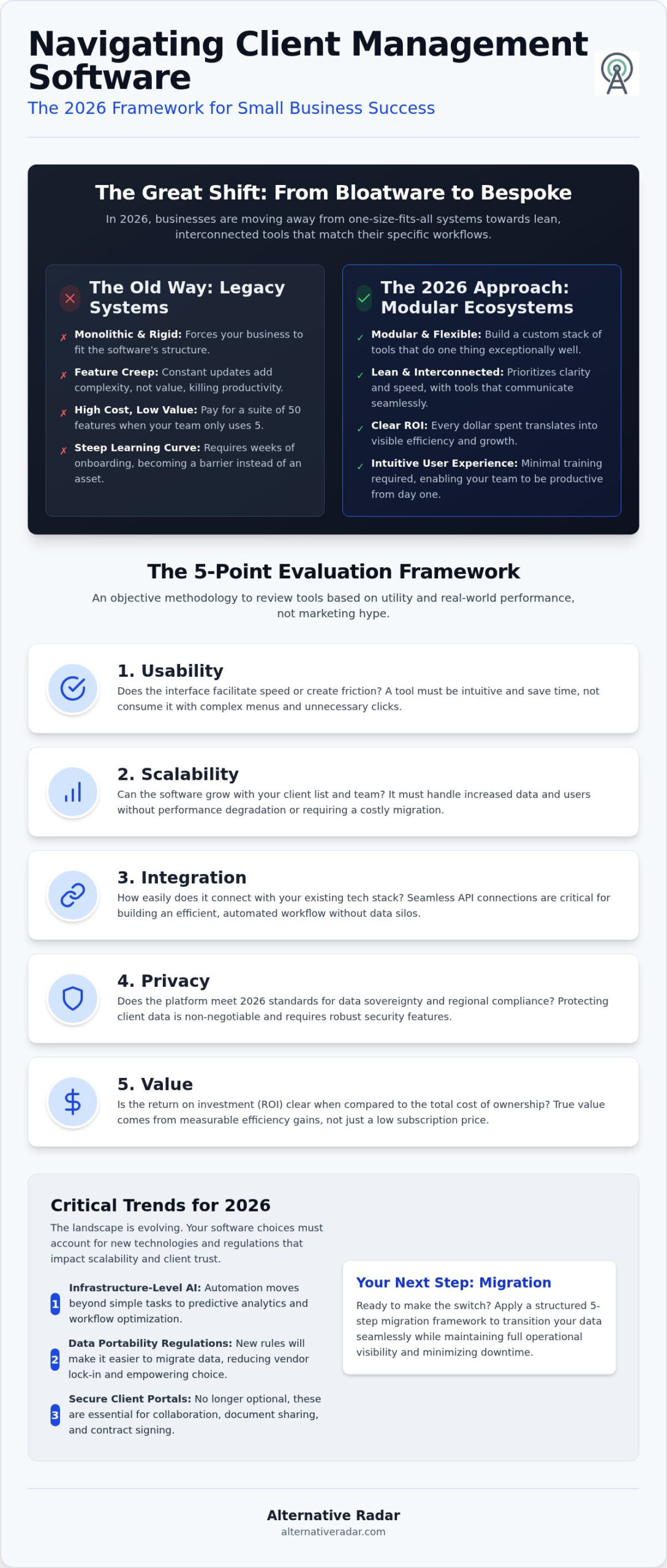
Client management software has transcended its origins as a simple digital Rolodex. By 2026, the most effective client management software for small business acts as the high-speed intersection of Customer Relationship Management (CRM), project management, and real-time communication. It’s no longer just about storing contact data. It’s about moving that data through an automated workflow that keeps projects on track and clients informed without manual intervention.
We’ve reached a tipping point where monolithic systems are being replaced by modular SaaS. Instead of a single, heavy application that tries to do everything poorly, businesses are choosing lean, interconnected tools that do one or two things exceptionally well. This shift empowers users to build a custom stack that fits their specific operations. You shouldn’t have to force your business to fit a rigid software structure. 2026 is the year of the modular ecosystem, where flexibility and speed are the primary metrics for success.
Many business owners now experience “bloatware fatigue.” There’s a genuine frustration in paying for a suite of fifty features when your team only uses five. This emotional pivot is driving a mass migration toward platforms that prioritize clarity over exhaustive feature lists. Efficiency-driven teams want to spend their time billable, not debugging their own internal tools.
Why Legacy CRMs are Losing Ground
Legacy systems often suffer from feature creep, a phenomenon where constant updates add complexity without adding value. This kills team productivity. When a staff member has to click through four menus just to log a call, the software becomes a barrier rather than an asset. Small businesses are scrutinizing the cost-to-value ratio more than ever. They want tools with a superior user experience (UX) that requires minimal training. If a tool isn’t intuitive, it’s a liability. Modern teams don’t have time for a three-week onboarding process for a tool that’s supposed to save them time.
The Rise of Niche and Industry-Specific Solutions
Boutique agencies and freelancers are no longer satisfied with general-purpose databases. They need actionable client portals where customers can upload documents, sign contracts, and view project progress in one secure space. This demand for specialization has led to a surge in industry-specific solutions. For technical teams who require transparency and customization, an open source crm software comparison can be a vital resource for finding a platform that allows for deep integration. The goal is to find a tool that aligns perfectly with your specific workflow, rather than settling for a market leader that feels like a mismatched suit.
Evaluation Framework: How We Review Client Management Tools
Our Digital Scout methodology operates on a simple premise: we do the testing so you don’t have to. We evaluate client management software for small business through a lens of objective utility rather than marketing budgets. We prioritize finding a viable alternative to dominant market leaders that often force users into expensive, rigid ecosystems. Our reviews are data-driven and user-centric, focusing on how a tool performs in a real-world workflow.
To maintain consistency, we apply a strict 5-point evaluation framework to every platform:
- Usability: Does the interface facilitate speed or create friction?
- Scalability: Can the software grow with your client list without requiring a complete migration?
- Integration: How easily does it connect with your existing tech stack?
- Privacy: Does it meet the 2026 standards for data sovereignty and regional compliance?
- Value: Is the return on investment clear when compared to the total cost of ownership?
Transparency is core to our Dutch-operated platform. While we may earn affiliate commissions through some recommendations, these partnerships never influence our rankings. Our goal is to empower you to explore software options based on logic and specific business needs rather than following the loudest marketing campaigns.
The 2026 Feature Checklist
In 2026, real-time collaboration and secure client-facing portals are no longer optional. Your clients expect a professional, centralized space to view project milestones and share documents. We also look for an API-first architecture, which ensures you can build custom integrations as your needs evolve. The 2026 Modular Minimum is defined as a platform that provides core communication and task management while allowing third-party data to flow freely through open APIs.
Calculating Total Cost of Ownership (TCO)
A low monthly subscription price is often deceptive. You must account for implementation time and staff training costs, which can quickly exceed the annual software fee. Free tiers also carry hidden costs, such as restrictive data limits or lack of priority support when things go wrong. For firms with technical resources, self-hosting can be a strategic financial move to eliminate recurring per-user fees and maintain total control over sensitive client data.
Top Client Management Software Reviews by Category
Selecting the right client management software for small business requires looking past the brand names with the largest advertising budgets. We’ve categorized the top performers of 2026 based on their specific utility for different operational models. Our scout-led evaluation focuses on tools that deliver high ROI through specialized features rather than generic bloatware.
Best for Small Teams and High-Growth Startups
The battle for the all-in-one crown has shifted toward platforms that offer granular custom fields without sacrificing speed. ClickUp remains a primary choice for teams that need high levels of customization within a single interface. However, Pipedrive continues to be our top recommendation for sales-heavy teams. With pricing starting at $14 per user, per month, its visual pipeline management is still the gold standard for clarity. It avoids the complexity of larger systems while providing the precise automation needed to move leads through the funnel.
Our Digital Scout pick for lean operations is Flowlu. It offers a free plan for two users and provides a remarkably clean interface that bridges the gap between simple task lists and full-scale project management. It’s built for teams that need to move fast without a dedicated IT department to manage their software. It provides a functional middle ground for those who find the market leaders too restrictive or overly complex.
Best for Service-Based Agencies and Freelancers
For agencies managing the full client lifecycle, Bonsai and HoneyBook are the primary contenders. HoneyBook is particularly aggressive in 2026 with a Starter package at just $8 per month, making it an accessible entry point for new freelancers. These platforms excel because they treat the client portal as a non-negotiable core feature. In the current market, clients expect a secure, branded space to sign contracts and view project milestones. Bonsai’s Basic plan starts at $9 per month, offering a professional suite that handles everything from lead capture to automated invoicing.
Best Open-Source and Privacy-First Alternatives
Privacy is a top-tier operational concern in 2026. With Delaware’s Data Privacy and Protection Act (DPDPA) now in effect and setting a low compliance threshold of 35,000 consumers, many firms are moving away from centralized cloud giants to maintain total data sovereignty. Odoo and SuiteCRM provide the power of full data ownership. For technical teams, our guide on popular open source business software 2026 details how these platforms allow for deep customization that proprietary software can’t match.
Self-hosting is worth the effort when your business model demands strict data isolation or when you want to eliminate recurring per-user licensing fees. Bitrix24 offers a middle ground here, providing a free plan with unlimited users and 5GB of storage, which serves as an excellent gateway for firms testing the waters of more complex, integrated environments.
Critical 2026 Tech Trends in Client Management
AI has transitioned from a marketing gimmick to a core infrastructure component. In 2026, the best client management software for small business uses artificial intelligence not just to generate text, but to manage the logic of your entire workflow. This shift has leveled the playing field, allowing smaller, agile vendors to offer the same predictive power once reserved for enterprise-level giants. AI Agents in 2026 act as autonomous intake specialists that qualify leads, schedule discovery calls, and update your pipeline without any manual data entry from your team.
Regulatory shifts are also dictating software architecture. As of January 1, 2026, new consumer data privacy laws in Indiana, Kentucky, and Rhode Island have made data portability a legal requirement. Your software must now allow clients to move their data between platforms with zero friction. Additionally, Delaware’s Data Privacy and Protection Act (DPDPA) has set a low threshold for compliance at 35,000 consumers, forcing even boutique firms to prioritize tools with built-in compliance modules. If your current tool doesn’t offer a clear path for data export, it’s already obsolete.
Security has moved toward a Zero-Trust model within client portals. In this environment, the software assumes no user is safe by default, requiring continuous verification for every document access or communication thread. This protects sensitive client information from the increasing sophistication of social engineering attacks. You can find the most secure tools by browsing our verified lists on Alternative Radar.
AI Agents and Autonomous Workflow Automation
Modern tools now go beyond simple “if-this-then-that” automation. Autonomous agents can categorize leads based on intent and suggest specific follow-up strategies derived from previous successful conversions. Predictive analytics have reached accuracy rates exceeding 85%, allowing you to identify which clients are likely to churn before they even send a cancellation email. Voice-activated CRM features are also standard, reducing manual data entry time by 60% and letting your team focus on strategy rather than spreadsheets.
The Integration Ecosystem: APIs and Webhooks
A closed ecosystem is now a major red flag for any professional buyer. Modern software must operate as a modular component within a larger stack, connected by robust APIs and webhooks. High-performance teams use middleware like Zapier or Make to ensure data flows seamlessly between every tool they use. For example, a creative agency might use webhooks to trigger a client approval notification in their CRM the moment a designer exports a final file from one of the best free alternatives to photoshop. This connectivity ensures that your sales, creative, and project management teams are always looking at the same real-time data.
Making the Switch: Your Migration Strategy
Transitioning to a new client management software for small business often fails not because of the tool itself, but because of a flawed migration process. Moving your data requires more than just a simple export and import. To avoid operational downtime and data corruption, you must follow a structured 5-step framework. This ensures that your new modular ecosystem remains clean, organized, and immediately productive.
The first rule of migration is “garbage in, garbage out.” If your current database is cluttered with duplicate leads and outdated contact information, migrating it will only transfer those inefficiencies to your new platform. Start by auditing your current data to identify what actually needs to move. Once the data is clean, you can proceed with the technical mapping. The five steps for a successful transition include:
- Inventory: Identify all data sources, including spreadsheets, legacy CRMs, and email contacts.
- Cleansing: Remove duplicates and standardize formatting for phone numbers and addresses.
- Mapping: Align your existing data fields with the requirements of the new software.
- Pilot Testing: Import a small subset of data to verify that all fields populate correctly.
- Final Sync and Training: Execute the full migration and immediately begin staff onboarding to ensure high adoption rates.
Don’t overlook the people side of this transition. Even the most efficient tool will fail if your team doesn’t understand how to use it. Provide clear documentation and focus on the immediate benefits, such as automated follow-ups or centralized communication, to encourage staff buy-in.
Data Mapping and Cleanup Best Practices
When preparing your data, structure your CSV or JSON exports to match the destination’s schema. JSON is often preferred for 2026 migrations because it handles complex legacy notes and nested custom fields more reliably than flat spreadsheets. Always test your migration with a small data subset, such as 5% of your active clients, before committing to a full import. This allows you to catch mapping errors before they affect your entire database. If you have extensive custom fields, ensure the new tool supports them or use a middleware tool to transform the data during the transfer.
Finding Your Perfect Software Match on Alternative Radar
Before you begin the migration, you must be certain you’ve chosen the right platform. Alternative Radar serves as your neutral advisor, helping you cut through marketing hype to find tools that offer genuine utility. Use our comparison engine to filter options by licensing type, price, and specific 2026 feature sets. We prioritize scout-led evaluations that highlight how these tools perform in real-world scenarios rather than just repeating manufacturer claims. Explore our latest categories on Alternative Radar to find the hidden gems that provide the best ROI for your specific business model.
Streamlining Your Client Operations for 2026
The shift from monolithic CRMs to modular ecosystems is no longer a trend; it’s a necessity for teams seeking a high return on investment. By prioritizing usability and data sovereignty over market-leader hype, you reclaim control of your team’s time and your company’s data. Success in 2026 depends on selecting a client management software for small business that integrates seamlessly with your existing stack and leverages autonomous agents to handle repetitive tasks.
Don’t settle for the loudest brand on the market. Our digital scouts have already done the hard work of testing and filtering the noise so you don’t have to. You can find your perfect client management alternative on Alternative Radar, where we provide objective scout-led reviews across more than 500 software categories. We deliver no-nonsense data on pros and cons to help you make a logic-based decision for your specific workflow.
Empowering your business with the right tools is the first step toward a more efficient and profitable year. It’s time to build a software stack that works as hard as you do.
Frequently Asked Questions
What is the best free client management software for 2026?
Bitrix24 and Flowlu are the top contenders for free client management software for small business in 2026. Bitrix24 provides a robust free tier with unlimited users and a 5GB storage cap, which is rare for the industry. Flowlu offers a free plan for up to two users that includes core project management features. These tools allow teams to test modular workflows without an initial financial commitment or restrictive per-user fees.
How does client management software differ from a traditional CRM?
Traditional CRM focuses primarily on the sales funnel and lead acquisition, while client management software integrates project management and post-sale communication. It bridges the gap between closing a deal and delivering the service. While a CRM might track a lead’s email history, client management tools provide a centralized space for document sharing, milestone tracking, and collaborative task management. This intersection ensures that the client experience remains consistent throughout the entire lifecycle.
Is open-source client management software secure enough for law firms?
Open-source software like SuiteCRM can be highly secure for law firms because it allows for total data sovereignty through self-hosting. By keeping data on private servers, firms avoid the risks associated with centralized cloud breaches and third-party data access. However, security depends on the firm’s ability to manage regular updates and server maintenance. For legal professionals, the ability to control encryption and access logs makes open-source a viable, privacy-first alternative to public cloud providers.
Can I migrate my data from Salesforce to a smaller alternative easily?
Migrating from Salesforce to a smaller alternative is manageable if you prioritize data mapping and cleanup before the transfer. Most modern platforms support CSV or JSON imports, which are the standard for 2026 data portability. You should always run a pilot test with a small subset of records to verify that custom fields and activity logs map correctly. Starting with a clean database prevents legacy inefficiencies from cluttering your new, leaner ecosystem during the transition.
What are the must-have AI features for client management in 2026?
In 2026, must-have AI features include autonomous intake agents and predictive churn analytics. These tools go beyond simple automation by qualifying leads and identifying clients who are likely to cancel before they even voice a concern. Voice-activated CRM entry is another essential feature, which has been shown to reduce manual data entry time by 60%. These capabilities allow small teams to operate with the efficiency and predictive power of a much larger organization.
How much should a small business spend on client management software?
Most small businesses should budget between $10 and $45 per user, per month, depending on the required feature depth. However, flat-rate models are becoming more popular in 2026 to avoid the success tax of adding new staff. For example, SuiteDash offers plans starting at a flat rate of $19 per month with unlimited staff. It’s vital to calculate the total cost of ownership for client management software for small business, including implementation and training costs.
Do I need a client portal for my service-based business?
A client portal is a non-negotiable requirement for service-based businesses in 2026. Clients expect a secure, branded environment where they can access contracts, upload files, and view project progress in real-time. This transparency reduces the volume of status-update emails and builds trust through professional presentation. Without a centralized portal, your communication becomes fragmented across email threads and chat apps, which often leads to missed deadlines and frustrated stakeholders during the project lifecycle.
What is the best alternative to HubSpot for a growing agency?
Pipedrive and HoneyBook are excellent alternatives to HubSpot for growing agencies that want to avoid high subscription costs and unused features. Pipedrive remains the leader for visual pipeline management with plans starting at $14 per user, per month. HoneyBook is better for agencies that need to manage the full lifecycle, including contracts and payments. These tools offer a leaner, more focused user experience that prioritizes team productivity over complex enterprise modules you may never use.