
Paying a monthly subscription tax just to monitor your own revenue is no longer a requirement for growth. Many small business owners feel trapped by rising software costs and interfaces that seem designed for professional accountants rather than busy entrepreneurs. If you’re tired of navigating through feature bloat just to send a simple invoice, you aren’t alone. The search for free quickbooks alternatives for small business isn’t just about saving money. It’s about reclaiming your time and focus from tools that have become too complex for their own good.
We’ve done the heavy lifting by vetting the top zero-dollar accounting platforms available in 2026. You’ll discover how to achieve automated expense tracking and generate tax-ready financial reports without spending a cent on monthly fees. This comparison cuts through the marketing hype to show you exactly which tools offer the best utility for your specific needs. From cloud-based leaders like Wave to robust open-source options like Akaunting, we’re previewing the seven best ways to streamline your books and protect your bottom line.
Key Takeaways
- Identify why modern small businesses are moving toward modular, specialized accounting tools to escape subscription fatigue and interface clutter.
- Understand the critical differences between cloud-based freemium platforms and open-source desktop software to choose the right balance of accessibility and data privacy.
- Compare the top seven free quickbooks alternatives for small business available in 2026, focusing on tools that offer automated invoicing and tax-ready reporting.
- Master the data migration process by following a clear framework for exporting and cleaning your financial records before switching to a zero-cost platform.
- Utilize Alternative Radar’s vetted research to bypass marketing hype and select a high-utility accounting remedy that eliminates monthly software spend.
Why Small Businesses are Leaving QuickBooks in 2026
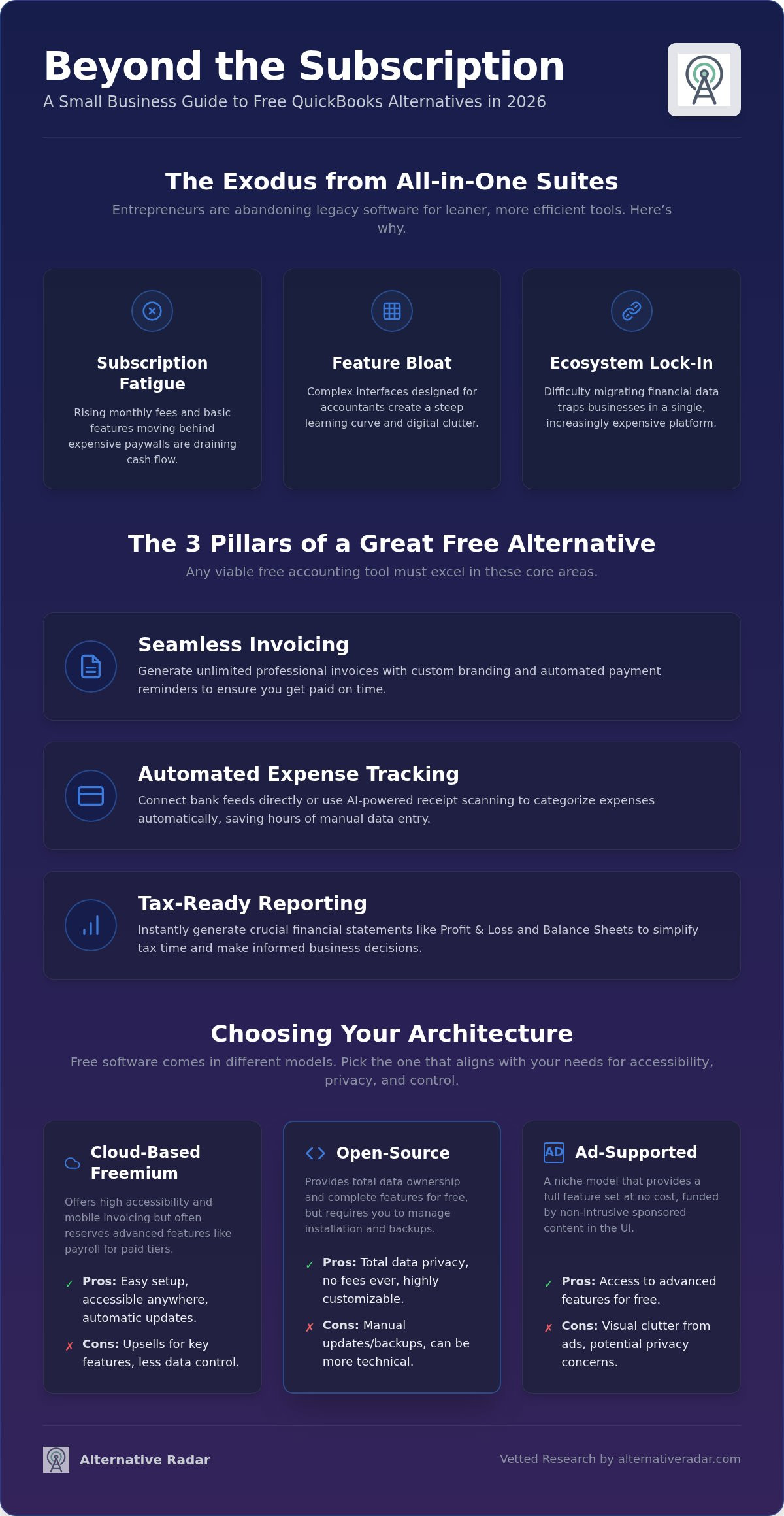
The accounting landscape in 2026 is defined by a move toward agility. Legacy suites that once dominated the market are facing a mass exodus as entrepreneurs prioritize lean operations over bloated feature sets. This shift isn’t just about price; it’s about efficiency. Modern small business owners are abandoning all-in-one suites in favor of specialized, modular tools that integrate seamlessly. For many, the search for free quickbooks alternatives for small business is driven by a desire for tools that do exactly what’s needed without the extra digital noise.
QuickBooks’ evolution into a complex ecosystem has created a significant barrier for non-accountants. The interface often feels cluttered with internal cross-sells and advanced settings that the average freelancer or startup founder never touches. Meanwhile, the rise of AI-powered automation has leveled the playing field. High-end features like automated receipt categorization and smart bank reconciliation, once reserved for enterprise budgets, have trickled down into the free market. These AI capabilities now come standard in entry-level software, making the steep costs of market leaders harder to justify for a growing company.
The Hidden Costs of ‘Industry Standard’ Software
Relying on “industry standard” labels often leads to subscription creep. Over the last few years, basic features like multi-currency support or advanced reporting have frequently migrated from entry-level plans to premium tiers. This creates a dangerous ecosystem lock-in where it’s difficult to move your data once you’ve started. Startups find themselves paying for a massive suite of tools when they only utilize a fraction of the functionality. In a lean business model, paying for unused features is a direct liability to your cash flow. It’s more productive to find a tool that fits your current scale rather than overpaying for “room to grow” that you might never need.
What to Expect from a Free Alternative
Transitioning to a free model requires a clear understanding of software licensing. Consulting a comprehensive comparison of accounting software helps clarify which technical labels, like double-entry or cash-basis, actually matter for your workflow. Truly free software, often open-source, provides the full feature set without a price tag. In contrast, freemium models offer a robust core but charge for add-ons like payroll or payment processing. Selecting a reliable alternative to the market leader requires looking past the brand name to ensure essential features like professional invoicing and tax-ready reporting are included.
The zero-dollar tech stack for 2026 combines open-source accounting cores with integrated AI automation to provide a professional financial foundation at no monthly cost.
When evaluating free quickbooks alternatives for small business, prioritize these three pillars:
- Invoicing: Unlimited professional templates with automated reminders.
- Expense Tracking: Direct bank feeds or AI-driven receipt scanning.
- Reporting: One-click generation of Profit & Loss statements and Balance Sheets.
Evaluating the Three Pillars of Free Accounting Software
Selecting free quickbooks alternatives for small business involves more than just looking at the price tag. In 2026, the market has matured into three distinct architectural pillars, each offering a different balance of accessibility and feature depth. Security is also a baseline expectation now. Even zero-cost tools must provide multi-factor authentication and encrypted data transit to be considered viable for professional use. You need a platform that protects your data while providing the utility required for tax compliance.
The market is generally divided into three categories:
- Cloud-Based Freemium: Offers high accessibility and mobile invoicing but often acts as a gateway to paid add-ons like integrated payroll.
- Open-Source Desktop: Provides total data ownership and privacy without monthly fees, though it requires manual backup management.
- Ad-Supported: A niche option that provides advanced features in exchange for non-intrusive, sponsored content within the interface.
Cloud vs. Desktop: Which is Right for Your Business?
Cloud tools like Wave and ZipBooks prioritize a fast, navigational experience. They’re ideal for service-based businesses that need to send invoices on the go. Conversely, GnuCash and Manager.io cater to those who value data ownership and offline access. This decision-making framework is similar to the logic used in an open source crm software comparison, where the primary goal is avoiding vendor lock-in. According to guidance from the Small Business Administration, maintaining accurate records is vital, so pick the platform you’ll actually use daily. A neutral search tool can help you filter these platforms by specific technical labels.
The Role of AI in Free Bookkeeping
Artificial intelligence has fundamentally changed what users expect from free software. Automated bank reconciliation is now a standard feature that uses machine learning to match transactions with high accuracy. AI-driven tax categorization helps non-accountants by automatically suggesting the correct expense accounts for common purchases based on historical data. Smart receipt scanning has also moved into the free domain. Modern OCR technology allows you to snap a photo of a bill and have the data automatically populated into your ledger, eliminating manual entry and reducing human error.
Top 7 Free QuickBooks Alternatives Analyzed
Selecting free quickbooks alternatives for small business requires a high-quality filter to identify which “free” tiers are actually sustainable for professional use. We’ve vetted seven platforms that offer zero-dollar entry points while maintaining robust security. Forbes’ analysis of free accounting software confirms that the best options today rely on payment processing fees or modular “one-app” models rather than monthly subscriptions. This shift allows you to access professional-grade tools without the financial burden of a recurring license.
Best for Freelancers: Wave and ZipBooks
Wave remains a market leader by offering unlimited invoicing and expense tracking without a monthly fee. It generates revenue through payment processing fees, which are 2.9% plus $0.60 per credit card transaction. ZipBooks provides a similarly intuitive interface and unlimited invoicing, though its free Starter plan restricts users to managing five customers. Both platforms integrate with Stripe and PayPal, making them ideal for service providers who need to automate their billing cycle immediately. These cloud-based tools prioritize ease of use, allowing non-financial professionals to generate profit and loss statements in seconds.
Best for Privacy-Conscious Users: GnuCash and Manager.io
Local data storage is making a comeback in 2026 as businesses seek to avoid cloud-based data harvesting. Manager.io offers a comprehensive desktop edition that is free forever and carries no limits on transactions or ledger entries. GnuCash remains the standard for double-entry purists, providing advanced reporting that matches QuickBooks Pro. While these tools have a steeper learning curve than cloud apps, they offer total control over your financial records without requiring an internet connection. This privacy-first approach ensures your sensitive business data stays on your hardware, not a third-party server.
Best for Scaling Businesses: Odoo and Akaunting
Odoo utilizes a “One App Free” model, allowing startups to use their robust accounting module at no cost until they need to integrate other ERP functions like CRM or Inventory. This is a strategic move for companies planning for long-term growth. Similarly, Akaunting provides an open-source, self-hosted platform that gives you the freedom to customize your environment. Leveraging popular open source business software 2026 provides a scalable foundation that prevents the need for disruptive migrations as your revenue increases. Rounding out the top seven, Zoho Books remains a powerful contender for businesses with annual revenue under $50,000, offering a free tier that includes bank reconciliation and a client portal.
How to Migrate from QuickBooks Without Losing Data
Transitioning your financial records to free quickbooks alternatives for small business requires more than a simple file upload. A successful migration preserves your audit trail while filtering out years of digital clutter. By following a structured four-step process, you can ensure your new ledger matches your old records to the cent. Start by exporting your Chart of Accounts, Customer lists, and Vendor lists into CSV formats. These files act as the universal language between different accounting platforms and are essential for a smooth handover.
Data hygiene is the most critical phase of this move. Before you import anything, open your CSV files and delete inactive accounts or duplicate entries. If you don’t clean your data now, you’ll simply migrate old errors into your new system. Once cleaned, you must map the fields. Every software uses slightly different terminology; what QuickBooks calls “Account Name,” your new tool might label as “Ledger Title.” Align these headers manually to prevent import errors. Finally, run a trial balance. Compare your current Profit & Loss statement and Balance Sheet in both systems to verify that every opening balance was transferred accurately.
The Technical Checklist for a Clean Break
Managing historical data is a common pain point. It’s often better to archive older records as PDF or Excel files for tax compliance and only import the current fiscal year’s data to your new platform. Active invoices require special attention. Ensure all outstanding bills are recorded in the new system before you disconnect your old subscription to avoid missed payments. The “Clean Cut” migration method involves finalizing all previous entries in QuickBooks and starting fresh with verified opening balances in your new software on the first day of a new fiscal period.
Connecting Bank Feeds and Third-Party Apps
Once your core data is settled, focus on your integrations. Most free platforms use third-party aggregators to connect with financial institutions. Verify that your specific bank is compatible with the new software’s feed before committing. If you run an e-commerce store, set up API connections for tools like Stripe or Shopify immediately to keep your sales data flowing. You can also automate your workflow by linking your accounting alerts to slack alternatives for real-time payment notifications. For help finding the right technical fit for your stack, explore our curated software comparisons to make an informed decision.
Finding Your Perfect Fit with Alternative Radar
The software market in 2026 is saturated with biased reviews and hidden costs. Alternative Radar acts as your digital scout, filtering through the noise to find high-utility tools that prioritize your needs over vendor partnerships. We understand that choosing free quickbooks alternatives for small business isn’t just about the price tag; it’s about finding a platform that integrates with your specific workflow. Our methodology focuses on providing an objective alternative to standard marketing guides by emphasizing technical precision and real-world performance.
We’ve done the heavy lifting of searching and testing so you don’t have to. By using a problem-solution framework, we identify the specific pain points—like subscription creep and interface clutter—and offer verified remedies. This curated approach saves you hours of trial-and-error testing. Whether you need a cloud-based invoicing tool or a privacy-first desktop ledger, our comparisons provide the clarity required to make a confident decision. Your next step is to select the platform from our vetted list that aligns with your transaction volume and start your migration today.
Our Methodology for Ranking Software
Our ranking system relies on transparency and logic. To earn a “Truly Free” label in our curated lists, a platform must offer a functional core—such as unlimited invoicing or bank reconciliation—without requiring a monthly subscription. We maintain an emotional distance from the software we review, acting as a neutral advisor. While we utilize affiliate-linked software recommendations and sponsored placements to keep our resources free for users, these partnerships never dictate our performance evaluations. We rely on constant feedback loops and technical audits to ensure our data remains accurate and helpful for lean startups.
Beyond Accounting: Building Your Free Software Ecosystem
Accounting is only one pillar of a modern business. You can use Alternative Radar to audit your entire monthly tech spend and replace expensive subscriptions with high-quality, zero-cost alternatives. Our platform helps you discover professional tools for graphic design, team communication, and CRM management. By building a modular software ecosystem, you protect your cash flow and maintain the agility needed to scale. Join our community of smart software switchers and start optimizing your digital stack for maximum efficiency. Every dollar you save on software is a dollar you can reinvest back into your core business operations.
Optimize Your Financial Stack for 2026
Transitioning to a zero-dollar accounting system is a strategic move for any lean operation. You’ve seen that modern free quickbooks alternatives for small business now offer the same automated invoicing, AI-driven categorization, and tax-ready reporting as expensive legacy suites. By choosing a tool that aligns with your specific volume and privacy needs, you eliminate recurring liabilities and reclaim control over your business data.
Whether you prefer the cloud-based agility of Wave or the total ownership of a desktop platform like Manager.io, the technology exists to support your growth without a subscription tax. Don’t let software bloat dictate your overhead. Use our objective comparison frameworks to filter through the noise and build a modular ecosystem that serves your bottom line. Our digital scouts have already indexed over 1,000 alternatives and provided independent software reviews to simplify your search.
Explore the Full Directory of QuickBooks Alternatives on Alternative Radar
Frequently Asked Questions
Is Wave accounting really free for small businesses?
Yes, Wave’s core accounting and invoicing features are free indefinitely with no limits on the number of customers or transactions. The platform generates revenue through payment processing fees and optional payroll services rather than monthly subscriptions. It is a reliable choice for those seeking free quickbooks alternatives for small business without hidden software costs. You only pay when you process a credit card payment or add a paid service like payroll.
Can I import my QuickBooks data into free software?
Most professional-grade free tools allow you to import financial data using CSV or Excel files. You can export your Chart of Accounts, customer lists, and vendor details from QuickBooks and map them to the fields in your new software. While direct API migrations are rare in free tiers, a manual import ensures you maintain your historical records. Always verify your opening balances after the import to ensure data integrity during the transition.
Are free QuickBooks alternatives safe for my financial data?
Security standards for free software in 2026 are robust. Cloud-based platforms utilize 256-bit SSL encryption and multi-factor authentication to protect data in transit. If you prefer total control, desktop-first options like Manager.io store your financial records locally on your own hardware. This eliminates the risks associated with third-party cloud storage. Regardless of the platform, maintaining regular backups is a necessary step to prevent data loss from accidental hardware failure.
What is the best open-source alternative to QuickBooks?
GnuCash is widely considered the best open-source alternative for users who require strict double-entry accounting principles. It is a desktop-based tool that handles complex reporting and multi-currency transactions without licensing fees. For businesses that prefer a web-based interface, Akaunting offers an open-source, self-hosted platform. These tools provide maximum transparency and customization, though they often require a steeper learning curve than cloud-based freemium options like Wave or ZipBooks.
Do free accounting tools support bank feeds in 2026?
Many free quickbooks alternatives for small business support automated bank feeds using secure aggregators. Platforms like Wave and ZipBooks allow you to connect your accounts to sync transactions automatically. However, some privacy-focused desktop tools like Manager.io require you to download and import bank statements manually to maintain offline security. Always check if your specific financial institution is supported by the software’s integration partner before committing to a new platform for your daily bookkeeping.
Will I outgrow free accounting software as my business expands?
Growth doesn’t necessarily mean you must switch to a paid subscription. Many free tools are designed to scale alongside your revenue. Platforms like Odoo allow you to start with a free accounting module and add integrated ERP features as your operations become more complex. Other tools like Manager.io have no transaction limits, making them suitable for high-volume businesses. You only outgrow free software when you require advanced features like complex inventory management or multi-user permissions.
Can I use Excel as a free QuickBooks alternative?
Excel can function as a basic ledger, but it lacks the automation and double-entry safeguards of dedicated accounting software. Manual data entry in spreadsheets increases the risk of calculation errors and makes tax preparation more difficult. Professional free tools automate invoicing and bank reconciliation, which saves hours of administrative work. While a spreadsheet is better than no record-keeping, a specialized accounting platform provides the reporting and audit trails necessary for a growing small business.
Does free software offer tax preparation features?
Most free software focuses on generating tax-ready reports rather than filing returns directly. You can produce Profit and Loss statements, Balance Sheets, and Sales Tax reports that your accountant can use for filing. Some platforms, such as Zoho Books, include built-in tax management features to help you track VAT or GST obligations. These tools ensure your financial data is organized and categorized correctly, which simplifies the year-end process and reduces your professional accounting fees.