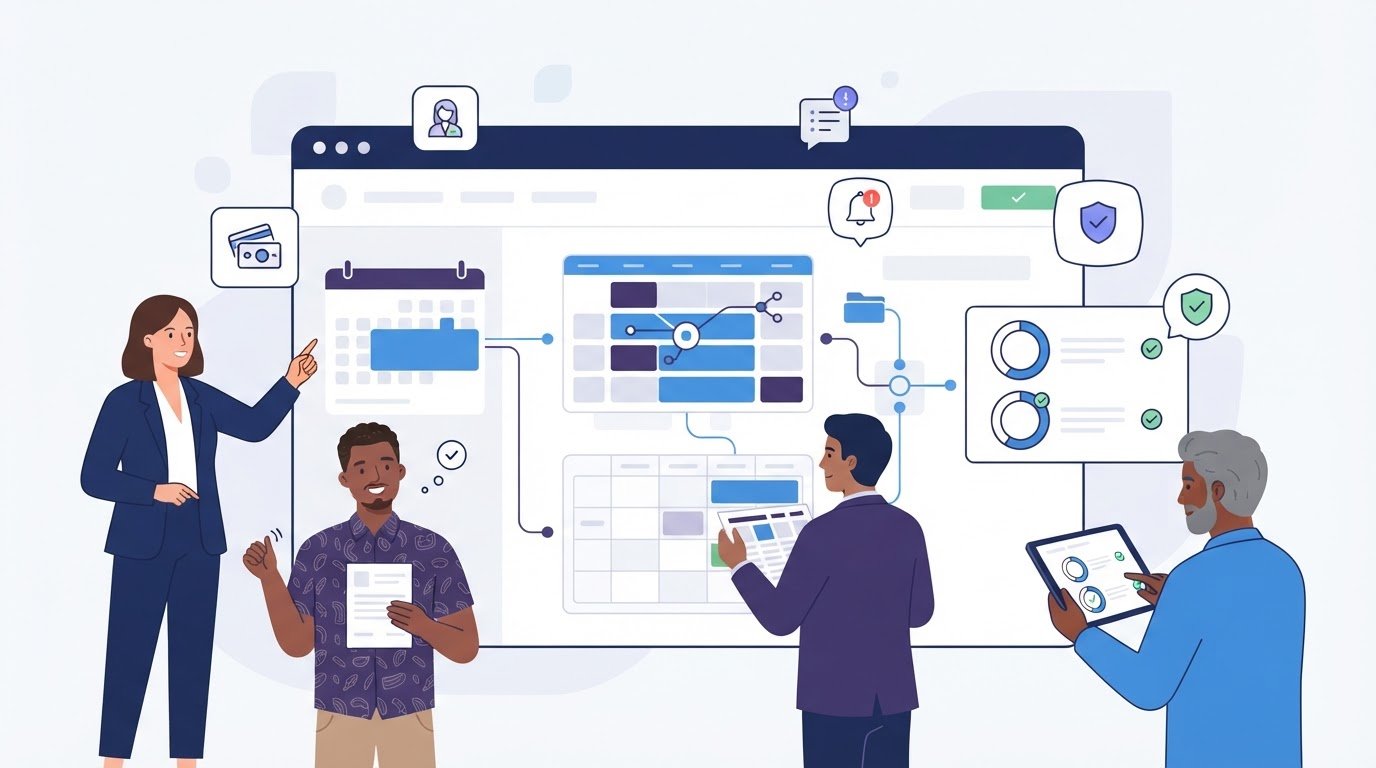
A basic calendar coordination link won’t cut it when your revenue depends on billable hours. Generic meeting schedulers fail to handle the operational friction service providers face every day, from uncollected deposits and last-minute no-shows to calendar sync glitches that cause embarrassing double-bookings. Finding the right appointment scheduling software for service businesses isn’t just about sharing availability; it’s about deploying a reliable booking engine that automates client intake, collects upfront payments, and protects your time.
You shouldn’t have to overpay for bloated enterprise systems with steep learning curves just to organize your day. In this guide, you’ll discover and compare the top appointment scheduling platforms built specifically for service operations in 2026. We evaluate each solution on core workflow functionality, including two-way calendar syncing, automated SMS reminders, and seamless payment processing, so you can select the perfect match for your business model.
Key Takeaways
- Distinguish basic meeting schedulers from true service booking engines equipped to process payments, intake forms, and complex staff rosters.
- Compare the leading appointment scheduling software for service businesses based on operational workflows and feature trade-offs rather than brand recognition alone.
- Audit two-way calendar synchronization across Google, Apple, and Microsoft ecosystems to permanently eliminate costly double-bookings.
- Follow a structured implementation blueprint to configure staff availability, buffer times, and service tiers without disrupting active bookings.
- Deploy automated waitlists and schedule optimization tactics to recapture lost revenue from last-minute client cancellations.
Meeting Schedulers vs Service Booking Engines: Understanding the Core Differences
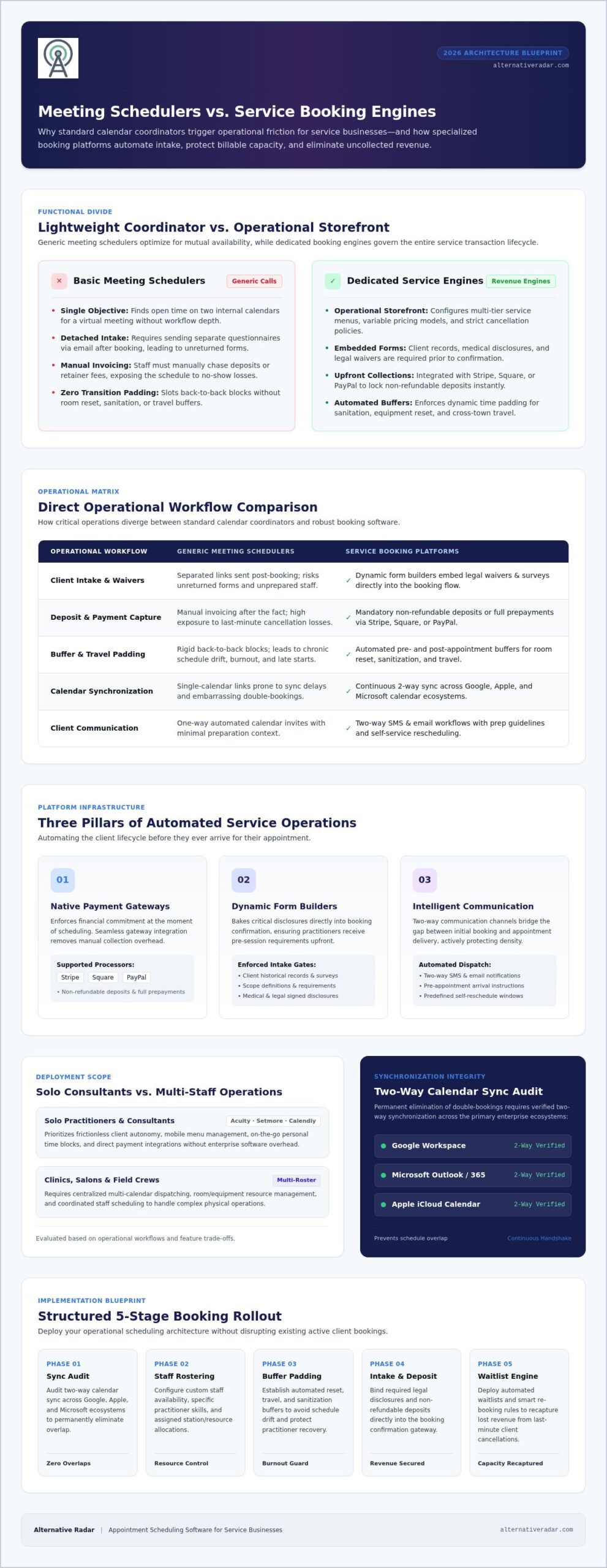
Most calendar tools promise to organize your day, but they often fall short when your livelihood depends on billable client sessions. Broadly speaking, appointment scheduling software tracks availability, coordinates meetings, and automates calendar invites. However, there is a fundamental functional divide between lightweight meeting coordinators and robust service booking platforms.
Meeting tools focus on one objective: finding mutually open time on two internal calendars for a virtual call. They treat every booked block identically. In contrast, purpose-built appointment scheduling software for service businesses acts as an operational storefront. These systems manage complex service menus, assign variable pricing, enforce strict cancellation policies, and handle multi-staff resource allocation. Choosing a tool meant for generic video calls to run an on-site or client-intensive service business creates operational bottlenecks.
The Limitations of Basic Calendar Links for Service Providers
Relying on a standard calendar link forces manual administrative work back onto your team. These lightweight coordinators cannot handle the multi-layered requirements of physical or structured appointments:
- Detached Intake Workflows: Sending separate forms via email after someone books leads to unreturned questionnaires and unprepared staff.
- Manual Deposit Invoicing: Chasing down retainer fees or upfront deposits manually creates friction, delays booking confirmation, and exposes you to revenue loss.
- Missing Travel and Reset Buffers: Standard meeting tools book appointments back-to-back. Service providers need automated padding for room sanitization, travel across town, and equipment setup to prevent chronic schedule drift and burnout.
Essential Capabilities of Dedicated Service Booking Platforms
True service booking platforms automate the entire transaction lifecycle before the client ever arrives. They convert a scheduling page into an automated operations manager.
First, native payment gateway integration allows businesses to require non-refundable deposits or full prepayments directly at the time of booking. By integrating with payment processors like Stripe or Square, these platforms eliminate payment chasing and hold clients financially accountable.
Second, dynamic form builders embed intake surveys and legal waivers directly into the booking flow. Appointments cannot be confirmed until necessary client records, medical disclosures, or scope definitions are completed.
Finally, intelligent communication sequences bridge the gap between booking and service delivery. Dedicated appointment scheduling software for service businesses deploys automated, two-way SMS and email sequences. These messages share prep instructions, confirm arrival times, and allow instant rescheduling within predefined cancellation windows, actively protecting your billable calendar density.
Top Appointment Scheduling Software for Service Businesses: 2026 Comparison
Selecting the right platform requires matching software mechanics to your operational reality. A single-practitioner consulting firm needs a friction-free booking flow, while an aesthetic clinic or field-service team requires multi-calendar dispatching and resource management. Instead of settling for a generic tool, use this breakdown to evaluate leading appointment scheduling software for service businesses based on operational size and workflow requirements.
Best for Solo Practitioners and Independent Consultants
Solo operators must protect their billable time without getting bogged down in complex software setups. For independent professionals, tools like Acuity Scheduling, Setmore, and Calendly excel by combining intuitive interfaces with client self-service features.
- Client Autonomy: Clients can reschedule or cancel appointments within predefined windows, eliminating administrative back-and-forth.
- Payment Integration: Native connections with processors like Stripe, Square, and PayPal let you collect deposits or full session fees before an appointment is locked in.
- Mobile Management: Dedicated mobile apps ensure you can block out personal time, review upcoming appointments, and adjust service menus on the go.
Best for Multi-Staff Clinics, Salons, and Field Crews
Operations managing multiple providers face distinct logistical hurdles. Platforms such as Square Appointments and SimplyBook.me solve these challenges by coordinating staff rosters, service stations, and specific equipment.
Round-robin routing distributes new appointments evenly across available personnel or routes clients based on specialized skill tiers. These systems also offer granular permissions, ensuring staff can manage their own daily schedules while administrators retain full visibility over client records and sales metrics. For multi-location businesses, centralized dashboards let you monitor room occupancy and team capacity across every site in real time.
Best for High-Volume and Enterprise Service Operations
Enterprise and high-volume operations need custom architecture and automated data synchronization. Platforms like WaitWell and custom implementations built on robust scheduling APIs process heavy customer traffic through virtual queues, dynamic intake routing, and automated check-ins.
At this tier, appointment data cannot remain siloed. High-volume teams use webhooks to route customer records directly into their central databases. If your organization manages complex customer lifecycles across sales and service fulfillment, check our open source CRM software comparison to see how dedicated booking engines integrate with self-hosted customer management systems.
Before locking your business into an annual contract, you can explore independent software comparisons on Alternative Radar to evaluate feature limits and find the most cost-effective fit for your team.
Key Evaluation Criteria: How to Select the Right Scheduling Platform
Evaluating software requires looking past sleek marketing pages to examine how a system performs under heavy operational load. An effective vetting framework focuses on five core pillars: calendar synchronization speed, intake compliance, payment rule enforcement, client-side friction, and software interoperability. Choosing the right appointment scheduling software for service businesses means selecting a platform that protects staff capacity, eliminates data entry, and mirrors your actual service delivery workflows.
Calendar Sync Integrity and Conflict Management
A scheduling engine is only as dependable as its calendar sync protocol. High-performing platforms use real-time push webhooks rather than periodic polling cycles across Google Calendar, Apple iCloud, and Microsoft Exchange. Sync lags of even five minutes can trigger disastrous double-bookings during peak inquiry windows.
Your platform must also account for physical constraints. Configurable buffer rules should automatically insert padding before and after sessions. This protects your team from chronic schedule drift, giving specialists necessary time for travel, room reset, and equipment preparation.
Client Onboarding and Intake Customization
Simple contact forms fail service providers who need technical or clinical context before an appointment begins. Look for platforms featuring conditional logic, which reveals tailored form fields based on the specific service or provider selected.
This setup screens out unqualified requests and guarantees accurate client records. The software should also securely handle document uploads for signed liability waivers, project briefs, or intake disclosures. Verifying compliance with regional data privacy standards protects both your business and your clients from security oversights.
Integration with Your Core Business Stack
Your booking interface must integrate cleanly with your back office rather than creating another disconnected data island. Direct connections to accounting platforms like QuickBooks and Xero automatically generate paid receipts, track deposit liabilities, and streamline month-end bookkeeping.
Equally important is CRM interoperability, which instantly logs booking records, cancellation histories, and client notes into a single source of truth. If your existing setup restricts webhook access or locks third-party integrations behind prohibitive paywalls, review our practical guide on finding the best alternative to popular software. Selecting the ideal appointment scheduling software for service businesses ensures data moves automatically across your entire operational stack.
Implementation Blueprint: Rolling Out Your New Booking Workflow
Switching systems can disrupt active operations if handled haphazardly. A successful transition protects existing client reservations while phasing out manual admin habits. Deploying new appointment scheduling software for service businesses requires a deliberate, step-by-step launch plan so your staff and clients experience zero friction from day one.
Configuring Services, Rules, and Policies
Start by auditing your service catalog before entering data into your new platform. Define precise service durations, itemized add-ons, and clear pricing disclosures so clients know exactly what they are purchasing.
- Enforce Cancellation Windows: Lock in automated cancellation thresholds, such as a strict 24-hour or 48-hour cut-off. This automatically forfeits deposits or applies cancellation fees if a client drops out last minute.
- Automate Prep and Recovery Buffers: Build mandatory 10-to-15-minute buffers around each session. This prevents appointment overlap and gives team members breathing room for cleanup, sanitization, or transit.
- Activate Staggered Reminders: Configure multi-channel notification sequences. Send an instant email confirmation upon booking, followed by an SMS reminder 24 hours prior and a final text two hours before the appointment. Automated reminders can reduce client no-shows by up to 67%, protecting your weekly billable hours.
Deploying Booking Touchpoints Across Client Channels
Once your backend rules are configured, map out your client-facing entry points. Make booking effortless by placing direct reservation links wherever your prospects interact with your brand.
Embed responsive booking widgets prominently above the fold on your website and service landing pages. Next, connect your booking URL to your Google Business Profile, Instagram action buttons, and local directory listings. Finally, insert direct scheduling links into your team’s email signatures and billing notices to encourage repeat bookings without back-and-forth communication.
Run end-to-end test bookings across both desktop and mobile devices before announcing the launch. Process a live credit card payment, verify the calendar sync on staff phones, and confirm that automated reminder texts trigger properly. When you are ready to identify platforms that support custom onboarding workflows, compare vetted scheduling platforms on Alternative Radar to evaluate feature limits and adoption requirements.
Optimizing Appointment Operations for Maximum Billable Capacity
A configured calendar is only the baseline. True operational profitability comes from maximizing schedule density and reclaiming billable hours that would otherwise slip away. Advanced appointment scheduling software for service businesses works proactively in the background, transforming passive booking pages into active yield-management engines that eliminate gaps and sustain steady revenue.
Automated Waitlists and Cancellation Backfilling
Cancellations happen, but they don’t have to cost you billable hours. Traditional operations waste precious administrative time calling backlogged clients to fill sudden openings. Modern systems replace that manual outreach with smart waitlist automation.
When a client cancels, the platform immediately broadcasts an automated SMS alert to everyone on that day’s waitlist. By applying first-come, first-served claiming rules, open slots are often reclaimed within minutes. This automated backfilling prevents empty chairs and unbilled crew time, directly protecting your bottom line without burdening your front desk.
Client Retention Through Recurring Scheduling
Acquiring new clients is far more expensive than retaining existing accounts. Maximizing your billable capacity requires locking in predictable repeat appointments before clients leave your office or job site.
- Standing Recurring Bookings: Set up automated weekly, bi-weekly, or monthly intervals for retainer clients. The system reserves recurring calendar blocks and charges saved payment credentials automatically.
- Automated Recall Prompts: Trigger personalized re-engagement notices based on past visit dates. If a client needs service every six months, the system dispatches an automated booking link at month five to schedule their follow-up before they look elsewhere.
- Capacity Analytics: Monitor booking heatmaps to identify underperforming service slots and high-demand windows. You can then adjust staff shifts or run targeted promotions to fill recurring slow periods.
Operational needs change as service companies grow. Platforms that serve a five-person team often become restrictive bottlenecks at twenty staff members. To keep your tech stack aligned with your operational goals, continually evaluate your workflow against top software alternatives on Alternative Radar to ensure your appointment scheduling software for service businesses delivers maximum return on investment.
Scale Your Service Capacity with the Right Booking Engine
Running a profitable operation requires infrastructure that actively protects your calendar rather than passively recording dates. The right booking system secures upfront client deposits, synchronizes multi-staff availability across diverse ecosystems, and captures intake details before work begins. Upgrading to dedicated appointment scheduling software for service businesses eliminates daily administrative churn and turns lost hours back into billable capacity.
You don’t have to navigate vendor marketing claims alone or overpay for bloated enterprise platforms. Alternative Radar delivers unbiased comparative breakdowns across leading business software, featuring detailed feature matrices that evaluate integrations, pricing tiers, and client experience without vendor bias. When you’re ready to modernize your booking workflow and empower your team, compare top scheduling software alternatives on Alternative Radar to choose the exact platform built for your operational model.
Frequently Asked Questions
What is the best appointment scheduling software for small service businesses?
The best appointment scheduling software for service businesses depends on team structure and operational workflow. Solo practitioners often thrive with platforms like Acuity Scheduling or Setmore because of their lightweight interfaces and built-in payment processors. Multi-chair salons and clinic practices usually benefit more from Square Appointments or SimplyBook.me, which offer advanced staff permissions and roster tracking. Prioritize tools that handle automated reminders and intake forms out of the box.
Can appointment scheduling software take deposits or upfront payments?
Yes, modern platforms integrate directly with merchant gateways like Stripe, Square, and PayPal to secure upfront revenue. Service providers can require full prepayment, a flat reservation deposit, or a percentage of the total fee before confirming a time slot. Additionally, these systems can securely store credit card details to enforce automated late cancellation or no-show penalty fees, shielding your business from uncompensated calendar gaps.
How does scheduling software prevent double-bookings across multiple staff calendars?
Platforms prevent double-bookings by executing real-time, two-way calendar synchronization with external ecosystems like Google Calendar, Apple iCloud, and Microsoft Outlook. When a client books an appointment, the software blocks that window instantly across connected devices. Simultaneously, any personal event or emergency block added to a staff member’s personal calendar automatically removes that availability from the public booking page, preventing conflicting reservations.
Is a free scheduling tool sufficient for a professional service business?
Free tiers work well for testing basic availability, but they rarely support commercial service operations long term. Most free packages cap monthly appointment volume, restrict custom intake questionnaires, and omit SMS reminders. More importantly, entry-level tiers often prohibit automated payment processing or display third-party vendor branding. Upgrading to a paid tier or evaluating specialized software alternatives ensures your booking flow matches professional client expectations.
What is the difference between Calendly and dedicated service booking software?
Calendly is designed primarily as a meeting coordinator for knowledge workers scheduling virtual calls. Dedicated appointment scheduling software for service businesses functions as an operational checkout engine. Specialized service platforms manage multi-tiered service menus, dynamic pricing, room and equipment allocation, in-flow client intake questionnaires, and mandatory deposit processing. If your business delivers hands-on services rather than video conferences, purpose-built engines provide significantly better operational control.
How do automated appointment reminders reduce client no-shows?
Automated reminders keep upcoming bookings top of mind by sending scheduled SMS and email notifications at strategic intervals. Setting alerts at 24 hours and two hours before an appointment gives clients timely notice to confirm or adjust plans. Crucially, these notifications include self-service reschedule links that allow clients to adjust dates within your cancellation policy, giving your team immediate lead time to fill opened slots.
Can I embed an appointment scheduling widget directly onto my existing website?
Yes, virtually every modern booking platform provides lightweight embed codes compatible with WordPress, Webflow, Squarespace, and custom HTML sites. You can embed an inline calendar directly onto your main service pages or deploy a subtle pop-up modal triggered by a sticky booking button. Keeping users on your domain during booking maintains brand continuity and improves conversion rates compared to routing visitors to third-party domains.