
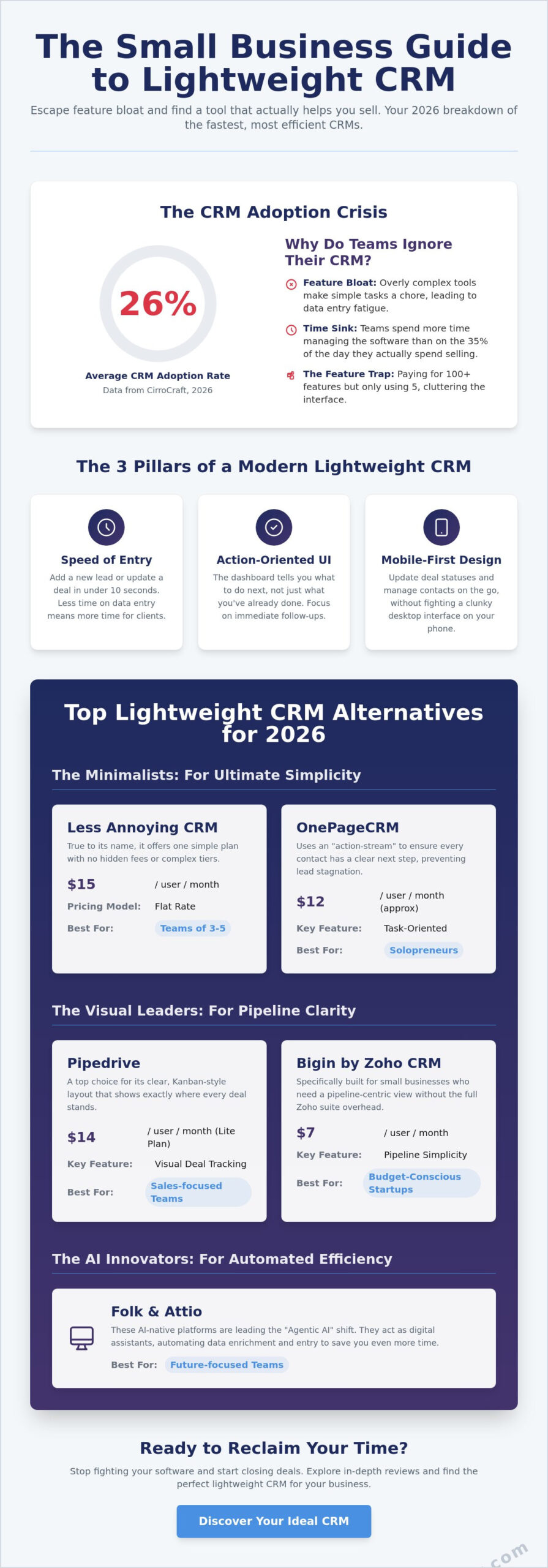
The average CRM adoption rate across businesses is only 26% according to 2026 data from CirroCraft. This low number isn’t a lack of effort. It’s a symptom of feature bloat that makes simple tasks feel like a chore. If you’re struggling with data entry fatigue or paying for tools your team ignores, you’re likely using a platform built for an enterprise; not a growing company. Finding a lightweight CRM for small business is about reclaiming your time and focusing on the 35% of the day you actually spend selling.
You deserve a system that works as hard as you do without the steep learning curve. This guide delivers on the promise of efficiency by highlighting no-fluff tools designed to scale your business without unnecessary complexity. We’ve done the heavy lifting to filter the market, providing a clear comparison of the top alternatives for 2026. From flat-rate essentials to AI-native platforms, you’ll discover exactly which tool fits your workflow and your budget.
Key Takeaways
- Identify the core components of a lightweight CRM for small business to ensure your team focuses on closing deals rather than managing complex software.
- Evaluate the highest-rated 2026 alternatives based on setup time and “anti-bloat” credentials to find your ideal match without searching for hours.
- Utilize our essential feature checklist to verify that your new tool includes seamless email integration and automated task reminders.
- Streamline your transition from spreadsheets with a proven data audit and field-mapping strategy that prevents lead loss during migration.
- Implement an agile scaling plan that prioritizes system simplicity today while maintaining the flexibility to grow your operations tomorrow.
What is a Lightweight CRM and Why Does Your Small Business Need One?
Traditionally, Customer relationship management (CRM) software was designed for managers who wanted deep data, not for salespeople who needed to close deals. A lightweight CRM for small business flips this script. It prioritizes core contact management and immediate sales follow-ups over complex, high-level reporting. It’s the difference between a heavy, multi-tool kit and a dedicated, sharp blade. One is versatile but cumbersome; the other is built for a single, vital purpose.
In 2026, we’re seeing an aggressive “anti-bloat” movement. Small teams are ditching enterprise giants like Salesforce in favor of agile tools. This shift isn’t just about saving money; it’s about speed. When a system requires a full-time administrator just to maintain the database, it’s no longer a tool. It’s a burden. Choosing a lightweight CRM for small business leads to higher adoption rates because the software actually helps the team instead of creating more “admin” work. You get a faster path to ROI because you aren’t spending months on implementation or thousands on mandatory training sessions.
It’s vital to distinguish between “free” and “lightweight.” They aren’t always the same thing. Many free platforms are simply stripped-down versions of massive enterprise systems. They still carry the clunky interface and confusing navigation of the parent software; they just have fewer active buttons. A truly lightweight system is designed for speed from the ground up, ensuring that every click serves a direct purpose in the sales cycle.
The Cost of Complexity: Why Big CRMs Fail Small Teams
Big CRMs often set a “feature trap.” You pay for 100 features but only use five. The other 95 clutter your screen and slow down your workflow. Beyond the subscription, you face hidden costs like implementation fees and the need for specialized consultants. For a small team, this complexity leads to poor data hygiene. If a form has 20 required fields, your reps will likely enter junk data just to bypass the screen. Simple tools encourage better data because they only ask for the information that actually moves a deal forward.
Core Pillars of a Lightweight System in 2026
A modern lightweight system stands on three pillars. First is speed of entry. You should be able to add a new lead in under 10 seconds. Second is an action-oriented UI. The dashboard shouldn’t just show historical logs; it should tell you exactly what’s next on your list. Finally, it must be mobile-first. Entrepreneurs are rarely stationary. They need to update a deal status from a smartphone between meetings without fighting a desktop-scaled interface. These pillars ensure the CRM remains a productivity booster rather than a time-sink.
The 5 Best Lightweight CRM Alternatives for 2026
Selecting a lightweight CRM for small business in 2026 requires a balance between utility and speed. The market has shifted toward “Agentic AI,” where the software acts as a digital assistant that handles data enrichment and entry. We’ve curated these options based on their ability to get you up and running in minutes, not weeks. These tools prioritize the sales pipeline over complex administrative hierarchies, ensuring your team remains focused on revenue-generating activities rather than software maintenance.
The Minimalists: Less Annoying CRM and OnePageCRM
Less Annoying CRM lives up to its name by offering a flat pricing model of $15 per user per month. There are no tiers or hidden fees, making it an ideal choice for teams of 3 to 5 people who want a predictable cost structure. Its interface is intentionally simple, removing the clutter often found in enterprise tools. OnePageCRM uses a unique “action-stream” approach. It treats every contact like a task, forcing founders to decide on a next step immediately. This prevents leads from stagnating in the database. If you’re a solopreneur, these tools offer the quickest path from spreadsheet to software without a steep learning curve.
The Visual Leaders: Pipedrive and Bigin by Zoho CRM
Pipedrive remains a top choice for those who prefer a Kanban-style layout. Its “Lite” plan starts at $14 per user per month when billed annually, providing a high-quality filter for deal tracking. It excels at showing you exactly where every prospect sits in your sales cycle. Bigin by Zoho CRM is another standout for visual simplicity, with paid plans starting at $7 per user per month. It’s built specifically for small businesses that need a pipeline-centric view without the overhead of a full CRM suite. For teams that value aesthetics and clear progress bars, these visual leaders provide a sense of momentum that text-heavy lists lack.
The 2026 AI Innovators: Folk and Attio
Folk and Attio represent the new wave of “Notion-style” CRMs. Folk feels like a modern spreadsheet but functions like a powerful database, making it familiar to anyone moving away from Excel. Attio is particularly innovative, offering a free plan for up to 3 users and a “Plus” plan at $29 per user per month. Attio uses data enrichment to automatically pull in company details, LinkedIn profiles, and recent news. This eliminates the manual entry that currently consumes 65% of a typical rep’s day. These agentic CRMs are the ultimate lightweight choice for 2026 because they do the work for you. To see how these compare against other modern platforms, you can browse our software radar for more tailored recommendations.
Essential Features vs. Unnecessary Bloat: A Buyer’s Checklist
Enterprise vendors often argue that you need an integrated marketing and service ecosystem from day one. This approach usually leads to “feature shock” where the interface becomes so crowded that your team retreats to using spreadsheets. A lightweight CRM for small business should serve as a high-quality filter, displaying only the data required to move a lead to the next stage. In 2026, efficiency is driven by “AI-Light” tools that reduce administrative friction rather than adding new layers of complex lead scoring or multi-currency ERP integrations.
Focus your search on these non-negotiable “Must-Have” features:
- Contact Management: A centralized, searchable database for all prospect details.
- Interaction History: A clear timeline of every call, email, and meeting.
- Task Reminders: Automated alerts to ensure no follow-up falls through the cracks.
- Email Integration: Native sync with Gmail or Outlook to log communications automatically.
Avoid paying for “Bloat” that slows down your sales cycle. Advanced forecasting models, complex lead scoring algorithms, and deep accounting integrations often require a dedicated administrator to manage. If a feature requires more than ten minutes of training to understand, it likely falls into the category of unnecessary complexity for a small team.
The 80/20 Rule of CRM Features
Identify the 20% of features that drive 80% of your sales results. For most small businesses, this means focusing on the speed of follow-up and the clarity of the pipeline. Test a CRM’s “speed to value” during a 14-day trial by seeing how quickly you can import ten leads and schedule their next actions. If you find that proprietary tools are too restrictive, viewing an open source crm software comparison can help you find a customizable alternative that remains agile and bloat-free.
Integration: The Secret to Staying Lightweight
A CRM shouldn’t be a data island. It needs to communicate with the tools you already use, such as Slack for notifications, Zapier for workflow automation, or Quickbooks for invoicing. This modular approach allows you to build a powerful tech stack without the weight of an all-in-one suite. It prevents siloed data and ensures information flows where it’s needed most. For more advice on building a streamlined operation, consult our guide on finding the best alternative to popular business tools. This strategy empowers you to choose the best-in-class tool for each specific job.
How to Migrate from Spreadsheets to a Lightweight CRM
Moving from a spreadsheet to a lightweight CRM for small business represents a shift from static tracking to active selling. While spreadsheets are free, they lack the automation and follow-up reminders necessary to scale. A successful migration requires more than just an upload button. It demands a structured approach to ensure your data remains clean and your team stays engaged. Follow these five steps to transition your data without the typical implementation headaches.
- Step 1: Audit your data. Review your current list and delete “dead” leads that haven’t engaged in over a year. A lightweight system works best when it isn’t clogged with irrelevant information.
- Step 2: Map your columns. Match your spreadsheet headers to the specific fields in your CRM. For example, ensure “Phone” maps to “Work Phone” rather than a generic notes field.
- Step 3: Run a test import. Upload a sample of 10 contacts. Check for broken characters or misaligned fields before importing your entire database.
- Step 4: Define your Minimum Viable Pipeline. Establish clear stages such as Lead, Qualified, Proposal, and Won or Lost.
- Step 5: Implement the ‘One-Action’ rule. Every contact in the system must have a scheduled next step. This habit prevents leads from stagnating.
Data Cleaning: The Foundation of Speed
Importing messy data is the fastest way to ruin your new CRM experience. If your spreadsheet contains inconsistent phone formats or misspelled email addresses, your automation will fail. Standardize your records before the move. Verify that every email address follows the correct “name@domain.com” structure and use a consistent format for phone numbers. Handling duplicates is equally critical. Duplicates are the silent killer of CRM efficiency, leading to multiple reps calling the same lead. Most tools have deduplication features, but it’s far more efficient to use Excel’s “Remove Duplicates” tool before the initial import.
Establishing Your Sales Workflow
A lightweight CRM thrives on simplicity. Resist the urge to create 15 different pipeline stages. A streamlined workflow like Lead to Qualified to Proposal to Won or Lost is usually sufficient for most small teams. Focus on setting up automated follow-up reminders rather than complex, branching logic. Simple workflows beat complex automation every time because they’re easier to maintain and faster to navigate. If you’re ready to select your platform and start this process, you can find the best lightweight CRM options on our comparison site.
Conclusion: Finding Your Ideal Software Radar
Choosing a lightweight CRM for small business isn’t about finding a “smaller” version of enterprise software. It’s about finding a tool that prioritizes focus over features. In 2026, the most successful small teams are those that resist the urge to over-engineer their sales process. By selecting an agile platform, you ensure that your data remains actionable and your team stays productive without being buried under administrative clutter. A system that requires less than an hour to set up is often more valuable than one that takes a month to master.
Our final recommendation is to start small and stay agile. Scale your software only when your current workflow truly breaks or when manual effort begins to cost you more than the price of an upgrade. Most of the tools we’ve analyzed offer 14 or 30-day free trials. Use these periods to verify that the software fits your specific rhythm before committing to an annual plan. Alternative Radar acts as your digital scout in this journey, filtering out the noise so you can compare tools based on objective utility rather than marketing claims. We prioritize clarity and comparison to help you make a decision that respects both your budget and your time.
Decision Matrix: Which Tool Wins for You?
To help you decide, we’ve categorized the top performers based on team structure and technical requirements. This matrix ensures you select a tool that matches your operational reality rather than just following market trends.
- Best for Solopreneurs: Less Annoying CRM. Its flat pricing of $15 per month and zero-learning-curve interface make it the most accessible entry point for one-person operations.
- Best for Sales Teams: Pipedrive or OnePageCRM. These platforms excel at visual pipeline management and “action-stream” tasking, keeping multi-person teams aligned on daily revenue goals.
- Best for Tech-Savvy Teams: Attio or Folk. If you value data enrichment and a modern, modular UI that feels like a database, these AI-native tools offer the most sophisticated experience for 2026.
Next Steps in Your Productivity Stack
A CRM is only one part of an efficient operation. To complete your agile setup, check out our guide on Slack alternatives for better team coordination. If you prefer a more customized environment or want to avoid proprietary lock-in, you can compare more tools on our popular open source business software 2026 guide. We also invite you to sign up for our newsletter to receive the latest software reviews and alternative recommendations directly in your inbox. Stay agile, stay focused, and choose the tools that empower your growth without adding unnecessary weight.
Streamline Your Sales Operations Today
Success in 2026 requires a shift from complex administration to high-velocity action. The right tool isn’t the one with the most features; it’s the one that removes daily friction from your workflow. Choosing a lightweight CRM for small business ensures that your team focuses on closing deals rather than navigating clunky interfaces. By prioritizing data hygiene and a simple pipeline, you transform your software from a digital filing cabinet into a genuine revenue driver.
Our platform provides independent and objective software comparisons that focus on maximizing your efficiency and ROI. We’ve expertly curated our recommendations to meet the specific needs of growing companies without the enterprise price tag. Discover more lightweight software alternatives on Alternative Radar to build a tech stack that works for you. You now have the roadmap to ditch the bloat and reclaim your productivity. Take the first step by testing a tool today and experience the difference that clarity makes.
Frequently Asked Questions
What is the absolute simplest CRM for a one-person business?
Less Annoying CRM is the most straightforward option for solopreneurs. It removes the complex hierarchies found in larger systems and focuses on a single, clear interface. You won’t spend hours watching tutorials because the design is intuitive and prioritizes basic contact management. It’s designed specifically to help you avoid the learning curves that often lead to software abandonment.
Can I use a lightweight CRM for free?
You can certainly find functional free versions. Bigin by Zoho CRM provides a free plan for a single user, while Attio and Freshsales offer free tiers for up to three users. These plans are excellent for testing the “lightweight” philosophy before you commit to a monthly subscription. Always verify the contact limits on these free tiers to ensure they fit your current database size.
How long does it take to set up a lightweight CRM?
Basic configuration typically takes under 30 minutes. If your contact list is already organized in a CSV format, the import process is nearly instantaneous. These tools prioritize a “plug-and-play” experience, allowing you to start tracking leads and setting follow-up reminders on your first day. This speed to value is a primary reason why small teams are ditching enterprise software in 2026.
Is a lightweight CRM secure enough for sensitive client data?
Security is a priority for modern vendors. Most lightweight CRM for small business options use AES-256 encryption and maintain SOC 2 compliance. Your data is often safer in a cloud-based CRM than it is in a local spreadsheet or an unencrypted document. These platforms use the same secure infrastructure as major financial institutions to protect your lead information and interaction history.
Do lightweight CRMs integrate with Gmail and Outlook?
Native integration with Gmail and Outlook is a standard feature for these alternatives. Systems like Pipedrive and Salesmate offer two-way synchronization. This means every email you send or receive is automatically logged in the client’s history without any manual input from your side. This automation eliminates the data entry fatigue that often plagues growing sales teams.
What happens if my business outgrows a lightweight CRM?
Migration is always an option if your needs change. Most lightweight tools allow for easy data export into standard formats like CSV or Excel. Many providers also offer “pro” tiers with advanced automation, so you can increase your system’s power without switching to a completely new platform. This ensures your lightweight CRM for small business remains a viable long-term investment.
Are there any open-source lightweight CRM options?
Options like SuiteCRM and Odoo provide open-source flexibility for teams that want more control. While these are powerful, they often require more technical oversight than a standard SaaS product. If you value customization over ease of setup, an open-source tool might be the right fit. Just be prepared to handle your own hosting and periodic technical maintenance.
How do I convince my team to actually use the CRM?
Adoption succeeds when you prove the tool saves time. Show your team how the CRM reduces manual entry and prevents lead loss through automated reminders. Start with a “Minimum Viable Pipeline” to avoid overwhelming them with too many fields at once. If the software makes their job easier rather than harder, they’ll adopt the new workflow quickly and consistently.