
Choosing the best free inventory management software is no longer about finding the most features; it’s about selecting the right set of restrictions for your current growth stage. You’ve likely already experienced the hidden costs of “free” through manual data entry errors in Excel or the chaos of overselling products across different sales channels. These friction points don’t just waste time. They prevent you from achieving real-time stock visibility across your locations. It’s frustrating to feel stuck between an outdated spreadsheet and a high-priced subscription.
This comparison identifies the most reliable tools in 2026 to help you scale your operations without upfront costs. You’ll discover how to implement automated stock alerts and barcode scanning capability using platforms that actually integrate with your existing sales channels. We break down the trade-offs of the Odoo “One App Free” plan, Square’s retail tools, and Zoho’s entry-level tier. This evaluation helps you choose a solution based on your specific growth bottlenecks rather than just following the market leaders. You’ll gain the clarity needed to transition from manual tracking to a streamlined, automated system.
Key Takeaways
- Identify when your business has hit the “spreadsheet ceiling” and requires real-time stock synchronization to prevent overselling.
- Evaluate the structural differences between Freemium and Open Source models to find the right free inventory management software for your technical capacity.
- Compare top-tier 2026 picks like Zoho Inventory and Odoo Community Edition to match software capabilities with your specific sales channels.
- Verify critical hardware-free features, including smartphone-compatible barcode scanning and customizable low-stock alerts for every SKU.
- Execute a seamless transition from manual logs to automation by following a structured physical audit and data cleansing process.
What is Free Inventory Management Software and Why Move Beyond Spreadsheets?
A free inventory management software system is a specialized digital tool designed to track stock levels, incoming orders, and outgoing deliveries without the burden of monthly subscription fees. While many small businesses start with manual logs, these systems provide a central database that updates automatically as sales occur. Understanding What is Free Inventory Management Software is essential for any operator looking to move beyond the limitations of static documents. In 2026, the industry has transitioned toward cloud-native, mobile-first solutions that prioritize accessibility and real-time synchronization over the rigid, offline structures of the past.
The “spreadsheet ceiling” is a common turning point for growing companies. You hit this ceiling when your manual tracking can no longer keep pace with your sales volume. Spreadsheets are inherently disconnected from your sales channels; they require constant human intervention to remain accurate. Dedicated software solves this by creating a live connection between your physical warehouse and your digital storefront. This shift ensures data integrity through automated audit trails, preventing the accidental deletions or formula errors that frequently plague Excel users.
The Hidden Costs of Manual Inventory Tracking
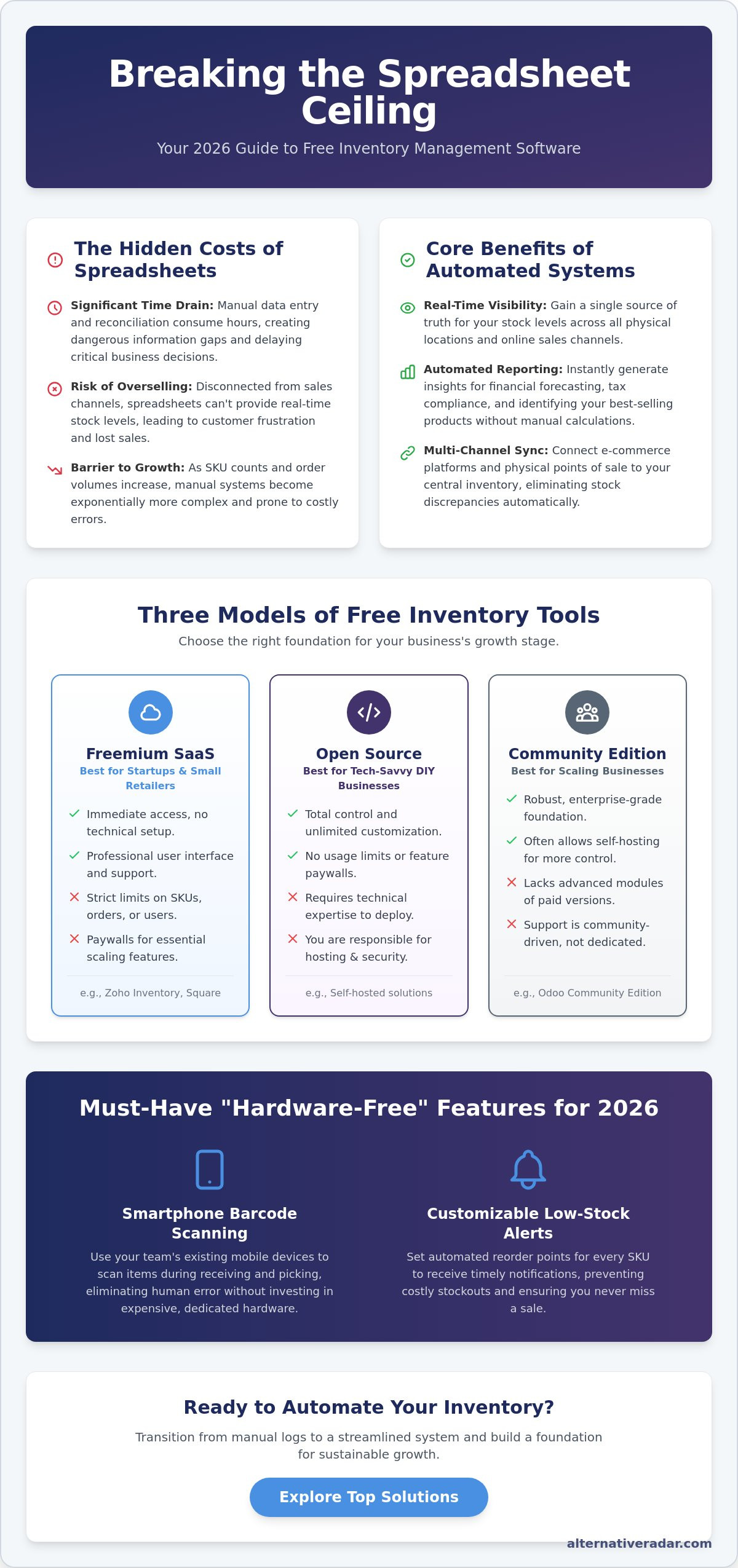
Relying on manual entry creates a significant drain on your most valuable resource: time. Reconciling a single week of sales against physical stock can take several hours when done by hand. This delay creates a dangerous information gap. When your data is even a few hours old, you risk overselling products you don’t actually have or overstocking items that aren’t moving. These inefficiencies make scaling a business nearly impossible. Static documents don’t grow with you; they become increasingly complex and prone to failure as your SKU count increases.
Core Benefits of Digital Stock Control
Switching to a digital system provides immediate operational advantages that directly impact your bottom line. You gain real-time visibility across all locations, whether you manage a single backroom or multiple warehouses. This level of transparency allows for:
- Automated Reporting: Generate instant insights for financial forecasting and tax compliance without manual calculations.
- Channel Synchronization: Connect your e-commerce platform directly to your stock levels to prevent customer frustration.
- Improved Accuracy: Use smartphone-based scanning to eliminate human error during the receiving and picking processes.
By prioritizing accuracy at the point of entry, you improve customer satisfaction. Buyers see reliable “in-stock” indicators, which builds trust and encourages repeat business. Moving to a dedicated platform isn’t just about saving money on software; it’s about building a foundation for sustainable growth. You replace guesswork with precision, ensuring that every stock movement is documented and traceable.
Evaluating the Three Main Models of Free Inventory Tools
Not all free inventory management software is built on the same financial or technical foundation. To select the right tool, you must distinguish between the underlying delivery models. Evaluating the Three Main Models of Free Inventory Tools reveals that your choice depends on whether you prioritize ease of use or total customization. Most modern solutions fall into three categories: Freemium SaaS, Open Source, and Community Editions. Each serves a different operational purpose, and picking the wrong one can lead to a restrictive paywall or a technical dead end.
Freemium SaaS: The Easiest Entry Point
Freemium is the most common model for cloud-based tools in 2026. These platforms provide a “free forever” tier designed for startups and micro-businesses. You get immediate access to professional-grade interfaces without any technical setup. However, these plans always come with usage caps. Common restrictions include a maximum of 50 SKUs, a limit of 50 monthly orders, or single-user access. This model mirrors other industries, such as the best free alternatives to photoshop, where users trade advanced features for zero upfront cost. This is the ideal model for retail startups that need to go live in minutes and don’t mind upgrading as they scale.
Open Source Solutions: Unlimited Growth with a Catch
Open-source inventory software offers the ultimate flexibility because the source code is public and free to use. There are no licensing fees, no SKU limits, and no “paywalled” features. The catch is the technical overhead. You’re responsible for server hosting, data security, and software updates. While the software is free, the infrastructure and maintenance require either your time or a paid developer. As seen in the popular open source business software 2026 report, these tools are best suited for manufacturing or wholesale businesses with specific workflow needs that standard SaaS tools can’t accommodate.
Some enterprise vendors also offer “Community Editions” or ad-supported versions of their enterprise software. These are often stripped-down versions of high-end ERP systems. They provide a taste of enterprise-grade logic but lack the customer support or integrations of the paid versions. Retailers often benefit most from Freemium SaaS because of built-in e-commerce connectors. In contrast, manufacturers often lean toward Open Source to manage complex Bill of Materials (BOM) without per-user costs. Before committing, compare platform limitations against your projected sales volume to ensure you won’t outgrow the free tier within six months.
The Top Free Inventory Management Software Picks for 2026
Selecting the right free inventory management software requires matching the tool’s specific constraints to your business model. While many platforms offer zero-cost tiers, the utility varies based on whether you prioritize order volume, user count, or mobile accessibility. We have evaluated the market to identify which platforms provide the most value without forcing an immediate upgrade. These picks represent a shift toward specialized tools that solve specific operational bottlenecks rather than offering generic, limited features.
Best for E-commerce: Zoho Inventory
Zoho Inventory remains a top choice for retailers who need multi-channel synchronization. Its free plan is strictly limited to 50 orders per month, 1 warehouse, and 1 user. Despite these volume caps, it provides professional-grade integrations with platforms like Shopify and Amazon. You can also access real-time shipping carrier tracking and basic stock alerts, which are features often reserved for paid tiers in competing software. It’s an ideal “starter” system for businesses that prioritize accuracy across digital storefronts over high transaction volume.
Best for Scalability: Odoo Inventory
Odoo Inventory is the strongest contender for businesses planning rapid expansion. Their “One App Free” program is a significant market outlier because it offers the full inventory module with unlimited users at no cost. This includes hosting, maintenance, and support for that single application. This removes the per-seat pricing barrier that usually slows down growing teams as they hire more warehouse staff. Because Odoo is modular, you can start with stock management and later integrate other functions. Review the open source CRM software comparison to see how Odoo’s ecosystem stacks up when you’re ready to add sales and customer management modules.
For operators who find Zoho too restrictive and Odoo too complex, Skyware Inventory offers a functional middle ground. It focuses on web-based simplicity and doesn’t impose the same strict item limits found in other SaaS tools. This makes it suitable for high-SKU environments with straightforward tracking needs. If your focus is local retail, Stockpile by Canvus serves as a reliable entry point. It offers a clean interface for tracking stock across a single location without a steep learning curve or complex setup. Finally, Boxhero is designed for mobile-centric users. It prioritizes smartphone usability, allowing your team to perform stock takes and updates directly from the warehouse floor using standard device cameras for scanning. These free inventory management software options ensure that even at a zero-dollar price point, you don’t have to compromise on data precision.
Critical Features to Verify Before You Commit
Selecting the right free inventory management software requires a rigorous audit of its technical foundations. A zero-cost price tag often masks functional gaps that can paralyze your operations as you scale. In 2026, baseline functionality must include smartphone-compatible barcode and QR code scanning. Requiring proprietary hardware defeats the purpose of a free tool. Your software should turn any standard mobile device into a high-speed scanner for receiving and picking directly from the warehouse floor. This mobile accessibility ensures that your data reflects the physical reality of your stock in real time, not just what was recorded at a desk hours later.
Precision in automated alerts is the secondary requirement. Look for systems that allow you to set custom reorder points for every individual SKU. Generic “low stock” notifications are insufficient; you need granular control to account for varying lead times from different suppliers. This prevents capital from being tied up in overstock while shielding you from the reputational damage of stockouts. Additionally, verify data portability. Ensure the platform provides full import and export flexibility via CSV or Excel. Without this, you face vendor lock-in, where moving your data to a more advanced system later becomes a manual, error-prone nightmare.
Integration Potential: APIs and Webhooks
Digital silos are a major growth bottleneck for modern businesses. A free tool shouldn’t exist in a vacuum; it must communicate with your accounting or sales platforms. Check for native integrations first, but prioritize tools that offer API access or webhooks for custom connections. API connectivity acts as the bridge between siloed business data, allowing your inventory levels to trigger actions in other apps automatically. If you want to maximize your operational output without increasing your budget, compare the latest efficiency tools designed for lean startups.
Reporting and Analytics in Free Tiers
Many vendors track your data but place a “reporting paywall” over the actual insights. Verify that your chosen tier includes Inventory Valuation, Sales History, and SKU Performance reports. In 2026, your system should also support LIFO and FIFO reporting to simplify tax compliance and financial auditing. A modern trend to watch for is AI-assisted stock forecasting. Even in free tiers, some advanced platforms now offer basic predictive analytics that suggest reorder quantities based on historical seasonal trends. This level of foresight was previously reserved for enterprise suites but is now a critical differentiator for high-quality free tools that aim to empower small operators.
How to Transition from Spreadsheets to Automated Inventory
Moving from a manual spreadsheet to a free inventory management software system requires more than a simple file upload. You must treat the migration as a reset for your operational data. If your starting data is inaccurate, the automation will simply accelerate your errors. Follow this five-step sequence to ensure a clean transition that minimizes downtime and protects your stock records.
- Step 1: Conduct a physical audit. Stop all warehouse movements for a 24-hour period to verify every physical unit against your current records. This ensures your “starting data” is 100% accurate.
- Step 2: Cleanse your data. Standardize your SKU naming conventions and categories before the import. Remove duplicate entries and resolve inconsistencies in unit measurements or descriptions.
- Step 3: Map your spreadsheet columns. Every software has specific requirements for data headers. Align your existing columns with the new system’s import fields to prevent formatting errors during the upload process.
- Step 4: Run a pilot test. Select a subset of 10 to 20 high-turnover items. Manage these exclusively in the new software for one week to identify workflow bottlenecks before a full rollout.
- Step 5: Train your staff. Demonstrate the mobile scanning and order fulfillment workflows directly on the warehouse floor. Ensure every team member understands how to log movements in real time using their mobile devices.
Standardizing Your SKU Architecture
Efficient tracking depends on a logical SKU structure. Don’t rely solely on manufacturer barcodes; these can change or be shared across different products. Create internal SKUs using a scalable Category-Style-Size format, such as “APPA-SHIRT-LRG.” This allows for instant identification during a search and simplifies the picking process. Avoid using special characters like #, %, or * in your naming. These symbols often break database search functions or cause errors during data exports. Keep your architecture alphanumeric and consistent across all product lines to maintain data integrity.
The Long-Term Strategy: When to Upgrade
A free tool is a launchpad, not a permanent ceiling. You should define specific trigger points that signal the need for a paid plan. Common indicators include exceeding 500 orders per month, requiring more than three concurrent users, or needing advanced multi-warehouse routing. Scaling your business operations often requires diversifying your revenue to support better tools. Implementing programmatic display advertising can generate the necessary margins to fund your software stack growth. Always remember that the best alternative to expensive enterprise suites is often a well-configured stack of specialized free tools that grow alongside your transaction volume.
Optimize Your Inventory Strategy for 2026
Transitioning from manual spreadsheets to a dedicated free inventory management software system is the most effective way to eliminate operational friction and prevent costly stock errors. You’ve learned that success depends on matching a platform’s specific constraints to your unique growth bottlenecks. Whether you prioritize the e-commerce integration power of Zoho or the unlimited user scalability of Odoo, the focus remains on maintaining data precision and real-time visibility. By implementing automated alerts and mobile scanning, you replace manual guesswork with actionable intelligence that drives productivity.
Finding the right balance between features and usage restrictions requires a structured, comparative approach. If you’re ready to refine your tech stack further, Find the perfect software alternative for your business on Alternative Radar. Our platform provides objective comparisons of 500+ software tools alongside expert-vetted open-source recommendations. We deliver real-time pricing and feature updates for 2026 to ensure you make the most efficient choice for your specific resources. Take control of your stock management today and build a reliable foundation for your business’s sustainable expansion.
Frequently Asked Questions
Is there a truly 100% free inventory management software with no limits?
Truly unlimited free software rarely exists in a cloud-hosted format. Most vendors use a freemium model that caps SKUs or monthly orders to encourage eventual upgrades. Open-source solutions like Odoo Community Edition offer the most flexibility without per-user fees, but you’re responsible for your own server and maintenance costs. Always evaluate the specific restriction model to ensure it aligns with your projected monthly transaction volume.
Can I use free inventory software on my mobile phone for barcode scanning?
Yes, most modern platforms allow you to use your smartphone camera as a high-speed scanner. Apps like Boxhero and Square for Retail are specifically designed for mobile-first workflows, which eliminates the need for expensive proprietary hardware. You can perform stock takes, receive shipments, and update levels directly from the warehouse floor. This ensures your digital records match your physical inventory in real time.
How do I migrate my existing Excel inventory to a free software platform?
Migration usually involves exporting your Excel data as a CSV file and mapping the columns to the new system’s import fields. You must standardize your SKU names and categories before uploading to prevent database errors. Most free inventory management software providers offer a template you can follow. Run a pilot test with a small batch of items to verify the data displays correctly before performing a full migration.
Does free inventory software support multiple warehouse locations?
Support for multiple locations varies significantly between providers. While Zoho’s free tier is restricted to a single warehouse, Odoo’s “One App Free” plan supports multi-location tracking. If you manage stock across a retail store and a separate storage unit, prioritize platforms that offer multi-warehouse features in their entry-level tiers. This ensures you maintain visibility across your entire supply chain without facing immediate upgrade costs. For schools or clubs managing equipment across various grounds, you can explore Cricket Practice Nets to see how professional-grade installations from Radford EZY Net can be efficiently tracked and maintained.
Is my data secure when using a free cloud-based inventory tool?
Cloud-based tools generally use the same encryption standards for both free and paid tiers. However, advanced security protocols like two-factor authentication (2FA) might be reserved for premium accounts. Always check the provider’s data privacy policy to see how they handle your information. If you require total control over your data, an open-source, self-hosted solution provides the highest level of security, provided you manage your own server updates.
What happens to my data if I decide to upgrade to a paid version later?
Upgrading is almost always a seamless process within the same ecosystem. Your existing stock levels, sales history, and SKU architecture remain intact when you move to a paid tier. The software simply unlocks additional features or higher transaction limits. This continuity is a major advantage of starting with a reputable freemium provider, as it avoids the technical risks associated with migrating to an entirely different platform.
Can free inventory software integrate with QuickBooks or Shopify?
Many free tools offer native integrations with popular e-commerce and accounting platforms. Zoho Inventory connects directly to Shopify and Amazon, though transaction limits still apply. Square for Retail integrates its inventory tools with its own POS and online store. If a native connector isn’t available, check for API access or third-party bridges like Zapier to keep your business data synchronized across all of your sales channels.
Which free inventory tool is best for a manufacturing business?
Manufacturing businesses often require complex Bill of Materials (BOM) and multi-stage production tracking. Odoo Inventory is the most capable free inventory management software for these needs due to its modular design and open-source foundation. It handles raw materials and finished goods better than retail-focused tools. For simpler workflows, a tool that allows for kitting can serve as an effective entry-level solution for tracking component stock.