
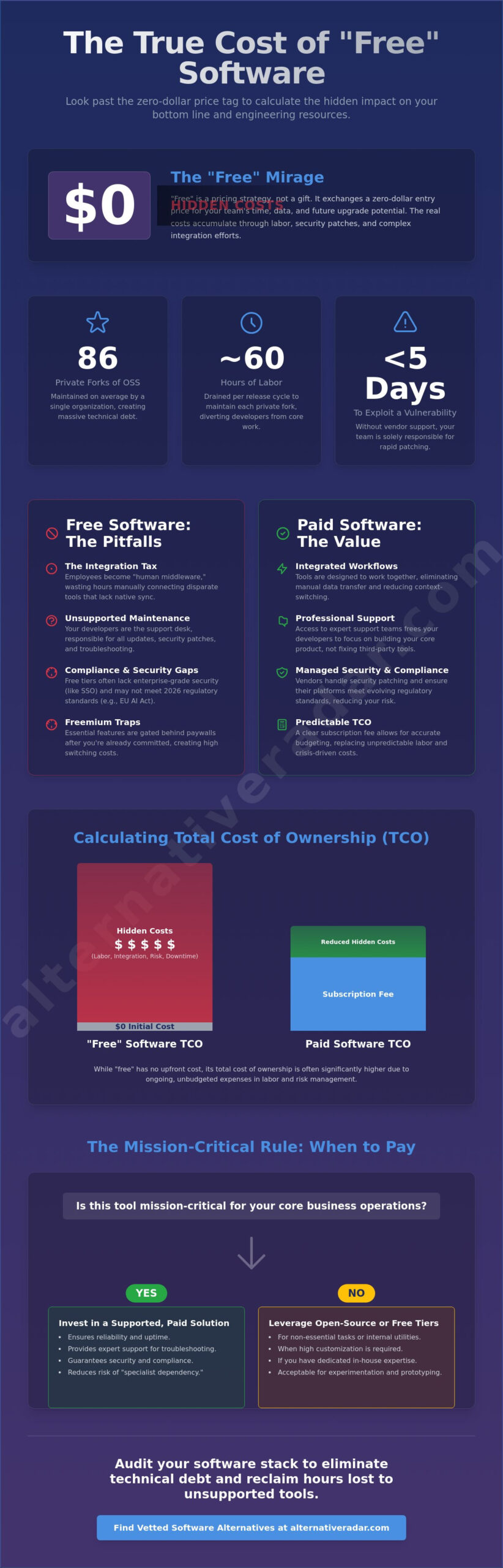
The average organization now maintains 86 private forks of open-source components, with each one draining roughly 60 hours of labor every release cycle. While a “zero-dollar” price tag looks perfect on a balance sheet, the hidden costs of free software often manifest as hundreds of wasted engineering hours and fragmented workflows that stall your team’s momentum. You likely feel the pressure to stay lean while struggling with the reality of troubleshooting without support or patching security vulnerabilities that AI now discovers in seconds.
We’ve analyzed the data to help you look past the initial savings and calculate the true impact on your bottom line. This guide provides a clear framework to compare free versus paid solutions so you can eliminate technical debt and build a more integrated software stack. You’ll learn how to quantify maintenance labor, navigate the 2026 regulatory landscape like the EU AI Act, and decide exactly when a paid license is the more profitable choice for your business.
Key Takeaways
- Learn to apply the Total Cost of Ownership (TCO) formula to quantify the actual impact of “zero-dollar” tools on your bottom line.
- Identify the hidden costs of free software by evaluating the “Integration Tax” and the labor required to maintain disconnected tools.
- Understand the compliance gaps in free tiers that could lead to data exposure or regulatory penalties under the latest 2026 standards.
- Use the “Mission Critical” rule to determine when to invest in supported, paid software and when to leverage the customization of open-source options.
- Audit your current software stack to eliminate technical debt and reclaim hours lost to troubleshooting without professional support.
The “Free” Mirage: Why Zero-Dollar Software is a Pricing Strategy
Software providers don’t distribute tools for free out of altruism. They use “free” as a calculated pricing strategy designed to capture market share, harvest data, or secure a future upgrade. In 2026, the market has moved away from heavy upfront licensing fees toward long-term operational expenditure (OpEx). This shift means the hidden costs of free software accumulate through labor, security patches, and complex integration efforts rather than a monthly bill. To evaluate these trade-offs accurately, your team needs to calculate the Total Cost of Ownership (TCO) of every tool in your stack. Free software in 2026 is an exchange of capital for internal resources.
The “Product vs. User” dynamic remains a critical factor in this environment. If you aren’t paying for the license, your usage patterns and data often become the product. Many free tools now use customer inputs to train proprietary AI models. This turns your internal workflows into valuable training data for their next paid release. Choosing a free tool often involves a trade-off where you sacrifice data privacy for an entry price of zero.
Open Source vs. Freeware: Know the Difference
Open Source Software (OSS) offers transparency and customization but demands high internal expertise. It relies on your developers to manage updates and security. Freeware, by contrast, is usually a proprietary “teaser” or an ad-supported utility. While OSS gives you control, managing popular open source business software 2026 requires a dedicated maintenance mindset. This differs significantly from the “set it and forget it” approach of closed-source tools. You must decide if your team has the capacity to act as their own support desk.
The Freemium Trap and Feature Gating
Freemium models are designed to create intentional friction. You might start with a free tier only to find essential features, such as advanced reporting or API access, gated behind a paywall. This leads to a high cost of “switching mid-stream” once your team is already reliant on the tool. Some providers also implement an “Export Tax,” making it technically difficult or expensive to migrate your data to a competitor. These barriers are part of the hidden costs of free software that only become visible after you’ve already committed your company’s time and data.
The Hidden Integration Tax and Technical Debt
Choosing free tools often feels like a win for the budget. However, it frequently triggers an “Integration Tax.” This is the invisible time your team spends building manual bridges between disconnected tools that weren’t designed to work together. When software doesn’t sync natively, your employees become the “human middleware.” They waste hours copy-pasting data across browser tabs or troubleshooting broken API connections. These hidden costs of free software quickly eclipse the price of a paid, integrated subscription.
This fragmentation leads to significant technical debt. In 2026, organizations maintain an average of 86 private forks of open-source components. Each fork requires roughly 60 hours of labor per release cycle to maintain. When teams skip these updates to save time, they create vulnerabilities in open-source software. Data shows that the time to exploit a new vulnerability has dropped to just five days. If you aren’t paying for a vendor to patch your tools, you’re paying your developers to do it, or worse, paying the price of a breach.
There’s also the risk of “Specialist Dependency.” If a single developer custom-configures a complex free tool and then leaves the company, the knowledge of how to maintain that system leaves with them. This creates a fragile infrastructure where one resignation can halt operations. Beyond the technical risks, the cognitive load of “Context Switching” drains productivity. Research suggests it takes over 20 minutes to regain focus after a distraction. Jumping between five different free apps instead of one integrated suite keeps your team in a state of perpetual inefficiency.
Fragmented Stacks and Workflow Friction
Deploying a slack alternative might save on monthly seat costs, but if it lacks robust notifications or native calendar sync, you lose hours to manual logging. Most free tiers also omit Single Sign-On (SSO). This forces users to manage multiple passwords, which increases security risks and slows down daily logins. You can compare integrated software suites to see where paid features actually pay for themselves through recovered time. Manual workarounds for missing features often become permanent, inefficient habits that stay with your team for years.
The Maintenance Burden: Updates, Backups, and Hosting
Self-hosting isn’t free. You pay for power, hardware, and the human capital required to ensure 99.9% server uptime. Smaller open-source projects also face “Project Abandonment.” If the community stops contributing, you’re left with dead software that requires a total, unplanned replacement. Free software maintenance is a recurring time tax on your most expensive employees.
Security, Compliance, and the High Price of Data Exposure
Free software often lacks the granular audit logs and administrative controls required by modern enterprise standards. This “Compliance Gap” becomes a liability during audits or regulatory reviews. Under the EU AI Act, which reached full enforcement for high-risk systems on August 2, 2026, non-compliance penalties can reach €35 million or 7% of global turnover. If your free tool doesn’t provide the transparency required by law, the hidden costs of free software could jeopardize your entire operation. Organizations have already faced cumulative GDPR fines exceeding €7.1 billion by early 2026, proving that regulatory oversight is no longer a peripheral concern.
Data privacy trade-offs are the standard currency for “zero-dollar” tools. Many free AI-powered platforms now use your inputs to train their proprietary models. This means your sensitive business logic or client data could inadvertently become part of a public dataset. Additionally, free tools rarely offer Service Level Agreements (SLAs). If a critical free tool goes down for 24 hours, you have no legal recourse or dedicated support line to call. You’re left waiting for a community volunteer to address the issue while your revenue stalls.
Vulnerability management is another area where free tools fall behind. In 2025, security researchers identified over 192,000 malicious malware packages targeting open-source registries. The time to exploit a new vulnerability has decreased to just five days. Enterprise-supported tools often receive private security patches before a vulnerability is publicly disclosed. In contrast, community-supported tools leave you exposed until a public fix is developed and manually applied by your team.
Liability and Legal Risks
Standard End User License Agreements (EULAs) for free software usually include a “No Warranty” clause. This leaves your business solely responsible when a tool fails or leaks sensitive data. The Federal Reserve has issued specific guidance on the Risk Management of Free and Open Source Software to help organizations navigate these strategic and legal pitfalls. While the price is low, an open source crm software comparison shows that data sovereignty is the real reason to choose these tools, not the lack of a license fee. You must own your data and the liability that comes with it.
The Cost of “Shadow IT”
When employees download unauthorized free tools to solve quick problems, they create “Shadow IT” security holes. These tools often bypass corporate firewalls and data retention policies. Offboarding becomes an administrative nightmare when an employee leaves the company but retains access to a personal “free” account containing work files. Managing 50 different logins across a team isn’t just a security risk; it’s a massive drain on your IT department’s time and resources. Centralizing your stack might cost more upfront, but it eliminates the hidden costs of free software associated with fragmented security.
Calculating the Total Cost of Ownership (TCO) for Software
To move beyond the mirage of “zero-dollar” tools, you need a concrete decision framework. Total Cost of Ownership (TCO) is a reality check for your budget. While the licensing fee stays at zero, the other variables in the equation often expand as your business grows. You can calculate the true impact using this formula: (License/Subscription) + (Installation) + (Training) + (Maintenance) + (Opportunity Cost). When you apply this to your stack, the hidden costs of free software usually reveal themselves as high-salary labor hours diverted from revenue-generating projects.
Assigning a dollar value to your team’s troubleshooting time is the first step. If an open-source platform requires a minimum monthly operating cost of $39,316 primarily driven by engineering salaries, a “free” tool is actually a major investment. You must also factor in “Scalability Pain.” A tool that works for a team of five might become a bottleneck when you have 10x more data. The cost of migrating that data later is often significantly higher than the price of starting with a scalable, paid solution today. Choosing to build or maintain a tool internally carries an opportunity cost. Every hour spent on software maintenance is an hour not spent on your core product.
Measuring the “Human Capital” Investment
Productivity is your most expensive resource. You must track the hours spent on “fiddling” with configurations versus actual productive output. For example, a free photoshop replacement might save on subscription fees, but if your designer loses a week of productivity to a steep learning curve, you’ve already spent the equivalent of an annual license. Internal support is another drain. When free software breaks, there is no vendor to call. Your internal IT team becomes the de facto support desk, pulling them away from strategic infrastructure work. You can audit your software efficiency to see where these labor leaks are happening.
The 3-Year Software Forecast
Free software is often cheaper in Year 1 but becomes a financial burden by Year 3. This happens because technical debt and maintenance requirements compound over time. You should also calculate the “Exit Cost.” This is the price of moving your data out of a free platform if the project is abandoned or if you outgrow its features. To protect your efficiency, set a “Kill Switch” threshold. If a free tool’s hidden costs of free software exceed the price of a paid alternative for three consecutive months, it’s time to migrate. Acknowledge that the cheapest option is rarely the most cost-effective over a long-term horizon.
Strategic Alternatives: When to Go Free and When to Pay
The decision to pay for software shouldn’t be based on budget availability alone. It’s a strategic choice about where you want to allocate your team’s energy. If a tool touches your customers or your primary revenue stream, follow the “Mission Critical” Rule: invest in a paid, supported tool. The hidden costs of free software become unbearable when a bug prevents a customer from checking out or causes a data sync error in your CRM. In these scenarios, the cost of a monthly subscription is negligible compared to the revenue lost during a service outage without a guaranteed SLA.
Open Source software wins when the goal isn’t saving money, but gaining control. If your business requires deep customization, total data sovereignty, or the ability to avoid vendor lock-in, open-source is the superior choice. You aren’t choosing it because it’s free; you’re choosing it because it’s flexible. For most businesses, the most efficient path is a “Hybrid Stack” approach. This strategy involves using stable, paid pillars for core operations while leveraging specialized free supporters for non-essential tasks. You can use Alternative Radar to find the “Sweet Spot” between price and performance for every layer of your infrastructure.
Finding Your Perfect Fit
Identifying where to spend your budget requires objective comparison. You can leverage alternative to guides to see where paid tools provide the highest ROI through automated workflows and native integrations. Reserve “free” status for commodity tools where the stakes are low. Simple file converters, basic syntax checkers, or temporary utilities are perfectly adequate in their free versions because they don’t create long-term technical debt. Always prioritize tools with standardized data exports. This ensures that if you outgrow a free tool, you can migrate without facing a massive “Export Tax.”
Conclusion: Investing in Efficiency
Free software is a tool, not a budget. It provides strategic value when used for exploration or specialized customization, but it becomes a liability when it drains your human capital. To keep your stack lean, audit your software every six months for “Hidden Cost” creep. If a tool requires more troubleshooting than it provides in utility, it’s no longer free. Smart organizations don’t just follow market leaders; they make tailored choices based on their specific resource constraints. Explore our curated lists of software alternatives to find the most efficient, integrated tools for your specific workflow and eliminate the hidden costs of free software today.
Optimize Your Software Stack for Long-Term Growth
Building an efficient software stack requires a shift from price-based thinking to value-based strategy. You’ve seen how the hidden costs of free software accumulate through technical debt, labor-intensive maintenance, and potential compliance gaps. By applying the Total Cost of Ownership formula, you can identify which tools are driving productivity and which ones are draining your human capital. Prioritize integrated, supported solutions for your mission-critical operations while using open-source options where customization and data sovereignty offer a clear competitive advantage.
Making the right choice doesn’t have to be a manual burden. You can find the best value alternatives for your business on Alternative Radar. Our platform offers objective comparisons across 500+ software categories, featuring deep dives into licensing and pricing trade-offs. These lists are independently curated by the software scouts at Madunet to ensure you get precise, reliable data. Use these insights to reclaim your team’s time and build a more resilient digital infrastructure. It’s time to stop paying for “free” tools with your most valuable resources.
Frequently Asked Questions
Is open-source software safer than proprietary software?
Open-source software isn’t inherently safer; its security depends on active maintenance and community oversight. While proprietary software offers dedicated support and private security patches, open-source provides transparency that allows your internal team to audit the code. In the 2026 landscape, the speed at which a vulnerability is patched is more important than whether the source code is public or private.
What is the most common hidden cost of using free software for business?
Internal labor is the most frequent hidden cost. Your team often spends significant time on manual troubleshooting, custom configurations, and patching vulnerabilities that a paid vendor would handle. These hidden costs of free software are often overlooked because they don’t appear as a line item on a monthly invoice, yet they drain your most expensive resource: human capital.
How do I calculate the opportunity cost of managing free tools?
You calculate opportunity cost by multiplying the hours spent on software maintenance by the hourly salary of the employees involved. Compare this figure to the potential revenue those same employees could’ve generated by focusing on core product development or sales. If the maintenance cost exceeds the subscription price of a paid alternative, the free tool is costing you money.
Can I use free software and still be GDPR compliant?
You can remain compliant, but you must manually verify that the tool meets all regulatory standards. Many free tiers lack the advanced audit logs and data processing agreements required for GDPR or the EU AI Act. Using free software requires you to take full responsibility for data sovereignty and privacy, as the provider often offers no legal guarantees or warranties.
Why do companies offer free software if it has hidden costs?
Companies use free software as a strategic entry point to build a user base or train AI models. By offering a “zero-dollar” tool, they can harvest usage data or create a path for users to eventually upgrade. The hidden costs of free software in this context are the trade-offs you make in privacy and operational control to avoid a licensing fee.
When should a small business switch from a free to a paid software tier?
You should switch when a tool touches your revenue stream or when manual workarounds reduce team productivity. If a free tool lacks essential features like Single Sign-On (SSO) or native integrations, the resulting friction creates a bottleneck. Small businesses should upgrade as soon as the labor cost of managing the tool exceeds the price of a supported, professional license.
Is “Free for Personal Use” software legal to use in a business setting?
No, using “Free for Personal Use” software in a commercial environment is a breach of the license agreement. This exposes your business to legal liability and potential fines during a software audit. Always check the licensing terms to ensure the tool’s explicitly cleared for business or commercial use before deploying it across your team’s workflow.