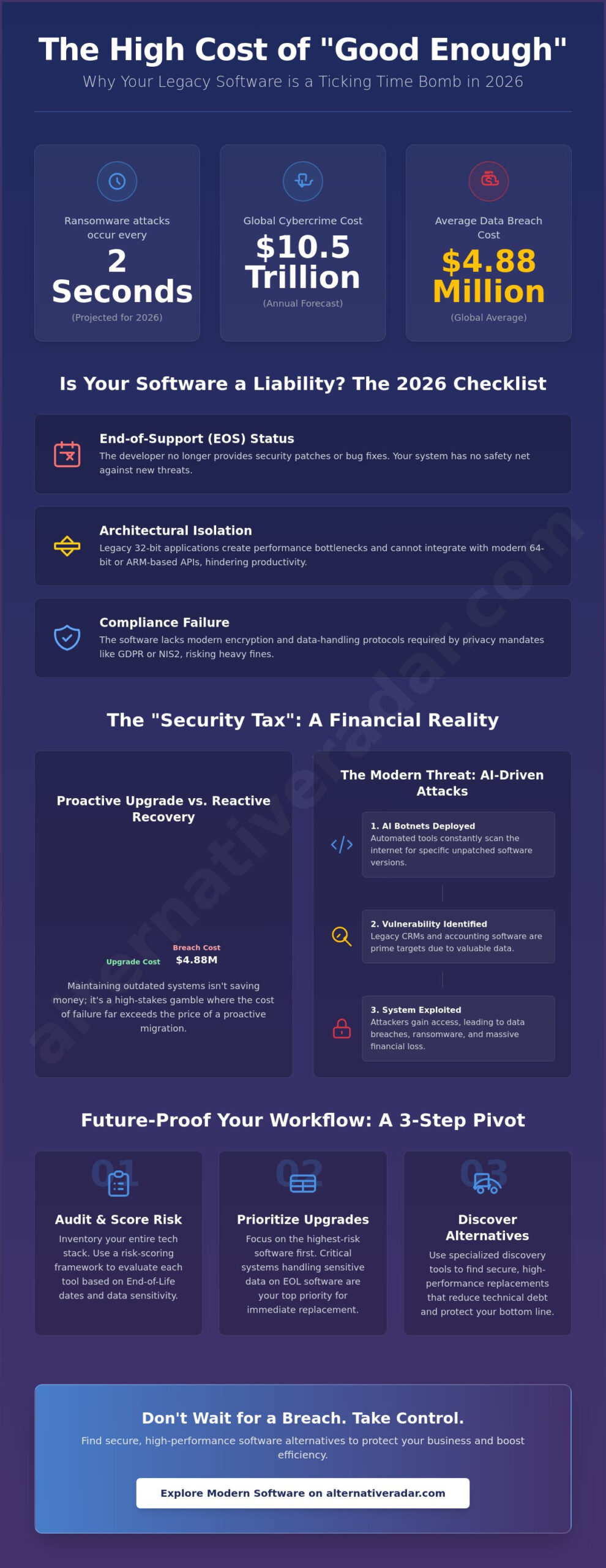
By the time you finish reading this sentence, another business has likely fallen victim to a ransomware attack. In 2026, these strikes occur every two seconds, contributing to a global cybercrime cost forecasted to surpass $10.5 trillion this year. You probably keep your legacy systems because they still work and the thought of a massive migration feels like a budget-breaking headache. It’s understandable to prioritize immediate stability over the perceived complexity of a total system overhaul.
Clinging to these tools creates a productivity anchor that exposes you to the critical risks of using outdated software, including data breaches that now cost an average of $4.88 million globally. This article identifies the security, financial, and operational dangers specific to the current tech environment. You’ll gain a clear decision-making framework for upgrading and receive objective recommendations for modern software replacements that prioritize your efficiency over market hype. We’ll move from identifying hidden vulnerabilities to executing a seamless pivot that protects your resources and your bottom line.
Key Takeaways
- Understand how AI-driven botnets exploit unpatched vulnerabilities in seconds, making the risks of using outdated software a critical financial liability.
- Identify the hardware and integration bottlenecks that cause legacy 32-bit applications to drain performance on modern ARM and 64-bit architectures.
- Master a risk-scoring framework to inventory your tech stack and prioritize upgrades based on End-of-Life dates and data sensitivity.
- Discover how to leverage specialized discovery tools to find secure, high-performance software replacements that reduce long-term maintenance debt.
The “If It Ain’t Broke” Fallacy: Why Legacy Software Is a Ticking Time Bomb
Every time a team member claims a system is “working just fine,” a potential security gap widens. This mindset is the “If It Ain’t Broke” fallacy, a dangerous assumption that overlooks the invisible decay of aging code. In 2026, software is no longer a static tool you buy once and use forever. It functions as your primary security perimeter. When that perimeter is built on code that hasn’t been updated in years, it becomes an invitation for exploitation. The risks of using outdated software start with this false sense of security, where operational stability masks deep-seated technical debt.
Legacy systems often house Unpatched Vulnerabilities that modern AI-driven scanners can identify and exploit in milliseconds. Relying on End-of-Life (EOL) software means you’re operating without a safety net. The developer has moved on, but the threat actors haven’t. They specifically target these “frozen” versions because they know no one is coming to fix the holes. Staying on an old version isn’t a cost-saving measure; it’s a high-stakes gamble with your company’s data and reputation.
What Qualifies as Outdated Software in 2026?
The definition of “outdated” has shifted from “broken” to “disconnected.” A tool is considered legacy if it meets any of these criteria:
- End-of-Support (EOS) Status: The developer no longer issues security patches, bug fixes, or technical assistance.
- Architectural Isolation: The software was built on 32-bit or older frameworks that cannot communicate with modern 64-bit or ARM-based API integrations.
- Compliance Failure: The application lacks the encryption standards or data-handling protocols required by 2026 privacy mandates like the EU’s NIS2 Directive or updated GDPR rules.
The Psychology of the Legacy User
Decision-makers often defer upgrades because of the “sunk cost” trap. After spending years mastering a specific interface, the thought of retraining an entire department feels overwhelming. This fear of temporary downtime often outweighs the long-term risks of using outdated software. There’s also a common resistance to the subscription-based pricing models that dominate the modern market. Many users prefer the perceived “ownership” of an old license, even if that license no longer protects them.
IT departments frequently wait for a crisis to occur before acting. This reactive approach is inefficient and expensive. By the time a legacy system fails or gets breached, the cost of recovery far exceeds the price of a proactive migration. You don’t have to follow every market trend, but you must recognize when a tool has transformed from an asset into a liability. Efficiency-driven organizations treat software as a living component of their infrastructure, requiring regular audits and timely replacements to maintain a competitive edge.
The Security Tax: Quantifying the Risks of Unpatched Vulnerabilities
Operating with legacy systems in 2026 is no longer just a technical oversight; it’s a direct financial liability. The average cost of a data breach has climbed to $4.88 million globally, a figure that often spells the end for small to medium enterprises. This “security tax” is the hidden cost of maintaining aging code that no longer receives protection. When you prioritize short-term savings over necessary upgrades, you inadvertently fund the recovery efforts of a future breach. The risks of using outdated software are now amplified by the sheer volume of Common Vulnerabilities and Exposures (CVEs) found in abandoned codebases, which have grown exponentially as older frameworks reach their final expiration dates.
Attackers don’t manually hunt for targets anymore. They deploy AI-driven botnets that scan the internet for specific, unpatched software versions in seconds. These automated tools identify the importance of software updates by highlighting exactly which systems lack modern defensive layers. Ransomware groups specifically target legacy accounting software and CRMs because these “crown jewels” contain the sensitive financial and customer data required for high-stakes extortion. If your core business data sits in a 2018-era database, you’re effectively leaving the vault door unlocked in a neighborhood where every thief has a master key.
The 2026 Threat Landscape: AI and Zero-Days
Modern attackers use Large Language Models (LLMs) to reverse-engineer abandoned open-source libraries and find exploits that were previously undiscovered. This has led to a surge in “shadow IT,” where employees use unapproved, outdated tools to bypass modern security protocols. According to a 2025 TechTarget survey, 32% of all successful cyberattacks specifically exploited unpatched software vulnerabilities. To stay ahead of these automated threats, organizations must move away from stagnant systems. You can find more secure, high-performance replacements by visiting Alternative Radar to compare modern options.
Legal and Compliance Consequences
The regulatory environment in 2026 has become significantly more punitive. Under HIPAA and newly enacted digital safety acts, using known-vulnerable software can be classified as gross negligence. This classification doesn’t just lead to fines; it often voids your cybersecurity insurance policy. Most insurers now require proof of active support and regular patching as a condition for coverage. Beyond your own walls, you may face liability for business partners if your legacy system leaks shared data, potentially triggering breach-of-contract lawsuits that far exceed the cost of a software license. Transitioning to supported platforms is the only way to ensure your legal and financial standing remains intact.
The Productivity Drain: Performance and Compatibility Bottlenecks
Security vulnerabilities often dominate the conversation, but the daily erosion of operational efficiency is equally damaging. Legacy systems act as anchors, slowing down every department they touch. In 2026, the risks of using outdated software manifest most clearly through the “Integration Gap.” Modern business environments rely on a web of seamless API communications. When one critical tool lacks the architecture to talk to your modern CRM or project management suite, you create a data island. This isolation forces your team to spend hours on manual data reconciliation, preventing the real-time insights required for fast decision-making.
Hardware mismatch presents another significant hurdle. As the industry shifts toward 64-bit and ARM-based architectures, running legacy 32-bit applications requires resource-heavy emulation layers. This setup results in frequent crashes and sluggish performance that hardware upgrades cannot fix. You might have the fastest processors available, but they’ll remain underutilized if they’re constantly struggling to translate archaic code. This technical debt doesn’t just slow down your computers; it stops your business from scaling because your core infrastructure cannot handle increased workloads or modern data volumes.
The Hidden Cost of “Workarounds”
Many organizations attempt to keep legacy tools alive by using “bridge” software or custom scripts. These workarounds are inherently unstable and require constant maintenance from IT staff who could be focused on innovation. Every hour spent fixing a broken integration between an old database and a new analytics tool is an hour of lost productivity. These manual processes are also prone to human error, leading to data inconsistencies that can take days to resolve. When your workflow depends on fragile patches, you’re not saving money; you’re just deferring a larger, more expensive failure.
User Experience as a Competitive Advantage
Modern workers, especially those in hybrid or remote environments, expect their professional tools to be as intuitive as their personal apps. Clunky, unintuitive interfaces are a primary driver of employee frustration and turnover. If your team is fighting with a UI designed two decades ago, they’re not focused on their actual jobs. Finding a modern alternative to popular but aging software can immediately boost morale and retention. Modern cloud-native platforms offer features like AI-automated data entry and collaborative real-time editing that legacy systems simply cannot replicate. Switching to a high-performance alternative ensures your team stays engaged and your operations remain agile enough to pivot when market conditions change.
The Software Audit: A Framework to Patch or Pivot
Identifying the risks of using outdated software is the first step, but mitigation requires a structured audit. You cannot manage what you haven’t cataloged. Start by creating a comprehensive inventory of your entire tech stack, specifically noting the End-of-Life (EOL) and End-of-Support (EOS) dates for every application. In 2026, many vendors have accelerated their sunsetting schedules to push users toward cloud-native versions. If you aren’t tracking these dates, you’ll likely face a forced migration during a peak operational period, which is the most expensive way to upgrade.
Once your inventory is complete, apply a risk-scoring model to prioritize your actions. Focus on two primary variables: exposure and data sensitivity. An internet-facing application with unpatched vulnerabilities is a critical threat that demands an immediate pivot. Conversely, an internal tool handling non-sensitive data might only require basic “patching” or compensating controls. Use a “Stay vs. Switch” scorecard to evaluate the cost of migration against the ongoing maintenance debt. If the cost of securing a legacy tool exceeds 30% of a new license, or if it lacks modern API support, it’s time to move. Plan your transition at least six months before an EOL date to allow for testing and data migration.
Step-by-Step Software Risk Assessment
Begin by reviewing the developer’s “Last Updated” logs and security bulletins. If a tool hasn’t seen a security patch in six months, it’s effectively abandoned. Next, evaluate your exit strategy by checking data portability. Can you export your database in a standard format like JSON or CSV, or is your data trapped in a proprietary silo? For core business functions, explore this open source crm software comparison to see if a community-supported alternative provides better long-term security than a stagnant commercial product. To find a tool that fits your specific operational requirements, use Alternative Radar to filter modern replacements by license type and security features.
Implementing Compensating Controls
Some legacy systems simply can’t be decommissioned overnight because of deep architectural dependencies. In these cases, you must implement compensating controls to minimize the risks of using outdated software. Specialist services like OT Sec UK, US, AE and IN can help organizations secure industrial automation and critical infrastructure during these transitions. Network segmentation is your most effective tool; isolate the legacy system on a dedicated VLAN with no direct internet access. Use a Web Application Firewall (WAF) to provide virtual patching, which blocks known exploits before they reach the vulnerable code. Most importantly, set a hard “Kill Date” for the software. Without a firm deadline, legacy tools tend to persist indefinitely, creating an ever-expanding attack surface that will eventually compromise your modern infrastructure.
Future-Proofing Your Workflow: Finding Modern Software Alternatives
Switching to modern infrastructure is often a financial necessity rather than a luxury. While the initial license cost of a new platform might seem high, it’s frequently lower than the cumulative price of the risks of using outdated software, which includes emergency patches, specialized maintenance, and the constant threat of a $4.88 million data breach. Modern software-as-a-service (SaaS) models shift the burden of security and maintenance back to the vendor, allowing your team to focus on core operations rather than infrastructure upkeep. By moving to a supported, high-performance environment, you eliminate the technical debt that prevents your business from scaling.
The 2026 software market has moved toward extreme specialization. Instead of relying on monolithic suites that try to do everything poorly, organizations are finding success with niche tools designed for specific workflows. Trialing these alternatives doesn’t have to disrupt your current operations. You can implement parallel testing, where a small team runs the new software alongside the legacy system for a set period. This approach allows you to verify data integrity and integration performance before you commit to a full-scale migration. Using Alternative Radar as your digital scout simplifies this process by providing objective comparisons of secure, modern replacements that fit your specific licensing and technical requirements.
Replacing the Giants: Modern Alternatives
Many organizations cling to legacy giants because they assume there are no viable replacements. However, the rise of specialized tools has created high-performance options for every department. For example, design teams can significantly reduce their overhead by exploring the best free alternatives to photoshop, many of which now offer AI-assisted editing and better collaboration features than older versions of creative suites. Similarly, if your team communication has become cluttered or insecure, reviewing the best slack alternatives for 2026 can help you find a platform that prioritizes privacy and deep work. Transitioning from locally hosted legacy databases to cloud-native alternatives also ensures your data remains accessible and encrypted, regardless of where your team is working.
The Continuous Discovery Mindset
To prevent future tech debt, you must establish a culture of “software agility.” This involves moving away from the “set it and forget it” mentality and adopting a quarterly software review cycle. During these reviews, evaluate your tools based on their last update date, security performance, and employee feedback. If a tool is no longer serving your efficiency goals or if the vendor has stopped providing regular patches, start the replacement process immediately. By maintaining a continuous discovery mindset, you ensure that your organization is never caught off guard by an End-of-Life announcement. You stay ahead of the curve by treating software as a dynamic asset that must be regularly audited and optimized to maintain your competitive edge in a fast-paced market.
Modernize Your Stack to Eliminate Technical Debt
Transitioning away from legacy systems is no longer a simple IT preference; it’s a survival requirement for 2026. You’ve seen how the integration gap and AI-powered threats turn stagnant code into a financial liability. Maintaining the status quo only deepens the risks of using outdated software, eventually costing you more in lost performance and security breaches than a modern license ever would. Adopting a proactive audit cycle allows you to reclaim your team’s time and protect your company’s resources from predictable failures.
You don’t have to navigate this transition alone. Stop risking your data—discover modern, secure alternatives today on Alternative Radar. Our platform serves as your digital scout, providing detailed comparisons of 5000+ apps with objective pros and cons for both free and premium tools. We provide updated 2026 pricing and feature lists so you can make an informed choice without the marketing hype. Take control of your infrastructure today and build a workflow that is resilient, efficient, and ready for whatever comes next.
Frequently Asked Questions
What is the difference between EOL and EOS in software?
EOL (End of Life) typically indicates the date a manufacturer stops marketing or selling a specific software version. EOS (End of Support) is the more critical date for security, as it marks when the developer ceases all technical assistance and security patches. Once a product reaches EOS, it becomes a permanent target for exploits because vulnerabilities will never be fixed.
How do I know if my current software is no longer supported?
Check the “About” section of your application to find the current version number and then visit the developer’s official support lifecycle page. Most reputable vendors publish clear tables showing when specific versions reach their support expiration. If you haven’t seen a version update or security patch in over six months, the software is likely abandoned or in a legacy state.
Can an antivirus program protect me if I use outdated software?
An antivirus program provides a secondary layer of defense but cannot fix the underlying vulnerabilities in outdated code. Attackers often use zero-day exploits to bypass antivirus detection entirely by targeting flaws in the software’s architecture. Relying on antivirus alone significantly increases the risks of using outdated software because it doesn’t address the root cause of the security gap.
Is it safe to use old software if my computer is not connected to the internet?
Air-gapping a computer reduces the risk of remote attacks but doesn’t make the software completely safe. Threats can still reach your system through infected USB drives, external hard drives, or other devices on your local network. While the risk of a mass-automated botnet attack is lower, the software remains inherently unstable and prone to performance failures that can lead to data loss.
How much does it typically cost to migrate from legacy software to a modern alternative?
Migration costs depend on the complexity of your data and the number of required integrations. You’ll need to account for new licensing fees, data migration services, and the staff hours required for training on the new interface. While this requires an upfront investment, it’s almost always more cost-effective than paying for emergency technical support or recovering from the risks of using outdated software during a breach.
What are the biggest risks of using unpatched open-source software?
Public exposure is the primary danger for unpatched open-source tools. Because the source code is visible to everyone, vulnerabilities are quickly identified and documented in public databases. Attackers use automated scanners to find any business still running these specific, unpatched libraries, allowing them to execute precise strikes against known weaknesses without much effort.
What should I do if my business relies on a program that no longer exists?
Begin an immediate search for a modern replacement and prioritize exporting your data into a standard format like CSV or JSON. If you must keep the old program running temporarily, isolate it on a separate network with no internet access to minimize exposure. Use discovery platforms to compare modern alternatives that offer similar functionality while providing the security and performance standards required in 2026.