
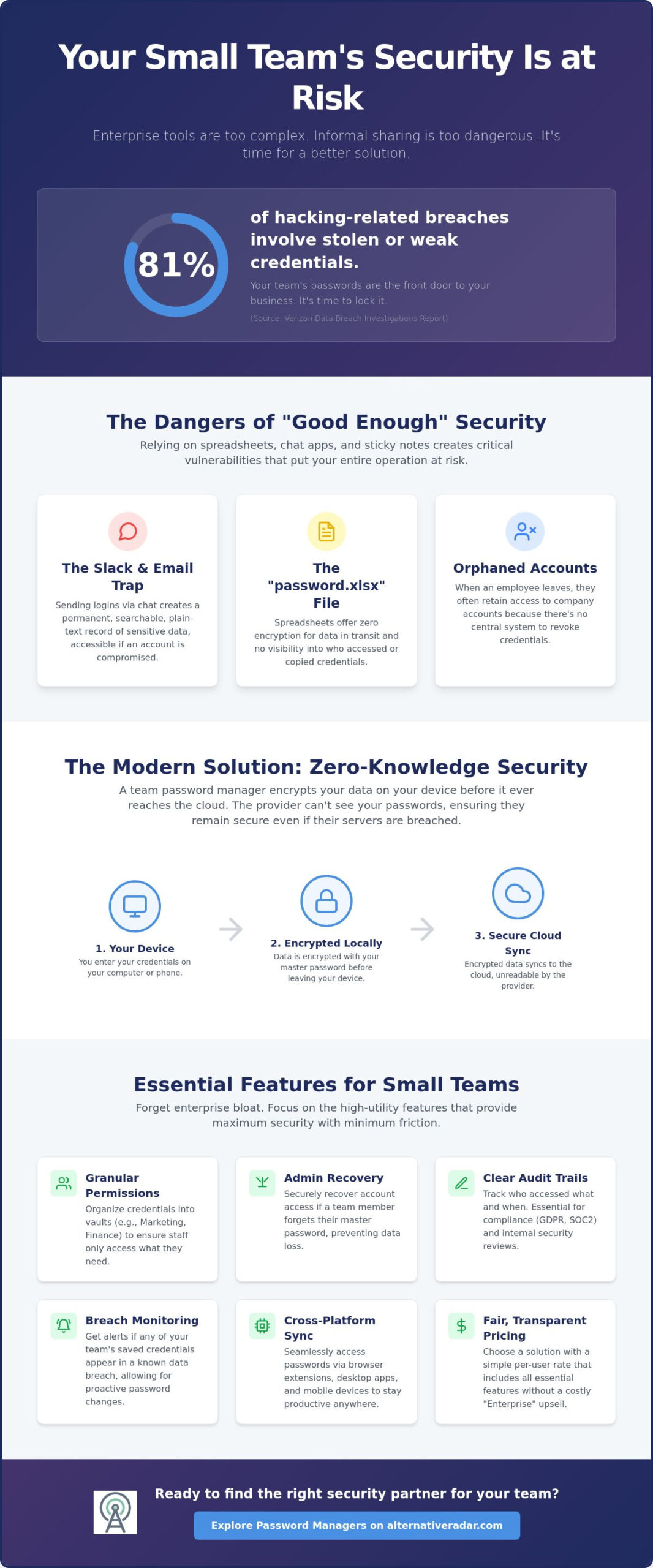
81% of hacking-related breaches in 2025 involved stolen or weak credentials, according to the Verizon Data Breach Investigations Report. Despite this risk, many organizations still share sensitive logins through Slack or physical sticky notes because enterprise-grade security tools often feel too complex or prohibitively expensive. It’s a frustrating cycle of paying for “Enterprise” features you never use while still worrying about losing account access when a key employee leaves the company.
Finding the right password manager for small teams means choosing a tool that staff will actually use, rather than bypass. You deserve a solution that provides zero-knowledge security architecture and seamless browser autofill without a bloated per-user cost. This guide identifies the most efficient and cost-effective options tailored specifically for teams under 50 members. We’ll analyze the latest 2026 pricing and feature sets for top-rated providers like Bitwarden, 1Password, and Keeper to help you centralize your onboarding and offboarding processes today.
Key Takeaways
- Identify why moving away from Slack and shared spreadsheets is critical for maintaining team data integrity in 2026.
- Evaluate the best password manager for small teams based on essential administrative features like granular vault permissions and emergency account recovery.
- Compare top industry contenders such as Bitwarden and 1Password to find the ideal balance between open-source transparency and seamless user experience.
- Learn a friction-free deployment strategy that includes auditing current credential habits and establishing effective master password policies.
- Apply a streamlined decision framework to choose a security partner based on your specific requirements for simplicity, security architecture, and cost-efficiency.
Beyond Shared Spreadsheets: Why Small Teams Need Dedicated Security in 2026
A dedicated password manager for small teams acts as a centralized, encrypted vault designed specifically for secure credential sharing. It’s more than a digital list; it’s a security infrastructure that replaces the dangerous “password.xlsx” file living on your shared drive. In 2026, relying on spreadsheets or browser-based saving is an operational liability. These methods offer no encryption for data in transit and zero visibility into who accessed which account. When your team grows, the lack of a formal system creates “Shadow IT,” where employees adopt SaaS tools independently. According to recent industry data, 59% of organizations report that staff adopt software without consulting IT, leading to massive bottlenecks when a password is changed but not communicated.
The “Slack/Email Trap” remains one of the most common vulnerabilities. Sending a login via chat creates a permanent, searchable record of that sensitive data in plain text. If a device is lost or a chat account is compromised, your entire digital stack is at risk. Modern security requires a zero-knowledge architecture. This means the service provider encrypts your data at the device level before it ever reaches their servers. They don’t have the “master key” to your vault, ensuring that even if the provider suffers a breach, your team’s credentials remain unreadable and secure.
The Security Risks of Informal Sharing
Orphan accounts are a primary threat to small businesses. When a team member leaves, they often retain access to company accounts because there’s no central way to revoke their credentials. Without a password manager for small teams, you’re forced to manually change dozens of passwords every time someone moves on. Additionally, weak and reused passwords remain the “low-hanging fruit” for hackers. Even if you use The Best Slack Alternatives for 2026 to improve your workflow, your security is only as strong as the weakest link in your communication chain. Plain-text sharing bypasses all the high-end encryption those platforms offer.
Regulatory Compliance for Small Businesses
Compliance isn’t just for enterprise corporations anymore. GDPR and SOC2 requirements now impact how even the smallest teams handle client and internal data. A professional password manager provides a clear audit trail, documenting exactly which user accessed a specific login and at what time. Using compliance-ready tools saves significant hours during business audits or when pitching to larger clients who require proof of your security protocols. It transforms security from a reactive chore into a proactive business asset.
Evaluating the Essentials: What Makes a Password Manager Team-Ready?
While enterprise-focused guides often push for complex Single Sign-On (SSO) and Active Directory integrations, a password manager for small teams should prioritize high-utility features over corporate bloat. Most teams under 50 members don’t have a dedicated IT department to manage complex backend syncs. Instead, they need a platform that balances deep security with an intuitive interface that non-technical staff can master in minutes. The goal is to remove friction, not add administrative overhead.
Granular permissions and administrative recovery are the foundation of a team-ready system. Permissions allow you to organize credentials into “collections” or “vaults,” ensuring the marketing team only sees social media logins while the finance team keeps sensitive bank data isolated. Administrative recovery is equally vital. It provides a secure way for owners to reset access if an employee loses their master password, preventing permanent data loss without compromising the zero-knowledge security model. If you are looking for more ways to streamline your digital toolkit, you can explore software comparisons that help small businesses scale efficiently.
Pricing transparency is another critical factor. Some providers lock basic team features behind “Enterprise” tiers, forcing you to pay for advanced auditing or compliance modules your small business doesn’t yet require. A truly team-ready solution offers a flat per-user rate or a starter pack that includes all the essential management tools. Finally, reliable cross-platform sync is non-negotiable. Your team needs instant access on laptops, tablets, and mobile devices to maintain productivity across different environments.
Administrative Controls and User Provisioning
A central dashboard is the heart of team management. It allows you to onboard new hires in seconds and, more importantly, offboard them instantly to prevent “orphan account” access. Use shared folders to structure access logically. Role-based access control (RBAC) sounds technical, but for a small business, it simply means assigning users as “Admins,” “Managers,” or “Users” to limit who can invite new members or delete shared records.
User Experience: The Adoption Factor
Security only works if your team uses the tool. High-quality browser extensions are the primary touchpoint for most users. If the autofill is unreliable or requires too many clicks, staff will revert to insecure habits. A built-in 2FA (TOTP) generator is a significant efficiency booster. It allows the password manager to handle the rotating six-digit codes for shared accounts, eliminating the need for employees to pass around a physical phone or use a shared chat thread for codes.
Top Contenders: The Best Password Managers for Small Teams Compared
Selecting a password manager for small teams requires weighing security architecture against daily usability. In 2026, the market has matured to offer highly specialized tools that cater to different organizational priorities. Whether your team values open-source transparency, a polished user interface, or rapid deployment, these four contenders represent the current gold standard for teams under 50 members. Each provider now supports passkey storage, ensuring your team is ready for a passwordless future.
Bitwarden: The Open-Source Standard
Bitwarden remains the premier choice for teams that prioritize transparency. Because its source code is public, it undergoes constant peer review and third-party audits. Similar to other Popular Open Source Business Software 2026, Bitwarden empowers users through choice; you can use their cloud or opt for self-hosting. For most small teams, the Bitwarden Business Teams Plan at $4 per user, per month, offers the best value. It provides all essential sharing features without the $6 per user cost of the Enterprise tier, which is largely focused on SSO integrations that smaller groups rarely need.
1Password: Best-in-Class User Experience
1Password is used by 100,000 organizations because it minimizes the learning curve for non-technical staff. Its “Watchtower” dashboard is a standout feature, providing a clear overview of weak passwords and compromised credentials across the entire team. Security is bolstered by a “Secret Key,” a 34-character code that acts as a second layer of encryption alongside the master password. Small teams can start with the Teams Starter Pack for a flat rate of $19.95 per month for up to 10 users. If your team exceeds that size, the Business Plan at $7.99 per user, per month, adds more advanced administrative controls.
NordPass for Business: Speed and Simplicity
NordPass has gained traction by moving away from legacy encryption standards in favor of the XChaCha20 algorithm. This modern approach is generally faster on mobile devices and modern hardware, reducing the lag sometimes felt in older managers. The admin panel is intentionally streamlined, making it ideal for business owners who don’t have a dedicated IT department. Their Teams plan is highly competitive, starting at $1.79 per user, per month when you commit to a 2-year plan. It’s a high-performance alternative for teams that want security without complex configuration.
Keeper: Security for Regulated Teams
If your team operates in a compliance-heavy industry, Keeper offers the most robust reporting tools. It provides deep visibility into password strength and security habits across the organization. For very small groups, the Keeper Business Starter Plan at $2 per user, per month (for 5-10 users) is an entry-level powerhouse. Larger teams of up to 50 will find the standard Business Plan at $4 per user, per month, provides the necessary balance of granular permissions and encrypted file storage.
Deployment Strategy: Onboarding Your Team Without the Friction
Successful deployment of a password manager for small teams depends more on change management than technical configuration. Most employees view new security protocols as a hurdle to their daily productivity. To counter this, avoid a “big bang” release where everyone is forced onto the platform at once. Instead, phase the rollout. Start with a single department, such as operations or finance, to identify specific workflow bottlenecks before going company-wide.
Before sending the first invitation, audit your current credential mess. Importing a bloated list of duplicate or expired passwords only confuses new users. Establish a clear “Master Password” policy that prioritizes length over complexity. A long passphrase like “Blue-Mountain-Coffee-2026” is easier to remember and harder to crack than a short, complex string of symbols. Schedule a 15-minute demo to show staff the browser autofill in action. When they see how much time it saves compared to manual typing, adoption rates climb naturally. If you need help finding the right fit for your workflow, you can compare the latest security software to see which tools offer the best onboarding experience.
Enforce Multi-Factor Authentication (MFA) from day one. Security is only effective if the vault itself is protected. By requiring a secondary code or passkey for the initial login, you eliminate the risk of a single compromised master password bringing down the entire system. This non-negotiable step ensures that your centralized database remains a fortress rather than a single point of failure.
Migrating Data Safely
Most teams already have passwords saved in Chrome, Safari, or Firefox. Securely export these as CSV files and import them directly into your team vault. During this move, delete legacy credentials for services you no longer use. Verify if your chosen tool offers a “concierge” migration service; many providers now assist small businesses in mapping their data to the correct collections during setup, which prevents data silos from forming early on.
Setting the Culture of Security
Expect resistance from employees who prefer the convenience of browser-saving. Explain that browser storage lacks the administrative recovery and granular permissions your business needs to survive a breach. Appoint a “Security Champion” within the team. This peer-level advocate can troubleshoot minor issues for their colleagues, which feels less intimidating than asking an owner or IT manager for help. Finally, use admin reporting tools to conduct regular “Password Health” reviews, turning security into a transparent, team-wide goal.
Making the Switch: Finding Your Ideal Team Security Partner
Choosing a password manager for small teams requires a clear-eyed evaluation of three competing priorities: security architecture, user simplicity, and total cost of ownership. While high-end security is the baseline, it’s the simplicity of the interface that determines whether your staff will actually adopt the tool. In 2026, there’s no longer a reason to tolerate legacy, high-friction tools that slow down your workflow. Modern providers have proven that zero-knowledge encryption can coexist with a seamless user experience.
The market is crowded with options, making it difficult to separate marketing hype from functional utility. Using a resource like Alternative Radar helps you filter through the noise by focusing on objective comparisons rather than paid endorsements. Once you’ve narrowed your list to two top contenders, start a 14-day trial with a small pilot group. This allows you to test real-world performance, such as how the browser extension handles your team’s most frequent logins, before committing to a company-wide license.
The Long-Term ROI of Secure Management
Implementing a professional vault system delivers measurable returns beyond simple data protection. Business owners often see a sharp reduction in internal support requests related to lost passwords or locked accounts. Because credentials are shared through encrypted collections rather than chat threads, employees spend less time hunting for access and more time on high-value tasks. As your business scales, having this infrastructure in place provides the peace of mind that your proprietary data remains isolated and auditable, regardless of staff turnover.
Next Steps for Your Small Team
Before you finalize your choice, look for seasonal bundles or specific “Small Business” discounts that providers often run in mid-2026. These can significantly lower the per-user cost for teams between 10 and 50 members. Always verify the mobile app performance on both iOS and Android, as your team will likely need to access credentials while away from their desks. Once your password security is handled, consider applying the same logic of efficiency and transparency to other parts of your business. You can explore our Open Source CRM Software Comparison to find tools that optimize your customer data management with the same level of precision.
Securing Your Team’s Digital Infrastructure
Moving from informal sharing to a professional password manager for small teams is a critical operational upgrade for 2026. We’ve seen that the most effective solutions balance high-level encryption with a low learning curve. Whether you value the transparency of open-source tools or the polished interface of industry leaders, the goal is to replace insecure habits with a centralized, auditable system. This shift protects your proprietary data and ensures that account access remains stable even as your team fluctuates.
Success depends on your deployment strategy. Start with a pilot group, enforce multi-factor authentication from day one, and prioritize length over complexity for master passwords. These steps reduce administrative friction and encourage long-term adoption among non-technical staff. By automating your credential management, you’ll free up your team to focus on high-value tasks rather than password resets.
If you’re ready to refine your tech stack with objective data, Explore the Best Software Alternatives on Alternative Radar. We provide curated lists of open-source and premium tools alongside expert insights into 2026 tech trends to help you make smarter choices. Build a secure foundation today and lead your team with confidence.
Frequently Asked Questions
What is the best password manager for a team of 5 people?
1Password’s Teams Starter Pack is often the most efficient choice for a team of five. It offers a flat monthly rate of $19.95 for up to 10 users, which is more cost-effective than per-user billing at this specific scale. This plan includes all essential security features like the Watchtower dashboard and guest sharing. It ensures that your small team doesn’t pay for unused “Enterprise” seats while maintaining high-end security standards.
Is it safe to store all my business passwords in one place?
Storing passwords in a centralized vault is significantly safer than using informal methods like spreadsheets or chat apps. Modern tools use zero-knowledge encryption, meaning the provider never sees your data. By combining a strong master password with multi-factor authentication (MFA), you eliminate the risk of a single point of failure. This centralized approach also allows you to monitor for weak or reused credentials across the entire organization.
Can I share passwords with clients using these tools?
You can securely share credentials with external clients using features like Bitwarden Send or 1Password’s secure link sharing. These tools generate encrypted, time-limited links that allow clients to view a password without needing an account on your platform. You can set these links to expire after one view or a specific number of hours. This method maintains security while providing the professional friction-less experience clients expect in 2026.
What happens if the business owner loses their master password?
If a business owner loses their master password without having a recovery plan in place, the vault data is permanently inaccessible. Because of zero-knowledge architecture, the service provider cannot reset the password for you. To prevent this, you must generate and safely store a recovery key during the initial setup. Many platforms also allow you to designate an emergency contact who can request access to your vault after a set waiting period.
Are free password managers good enough for a small team?
Free password managers are generally insufficient for a professional password manager for small teams because they lack administrative oversight. Free tiers usually restrict sharing to one other person or offer no “Collections” for group access. You also lose the ability to revoke access instantly when an employee leaves the company. Paying for a team plan provides the centralized dashboard and audit logs necessary for business security and compliance.
How much does a team password manager typically cost in 2026?
Professional team plans in 2026 typically range from $2 to $8 per user, per month. For example, Keeper offers a Business Starter plan at $2 per user for very small groups, while Bitwarden’s standard Teams plan sits at $4 per user. Some providers offer flat-rate “Starter Packs” for under $20 per month that cover up to 10 people. These costs are a minor investment compared to the potential financial impact of a credential-related data breach.
Do these tools work with 2FA codes?
Modern password managers work seamlessly with 2FA by acting as a built-in TOTP (Time-based One-Time Password) authenticator. Instead of passing around a physical phone or using a separate app, the manager generates the six-digit codes directly within the login field. This feature is a major efficiency booster for shared accounts. It ensures that every team member with vault access can log in without needing a secondary device for the authentication code.
Can I host my own password manager for my team?
You can host your own password manager if your team has the technical resources to manage a server. Bitwarden is the leading choice for organizations that require total control over their data residency. While self-hosting provides maximum privacy, only 6% of regulated small businesses choose this route. The increased audit requirements and management overhead often outweigh the benefits for teams that don’t have a dedicated IT department to handle server security.