
Why are you paying more for the same cloud storage features you had two years ago? With Microsoft 365 and Google Workspace implementing price hikes in 2026, many teams feel trapped by ecosystems that prioritize subscription growth over user privacy. Finding the best cloud storage for small business isn’t just about buying gigabytes anymore. It’s about avoiding rising costs and ensuring your proprietary data isn’t being fed into a provider’s AI training model without your consent.
You deserve a system that works as fast as your remote team does, without the headache of complex permission management or sluggish sync speeds. We’ve done the heavy lifting by testing the leading platforms against the latest 2026 security standards, including mandatory HIPAA encryption and CPRA data broker regulations. This comparison breaks down the most secure, scalable, and cost-effective solutions available today. You’ll discover how to achieve zero-trust data security and predictable monthly billing while keeping your existing workflows intact. We’ll evaluate the top contenders to help you choose a platform that empowers your team’s productivity instead of draining your resources.
Key Takeaways
- Identify why consumer-grade storage fails growing teams and how to transition to a collaborative ecosystem model.
- Evaluate providers based on Zero-Trust encryption and AI-powered metadata to ensure both security and rapid file retrieval.
- Compare integrated Big Tech suites against privacy-first leaders to determine the best cloud storage for small business needs in 2026.
- Reduce migration risks by auditing dark data and implementing a phased pilot team approach to avoid operational downtime.
- Prioritize sovereign data control and workflow integration over brand popularity to maximize your long-term return on investment.
Beyond Gigabytes: The State of Small Business Cloud Storage in 2026
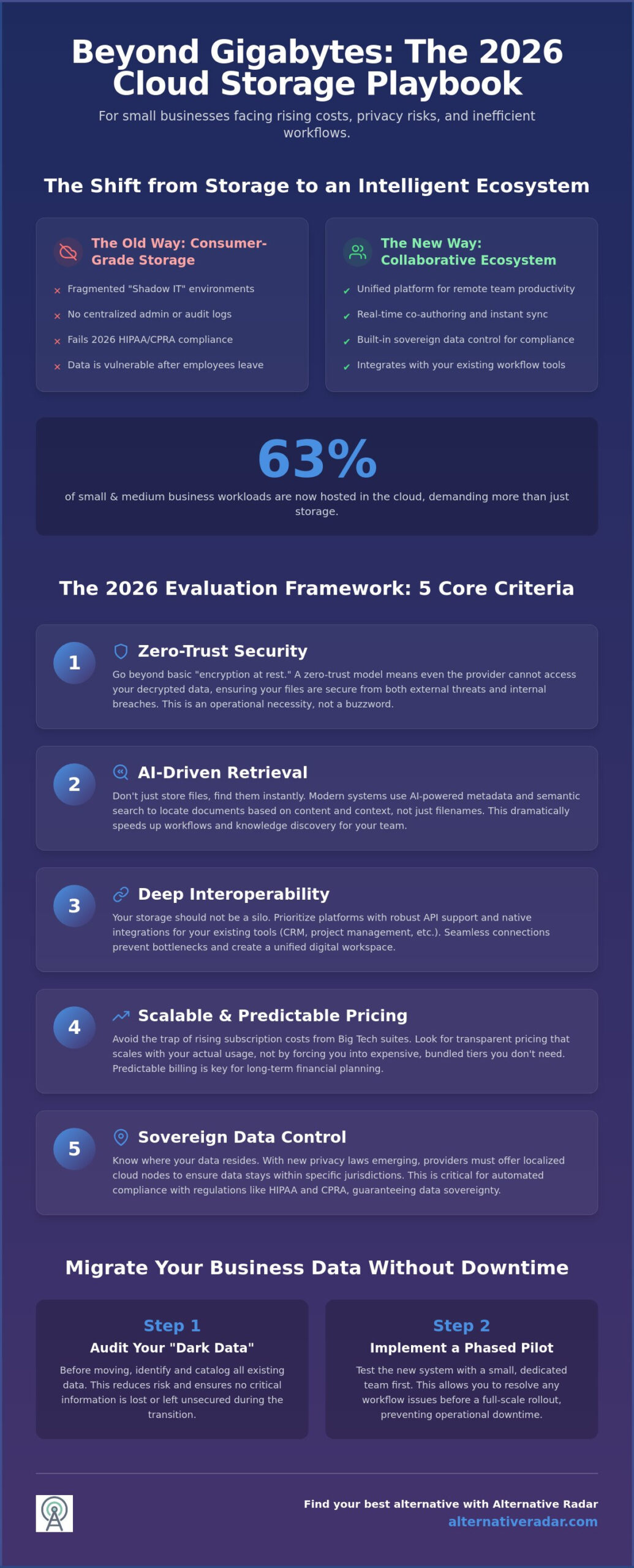
In 2026, storage is no longer just a digital locker for your documents; it’s a collaborative ecosystem. While older models focused on raw capacity, the best cloud storage for small business now prioritizes how data moves and who controls it. Small businesses are increasingly moving away from “dumb” storage toward intelligent content management systems that integrate directly with their operational tools. Research confirms that 63% of small and medium-sized business (SMB) workloads are now hosted in the cloud, reflecting a massive shift toward infrastructure that supports real-time decision making rather than passive archiving.
This evolution is driven by a focus on data sovereignty. As state-specific privacy laws take effect in Indiana, Kentucky, and Rhode Island in early 2026, businesses need storage that guarantees where data resides. You can’t just throw files into a generic bucket anymore. Modern providers use localized cloud nodes to keep data within specific jurisdictions, ensuring compliance while speeding up access. For those evaluating the technical specifics of various providers, a comprehensive comparison of file hosting services reveals how features like encryption and regional hosting have become standard benchmarks for professional use. Identifying the best cloud storage for small business requires looking past the brand name to see if the architecture supports these modern regulatory demands.
Why Your Small Business Has Outgrown Personal Cloud Storage
Relying on consumer-grade plans creates a fragmented environment known as shadow IT. When employees use personal accounts to share work files, your business loses visibility. You can’t track who accessed a file or prevent a former employee from keeping copies of sensitive client data. Basic plans lack the centralized administrative control and detailed audit logs required to meet 2026 HIPAA updates, which now mandate encryption for all electronic protected health information. Additionally, personal storage silos prevent you from using your own data to train internal AI models, effectively locking your business out of the automation gains your competitors are already seeing.
The Essential Role of Cloud Infrastructure in Remote Work
Remote teams can’t afford the “download, edit, re-upload” cycle of the past. Real-time co-authoring is a non-negotiable requirement for 2026 workflows. To support this, leading providers leverage edge-computing storage nodes to reduce latency for global teams. This means your designer in London and your manager in New York see updates instantly, without the lag typical of centralized servers. A cloud-native workflow is an operational strategy where every document, communication, and process is built specifically to live and function within a connected, secure digital environment.
The 2026 Evaluation Framework: 5 Criteria for Choosing Your Provider
Choosing the best cloud storage for small business requires a departure from 20th-century metrics like raw gigabytes. While capacity remains a baseline, your decision should hinge on how the platform manages, protects, and retrieves your data. For those new to these concepts, IBM provides a foundational explanation of cloud storage that highlights how modern infrastructure differs from legacy local backups. In 2026, the focus has shifted toward five specific pillars: zero-trust security, AI-driven retrieval, deep interoperability, scalable pricing, and automated compliance.
Interoperability is particularly vital as your tech stack grows. Your storage shouldn’t exist in a vacuum; it must link seamlessly with your productivity tools and your open source crm software comparison results. If a provider doesn’t offer robust API support or native integrations for your existing tools, it will eventually become a bottleneck for your team’s productivity. You can find more specialized tool evaluations at Alternative Radar to ensure every part of your digital infrastructure aligns.
Security Architecture: Beyond Simple Passwords
Zero-trust is no longer a buzzword; it’s a operational necessity. Most providers offer “encryption at rest,” which means your files are encrypted on their servers, but the provider still holds the master key. For maximum privacy, look for end-to-end encryption (E2EE), where only your business holds the keys. This distinction is critical for meeting the 2026 HIPAA Security Rule updates, which now mandate encryption for all electronic protected health information. Beyond encryption, ensure your provider supports hardware-based 2FA and offers a robust version history. This acts as your primary safety net against ransomware, allowing you to roll back your entire file system to a point before the infection occurred.
AI and Automation: The New Productivity Frontier
The best cloud storage for small business in 2026 uses AI to eliminate the “folder hunt.” Instead of navigating complex directory trees, teams use natural language queries to find files based on their content rather than just their titles. AI-assisted storage now handles the heavy lifting of auto-tagging images and categorizing documents as they’re uploaded. Industry analysts suggest these automated document workflows can save small teams significant time previously spent on manual file retrieval and approval routing. By setting up triggers—such as automatically moving a signed contract to a specific client folder—you remove the friction that slows down remote collaboration.
Finally, consider the “per-user price trap.” As your team grows, subscription costs for big tech suites can skyrocket. Look for providers that offer pooled storage or tiered pricing that doesn’t penalize you for adding new team members. This ensures your monthly billing remains predictable even during periods of rapid scaling.
Top Cloud Storage Alternatives for Small Business: Side-by-Side
Finding the best cloud storage for small business requires looking beyond the marketing budgets of the tech giants. While most lists stop at the “Big Three,” the 2026 market offers specialized tools for every niche, from high-security legal firms to price-sensitive startups. While per-user pricing models offer low entry costs for tiny teams, flat-rate storage models often provide better long-term value for growing organizations that manage large volumes of data without adding massive monthly overhead. According to the best cloud storage apps of 2026, the gap between consumer and enterprise features has narrowed, making it easier to find professional tools at a competitive price point.
The Ecosystem Giants: Pros and Cons
Microsoft OneDrive remains the default for Windows-centric offices due to its deep integration with the Office suite. However, many teams report “feature bloat,” where the interface becomes cluttered with unnecessary tools that slow down simple file management. Google Drive continues to lead in real-time collaboration, but its 2026 policy of using non-sensitive data for AI training has pushed some privacy-conscious firms away. Apple iCloud for Business has emerged as a surprising dark horse; it’s now a viable option for creative-only teams that operate exclusively within the Apple ecosystem and prioritize seamless hardware integration over cross-platform flexibility.
The Privacy and Niche Specialists
For industries like finance and law, zero-knowledge encryption isn’t optional. Tresorit offers Swiss-based storage where even the provider can’t access your files, justifying its premium price through absolute data sovereignty. If you prefer total control over your infrastructure, Nextcloud stands as the popular open source business software 2026 leader for self-hosted data. This allows you to bypass subscription hikes by hosting on your own hardware or a private cloud. To build a complete, secure tech stack, you should link these storage tools to your slack alternatives for unified team communication.
Creative agencies often find that Box or Egnyte serve their workflows better than generic drives. These platforms focus on heavy content management, offering sophisticated metadata tagging and approval workflows that standard suites lack. If your primary concern is the bottom line, value-driven alternatives like pCloud Business or Icedrive offer lifetime or high-capacity plans that avoid the recurring per-user “price trap” mentioned earlier. At Alternative Radar, we prioritize these functional comparisons so you can bypass the “Big Tech” tax and find the best cloud storage for small business that fits your specific seat count and data volume.
Implementation Strategy: Migrating Your Business Data Without Downtime
Drag-and-drop migration is often a recipe for disaster. If you simply move years of accumulated “dark data” to a new platform, you’re carrying over old inefficiencies and security gaps. Successful implementation of the best cloud storage for small business requires a structured approach that preserves uptime while optimizing your new digital environment for 2026 AI-driven retrieval tools. You must treat this move as a data reset rather than a simple relocation. A clean migration ensures your team doesn’t lose hours searching through poorly mapped folder hierarchies.
Phase 1: The Pre-Migration Audit
Categorize your information into “hot” and “cold” data before starting the transfer. Hot data includes active projects your team needs daily, while cold data consists of archived records that can live in cheaper, long-term storage tiers. This audit prevents you from paying premium rates for gigabytes you rarely access. You should also standardize naming conventions now. AI search tools rely on clear metadata; cleaning up your file names before the move ensures these tools function at peak performance from day one. Establish your administrative hierarchy before the first file is uploaded to ensure permissions are locked down from the start.
Testing the best cloud storage for small business with a small “pilot team” reveals hidden friction points before they affect the whole company. Choose one department, like marketing or finance, to move first. This allows you to identify bottlenecks in your data mapping or permission settings without disrupting the entire operation. When you’re ready for the full move, prioritize providers that offer “delta-sync” technology. This only uploads the specific changes made to a file rather than the entire document, which prevents your office internet from crashing under the weight of terabytes of data.
Phase 2: Execution and Onboarding
Decide between native provider importers and third-party migration tools based on your volume of data. While native tools are often free, third-party software provides better reporting and verifies data integrity with checksums to ensure no bits were lost in transit. This verification is vital for maintaining compliance with 2026 data privacy regulations. Once the data is live, your team needs a “Cloud Storage Playbook” to ensure consistent filing. This internal document should outline how to use new AI search protocols and mandatory encryption features for sensitive files.
Without clear training, employees often revert to old, less secure habits. Make sure every team member understands the new zero-trust protocols and how to manage shared links safely. To find a platform that supports these advanced migration and security features, compare the top business storage providers on our platform.
Conclusion: Finding Your Best Alternative with Alternative Radar
The search for the best cloud storage for small business ends when you stop following market leaders and start following your team’s specific data requirements. In 2026, the most popular choice isn’t always the most productive one. Whether you prioritize the zero-trust encryption of Tresorit or the deep ecosystem integration of Google Workspace, your decision must balance long-term cost, security protocols, and sync speed. Storage has become a commodity; the real value lies in how a platform handles AI-powered retrieval and localized data control to meet evolving privacy regulations.
Alternative Radar acts as your digital scout. We’ve already done the hard work of searching, testing, and comparing platforms so you can skip the marketing hype. We filter the noise of the SaaS market to provide high-quality, objective comparisons that value your time and resources. Our goal is to empower you to make smarter choices that fit your unique workflow rather than just adopting what the big tech suites offer by default.
Why Your Choice Today Impacts Your 2027 Scaling
Scaling isn’t just about adding more users. It’s about ensuring your infrastructure can handle increasingly complex data needs, such as the high-volume reporting and asset management required for programmatic display advertising. Vendor lock-in happens when you choose a provider that makes it difficult or expensive to export your data later. Avoid this by selecting platforms that offer standardized API access and transparent migration paths from the start. This foresight prevents the “migration tax” that often hits growing businesses when they finally outgrow a restrictive ecosystem.
Before you sign a long-term contract, use this final checklist to verify your choice:
- Does the provider offer true end-to-end encryption (E2EE) for all business tiers?
- Is the monthly billing predictable as you scale your seat count?
- Does the AI search function effectively index your specific file types and metadata?
- Can you integrate the storage seamlessly with your existing communication and CRM tools?
Explore More Business Alternatives
Your storage is just one piece of your productivity puzzle. If you manage a creative team, check our guide on the best free alternatives to photoshop to keep your software costs lean. For a broader look at how to optimize your entire tech stack, read our finding the best alternative master guide. Don’t settle for the most popular option just because it’s familiar. Use our tools to find a tailored software fit that empowers your team’s growth. Compare cloud storage providers now on Alternative Radar and take control of your business data.
Secure Your Digital Infrastructure for 2027 and Beyond
Selecting the best cloud storage for small business requires moving past the standard offerings of the tech giants. You’ve seen how zero-trust security and AI-driven file management are now the baseline for professional workflows. By focusing on data sovereignty and avoiding vendor lock-in, you ensure your team remains productive. Your decision today dictates how effectively your team will scale into next year and beyond.
The SaaS market moves fast. Don’t let subscription bloat or complex permissions slow your growth. It’s time to prioritize tools that value your resources. Our Madunet digital scouts have already done the heavy lifting, providing objective, data-driven comparisons that prioritize privacy and efficiency. We filter the noise so you can focus on making smarter choices. We act as a neutral advisor, helping you navigate the shift toward sovereign data control without the marketing hype.
Discover the best cloud storage alternatives for your team on Alternative Radar. Your team’s efficiency depends on the tools you choose today. Make them count.
Frequently Asked Questions
What is the most secure cloud storage for a small business in 2026?
Tresorit and Proton Drive are currently the leaders in zero-knowledge security for 2026. These providers ensure that only you hold the decryption keys, meaning the service provider cannot access your data even if subpoenaed. This architecture is vital for businesses in legal or financial sectors that must comply with the latest 2026 HIPAA and CPRA encryption requirements. Using Swiss-based or EU-based providers often adds an extra layer of privacy protection.
Is free cloud storage safe enough for business use?
Free cloud storage is generally insufficient for professional use because it lacks essential administrative controls and audit logs. Most free plans use your non-sensitive data to train AI models or target advertisements, which creates significant privacy risks. For the best cloud storage for small business, you need a paid tier that offers a service level agreement and dedicated security features to protect your proprietary information.
How much cloud storage does a small business typically need?
Most small businesses start with 1TB to 2TB per user, though creative agencies often require significantly more. While a standard office worker manages documents that take up little space, video production teams can consume terabytes in a single month. Evaluate your current local storage usage and add a 20% buffer to account for the rapid data growth typical in 2026 workflows. Pooled storage plans are often more efficient for growing teams.
Can I use cloud storage as a primary backup for my business?
Cloud storage should not be your only backup solution because sync errors can propagate deletions across all devices instantly. Use a dedicated cloud backup service alongside your storage to maintain immutable versioning. Following the 3-2-1 rule, three copies of data, on two different media, with one offsite, remains the gold standard for protecting business continuity. Storage is for daily work; backup is for disaster recovery.
What is the difference between cloud storage and cloud backup?
Cloud storage is designed for active collaboration and real-time file access across multiple devices. In contrast, cloud backup is a disaster recovery tool that creates a point-in-time snapshot of your entire system. While you use storage to edit documents today, you use backup to restore your entire server if a hardware failure or cyberattack occurs tomorrow. Both are necessary components of a modern digital infrastructure.
How do I switch cloud storage providers without losing data?
Switch providers by using specialized migration tools that verify data integrity with checksums during the transfer. Avoid manual drag-and-drop methods for large volumes, as these often fail to preserve folder permissions or metadata. Run a pilot migration with a single department first to ensure the new folder hierarchy matches your team’s existing workflow before moving the entire company. This prevents downtime and identifies sync bottlenecks early.
Does cloud storage comply with GDPR for small businesses?
Compliance depends on the provider’s data residency options and your Data Processing Agreement (DPA). Ensure your chosen best cloud storage for small business offers servers located within the EU or a jurisdiction with equivalent protections. You must also verify that the provider supports the “right to be forgotten” and provides the necessary audit logs to demonstrate compliance. Not all global providers meet these standards by default, so check the settings carefully.
Are there any good open-source cloud storage alternatives for teams?
Nextcloud is the premier open-source choice for teams that want absolute control over their data infrastructure. It allows you to host the software on your own servers, bypassing the subscription fees and privacy concerns associated with “Big Tech” suites. This self-hosted model provides the flexibility to integrate custom security protocols and third-party apps without being restricted by a proprietary provider’s ecosystem. It requires more technical setup but offers unmatched sovereignty.