
Why are you still paying a monthly “tax” just to access your own customer data? It’s frustrating to watch SaaS subscription costs climb while your control over data privacy diminishes. Finding the right self-hosted customer management software is the most effective way to secure your database and eliminate unpredictable overhead. With the 2026 CCPA regulations now requiring mandatory privacy risk assessments, housing sensitive information on proprietary clouds has become a significant compliance liability.
This guide identifies the best tools to help you regain total sovereignty over your information while maintaining a professional tech stack. We’ve scouted the market to find the most stable, high-utility options for the current year. You’ll discover how platforms like Twenty CRM version 2.21.0 and SuiteCRM 8.10.1 compare in terms of features, licensing, and long-term value. Our analysis focuses on helping you lower your total cost of ownership and build a CRM infrastructure that you actually own.
Key Takeaways
- Regain total data sovereignty and eliminate unpredictable subscription bloat by transitioning to a private hosting environment.
- Identify the best self-hosted customer management software for your specific scale, from the battle-tested SuiteCRM to the AI-native Twenty CRM.
- Simplify your infrastructure deployment using Docker and Kubernetes to achieve SaaS-level performance on your own terms.
- Audit your Total Cost of Ownership (TCO) by weighing long-term server maintenance against the rising cost of per-user licensing fees.
- Utilize neutral comparison frameworks to filter through market noise and select tools based on technical merit and workflow compatibility.
The Shift to Self-Hosted Customer Management in 2026
Self-hosted customer management software is no longer a niche choice for technical hobbyists. In 2026, it represents a strategic pivot for organizations that want to own their operational core. Unlike traditional SaaS models, these platforms are installed on your own private servers or dedicated cloud instances. This architecture gives you absolute authority over the software environment, from the database schema to the underlying security protocols. You aren’t just renting a service; you’re building an asset.
The year 2026 marks a turning point for “Data Sovereignty.” With the global Customer relationship management (CRM) market projected to hit $126.2 billion this year, businesses are realizing that their most valuable asset is often held hostage by per-user subscription models. High-growth teams are moving away from unpredictable “per-seat” pricing in favor of infrastructure-based costs. This shift allows you to scale your headcount without a linear, painful increase in software expenses. You pay for the server power you use, not the number of people logging in.
Modern alternatives have also effectively eliminated the “clunky” reputation of legacy open-source tools. New releases like Twenty CRM version 2.21.0 provide sleek, AI-native interfaces that rival the user experience of industry leaders like Salesforce. You get the polish of a premium product without the restrictive licensing or the “subscription bloat” that drains monthly budgets. The UI/UX gap has closed, making the transition smoother for non-technical staff who expect modern, fast-loading dashboards.
Privacy and Compliance: The New Business Standard
Compliance is no longer optional; it’s a primary operational risk. As of January 1, 2026, new CCPA regulations require mandatory privacy risk assessments and cybersecurity audits. By using self-hosted customer management software, you eliminate the need for many third-party data processors. This simplifies your GDPR obligations, especially regarding the European Data Protection Board’s focus on the “right to erasure” (Article 17). Regulated industries like finance and healthcare are leading this migration to ensure total control over data residency and backup protocols. You decide exactly where the data lives and who can touch it.
The End of Vendor Lock-In
Proprietary SaaS vendors frequently implement sudden price hikes or sunset features that your team relies on. Self-hosting protects you from these external shocks. When you own the source code and the database, you are in control of the software roadmap. You have the freedom to modify the logic to fit your specific workflows rather than bending your business to fit a vendor’s limitations. This ownership makes long-term migrations easier because you aren’t fighting against a closed, proprietary ecosystem. You own the keys, the house, and the land it sits on.
Evaluating the Top Self-Hosted CRM Contenders for 2026
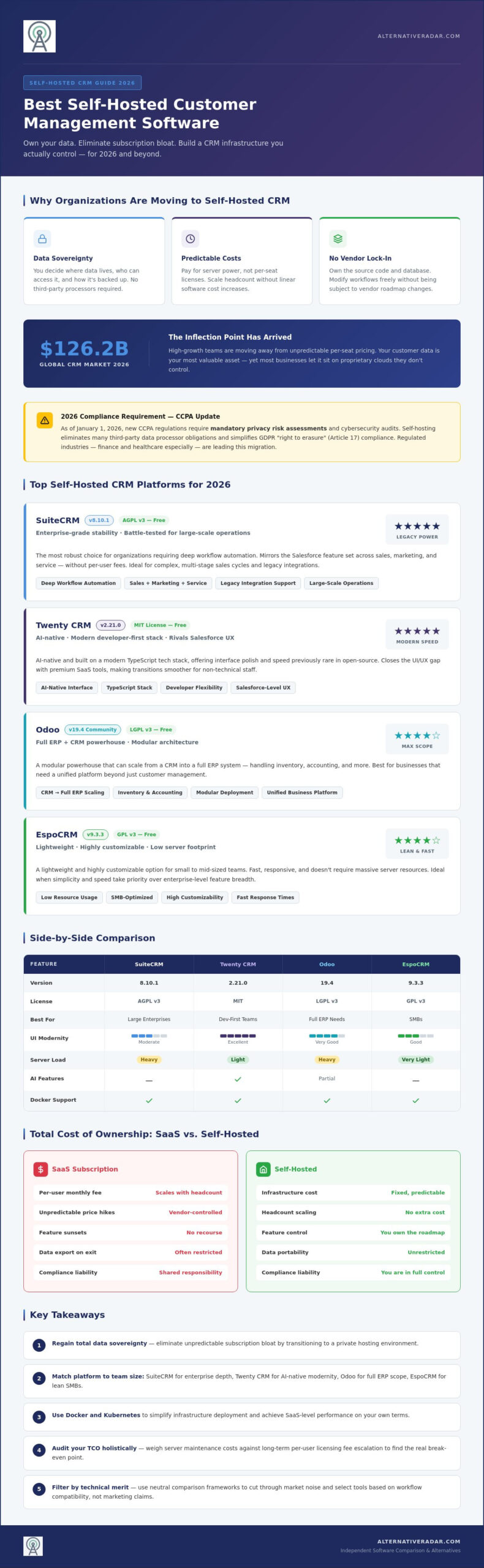
Selecting the right self-hosted customer management software depends on whether you value legacy stability or modern agility. The market has bifurcated into established enterprise platforms and lean, developer-first newcomers. Each option offers a different path to data sovereignty, but the technical trade-offs are significant. If you’re looking to eliminate subscription bloat, your choice should align with your existing server infrastructure and your team’s ability to manage updates.
SuiteCRM 8.10.1 remains the most robust choice for organizations requiring deep workflow automation. It effectively mirrors the Salesforce feature set, providing a comprehensive suite for sales, marketing, and service without per-user fees. For teams that prioritize a contemporary user experience, Twenty CRM version 2.21.0 has emerged as a top-tier contender. It’s AI-native and built on a modern tech stack, offering a level of speed and interface polish that was previously rare in the open-source world.
If your needs extend beyond simple contact management, Odoo 19.4 provides a modular Community Edition under the LGPL v3 license. It’s a powerhouse that can scale from a CRM into a full ERP system, handling everything from inventory to accounting. Meanwhile, EspoCRM 9.3.3 offers a lightweight and highly customizable alternative. It’s particularly effective for small to mid-sized teams that need a fast, responsive tool that doesn’t require massive server resources to run smoothly.
SuiteCRM vs. Twenty: Established Power vs. Modern Speed
SuiteCRM’s primary advantage lies in its ability to handle complex, multi-stage sales cycles and legacy integrations. It’s a battle-tested engine designed for large-scale operations. Twenty takes a different approach by focusing on developer flexibility and AI-driven data entry. If your team is comfortable with TypeScript and wants a minimalist, high-velocity UI, Twenty is the superior choice. If you need a platform that can manage 100+ users with intricate permission levels out of the box, SuiteCRM is the more reliable investment.
Modular Solutions: When You Need More Than Just a CRM
Odoo 19.4 is the leader for businesses that want an all-in-one ecosystem. By integrating customer management with other business functions, you eliminate the need for brittle API connections between separate platforms. However, this “suite” approach can lead to feature creep if you only need a standalone CRM. To see how these tools perform in side-by-side technical benchmarks, you can explore our broader CRM comparison lists for deeper specs. Scaling a modular system like Odoo requires more careful resource planning as you activate additional features, whereas a dedicated CRM like EspoCRM stays lean as you grow.
Technical Requirements and Modern Deployment Strategies
Deploying self-hosted customer management software is significantly more accessible in 2026 than it was even three years ago. The widespread adoption of containerization technologies, specifically Docker and Kubernetes, has standardized the installation process. You no longer need to spend hours manually configuring environment variables or database dependencies. Instead, you can deploy pre-configured images that ensure your CRM runs identically across different hardware configurations. This shift has effectively removed the “it works on my machine” hurdle for IT departments.
Your hardware choice dictates the performance and responsiveness of your system. For a small team of 10 users, a basic VPS with 2 vCPUs, 4GB of RAM, and 40GB of SSD storage is typically sufficient. As you scale to 50 users, you should look at 4 vCPUs and 16GB of RAM to handle concurrent database queries. For enterprise-level deployments of 100 or more users, an 8-core CPU with 32GB of RAM and high-speed NVMe storage is necessary to maintain SaaS-level latency. Always over-provision your RAM slightly to account for the memory-intensive nature of modern AI-indexing features.
Deciding between cloud instances and on-premise hardware involves a trade-off between convenience and absolute sovereignty. Cloud providers like AWS or DigitalOcean offer 99.9% uptime and easy snapshots, but your data still resides on someone else’s physical disk. On-premise hardware provides the highest level of security for sensitive industries, as the data never leaves your physical facility. Regardless of your choice, you must implement automated, encrypted off-site backups. A reliable disaster recovery plan is the only way to protect your business against local hardware failure or site-wide outages.
One-Click Deployments and Managed Hosting
If you want the benefits of ownership without the burden of manual server administration, platforms like Elestio or Cloudron offer a streamlined path. These services handle the heavy lifting of security patches and version updates for you. Managed Open Source serves as a middle-ground for reliability by providing the control of self-hosting with the maintenance ease of a subscription service. This model allows you to focus on your sales pipeline rather than your server logs.
AI and Local LLM Integration
The primary technical advantage of self-hosting in 2026 is the ability to integrate local Large Language Models (LLMs). You can now run lead scoring and sentiment analysis directly on your own infrastructure without transmitting customer data to third-party AI providers. This keeps your competitive intelligence private while still benefiting from modern automation. By using local APIs, you can connect your CRM to your existing productivity tools, future-proofing your stack for the next generation of AI-driven sales workflows.
Decision Framework: Is Self-Hosting Right for Your Team?
Choosing to deploy self-hosted customer management software is a high-stakes decision that balances financial savings against operational responsibility. You must determine if your organization is ready to move from a “renter” mindset to an “owner” mindset. While the promise of data sovereignty is compelling, the shift requires a realistic assessment of your technical resources. If your team handles highly sensitive client data or requires deep code-level customization, the investment in self-hosting often pays for itself through increased security and flexibility.
The primary driver for this transition is typically the Total Cost of Ownership (TCO). SaaS platforms often hide their true cost behind tiered feature gates and per-user pricing that punishes growth. In contrast, self-hosting costs are largely decoupled from your headcount. You pay for the infrastructure and the labor to maintain it, not for the number of people logging in. However, you must conduct a “Maintenance Reality Check” before committing. You need to ensure your IT department has the bandwidth to manage security patches, version upgrades, and database optimization without compromising their daily tasks.
Calculating Your ROI
For a team of 20 users, the break-even point for self-hosting typically occurs within the first 18 to 24 months. While a premium SaaS CRM might cost your business $1,200 monthly, a self-hosted instance on a high-performance VPS often costs less than $100 in monthly infrastructure fees. Even when you factor in five hours of IT labor for monthly maintenance, the long-term savings are substantial. Be sure to account for “hidden” costs such as cloud storage egress fees and the one-time purchase of premium plugins for specific integrations. Over a three-year period, owning your stack can reduce your software spend by 40% to 60% compared to equivalent SaaS tiers.
The Hybrid Approach: The Best of Both Worlds
You don’t have to migrate your entire operation overnight. Many successful teams adopt a hybrid strategy by using a self-hosted CRM for core data while maintaining SaaS integrations for non-sensitive tasks like email marketing or lead generation. This limits your exposure to vendor lock-in while keeping your most valuable data under your direct control. To test the feasibility of this move, consider setting up a pilot program with an open source crm software comparison to evaluate which tool aligns with your internal technical skill set. Transitioning in stages allows you to refine your backup protocols and ensure your team is comfortable with the new interface. Before you finalize your choice, compare specific feature sets to ensure your selected platform supports your long-term scaling goals.
Finding Your Perfect CRM Alternative with Alternative Radar
Selecting the right self-hosted customer management software in a market saturated with over 150 viable contenders requires a high-quality filter. In 2026, the software landscape is more fragmented than ever. You shouldn’t have to spend weeks auditing repository commits or testing database migrations just to find a stable tool. Alternative Radar acts as your digital scout, identifying high-utility platforms based on technical merit rather than marketing budgets. We prioritize objective comparisons to help you make high-stakes infrastructure decisions with confidence.
Our scouting process focuses on tools that often fly under the radar of mainstream tech publications. While market leaders spend millions on programmatic advertising, many of the most secure and efficient CRM engines are built by community-driven teams focused on performance. We analyze these tools through a lens of efficiency and long-term viability. By using our discovery platform, you gain access to a curated list of software that respects your data sovereignty and aligns with modern DevOps practices. Don’t settle for the most popular option; choose the one that fits your specific technical requirements.
How to Use Our Comparison Tools
Efficiency-driven decision-making starts with the right data. Our platform allows you to filter results by license type, technical stack, and industry-specific feature sets. If you need to see how your CRM choice integrates with other essential tools, access our popular open source business software 2026 guide for a broader strategic view. This resource helps you build a cohesive ecosystem where every piece of software is under your direct control. You can save hours of manual searching by using our side-by-side technical benchmarks to validate your choices before you ever touch a command line.
Commit to Data Sovereignty Today
Before you start your first self-hosted instance, verify that your selected platform meets your long-term growth goals. Use this final checklist to ensure a successful deployment:
- Confirm your server hardware meets the RAM and CPU benchmarks discussed in previous sections.
- Audit the software’s API documentation for compatibility with your existing tech stack.
- Establish an automated, encrypted off-site backup protocol.
- Verify the active maintenance status of the software’s source code.
Encourage your team to move toward more customizable crm software to ensure your database can adapt to the evolving AI requirements of 2026. Explore our full database at Alternative Radar to find your perfect match and take back control of your customer information today.
Build Your Data Sovereignty with Confidence
Transitioning to self-hosted customer management software is a strategic investment in your organization’s long-term independence. By taking control of your infrastructure, you effectively bypass the unpredictable pricing and privacy risks inherent in proprietary SaaS models. The technical barriers to entry have vanished thanks to containerization and modern deployment platforms. Whether you prioritize the deep automation of SuiteCRM or the AI-driven agility of Twenty, the choice to own your data is the only way to ensure total compliance with the evolving regulatory landscape of 2026.
Stop settling for restrictive licenses that tax your business growth. You can now access a neutral, objective comparison of 50+ CRM tools updated for 2026 software trends. We focus on data privacy and open-source licensing to ensure you find a tool that aligns with your technical merit requirements. Find the best self-hosted CRM for your team on Alternative Radar and start your journey toward a more stable, scalable future. Empower your team with tools you actually own.
Frequently Asked Questions
Is self-hosted CRM really cheaper than SaaS in the long run?
Yes, self-hosting is generally more cost-effective because it eliminates the per-user monthly “tax” typical of SaaS models. For a team of 20 users, the break-even point often occurs within 18 to 24 months. While SaaS expenses scale linearly with your headcount, self-hosted customer management software costs remain relatively flat, tied only to your server infrastructure and occasional maintenance labor.
Do I need a dedicated developer to manage a self-hosted CRM?
You don’t necessarily need a full-time developer, but you do need someone comfortable with basic server administration. Modern deployment tools like Docker and Kubernetes have made the installation process much more accessible for general IT staff. Many small teams also use managed open-source hosting providers to handle the backend technical work without the expense of a dedicated engineering hire.
Can I migrate my data from HubSpot or Salesforce to a self-hosted platform?
Yes, most professional-grade self-hosted platforms support CSV imports or API-based data transfers. Tools like SuiteCRM and Twenty CRM include mapping utilities specifically designed to ingest data from major SaaS competitors. It’s best to audit your current database schema first to ensure custom fields and relationship links remain intact during the migration process.
What are the biggest security risks of hosting my own customer data?
The primary risks are misconfigured server settings and neglected security patches. When you use self-hosted customer management software, you are responsible for your own firewall, SSL certificates, and encryption protocols. You can mitigate these threats by implementing automated off-site backups and using containerized environments that simplify the process of applying critical security updates across your stack.
Are there self-hosted CRMs that offer mobile apps for sales teams?
Yes, several leading options provide native mobile applications or highly responsive web interfaces. SuiteCRM and EspoCRM both offer mobile functionality that allows field agents to update records and access lead data on the go. Newer platforms like Twenty focus on mobile-first web design, ensuring that your sales team has a seamless experience regardless of the device they use.
How do I handle software updates and bug fixes for open-source CRMs?
Updates are typically managed through package managers or Docker Compose commands. Most active open-source projects release maintenance versions monthly to address bugs and security vulnerabilities. You should always run a staging environment to test these updates before applying them to your production server. This practice ensures that custom modifications don’t break when the core software is upgraded.
Which self-hosted CRM is best for a small business with no IT department?
EspoCRM is a top contender for small businesses because it is lightweight and features a more intuitive configuration panel than enterprise-level suites. If you lack any internal technical resources, using a one-click deployment service like Cloudron or Elestio is a smart move. These services handle the server management for you while still giving you full ownership of your data.
Can I run a self-hosted CRM on a basic VPS like DigitalOcean or Linode?
Yes, basic VPS instances are excellent for hosting these platforms. A small team of 10 users can usually run a responsive system on an instance with 4GB of RAM and 2 vCPUs. As your database grows or your user count increases, these providers allow you to scale your hardware resources upward with minimal downtime, making them a flexible choice for growing teams.