
What if the software meant to accelerate your growth is actually the ceiling holding your sales team back? Most leaders expect that scaling their technology will be a linear process, yet they often encounter complexity creep that makes tools unusable for the very reps they are meant to empower. You might already feel the friction of sudden pricing jumps when adding users or the frustration of data silos forming as departments expand. Finding the best crm for sales teams in 2026 requires looking beyond basic features toward architectural flexibility and cost-predictability.
This article identifies the most reliable platforms that grow alongside your business while ensuring data integrity and technical performance. We have acted as a digital scout, filtering through the noise to compare how these top-tier brands handle increased volume without slowing down your operations. You will discover which systems offer the most seamless integrations and transparent licensing models to keep your growth trajectory on track. We prioritise clarity over marketing hype, providing the objective comparisons you need to make a smarter, more efficient choice for your future expansion.
Key Takeaways
- Distinguish between horizontal and vertical scaling to ensure your system handles increased workloads without performance hits.
- Select the best crm for sales teams by prioritising robust API infrastructure and advanced customisation options like custom objects.
- Compare the enterprise-grade depth of Salesforce against the modular, user-centric scalability of HubSpot to find your ideal fit.
- Determine whether your technical team requires the flexibility of open-source software or the managed convenience of a SaaS ecosystem.
- Implement a strategic data audit and process mapping phase to protect your information integrity during the transition to a more powerful platform.
What is CRM Scalability? Understanding the Growth Trap
Growth often reveals the hidden limitations of your technology. While many platforms claim to support expansion, true scalability is the system’s ability to handle increasing workloads without performance degradation. Before selecting the best crm for sales teams, you must understand What is CRM? scalability in a technical sense. It involves more than just adding new user seats; it requires a foundation that remains stable as your data becomes more complex.
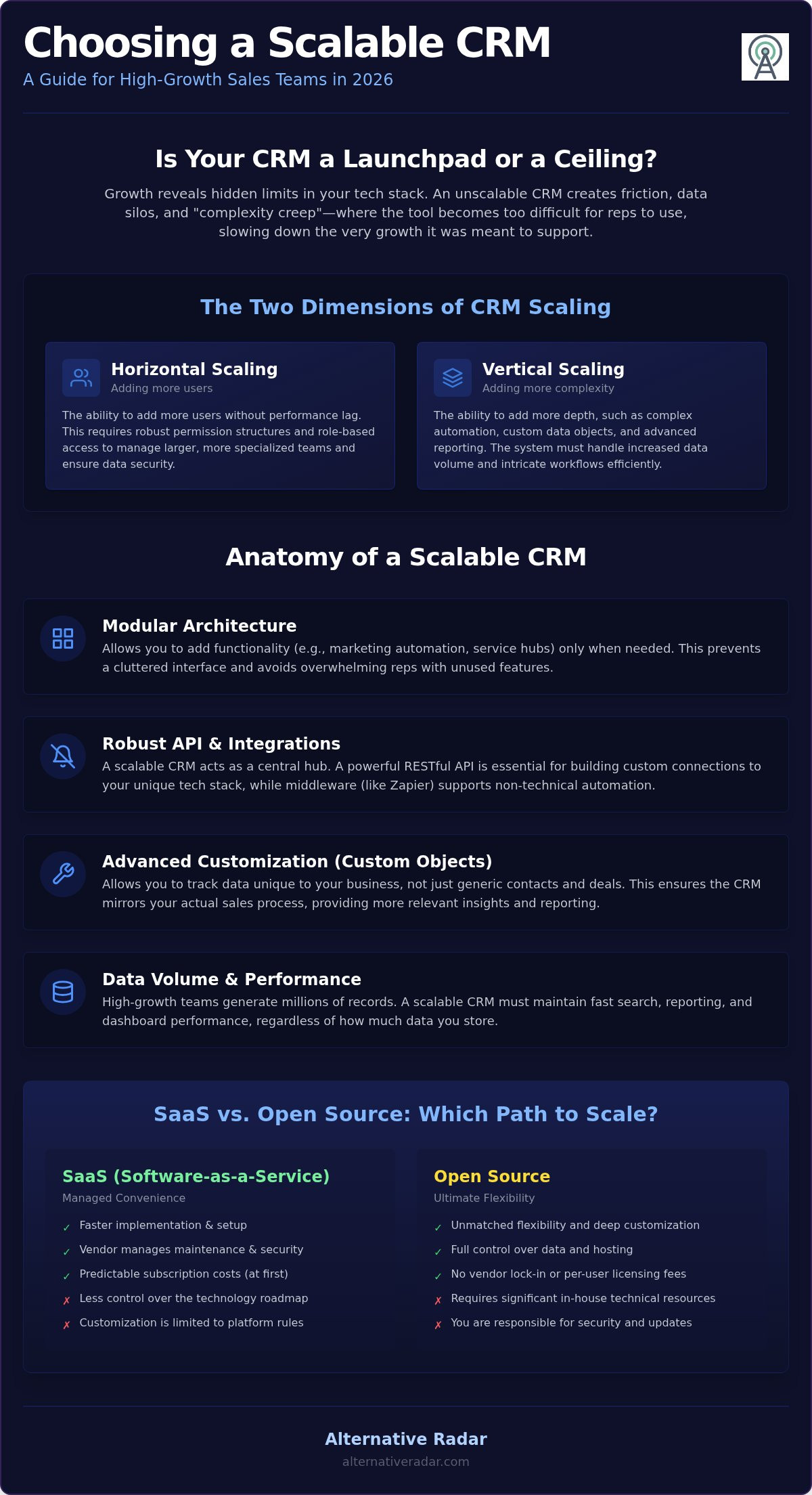
Scaling typically happens in two directions. Horizontal scaling refers to adding more users to the system, which demands robust permission structures and role-based access. Vertical scaling involves adding depth, such as complex automation, custom objects, and advanced reporting. A system that excels at one but fails at the other creates a growth trap. You might find that a tool perfectly suited for a 10-person startup breaks at 50 users because it lacks the governance features needed to manage larger, departmentalised teams.
This failure often stems from architectural debt. Rigid CRM systems rely on “quick fix” customisations that work in the short term but create a tangled web of logic as you grow. Eventually, the system becomes so heavy with these workarounds that it slows down, leading to “complexity creep” where sales reps find the tool too difficult to use. To avoid this, you need a platform designed for architectural flexibility from the start.
The Two Dimensions of CRM Growth
- User Capacity: As you expand, the system must manage concurrent access without lag. It needs sophisticated tools for managing permissions, ensuring that sensitive data remains restricted as roles become more specialised.
- Data Volume: High-performing teams generate millions of records. A scalable CRM ensures that search functions and dashboard reporting remain fast, regardless of how many leads or contacts you store.
- Process Complexity: Your workflows will evolve from simple lead tracking to multi-stage, automated customer journeys. The best crm for sales teams provides the logic engines to support these intricate processes without requiring constant manual intervention.
Why Your Current CRM Might Be a Dead End
Entry-level tools and spreadsheets eventually hit a feature ceiling. You might notice that adding a new automation suddenly breaks three existing ones, or that your reporting no longer provides the granular insights you need. This is often accompanied by proprietary lock-in, where a vendor makes it difficult or expensive to export your data, essentially holding your business growth hostage. Recognising these signs early allows you to transition before the friction costs become too high. CRM scalability is the system’s ability to maintain a stable cost-per-user and consistent performance levels even as data volume and process complexity grow exponentially.
Essential Features for a Scalable CRM Ecosystem
Scaling beyond a basic spreadsheet requires a specific set of technical capabilities. The best crm for sales teams acts as a central nervous system, connecting disparate tools into a unified workflow. To maintain efficiency as you grow, your chosen platform must offer more than just contact storage; it needs a foundation built on modularity and connectivity. This ensures that the tool remains useful for reps while providing the granular data needed for executive decision-making.
Modular architecture allows you to add specific functionality, such as advanced marketing automation or customer service hubs, only when your team requires them. This prevents complexity creep by keeping the interface clean and focused. Additionally, look for platforms that offer advanced customisation through custom objects. These allow you to track data points unique to your industry, such as specific contract types or equipment IDs, ensuring the system reflects your actual business reality rather than a generic template.
API and Integration Capabilities
A scalable CRM is never an island. RESTful APIs are the gold standard for growing businesses because they allow for flexible, high-speed communication between your CRM and external tools like accounting software or customer portals. While native integrations are convenient for standard tasks, a robust API allows your developers to build custom connections that fit your unique tech stack. For teams without deep technical resources, middleware like Zapier or Make acts as a vital bridge, allowing you to automate workflows between the best crm for sales teams and hundreds of third-party apps without writing custom code.
Advanced Data Management
As lead volume increases, so does the risk of “dirty data.” Scalable systems provide built-in data cleansing tools to merge duplicates and validate entries automatically. Managing a growing team also requires Role-Based Access Control (RBAC). This ensures that as you add departments, users only see the data relevant to their specific tasks, maintaining both security and focus. If you are currently evaluating your options, you can compare specific feature sets across top-rated platforms to see which architecture matches your growth plans. High-speed import and export tools are equally critical, allowing for bulk data processing that doesn’t bottleneck your operations. Sophisticated reporting and AI-driven forecasting use this historical data to predict future revenue, helping you manage complex datasets and make informed investment decisions.
The Best CRM Brands for Sales Teams in 2026: A Comparative Review
Choosing the best crm for sales teams requires a clear view of your long-term roadmap. Entry-level pricing often masks the steep financial climb required to unlock enterprise-grade automation. We have analysed the market to identify which brands offer true architectural flexibility versus those that rely on restrictive pricing tiers. Your decision should balance immediate usability with the total cost of ownership over a five-year growth period.
The Enterprise Giants: Salesforce vs. HubSpot
Salesforce and HubSpot dominate the high-end market with contrasting philosophies. Salesforce provides a vast ecosystem for customisation, but its Enterprise tier at $175 per user per month carries a high total cost of ownership due to the need for specialist administrators. It’s the industry standard for massive complexity, yet it requires significant technical investment to maintain. HubSpot counters this with a modular approach and a more intuitive interface. However, the “HubSpot trap” involves significant one-time costs, including a $3,500 onboarding fee for the Sales Hub Enterprise tier. If you want to bypass these proprietary ecosystems entirely, consider an Open Source CRM Software Comparison to find a more flexible path that avoids vendor lock-in.
The Agile Scalers: Zoho and Pipedrive
Zoho and Pipedrive offer streamlined alternatives for businesses prioritising efficiency and cost-predictability. Zoho CRM provides an expansive feature set for a lower entry point, with its Ultimate tier priced at $52 per user per month as of August 2026. For businesses scaling on a strict budget, the Zoho One bundle provides an entire business suite for a flat fee, eliminating the need for multiple disparate subscriptions. This makes it an excellent choice for maintaining data integrity across different departments without the high overhead of enterprise rivals.
Pipedrive focuses on sales velocity by stripping away the non-essential features that often lead to complexity creep in other platforms. It prioritises a visual pipeline that drives quick user adoption, which is vital as teams grow larger and new hires need to get up to speed quickly. By focusing on the core sales process rather than general business management, Pipedrive ensures that the best crm for sales teams remains a tool for productivity rather than a source of administrative friction. Evaluating user adoption rates early in your search will help you avoid investing in a powerful system that your reps eventually ignore.
Open Source vs. SaaS: Which Scaling Path Fits Your Sales Team?
Choosing between open-source flexibility and SaaS convenience is a pivotal decision for any growing organisation. Finding the best crm for sales teams often involves deciding where your data lives and who manages the underlying infrastructure. While SaaS is the industry default, the “freedom vs. convenience” trade-off becomes more pronounced as your headcount grows. You must weigh the immediate ease of a hosted platform against the long-term customisation potential of an open-source codebase.
SaaS platforms prioritise speed and reliability. They handle the heavy lifting of server maintenance, security patches, and global accessibility, allowing your reps to focus on closing deals rather than troubleshooting software. Conversely, open-source solutions appeal to technical teams that require a highly customisable CRM environment. These platforms allow you to modify the source code to fit unique workflows that proprietary systems might not support without expensive workarounds.
When to Choose Open Source (SuiteCRM, Odoo)
Open-source software provides total control over data residency and server locations. This is a critical advantage for businesses in highly regulated industries where privacy and data sovereignty are non-negotiable. By self-hosting, you avoid the sudden per-user licensing jumps that often occur with SaaS providers during periods of rapid headcount growth. This makes it a financially viable path for horizontal scaling if you have the internal technical resources to manage the deployment. For a broader look at how these tools fit into a modern tech stack, explore our guide to Popular Open Source Business Software 2026.
The Case for Scalable SaaS Platforms
For non-technical sales organisations, SaaS platforms offer a zero-maintenance overhead that is difficult to beat. Updates are automatic, ensuring you always have access to the latest security features and AI-driven tools without manual intervention. The primary advantage here is the “App Store” ecosystem. Most leading SaaS CRMs offer a massive library of native integrations, allowing for rapid, code-free feature expansion as your requirements evolve. This modularity ensures that the best crm for sales teams can adapt to new marketing or service needs in minutes rather than months.
Security remains a shared responsibility regardless of your choice. SaaS providers typically handle SOC2 compliance and encryption at rest out of the box, whereas open-source deployments require your team to configure and maintain GDPR-compliant server environments. You can compare top-rated CRM alternatives to see which deployment model aligns with your current technical resources and growth projections.
Strategic Implementation: Transitioning Without Data Loss
Transitioning to a more powerful platform is a high-stakes operation. Even the best crm for sales teams will fail if the underlying data is fragmented or the team refuses to use it. You must treat this transition as a strategic project rather than a simple software update. Start with a “Spring Cleaning” phase to audit your existing records. This involves identifying duplicate entries, correcting outdated contact information, and deleting obsolete leads that no longer serve your pipeline.
Map your existing sales processes to the new system architecture before moving a single record. This ensures that your unique workflows remain functional in the new environment. Running a pilot programme with a small, high-growth team allows you to identify technical friction points in a controlled setting. This team acts as your internal scouts, testing the system’s limits before a company-wide rollout.
Data Mapping and Migration Best Practices
Success depends on a detailed source-to-target map. This document defines exactly where each piece of historical data will live in the new system, including tailored fields and custom objects. Poor data mapping is the leading cause of failed CRM migrations, often resulting in lost history or unusable records. You should prioritise active leads and recent customer interactions over legacy data from five years ago. This keeps the new system lean and ensures that your reporting remains accurate from day one. If you are still in the selection phase, consult our complete guide on Finding the Best Alternative to Popular Software to ensure your new choice truly fits your technical requirements.
Ensuring Long-Term Adoption
User buy-in is the final boss of scalability. Even the most advanced automation is worthless if your reps find it cumbersome. Establish a CRM Center of Excellence, which is a small internal support group, to handle troubleshooting and best-practice sharing. This group ensures that the best crm for sales teams continues to provide value as your organisation evolves. Continuous training is essential because software providers frequently release new features and API updates. By prioritising education and internal support, you transform the CRM from a mandatory database into a competitive advantage that empowers your team to scale without friction.
Future-Proofing Your Sales Infrastructure
Scaling your business requires a CRM that remains a tool for productivity rather than a source of administrative friction. Effective growth depends on balancing horizontal user expansion with the vertical complexity of automated workflows and high-volume data management. Whether you prioritise the modular convenience of a SaaS ecosystem or the architectural freedom of open-source software, your choice must align with your team’s technical capacity and budget predictability. Selecting the best crm for sales teams involves looking past entry-level features to ensure the platform can handle your 2026 growth targets without performance degradation.
The right system empowers your reps to focus on high-value interactions while maintaining a single source of truth for your entire organisation. If you’re ready to move beyond market leaders and find a tailored fit, we’ve already done the heavy lifting for you. Explore the best CRM alternatives on Alternative Radar to access objective, data-driven software comparisons and expert analysis of 50+ CRM brands, all regularly updated for 2026 market shifts. Make a smarter choice today and build a foundation that grows alongside your ambition.
Frequently Asked Questions
What makes a CRM scalable compared to a standard one?
A scalable CRM prioritises architectural flexibility and performance stability over basic contact storage. While standard tools often lag as data volume increases, a scalable system maintains high-speed reporting and search capabilities across millions of records. It provides the governance features needed for hundreds of concurrent users, such as role-based access and sophisticated permission levels, ensuring the tool doesn’t become unusable as your team structure grows more complex.
How much does it typically cost to scale a CRM from 10 to 100 users?
Scaling costs depend heavily on your chosen vendor’s tier structure and licensing model. You might start at $25 per user on a basic plan, but moving to an enterprise tier can push costs to $175 or more per seat. Additionally, some platforms require one-time onboarding fees that can reach $3,500. You must also factor in the cost of increased API limits and storage as your team generates more data over time.
Can I switch from a SaaS CRM to an open-source one later?
You can switch, but the process requires a rigorous data migration strategy to avoid information loss. Most SaaS providers allow you to export data in standard formats, yet mapping those records to an open-source architecture demands significant technical expertise. It’s often more efficient to select a flexible platform early on rather than managing a complex transition once your data silos have already become unmanageable and technically restrictive.
Does HubSpot scale as well as Salesforce for large enterprises?
HubSpot has evolved into a formidable enterprise competitor by 2026, offering a unified codebase that simplifies user adoption across large teams. While Salesforce remains the industry standard for massive customisation and complex ecosystem depth, HubSpot offers a modular approach that is often easier to manage. The best crm for sales teams at the enterprise level depends on whether you prioritise deep technical customisation or a streamlined, user-friendly interface for your reps.
What are the hidden costs of scaling a CRM system?
Hidden costs frequently include API overage charges, additional data storage fees, and the expense of third-party middleware for integrations. Many vendors also charge for premium support as a percentage of your total license fees, which can significantly increase your annual spend. You should also account for the internal resources required for continuous training and data cleansing, as these are essential for maintaining the best crm for sales teams as you grow.
How do I know if my business is ready for an enterprise-grade CRM?
Your business is ready when your current software starts creating data silos or slowing down your sales velocity. If your reporting can no longer provide granular insights into multi-departmental customer journeys, or if your reps spend more time on manual workarounds than selling, you’ve hit a feature ceiling. Reaching a headcount of 50 users is usually the tipping point where basic tools fail to provide the necessary governance and automation.
Is open-source CRM really free for a growing team?
Open-source software eliminates per-user licensing fees, but it isn’t free to operate at scale. You’ll need to budget for high-performance server hosting, security maintenance, and the technical staff required to manage updates and customisations. For teams with massive headcounts, this model offers a lower total cost of ownership, but smaller businesses often find that the maintenance overhead exceeds the predictable monthly subscription costs of a managed SaaS platform.