The most expensive writing subscription in your budget might actually be your biggest productivity bottleneck. If you’re tired of seeing “Premium” locks on every helpful suggestion, it’s time to explore free grammarly alternatives that don’t gatekeep your best work. Most writers share the frustration of tools that tease better clarity while hiding the actual fixes behind a paywall. Privacy also remains a critical concern as users question how their sensitive data is handled by large-scale AI models. You shouldn’t have to compromise your data or your budget for polished prose.
This guide cuts through the marketing noise to identify the most powerful writing assistants available in 2026. We’ve evaluated these platforms based on their style-checking depth, word count limits, and security protocols. You’ll learn how to secure a reliable, free-forever writing assistant that provides advanced style suggestions rather than just basic spellcheck. We’ve done the testing and comparison so you can upgrade your workflow with confidence and efficiency.
Key Takeaways
- Identify why the 2026 writing landscape makes premium-only features a barrier and how to bypass them for better efficiency.
- Compare the most effective free grammarly alternatives to find the right balance between advanced AI style suggestions and zero subscription fees.
- Evaluate the privacy benefits of open-source solutions against popular freemium models to protect your sensitive documents.
- Match specific AI writing assistants to your professional needs, ranging from academic citation support to creative long-form pacing.
- Execute a clean transition with a migration checklist that secures your custom dictionary and deletes your data from previous platforms.
Why Look for a Free Grammarly Alternative in 2026?
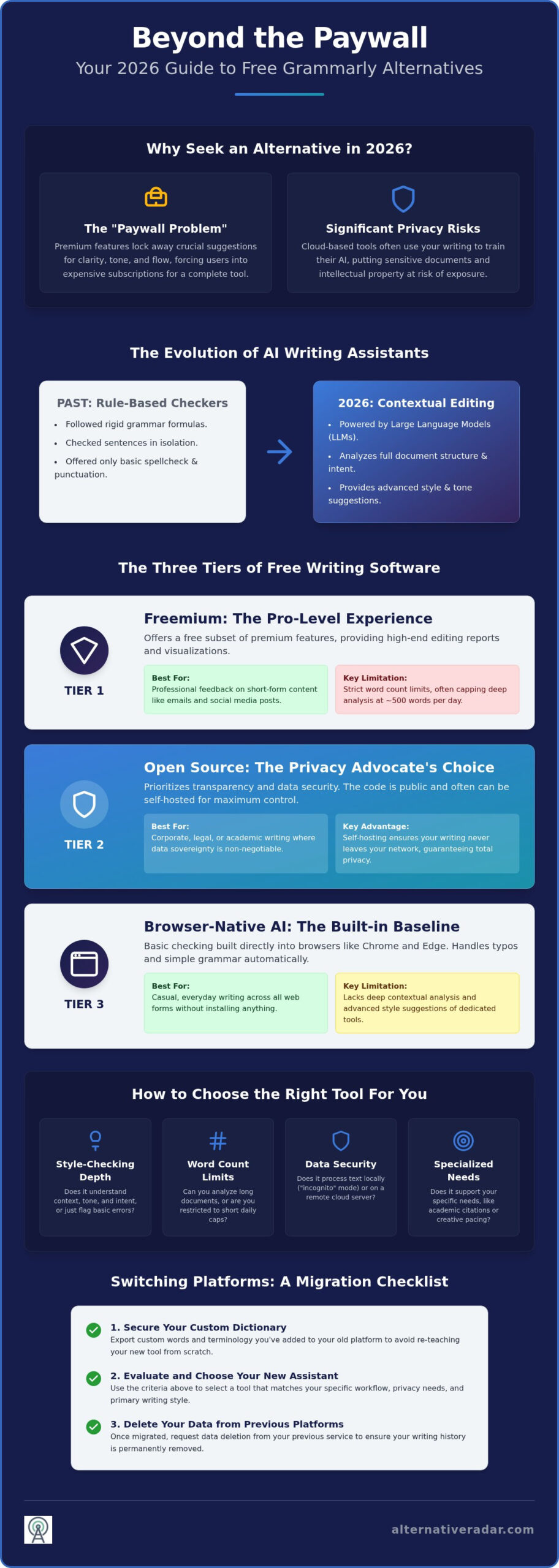
By 2026, the digital writing landscape has shifted from basic spellchecking to sophisticated AI partnership. While Grammarly remains a household name, its free tier has become increasingly restrictive, often acting more like a demo than a functional tool. Users now face a persistent “paywall problem” where advanced clarity, tone adjustments, and even basic flow improvements are locked behind high monthly fees. This friction has pushed professionals and students alike to seek out free grammarly alternatives that offer premium-level features without the recurring cost. As a digital scout, Alternative Radar helps you bypass these paywalls by identifying tools that prioritize your productivity over their profit margins. You can also explore our broader database of software options to find other office tools that fit your specific workflow.
Standard browser-native AI in Chrome and Edge now handles basic typos for free. This means a standalone writing assistant must provide significant added value to justify its space in your workflow. If a tool only does what your browser already does, it isn’t helping you work faster or better. Modern writers need tools that understand complex intent rather than just flagging passive voice. The market has matured, and the best tools today focus on how your writing feels to a human reader, not just how it looks to an algorithm.
The Evolution of AI Writing Assistants
We’ve moved past the era of simple rule-based checking. Early tools followed rigid formulas, but 2026 represents a turning point where Large Language Models (LLMs) provide deep context awareness. High-quality alternatives now analyze your entire document’s structure rather than checking sentence by sentence in isolation. Contextual Editing is the 2026 standard that describes an AI assistant’s capacity to interpret a writer’s underlying intent and document goals to provide style suggestions that go beyond basic grammar. This level of sophistication, once a paid luxury, is now becoming accessible through decentralized and open-source projects that challenge the dominant market leaders.
Privacy Concerns with Cloud-Based Checkers
Your writing is often the primary fuel for proprietary AI training. Many users don’t realize that using cloud-based checkers often grants the service provider rights to use their text to refine future models. For professionals handling sensitive legal documents or proprietary code, this is a significant security risk. The demand for data sovereignty has led to a rise in local-first tools. These tools process your text on your device rather than sending it to a remote server. When evaluating free grammarly alternatives, look for those offering “incognito” editing modes or zero-knowledge architectures. These features ensure your intellectual property remains yours alone, providing a layer of security that market leaders often overlook in favor of data collection.
The Three Tiers of Free Writing Software
Selecting the right tool depends on your specific output and privacy requirements. The market for free grammarly alternatives is generally split into three distinct categories: freemium software, open-source projects, and browser-native AI. Each tier offers a different balance of features and data security. While some users prioritize deep stylistic analysis, others need a “set it and forget it” solution that works across all web forms. Understanding these tiers helps you avoid the frustration of hitting a paywall mid-sentence.
Freemium: The Pro-Level Experience
Freemium tools like ProWritingAid provide a high-end editing experience by offering a subset of their premium reports for free. They often hook users with detailed visualizations of sentence length and readability scores. However, by 2026, most freemium models have tightened their word count limits. You might find a daily cap of 500 words for deep analysis, which is sufficient for emails but challenging for long-form essays. For a broader look at how these models fit into a professional environment, see our Open Source Business Software 2026 guide. These tools are best for those who want professional-grade feedback in small bursts.
Open Source: The Privacy Advocate’s Choice
Open-source solutions prioritize transparency and community improvement. LanguageTool is the primary example here, offering a massive free tier that supports dozens of languages. Because the code is public, the community frequently contributes specialized dictionaries and style guides that commercial tools might overlook. The biggest advantage is security. You can even self-host your own instance of these tools on a local server. This setup ensures that your writing never leaves your internal network, making it the ideal choice for corporate or legal environments where data sovereignty is non-negotiable.
The third tier consists of browser-integrated AI tools in Chrome, Edge, and Safari. They’re already installed and require no extra setup. While convenient, they often lack the depth of dedicated writing assistants. When choosing between free grammarly alternatives, you must calculate the “total cost of free” across three main factors:
- Ads: Some tools display sponsored suggestions or software placements to keep core features free.
- Data: Many cloud-based models train their AI on user submissions unless you opt-out.
- Functionality: Most free tiers restrict advanced features like plagiarism checks or tone rewrites.
If you need more tailored results, you can explore our curated software database to find the exact match for your specific writing workflow.
Top 5 Free Grammarly Alternatives Compared
Finding the right writing assistant requires balancing feature depth with restrictive usage caps. In 2026, the market offers several high-quality free grammarly alternatives that cater to different professional needs. Whether you require multi-language support or deep stylistic analysis, these tools provide robust functionality without a subscription fee. We’ve curated this list to help you identify which platform aligns with your specific output requirements.
- LanguageTool: This open-source powerhouse is the best choice for multi-lingual writers. It supports over 30 languages and offers a generous 20,000-character limit per check on its free tier.
- ProWritingAid: Ideal for long-form and creative content. Its free version provides 20 distinct style reports, though it limits deep analysis to 500 words per day.
- Hemingway Editor: A specialized tool for improving readability. It doesn’t check grammar in the traditional sense but uses color-coded highlights to identify complex sentences and passive voice.
- QuillBot: The industry leader for paraphrasing. Its free tier allows you to rewrite up to 125 words at a time, making it perfect for shifting tone or refining specific paragraphs.
- Microsoft Editor: A lightweight, reliable extension for Edge and Chrome. It integrates perfectly with Office 365 and provides essential grammar and spelling checks across most web forms.
- Alternative Radar: Our own comparison platform serves as your essential digital scout. Use our database to filter these tools by license type, privacy features, and user ratings to ensure you’re making the most efficient choice.
LanguageTool vs. ProWritingAid
These two platforms represent the most comprehensive free grammarly alternatives available today. LanguageTool excels in linguistic diversity and accuracy across European and Asian languages, making it indispensable for global communication. ProWritingAid offers a deeper dive into English prose, identifying repetitive starts and overused words that basic checkers miss. While LanguageTool provides broader character limits for general editing, ProWritingAid delivers more granular style feedback that helps writers refine their unique voice over time.
Specialized Tools: Hemingway and QuillBot
Not every writing task requires a full grammar audit. Hemingway Editor functions as a clarity checker that strips away “fluff” to make your prose bold and direct. It’s a visual tool that challenges you to simplify your sentence structure for better impact. QuillBot occupies a unique niche by focusing on the “how” of writing rather than just the “what.” It helps you find alternative ways to express an idea without losing the original meaning. You can build a “Power User” workflow by using Hemingway to simplify your draft and then running specific sections through QuillBot to adjust the professional tone.
How to Choose the Right Tool for Your Writing Style
Most writers don’t need every feature. Selecting from the available free grammarly alternatives requires matching the software’s primary strengths to your specific genre. If you’re drafting a legal brief, you need a tool that enforces a formal tone. If you’re writing a novel, you need a system that flags repetitive sentence starts and dialogue tags. Efficiency comes from using a tool that understands your goals rather than one that applies generic rules to every document.
The Academic and Professional Framework
Students and researchers face unique challenges regarding AI-generated content. You should avoid “AI rewriters” that significantly alter your sentence structure, as these often trigger plagiarism and AI-detection flags in 2026. Instead, prioritize tools that offer citation assistance and formal tone checks. For professional networking, look for assistants that integrate directly with LinkedIn to polish your comments and posts in real-time. If your work involves high-velocity team coordination, see our Slack Alternatives Guide to understand how writing assistants integrate with modern communication stacks.
Integration and Workflow Optimization
Where you write is just as important as what you write. Browser extensions offer the most convenience for web-based emails and social media, but they can sometimes lag in heavy web applications. If you spend your day in Google Docs or Microsoft Word, choose a tool with a dedicated plugin to ensure your formatting stays intact. Desktop apps are often more stable for long-form projects but might lack the “everywhere” functionality of a browser-native tool. You need a solution that moves with you across platforms without requiring constant re-authentication.
Content marketers and creative writers should focus on different metrics. For marketing, readability scores and SEO integration are non-negotiable. You need to know if your prose is too complex for your target audience before you hit publish. Creative writers, however, benefit more from pacing analysis and “overused word” reports that help maintain a unique narrative voice. Matching your specific workflow to the right free grammarly alternatives ensures you don’t waste time on irrelevant suggestions. Find your ideal writing partner in our comprehensive software directory to see which tools currently lead the market in specialized style checking.
Switching from Grammarly: A 2026 Migration Checklist
Transitioning to free grammarly alternatives is a strategic move for your budget and data privacy. However, a successful migration requires more than just uninstalling a browser extension. You need a systematic approach to ensure your personal writing style and custom vocabulary aren’t lost in the process. Following a structured checklist helps you maintain your current productivity levels while you adapt to a new interface and set of features. We’ve outlined the necessary steps to make this transition seamless and secure.
- Step 1: Export your custom dictionary. Save your personal style settings and any industry-specific terminology you’ve added over the years. You’ll need to manually import these into your new assistant’s “Personal Dictionary” or “Local Style Guide” section.
- Step 2: Audit your privacy settings. Before closing your old account, request a full data deletion. This ensures that your previous drafts aren’t stored on external servers or used for continued model training.
- Step 3: Install and test. Deploy your chosen alternative across your primary platforms, such as your browser, word processor, and mobile device. Check for latency issues or formatting conflicts in your most common document types.
- Step 4: Expand your toolkit. Use Alternative Radar as your permanent digital scout to identify other areas where you can swap expensive subscriptions for high-performing free software.
Securing Your Data During the Move
Data sovereignty is a primary reason users switch to free grammarly alternatives in 2026. When you leave a cloud-based provider, don’t just cancel the subscription; active data deletion is required. Most platforms are legally obligated to provide a “Request Deletion” button in their privacy dashboard. Once your data is cleared, prioritize setting up local dictionaries in your new tool. If you’ve chosen an open-source option like LanguageTool, you can host your own instance to ensure your text never leaves your hardware. Always verify that your new assistant has a “Zero-Training” policy, which guarantees they don’t use your input to refine their AI models.
Building Your Ultimate Free Productivity Stack
A grammar checker is just the first step in optimizing your digital workspace. Efficiency-driven professionals know that software savings should extend across their entire workflow. If you’re a creator, you might consider exploring Photoshop alternatives to round out your toolkit without adding another monthly bill. The goal is to build a cohesive stack of tools that communicate with each other while respecting your privacy and resources. You can rely on Alternative Radar as your ongoing resource for software comparisons and objective analysis. We’ve already done the hard work of testing these platforms so you can focus on the actual work of writing and creating.
Take Control of Your Writing Workflow in 2026
Upgrading your writing process no longer requires a monthly subscription fee. By selecting the right free grammarly alternatives, you gain access to advanced style reports and privacy-first editing without the restrictive paywalls of market leaders. Whether you prioritize the community-driven transparency of open-source tools or the specialized clarity of Hemingway, the perfect assistant for your specific style is already available. You’ve seen that migrating your data is a straightforward process that secures your intellectual property while streamlining your productivity.
Don’t stop at your writing assistant. Software optimization is an ongoing journey that impacts every part of your digital life. At Alternative Radar, we act as your digital scout by providing objective comparisons across 500+ software categories. Our privacy-focused reviews and daily updates for 2026 software trends ensure you always have the most efficient tools at your fingertips. Find your perfect software match on Alternative Radar and start building a more cost-effective tech stack today. You have the power to choose better tools that respect your resources and your time.
Frequently Asked Questions
Is there a 100% free Grammarly alternative without any restrictions?
No single tool is completely unrestricted, but open-source options like LanguageTool come closest. While they don’t have a paywall for core grammar checks, they might limit the characters per check or specific style reports. Most free grammarly alternatives operate on a freemium model where you trade advanced features for the zero-dollar price tag. You’ll usually find daily usage caps or restricted access to deep plagiarism audits.
Which free grammar checker is best for privacy-conscious users?
LanguageTool is the premier choice for privacy because it is open-source and offers a self-hosted version. This allows you to process text locally on your machine rather than sending it to a cloud server. Unlike many corporate tools that use your writing to train their AI models, local-first tools ensure your sensitive data remains under your control. It’s the best way to avoid having your intellectual property stored on external servers.
Can LanguageTool replace Grammarly Premium for free?
It can replace many premium features, especially for multi-lingual editing and deep grammatical analysis. LanguageTool’s free tier is significantly more generous than Grammarly’s, offering checks for over 30 languages and advanced rule sets. However, it might lack some of the specific tone of voice or automated rewriting features found in paid subscriptions. It remains a top-tier choice for users who value functional depth and transparency over a polished marketing interface.
How do free AI writing tools make money if they don’t charge users?
Most free tools generate revenue through freemium upgrades, programmatic display advertising, or affiliate-linked software recommendations. Some platforms also offer sponsored software placements within their interface. These revenue streams allow the core product to remain free for most users while providing a path for professional buyers to pay for higher limits. This model ensures the software stays updated with 2026 trends without requiring a mandatory subscription from every single user.
Will using a free Grammarly alternative lead to plagiarism flags?
No, using a grammar checker doesn’t inherently trigger plagiarism flags. These tools suggest stylistic and grammatical corrections rather than generating original content from scratch. However, if you use AI rewriter features that extensively restructure your sentences, some academic detectors might flag the text as AI-generated. It’s best to use these tools for polishing your own original thoughts rather than rewriting entire paragraphs taken from other sources or authors.
Do free grammar checkers work offline in 2026?
Yes, several tools now offer offline functionality through desktop applications or local browser processing. LanguageTool and certain specialized desktop editors allow you to check documents without an active internet connection. This is a major advantage for writers who work while traveling or in high-security environments where cloud access is restricted. You should always check the specific software requirements to confirm if the offline mode includes the full suite of AI style suggestions.
Which free tool is best for non-native English speakers?
LanguageTool is the most effective tool for non-native speakers due to its massive multi-language support. It doesn’t just check English; it understands the grammatical nuances of over 30 different languages. This makes it easier to spot errors that occur when translating thoughts from your native tongue. It provides clear explanations for every correction, which helps users improve their linguistic skills while they draft emails, reports, or social media posts.
Is Microsoft Editor better than the free version of Grammarly?
Microsoft Editor is often more efficient for users already embedded in the Office 365 ecosystem. It provides a cleaner, integrated experience within Word and Outlook without the intrusive upgrade nudges found in other free grammarly alternatives. While Grammarly’s free tier offers slightly more nuanced style suggestions, Microsoft Editor’s speed and seamless cross-platform functionality make it a superior choice for quick business communication and standard academic drafting across most modern browsers.