
What if the software you pay for every month is actually hindering your path to profitability? For many designers, the debate of gimp vs photoshop used to be a simple choice between professional power and amateur experimentation. However, as Adobe’s subscription costs continue to rise and GIMP 3.2.6 introduces more stable, modern infrastructure, that gap is narrowing. You probably feel the pressure of the Creative Cloud “tax” while simultaneously fearing the productivity hit that comes with learning a new, non-standard interface.
It’s a common frustration to want independence from recurring fees without sacrificing the speed of AI-powered tools. This guide will help you discover whether GIMP’s community-driven evolution can truly replace Photoshop’s AI-powered ecosystem for your specific design workflow. We’ll provide a clear understanding of what GIMP can and cannot do when compared to Photoshop 27.10. You’ll get a framework to decide if switching is worth the temporary loss in speed. We also explore other modern alternatives that bridge the gap between open-source freedom and high-end automation.
Key Takeaways
- Evaluate the trade-offs between proprietary speed and community-driven freedom to determine which philosophy aligns with your long-term budget.
- Compare the efficiency of Adobe Firefly against local AI plugins to see if GIMP can match the generative power required for your specific projects.
- Resolve the gimp vs photoshop debate for your professional needs by analyzing how each handles critical tasks like CMYK print preparation and non-destructive editing.
- Identify the specific features, such as brush engines or SVG export tools, that make one platform superior for your role as an illustrator or web designer.
- Access a curated list of specialized design tools to help you transition away from the Creative Cloud without losing professional functionality.
Breaking Down the Creative Choice: GIMP vs Photoshop in 2026
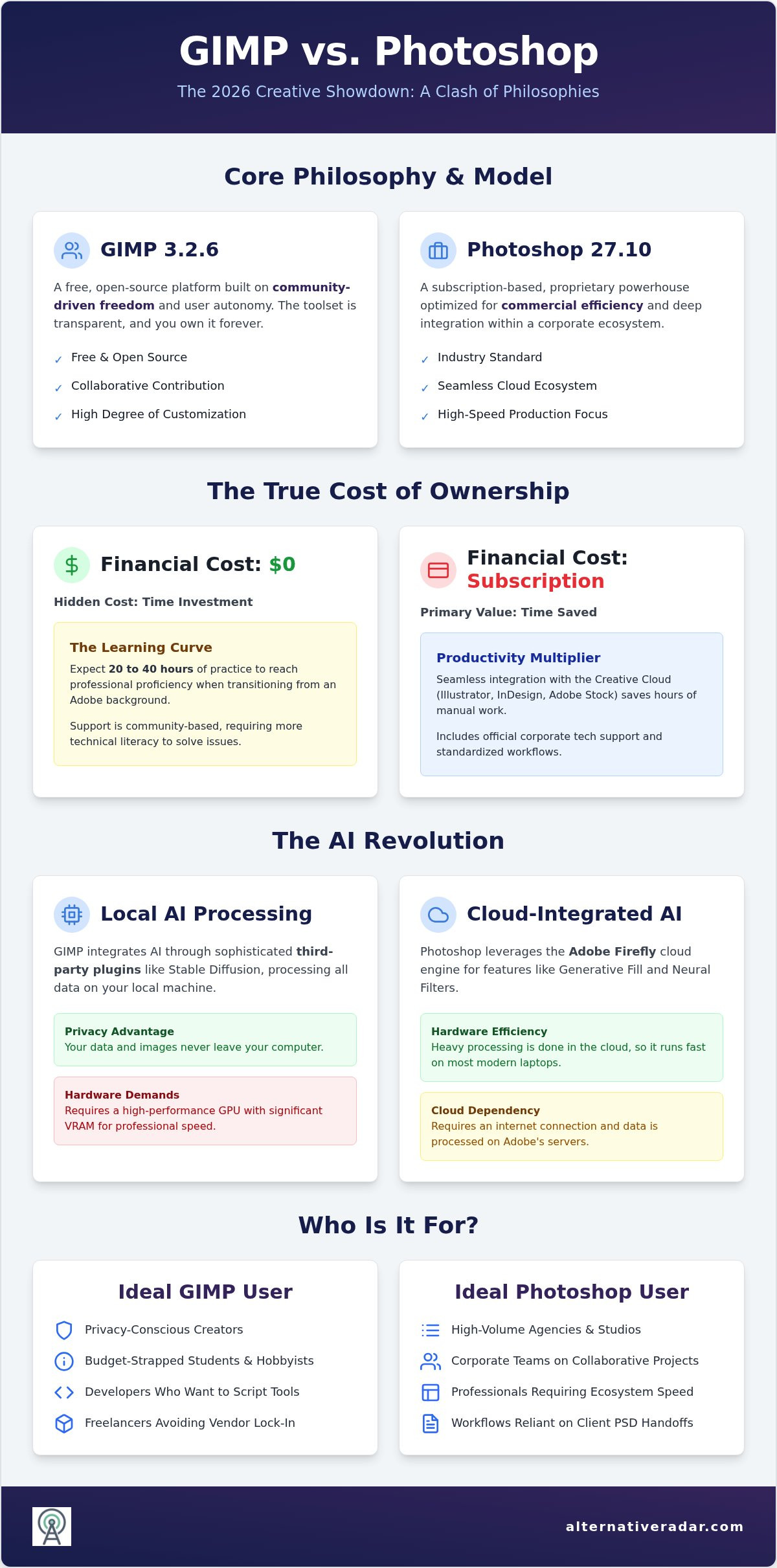
The choice between gimp vs photoshop is no longer just about a price tag. It’s a clash of fundamental philosophies. Photoshop operates as a proprietary powerhouse, optimized for high-speed production and deep integration within a corporate ecosystem. Conversely, GIMP represents community-driven freedom, offering a transparent toolset that users own forever. Photoshop is a subscription-based proprietary raster editor focused on commercial efficiency, while GIMP is a free, open-source raster platform built on collaborative contribution and user autonomy.
By late 2026, subscription fatigue has reached a breaking point. Many creators are tired of monthly fees that never end. This shift has sparked a massive resurgence in GIMP interest. However, choosing a tool based solely on the lack of a bill is a mistake. You must define your value. If your time is worth $100 an hour and GIMP’s non-standard UI costs you three hours of troubleshooting a week, the free software is actually costing you $300. Target users for GIMP include privacy-conscious creators, budget-strapped students, and developers who want to script their own tools. Photoshop remains the domain of high-volume agencies and professionals where every second saved justifies the cost.
The True Cost of ‘Free’ Software
Learning GIMP isn’t just about finding where the buttons are. It’s a hidden investment. Unlike Photoshop’s standardized workflows, GIMP requires a significant mindset shift. You won’t have a corporate help desk to call when a plugin breaks. Instead, you’ll rely on community forums and the GIMP Wikipedia page for technical context and historical documentation. When evaluating gimp vs photoshop, consider these hidden factors:
- The Learning Curve: Expect to spend 20 to 40 hours of practice to reach professional proficiency in GIMP if you’re coming from an Adobe background.
- Community Support: You trade official tech support for a global network of volunteers. Solutions are often faster to find but require more technical literacy.
- Toolkit Diversification: Professional freelancers are increasingly using GIMP alongside other tools to avoid total vendor lock-in, treating it as a specialized instrument rather than a total replacement.
Adobe’s Ecosystem Advantage
Photoshop doesn’t exist in a vacuum. Its primary strength is the halo effect of the Creative Cloud. If your workflow requires jumping between Illustrator for vectors and InDesign for layout, the seamless cloud syncing saves hours of manual export time. Integrated access to Adobe Stock and Adobe Fonts acts as a massive productivity multiplier. In the corporate world, Photoshop remains the industry standard for a practical reason: client file handoffs. If your agency partner expects a layered PSD with live smart objects, GIMP’s compatibility hurdles can become a significant bottleneck. The ability to share assets across a team instantly is often what makes the subscription fee a sound business investment rather than a burden.
Core Functionality and the AI Revolution
By 2026, the divide in gimp vs photoshop is defined by how each platform handles artificial intelligence. Adobe Photoshop version 27.10 relies on Firefly, a cloud-integrated engine that powers Generative Fill and Generative Upscale. It’s fast and requires zero local processing power from your machine. In contrast, GIMP 3.2.6 has embraced local AI integration through sophisticated third-party plugins. While Photoshop offers “one-click magic” for complex edits, GIMP requires you to manage your own models and datasets. Local AI processing in GIMP provides a privacy advantage over Adobe’s cloud-based processing because your data never leaves your machine.
Generative Tools and Neural Filters
Photoshop holds a clear lead in context-aware editing and content generation. Its Neural Filters can harmonize objects into a new scene or change facial expressions with a simple slider. GIMP users can achieve similar results by integrating open-source models like Stable Diffusion, but the trade-off is hardware. Photoshop runs efficiently on almost any modern laptop because the heavy lifting happens in Adobe’s cloud. Local AI in GIMP demands a high-performance GPU with significant VRAM to process images at a professional speed. If you prefer a more streamlined experience without the subscription, you might want to explore the best free alternatives to photoshop that balance ease of use with modern features.
Precision Editing and Selection Power
Selection tools have seen the most drastic benchmarks in 2026. Photoshop’s “Select Subject” and “Refine Edge” use AI to identify hair and transparent objects with near-perfect accuracy. GIMP’s smart selection tools have improved but still rely more on manual refinement and the classic Path tool. This difference is a major reason why small businesses using Photoshop report saving an average of five hours per week on routine editing tasks.
- Path Tool: GIMP’s approach is precise and manual, making it ideal for technical illustrators who want total control. Photoshop uses AI-assisted paths to predict curves as you draw.
- Object Removal: Photoshop’s Generative Fill removes complex objects while recreating the background seamlessly. GIMP’s Resynthesizer plugin performs well for simple textures but struggles with complex structural recreation.
- Automation: Adobe uses Action scripts that are easy to record and play back. GIMP utilizes Script-Fu or Python-Fu, which offer deeper customization for developers but require a steeper learning curve for average users.
Your choice depends on whether you value automated speed or granular control over your data. Photoshop excels at rapid iteration, while GIMP provides a transparent environment for those who don’t mind a more hands-on technical process.
Professional Workflow Comparison: CMYK, NDE, and UI
In the debate of gimp vs photoshop, professional output often dictates the winner. For years, GIMP’s biggest weakness was destructive editing. While Photoshop perfected Smart Objects and Adjustment Layers decades ago, GIMP has finally integrated non-destructive capabilities through its GEGL-based infrastructure. This allows for live filter previews and editable effects. It still lacks the polished “Smart Object” container system that makes Photoshop so efficient for complex compositions, but the gap is closing for basic editing tasks.
The CMYK hurdle remains a significant barrier for print professionals. Photoshop handles native CMYK color spaces effortlessly, which is why it remains the industry standard in prepress departments. GIMP operates primarily in RGB. To prepare files for high-end offset printing, GIMP users often rely on a pipeline approach. This involves exporting high-quality TIFFs and using Scribus, an open-source desktop publishing tool, to handle the final ICC profile conversions and soft proofing. This extra step is the price of open-source freedom.
The Print Production Reality
Prepress requires absolute precision. Photoshop’s lead in color management isn’t just about the software; it’s about the ecosystem of ICC profiles and soft-proofing tools that printers expect. If you’re working on a project that requires high-end offset printing, Photoshop’s native support for spot colors and channel-specific editing saves hours of manual correction. GIMP 3.2.6 has improved its color management stability, but it still feels like an RGB-first tool trying to speak a CMYK language. For digital-only creators, this is a non-issue, but for print designers, it’s a critical workflow consideration.
Customizing the GIMP Experience
Many designers abandon GIMP because the interface feels “wrong” compared to the Adobe standard. You don’t have to suffer through the default layout. GIMP 3.x offers a highly customizable single-window mode that mimics the Photoshop workspace. To bridge the productivity gap and settle the gimp vs photoshop friction, follow these steps:
- Shortcut Mapping: Use the “Edit > Keyboard Shortcuts” menu to remap GIMP’s commands to match the Adobe muscle memory you’ve already built.
- Dockable Dialogues: Arrange your layers, paths, and tool options into a single right-hand column to replicate the Photoshop palette layout.
- Theme Integration: Download “Photoshop-style” icon packs and CSS themes to make the visual environment feel familiar.
By reconfiguring the UI, you eliminate the cognitive load of searching for tools. This customization transforms GIMP from a frustrating alternative into a functional workspace. While the base installation is powerful, the real victory for many users comes from mastering the plugin ecosystem. Tools like G’MIC-Qt add hundreds of professional filters that extend GIMP’s functionality, offering a level of community-driven power that rivals Adobe’s proprietary filters.
Choosing Based on Your Creative Identity
Deciding between gimp vs photoshop requires an honest assessment of your daily output. Your creative identity dictates which tool serves your bottom line and which one creates unnecessary friction. While both platforms handle pixels, they serve different masters. A web designer’s needs for rapid asset export differ significantly from a digital illustrator’s requirement for brush physics or a photographer’s demand for RAW processing.
Web designers often prioritize export speed. Photoshop excels here with its “Export for Screens” feature, allowing you to generate multiple assets at various scales simultaneously. GIMP handles SVG files well and provides precise control over individual exports, but it lacks the automated multi-file workflow that saves time in large-scale UI projects. For digital illustrators, the focus shifts to brush engines and tablet support. GIMP 3.2.6 has modernized its tablet integration, offering better pressure sensitivity for Wacom and Huion users. However, Photoshop’s brush engine remains the benchmark for latency and complex stroke physics.
Photographers must consider bit-depth and RAW handling. GIMP now supports 32-bit float per channel, making it capable of professional-grade retouching without banding. You’ll still need an external RAW processor like Darktable or RawTherapee, whereas Photoshop users benefit from the integrated power of Adobe Camera Raw. Many professionals now adopt a hybrid approach. They use GIMP for privacy-sensitive or personal projects to avoid cloud-based data collection and maintain a single-app Photoshop subscription for high-speed commercial work.
When Photoshop is Non-Negotiable
In corporate agency environments, collaboration is the primary driver. If your team relies on the full Adobe suite, staying within that ecosystem is mandatory for seamless file handoffs. High-volume commercial retouching also favors Photoshop because its proprietary AI tools cut processing time significantly for routine tasks. If your work involves advanced 3D textures or video layer manipulation, Photoshop is the only viable choice between the two. If neither of these fits your exact needs, you should explore our full directory of software alternatives to find a more specialized tool.
When GIMP is the Smarter Choice
GIMP is the superior option for budget-conscious freelancers and non-profits that cannot justify recurring subscription costs. It’s the standard for creators on Linux-based workstations where Adobe products don’t run natively. Privacy-focused creators also choose GIMP to ensure their creative assets aren’t being used to train cloud-based generative models. It’s a lightweight solution that runs efficiently on older hardware or systems with limited resources. When you compare gimp vs photoshop for these specific use cases, the open-source alternative provides a level of autonomy that proprietary software cannot match.
Finding Your Ideal Design Ecosystem with Alternative Radar
The debate of gimp vs photoshop is often framed as a binary choice between cost and power. In reality, your workflow might benefit from a combination of tools rather than a single platform. By 2026, the ecosystem has expanded beyond these two giants. Specialized software now addresses specific pain points like batch processing, social media layout, or high-end digital painting with more precision than a general-purpose editor. Choosing the right tool isn’t about following the crowd; it’s about identifying the specific utility that matches your output requirements.
Alternative Radar serves as your digital scout. We’ve already done the testing so you don’t have to. Our goal is to provide a neutral comparison that prioritizes your time and resources over corporate marketing. Auditing your software stack for efficiency is the next logical step. Identify which tasks take the most time and look for the tool that streamlines that specific action. We filter out the marketing hype to find genuine utility, helping you build a toolkit that empowers your creative process.
Beyond the Big Two: Other Contenders
If you need a professional UI without the monthly fee, Affinity Photo remains a top choice for its one-time purchase model. For quick social media graphics, browser-based editors have become surprisingly powerful, offering templates that save hours of design work. You can explore these options in our guide to the best free alternatives to photoshop. Finding your niche requires looking past the industry standard to see what actually works for your specific creative identity. Use Alternative Radar’s complete guide to map out your transition and discover tools you might have overlooked.
Empowering Your Software Decisions
We believe in objective, data-driven comparisons. Avoiding subscription traps and proprietary lock-in is essential for long-term creative freedom. When you move away from the Creative Cloud, you regain control over your data and your budget. Alternative Radar provides the scout reports you need to manage these transitions safely. Join our community to stay updated on the latest software shifts and ensure your toolkit remains lean and effective. Smart choices lead to higher productivity. Stop following the market leaders and start building a stack that works for you. Your gimp vs photoshop decision is just the beginning of a more efficient design journey.
Mastering Your Creative Workflow
The choice between gimp vs photoshop ultimately rests on your specific time-to-value requirements and professional output needs. While Photoshop remains the industry standard for high-speed commercial production and seamless cloud-based AI integration, GIMP 3.2.6 offers a robust, privacy-first alternative for creators who prioritize autonomy. Your decision should align with whether you value the automated efficiency of a proprietary ecosystem or the long-term freedom of an open-source platform.
Alternative Radar acts as your independent curator, providing objective analysis on over 500 software alternatives to help you find tools that prioritize utility over marketing hype. We focus on empowering you to make smarter choices that protect your budget and your data. Our scout reports are trusted by creative professionals worldwide to filter through industry noise and find genuine functional value.
Explore our full list of Photoshop alternatives to find your perfect match. Auditing your software stack is the first step toward a more efficient and profitable design process. Take control of your digital toolkit today and build a workflow that serves your unique creative identity.
Frequently Asked Questions
Is GIMP really as good as Photoshop for professional use?
GIMP 3.2.6 is a professional-grade tool for many workflows, but it doesn’t match Photoshop’s speed in high-volume environments. While GIMP handles 32-bit float per channel and non-destructive editing, it lacks the seamless AI automation found in Photoshop 27.10. For freelancers focusing on web design or photography, it’s often more than enough. However, for agency work requiring tight cross-app integration, Photoshop remains the more efficient choice.
Can GIMP open and edit Photoshop PSD files?
GIMP can open layered PSD files, but compatibility isn’t perfect. Basic layers and masks usually import correctly, but proprietary Adobe features like Smart Objects, Adjustment Layers, and specific layer styles often lose their editability. If your professional workflow involves frequent file handoffs with agencies using the Creative Cloud, these compatibility hurdles can cause significant delays. GIMP works best as a standalone tool rather than a 1:1 collaborative replacement.
Does GIMP support CMYK for professional printing in 2026?
GIMP still lacks native CMYK support and remains an RGB-first editor. Professional print preparation requires using plugins like Separate+ or migrating the project to Scribus for final color space conversion. While GIMP 3.x has improved its handling of ICC profiles, the lack of a native CMYK workspace makes it less ideal for high-end offset printing compared to Photoshop’s robust prepress toolset. Digital creators won’t notice this limitation.
What are the best AI plugins for GIMP to compete with Photoshop’s Generative Fill?
The most effective way to close the gimp vs photoshop AI gap is through Stable Diffusion integration. Plugins like GIMP-Stable-Diffusion allow you to perform generative fill and object removal locally. Unlike Photoshop’s cloud-based Firefly engine, these tools require a powerful local GPU with at least 8GB of VRAM. This local processing offers a significant privacy advantage as your creative data never leaves your workstation for model training.
How long does it take to learn GIMP if I already know Photoshop?
Most experienced designers report a learning period of 20 to 40 hours to reach professional proficiency. The challenge isn’t the lack of features but the shift in interface logic and keyboard shortcuts. You’ll need to spend time remapping muscle memory and configuring the single-window mode to mimic the Adobe workspace. Once you overcome this initial friction, the functional differences between the two platforms become much easier to manage.
Is GIMP safe to download and use for commercial business projects?
GIMP is completely safe for commercial use and is licensed under the GPL. This license grants you the legal right to use the software for any business purpose without recurring fees. To ensure security, always download the installer directly from the official gimp.org website. Avoid third-party mirrors or bundled “pro” versions, which may contain unwanted software or malware that could compromise your business workstation’s integrity.
Why is Photoshop still considered the industry standard despite its cost?
Photoshop maintains its status through ecosystem dominance and time-to-value. Research suggests small businesses using Photoshop save an average of five hours per week through AI-powered automation and cloud syncing. The ability to move assets instantly between Illustrator, InDesign, and Premiere Pro creates a productivity multiplier that many companies find justifies the subscription cost. In the gimp vs photoshop debate, the industry standard often wins on pure speed.
Are there any one-time purchase alternatives that sit between GIMP and Photoshop?
Affinity Photo is the primary contender for users seeking a professional middle ground. It provides a familiar UI and native CMYK support without a monthly subscription. Other options include browser-based editors for rapid social media tasks or specialized tools like Krita for digital painting. These alternatives bridge the gap for creators who need more polished features than GIMP offers but want to escape the recurring costs of the Creative Cloud.