
Stop paying for features you don’t use just to keep your project files hostage behind a monthly paywall. You likely feel the sting of the “Creative Cloud tax” every month, especially when software bloat slows your machine or the interface feels too complex for a quick social media task. It’s a common frustration for creators who want professional results without the mandatory corporate overhead.
Finding reliable free adobe premiere alternatives used to mean compromising on stability or advanced features. In 2026, that’s no longer the case. This guide helps you reclaim your production budget by highlighting high-performance software that matches the power of Premiere Pro. We’ve acted as your digital scout, testing the latest releases to find the perfect balance between technical depth and processing efficiency. You’ll discover which tools offer the best AI-assisted workflows for speed and which ones provide the node-based precision required for cinematic projects. This comparison moves beyond simple lists to provide a clear path toward a faster, more cost-effective editing suite.
Key Takeaways
- Calculate the long-term impact of the “subscription tax” and identify how modern hardware requirements are shifting the value proposition toward lighter NLEs.
- Master the transition from layer-based timelines to node-based precision using industry-standard tools that offer high-end color grading for free.
- Accelerate social media production by utilizing AI-driven platforms designed for rapid, short-form exports on Instagram and TikTok.
- Select the best free adobe premiere alternatives by auditing your specific hardware capabilities against the rendering demands of each software engine.
- Prioritize data sovereignty and cross-platform stability by exploring open-source editors that offer professional features without usage tracking.
The Shift in Video Editing: Why Creators are Leaving Premiere Pro in 2026
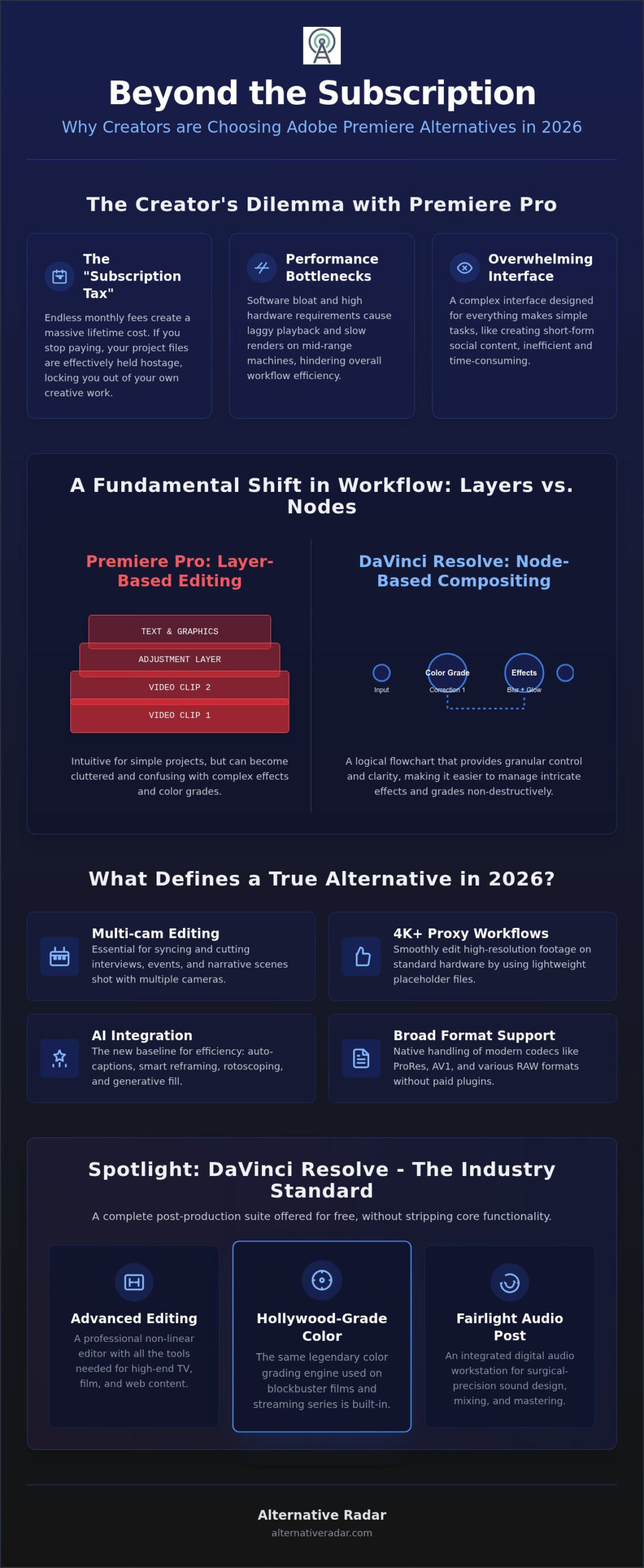
The video editing market is no longer a monopoly. In 2026, the “Creative Cloud tax” has become a significant barrier for independent professionals and small agencies. Paying a monthly fee indefinitely creates a massive lifetime cost compared to one-time licenses or high-quality free tools. If you stop your subscription, your project files effectively become locked. This dependency is a risk that many creators no longer want to take. They want ownership, not just a rental agreement for their creativity.
Hardware requirements are another major factor. Adobe’s 2026 build prioritizes high-end workstations, often leaving mid-range laptops struggling with basic playback. This bloat drives the search for free adobe premiere alternatives that offer leaner code and better optimization for standard consumer hardware. The market has shifted toward efficiency. You don’t always need a bloated suite that tries to do everything when a specialized tool can do exactly what you need faster.
The landscape of non-linear editors (NLEs) has fractured into specialized categories. You have open-source engines, freemium professional suites, and platform-native tools built for specific social media formats. For a detailed look at how these tools stack up, you can consult this comprehensive comparison of video editing software which tracks feature sets across dozens of platforms. This diversity allows you to pick a tool that fits your specific output rather than forcing your workflow into a generic mold.
The Hidden Costs of Adobe’s Ecosystem
Subscription fatigue is real. Beyond the price, constant cloud-dependency introduces risks. If your connection drops or servers experience downtime, your workflow halts. Many users also find they’ve hit a learning curve plateau. The software’s complexity, once a badge of professional status, is now a hurdle for those who need to deliver fast-turnaround social content. It’s often more efficient to use a tool that prioritizes the task at hand rather than one that hides basic functions behind layers of legacy menus.
What Makes a ‘True’ Alternative in 2026?
A viable replacement must handle modern standards. You shouldn’t settle for basic tools that lack professional depth. A professional-grade alternative requires specific features to be competitive:
- Multi-cam editing: Essential for interviews and event coverage.
- 4K proxy workflows: Necessary for editing high-resolution footage on standard hardware.
- AI integration: The new baseline for auto-captions, rotoscoping, and generative fill.
- Format support: Native handling of ProRes, AV1, and RAW files without paid plugins.
The best free adobe premiere alternatives today aren’t just “lite” versions of paid software. They are robust engines that prioritize user efficiency and modern hardware acceleration. Making the switch is about finding a tool that respects your time and your budget.
DaVinci Resolve: The Industry-Standard Professional Free Alternative
DaVinci Resolve is the dominant force among free adobe premiere alternatives because it doesn’t strip away core functionality to force an upgrade. While competitors often hide essential tools behind paywalls, Blackmagic Design provides a complete post-production environment. This includes advanced editing, professional color grading, and a full digital audio workstation in a single interface. It is a desktop powerhouse that avoids the limitations of mobile-first apps.
Transitioning from Premiere Pro requires a fundamental mindset shift regarding timeline logic. Premiere relies on a layer-based system, which can become cluttered during complex edits. Resolve uses a node-based architecture for its color and effects pages. Nodes allow you to chain effects and corrections in a non-destructive, highly organized way. This structure offers more granular control, making it easier to manage intricate grades or multi-layered compositions without losing track of your workflow.
The color grading page is Resolve’s crown jewel. It is the same engine used in Hollywood DI suites for blockbuster films. You get primary and secondary color wheels, power windows, and advanced tracking for $0. For audio, the Fairlight suite offers surgical precision for sound design and mixing. You can achieve professional results natively, eliminating the need for external applications to handle noise reduction or EQ balancing.
Resolve’s Free Tier vs. Studio Version
The free version is remarkably generous. You only lose access to the DaVinci Neural Engine, specific advanced Resolve FX, and resolutions beyond 4K, such as 32K exports. For 90% of solo creators and YouTubers, these limitations are irrelevant to their daily output. Blackmagic Design offers a single lifetime license for the Studio upgrade instead of requiring a recurring monthly fee.
Hardware and Optimization
Resolve is built on GPU-centric processing. It utilizes your graphics card more efficiently than Premiere, which often relies heavily on the CPU. This optimization leads to smoother real-time playback and significantly faster rendering on modern hardware. To maintain performance on older laptops, you can utilize the Optimized Media and Proxy workflows to downscale footage during the edit. If you’re building a full zero-cost production suite, consider checking out the best free alternatives to photoshop to manage your graphic assets. You can find software that fits your budget by exploring our curated comparisons of professional-grade tools.
Speed-to-Feed: AI-Driven Alternatives for Social and Short-Form
Speed is the primary metric for social media creators in 2026. While professional NLEs like DaVinci Resolve offer deep precision, they often lack the automation needed to produce multiple high-quality clips daily. This efficiency gap has fueled the rise of AI-driven free adobe premiere alternatives that prioritize rapid workflows over manual technicality. These tools don’t just replace Premiere; they redefine the editing process by automating the most time-consuming tasks.
The current landscape features powerful automation tools like auto-reframe, smart-cut, and trend-sync. These features allow you to transform horizontal footage into vertical formats or sync cuts to a beat with a single click. In contrast, Premiere often requires manual adjustments or third-party plugins to achieve the same results. For creators focused on Instagram, TikTok, or YouTube Shorts, these automated suites provide a significant competitive advantage in production volume.
CapCut Desktop: More Than Just a Mobile Port
CapCut Desktop has evolved into a legitimate workstation tool. It features advanced keyframing and masking capabilities that rival mid-tier paid software, allowing for complex visual storytelling without a subscription. The real value is the template economy. You can leverage pre-built structures to maintain visual consistency and match current platform trends instantly. For those using Chromebooks or low-spec hardware, the browser-based version offers a surprisingly robust editing experience that handles rendering on the cloud rather than taxing your local CPU.
Native Platform Editors (Edits by Meta)
Meta’s “Edits” app is the 2026 dark horse for Reels-first creators. By integrating directly with the Instagram ecosystem, it eliminates the friction of exporting and re-uploading files. It provides AI-assisted transitions and a licensed audio library that ensures your content remains platform-compliant. Many creators now choose to skip the desktop NLE phase entirely. They find that native tools handle smart-cuts and auto-reframing more effectively than traditional software because the tools are built for the specific destination platform.
However, using these platforms involves a clear privacy trade-off. When you use tools from ByteDance or Meta, your usage data and project metadata are often part of the value exchange. You must weigh the benefits of AI speed against your needs for data sovereignty. If you require a tool that keeps your data local and private, the open-source options we’ll cover next provide a more secure, though less automated, environment.
Open-Source Power: Privacy and Performance for Advanced Users
For creators who prioritize data sovereignty and system efficiency, Free and Open-Source Software (FOSS) provides a level of control that commercial suites cannot match. While AI-driven tools offer speed through cloud processing, they often track user behavior and project metadata. Professionals are increasingly moving toward free adobe premiere alternatives that operate entirely offline and respect user privacy. These tools don’t just protect your data; they offer a lightweight architecture that allows you to edit 4K footage on Linux distributions or older Windows machines that would struggle with modern Creative Cloud builds.
The FOSS landscape in 2026 is defined by two major engines: Kdenlive and Shotcut. Both utilize the powerful FFmpeg libraries to ensure compatibility with virtually any video format without the need for expensive plugins or transcoding. This technical flexibility makes them ideal for custom production pipelines where you need to build a bespoke editing interface through open-source plugins. You can audit your production workflow to see if a privacy-first approach fits your current project requirements.
Kdenlive: The Linux Powerhouse for Windows Users
Kdenlive has long been the standard for video editing on Linux, but its 2026 stability updates have made it a reliable choice for Windows and macOS users as well. It features advanced proxy clips and multi-track editing capabilities that function smoothly without the bloat of background subscription checks. This editor integrates perfectly with other tools in a popular open source business software 2025 pipeline, allowing for a professional-grade environment that costs nothing to maintain. The interface is highly modular, meaning you can strip away unnecessary windows to focus entirely on your timeline.
Shotcut: The Minimalist’s Choice
Shotcut is the preferred tool for technical editors who value a clean, functional workspace. It skips the traditional project “ingestion” phase, allowing you to start editing immediately. Shotcut’s “No-Import” workflow allows you to edit files directly from your drive, bypassing the time-consuming ingestion phase typical of traditional NLEs. This efficiency is paired with a non-linear timeline that supports 4K resolutions and hardware acceleration through your GPU. It’s the best choice for quick, high-quality technical edits where you don’t need the heavy automation of AI but require the reliability of a stable, local engine. If you want to bypass the market leaders, you can find the right open-source tool for your operating system through our curated lists.
Strategic Framework: Which Premiere Alternative Fits Your 2026 Workflow?
Selecting the right post-production tool requires more than just a feature comparison. You need a structured approach to identify which software aligns with your specific output and technical constraints. By systematically testing free adobe premiere alternatives, you can ensure your final choice supports your creative vision without technical friction.
Follow these five steps to finalize your transition strategy:
- Step 1: Define your primary output. Cinematic projects require the node-based precision of Resolve, while high-volume social content benefits from AI-driven speed.
- Step 2: Audit your hardware. Verify if your GPU can handle Resolve’s demands or if you require the lightweight efficiency of Shotcut or Kdenlive.
- Step 3: Evaluate your AI-dependency. Determine if you need manual control for every frame or automated features like auto-reframe and smart-sync for rapid delivery.
- Step 4: Check your ecosystem. Ensure your new NLE integrates with your team’s communication tools, such as slack alternatives, to maintain a smooth project pipeline.
- Step 5: The ‘Creative Cloud Exit’ Test. Run a single pilot project from start to finish. This identifies potential workflow bottlenecks before you cancel your Adobe subscription.
The Decision Matrix: Performance vs. Precision
Your choice depends on your specific creator profile. DaVinci Resolve is the industry standard for long-form, color-critical work that demands high production value. In contrast, CapCut and Meta Edits are superior for creators managing high-volume social media accounts where trend-syncing is the priority. If you need free adobe premiere alternatives that prioritize privacy or legacy hardware support, Kdenlive offers the best balance of performance without system bloat.
Final Verdict: Making the Switch
Reclaiming your budget starts with remapping your muscle memory. Most professional editors allow you to import Premiere’s keyboard shortcuts, which drastically reduces the initial frustration of switching. Commit to a 30-day transition plan where you use your chosen tool for every minor task. This period is essential for moving past the terminological differences between layer-based and node-based systems. You can find the best alternative to any market-leading software by using our curated guides. Stop following expensive market trends and start using a tool that respects your resources.
Reclaiming Your Creative Autonomy in 2026
Moving away from a subscription-based model is a strategic decision that prioritizes long-term efficiency over market habit. You’ve seen that the best free adobe premiere alternatives now rival industry leaders in both technical depth and processing speed. Whether you choose the cinematic precision of DaVinci Resolve or the AI-driven automation of social-first editors, your choice should align with your specific hardware and output requirements. You don’t have to settle for software bloat or recurring fees to produce professional-grade content.
At Alternative Radar, we act as your digital scout to bypass marketing hype. We provide objective, data-driven comparisons rooted in Dutch-owned transparency. Our goal is to help you find the highest utility tools without the fluff. If you’re ready to explore a broader exit strategy from expensive ecosystems, discover more software alternatives on Alternative Radar. Transitioning to a new suite takes time, but the financial and operational freedom is worth the initial learning curve. Start your next project with a tool that fits your budget and your workflow.
Frequently Asked Questions
Is DaVinci Resolve actually free or just a trial?
DaVinci Resolve is a completely free, perpetual license software, not a time-limited trial. Blackmagic Design offers this version to encourage creators to enter their professional ecosystem. You can export projects up to 4K resolution at 60 frames per second without any watermarks or hidden fees. While a paid Studio version exists for high-end features like the Neural Engine and specific FX, the free tier remains the most robust professional tool for solo creators.
Can I open Premiere Pro project files (.prproj) in these alternatives?
No, you cannot natively open .prproj files in other software because the format is proprietary to Adobe. To move your work to free adobe premiere alternatives, you should export your timeline as an XML or AAF file. These industry-standard formats allow different editors to read your cuts and track placements. Keep in mind that specific effects, plugins, and complex transitions won’t transfer and will require manual re-application in your new editor.
What is the best free video editor for low-end PCs in 2026?
Shotcut is widely considered the most efficient choice for low-end PCs in 2026. It features a minimalist interface and a “No-Import” workflow that places very little strain on your system resources. If your computer has limited RAM or an older CPU, Shotcut’s ability to handle 4K through aggressive proxy scaling makes it more viable than Premiere. Kdenlive is another strong contender for Linux users seeking high performance on legacy hardware.
Does CapCut Desktop have a watermark in the free version?
CapCut Desktop allows you to export your videos without a watermark in the free version. You might see a short branded clip at the end of your timeline, but you can simply delete this before hitting the export button. While some specific AI effects and transitions are locked behind a Pro subscription, the core editing features remain free. It’s a highly efficient tool for creators who need clean, professional exports for social platforms.
Are open-source editors like Kdenlive safe and stable for professional work?
Kdenlive is both safe and stable for professional environments. Because it is open-source, the software is free from hidden tracking or telemetry that often plagues commercial apps. The 2026 updates have addressed previous crash issues, making it a reliable engine for long-form storytelling. Many independent journalists and filmmakers use it because it handles complex multi-track timelines and proxy workflows without the bloat or background processes found in subscription-based software.
Which free alternative has the best AI auto-captioning feature?
CapCut Desktop currently offers the most accurate and fastest AI auto-captioning among the free adobe premiere alternatives. It uses advanced speech-to-text algorithms that support multiple languages and automatically sync text to your audio track. Meta’s native Edits app also provides high-quality captioning optimized for Instagram. If you need surgical precision and custom styling for your subtitles, CapCut’s interface allows for rapid bulk editing that significantly outperforms Premiere’s native captioning tools.
Do I need a powerful GPU to use DaVinci Resolve’s free version?
DaVinci Resolve is a GPU-intensive application, so a dedicated graphics card is essential for professional performance. While the software will run on some integrated chips, you’ll likely experience significant lag during playback and color grading. To get the most out of the free version, you should have at least 4GB of VRAM. If your hardware is older, consider using Shotcut or Kdenlive, as they rely more on the CPU and are less demanding.
How do I transfer my Premiere Pro keyboard shortcuts to other software?
You can easily transfer your muscle memory by selecting the “Adobe Premiere Pro” preset in your new editor’s settings. Professional tools like DaVinci Resolve and Kdenlive include these pre-configured maps to help users switch ecosystems without frustration. Simply navigate to the keyboard customization menu and choose the Premiere layout from the dropdown list. This allows you to use familiar shortcuts for cutting, rippling, and navigating the timeline while learning the new interface.