
The tool with the most integrations might actually be the one slowing your business down. A comprehensive workflow automation tools comparison in 2026 reveals that the “obvious” market leaders often trap you in a cycle of escalating costs and rigid logic. You’ve likely felt the sting of the “SaaS Tax” as your task volume grows or hit a wall when trying to bake modern LLMs into legacy processes. It’s frustrating to pay more for automation that still requires constant human supervision.
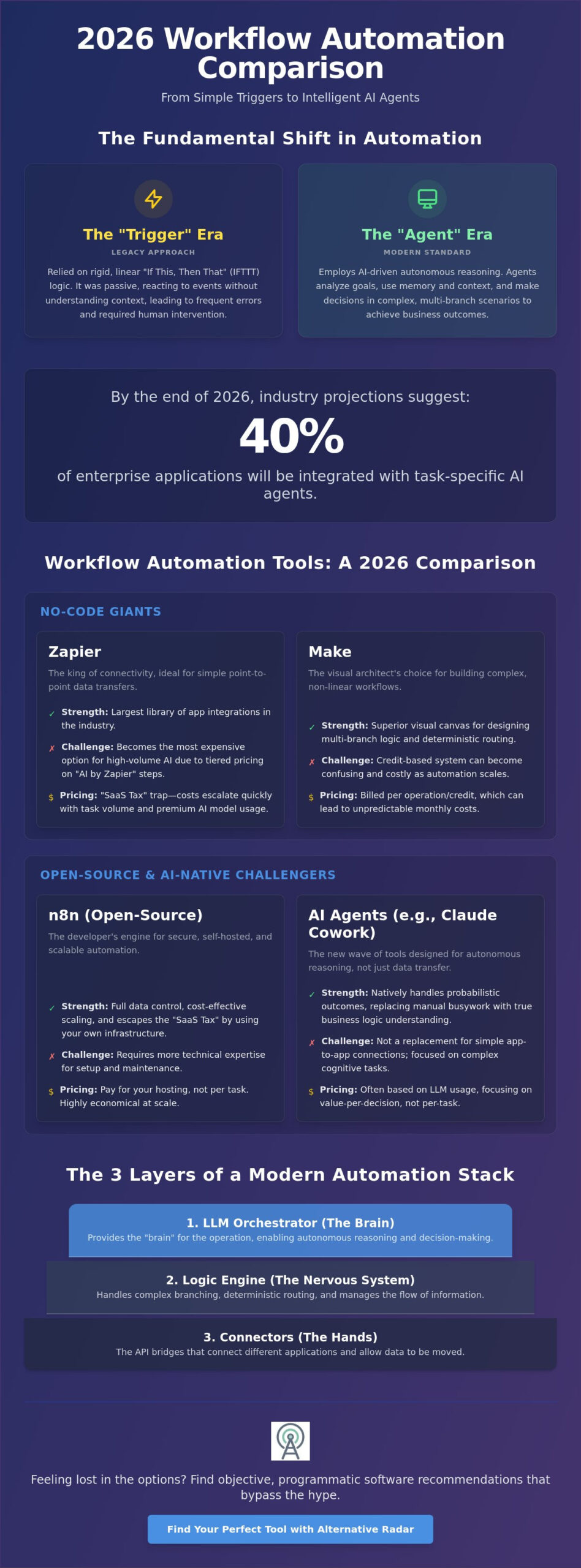
By the end of 2026, industry projections suggest that 40% of enterprise applications will be integrated with task-specific AI agents. This guide provides the definitive comparison of 2026 workflow automation tools to help you transition from simple triggers to intelligent AI-driven agents. We’ll break down the pricing models of Zapier, Make, and n8n; identify high-value alternatives like Claude Cowork; and give you a clear framework to choose a tool that scales without breaking your budget. You’ll discover how to replace manual busywork with autonomous reasoning that actually understands your business logic.
Key Takeaways
- Shift from rigid linear logic to multi-branch reasoning by evolving your tech stack from simple triggers to autonomous AI agents.
- Use our workflow automation tools comparison to evaluate no-code giants against open-source challengers based on visual debugging and deterministic routing.
- Identify high-value alternatives to market leaders that allow you to scale task volume without succumbing to the “SaaS Tax” of exploding monthly costs.
- Establish a secure automation framework by auditing sensitive data flows and selecting the right LLM strategy for your specific business needs.
- Leverage Alternative Radar as your digital scout to find objective, programmatic software recommendations that bypass biased marketing hype.
The 2026 Workflow Landscape: From Simple Triggers to AI Agents
The standard for Business Process Automation has shifted fundamentally. For years, automation relied on linear “If This Then That” (IFTTT) logic. You moved data from point A to point B when a specific event occurred. While functional, this approach is rigid. It breaks the moment a workflow encounters a variable it hasn’t seen before. Any workflow automation tools comparison in 2026 must recognize that we’ve moved past simple data transfer into the era of multi-branch reasoning.
The “Trigger” era was defined by passive reactions. In contrast, the “Agent” era is defined by autonomous decision-making. Modern tools don’t just wait for a signal; they evaluate the goal and determine the best path to achieve it. This transition is why your current stack might feel like it’s hitting a ceiling. “Dumb” data transfer creates a bottleneck where humans still have to intervene to fix errors or interpret context. A modern automation stack now requires three distinct layers: Connectors to bridge apps, Logic Engines to handle complex branching, and LLM Orchestrators to provide the “brain” for the operation.
What is an AI Reasoning Agent?
An AI Agent is a system that uses LLMs to determine the steps needed to reach a goal. Unlike traditional bots that follow a fixed script, an agent analyzes intent. It uses memory and context to understand that a “high-priority lead” in June 2026 requires a different response than one from six months ago. It doesn’t just move a row in a spreadsheet. It reads the data, compares it against your business goals, and decides whether to alert a salesperson, draft a digital proposal, or trigger a custom print run through Linemark for a personalized physical mailing. This ability to handle probabilistic outcomes rather than just deterministic ones is the key differentiator in any 2026 workflow automation tools comparison.
The ROI of Intelligent Automation
The value of shifting to agentic workflows goes far beyond saving a few hours of manual entry. The real ROI lies in massive error reduction and the generation of creative output that was previously impossible to automate. Businesses are now deploying agents for sophisticated tasks like automated meeting preparation, deep-dive call analysis, and self-cleaning CRM management. By integrating popular open source business software 2026 into their infrastructure, teams are building private, cost-effective environments where agents can operate without the high “per-task” fees associated with legacy cloud platforms. This strategic shift allows companies to scale their operations horizontally without a linear increase in software spend.
Workflow Automation Tools Comparison: Choosing Your Engine
The automation market is no longer a monolith. According to a recent Workflow Automation Market Analysis, the global market is valued at approximately $27 billion in 2026. This massive growth has created three distinct tiers: no-code giants, low-code powerhouses, and open-source challengers. When conducting a workflow automation tools comparison, looking at the integration count isn’t enough. You must evaluate visual debugging efficiency and the tool’s ability to handle probabilistic routing for AI agents.
Scaling creates a “Cost Per Task” trap that often catches growing businesses off guard. Pricing models in 2026 have diverged significantly. Some platforms charge per execution, while others use complex credit systems or model-based AI surcharges. Security has also become a non-negotiable filter. With cloud deployments accounting for 61.4% of the market, data residency and encryption standards now dictate which tools are enterprise-ready and which are merely hobbyist connectors. If you’re feeling lost in the options, Alternative Radar acts as a digital scout to help you filter these tools by your specific technical requirements.
The No-Code Giants: Zapier and Make
Zapier remains the king of connectivity with the largest app library in the industry. However, its June 2026 update introduced a model-based pricing structure for “AI by Zapier” steps. These steps are now priced by tier, with premium models costing 5x more than standard ones. This makes Zapier the most expensive option for high-volume AI processing. Make offers a superior visual canvas for architects who need to build complex, multi-branch logic. Make’s credit-based system is typically more cost-effective for intricate workflows where a single trigger initiates dozens of internal operations. While Zapier wins on setup speed, Make reduces long-term maintenance costs for sophisticated users.
The Engineering-Forward Challengers: n8n and Pipedream
For teams requiring absolute data control, n8n is the premier open-source choice. As of June 19, 2026, version 2.27.3 features a rebuilt AI Agent node that supports various models including Claude and GPT-4o. The ability to self-host n8n allows you to bypass per-task fees entirely, making it ideal for high-volume data processing. Pipedream serves developers who prefer code-level control over API events. It provides granular visibility into the request-response cycle that visual tools often hide. Integrating these engines with an open source CRM software comparison framework ensures your entire stack remains flexible, secure, and free from vendor lock-in.
Breaking the SaaS Monopoly: High-Value Alternatives to the Big Three
Choosing the “default” option like Zapier is often the fastest path to a bloated software budget. While it offers the most connectors, its per-task pricing model functions as a tax on your growth. As your business scales, you shouldn’t be penalized for being more efficient. A strategic workflow automation tools comparison shows that high-volume users can often find better value in tools that offer flat-fee structures or unlimited tasks. This shift is particularly evident in large institutions like Liberty University’s workflow automation tools, where they categorize software based on specific operational needs rather than just market popularity.
Vertical automation is another rising trend in 2026. Instead of using a general-purpose engine, many teams are moving toward tools built specifically for marketing or sales agents. These platforms come with pre-configured reasoning chains that understand industry-specific context. If you’re worried about the complexity of moving your existing Zaps, don’t be. Most modern alternatives now offer import features that map your existing triggers and actions to their own systems, significantly lowering the barrier to exit.
The Best Free and Open-Source Alternatives
Self-hosting is the ultimate way to break the SaaS monopoly. By running tools like n8n on your own infrastructure, you can reduce your automation bill by as much as 90%. For example, while cloud plans might start at around $24 per month for limited executions, a self-hosted instance costs only the price of a basic server, typically $5 to $20 for unlimited runs. This approach relies on “fair-code” licenses, which protect the developers’ commercial interests while giving you the freedom to scale. For a deeper look at making this transition, check out our guide on finding the best alternative to popular software.
Managed AI Alternatives: When You Don’t Want to Build
Not every team has the bandwidth to manage their own server or build complex logic from scratch. Managed AI alternatives like Wrk and Relay.app are filling this gap by offering “human-in-the-loop” services. These platforms handle the edge cases where AI might fail, providing a level of reliability that pure-play software can’t match. This “done-for-you” approach is increasingly replacing internal “Automation Ops” roles, allowing businesses to focus on strategy rather than troubleshooting API errors. It’s a trade-off between total customization and guaranteed delivery.
Designing for Scale: Security, API Management, and AI Reasoning
Scaling an automation engine requires moving from tactical fixes to architectural strategy. You can’t just add more tasks and hope for the best. A proper workflow automation tools comparison should prioritize how an engine handles massive data throughput without sacrificing security. By the end of 2026, experts predict that 40% of enterprise applications will be integrated with task-specific AI agents. Managing this volume safely requires a structured five-step framework.
First, audit your data flow. Every automated step is a potential security leak. You must determine exactly where your sensitive customer information travels at every stage of the process. Second, choose your LLM strategy. While OpenAI and Anthropic offer high performance for complex reasoning, local Llama 3 models provide cost stability and total data sovereignty. Third, implement “Human-in-the-loop” checkpoints for high-stakes decisions like financial approvals or legal drafting. Fourth, monitor for hallucinations. Even the best 2026 agents can fail, so you need automated debugging to catch logic errors before they reach production. Finally, optimize your costs. Move high-volume, repetitive tasks away from expensive “per-task” cloud platforms and toward self-hosted nodes. If you’re struggling to map these requirements to a specific platform, Alternative Radar can help you filter tools based on these advanced enterprise criteria.
Security and Data Privacy in 2026
The rise of “Shadow AI” is a major threat to modern enterprises. This occurs when employees use unauthorized automation tools to process company data, bypassing corporate security protocols. To combat this, SOC2 compliance and end-to-end encryption have become non-negotiable standards for any professional tool. Executing LLMs locally is becoming the gold standard for privacy because it ensures sensitive data never leaves your internal network. This approach eliminates the risk of your proprietary data being used to train third-party models.
Future-Proofing Your Automation Stack
An API-first architecture is essential for any tool you select in 2026. This ensures that your workflows can adapt as your tech stack evolves. Avoid vendor lock-in by using standardized JSON data structures for all internal communications. This makes it easier to swap out components if a provider changes their pricing or features. For example, when setting up team notification workflows, you might look at the best Slack alternatives to ensure your alerts go to the most efficient channel for your specific team structure. Focus on building a modular system where each agent and connector is an independent, replaceable unit.
Navigating the Software Maze with Alternative Radar
Finding the right automation engine shouldn’t feel like a high-stakes gamble. The market is saturated with “Top 10” lists that are often little more than paid placements for the highest bidder. This is where Alternative Radar steps in as your digital scout. We move beyond marketing hype to provide an objective workflow automation tools comparison based on utility, precision, and technical suitability. By stripping away the fluff, we empower you to challenge market leaders and discover hidden gems that might be a better fit for your specific budget and scale.
Our platform uses a programmatic approach to evaluate software. We don’t just look at popularity; we categorize tools by their licensing models, pricing structures, and AI reasoning capabilities. This ensures that you aren’t just following market inertia. Instead, you’re making a calculated choice based on how a tool actually performs in a production environment. Whether you need an enterprise-grade orchestrator or a lightweight open-source alternative, our directory acts as a high-quality filter for your decision-making process.
Why Objectivity Matters in SaaS Discovery
Pay-to-play lists create a distorted view of the software landscape. When the “best” tool is simply the one with the largest marketing budget, users end up with bloated costs and rigid workflows. We prioritize clarity over partnerships. Our evaluations focus on the actual needs of professional buyers, such as deterministic routing and visual debugging features. This commitment to objectivity encourages a culture of smarter choices. It’s about finding the tool that solves your specific problem, not the one that spent the most on programmatic ads this month.
Ready to Automate? Start Your Search
Before you commit to a long-term contract, run your finalists through a 2026 checklist. Does the tool support agentic workflows? Is it SOC2 compliant? Does the pricing model scale linearly with your task volume? Using a workflow automation tools comparison framework allows you to spot potential bottlenecks before they impact your operations. Start by filtering our directory based on your team size and the specific LLM strategy you’ve chosen for your business. We’ve done the hard work of searching and testing so you don’t have to.
Explore our full comparison of workflow automation alternatives on Alternative Radar and find the engine that will power your next phase of growth.
Master Your Automation Architecture
Transitioning from simple triggers to intelligent AI agents is an architectural necessity for businesses scaling in 2026. This workflow automation tools comparison has demonstrated that the real value lies in choosing an engine that supports multi-branch reasoning without imposing a “SaaS Tax” on your growth. Whether you opt for the visual complexity of Make or the data sovereignty of a self-hosted n8n instance, your choice must align with your long-term security and cost-efficiency goals. You don’t have to settle for the most expensive default option just because it’s familiar.
Alternative Radar acts as your digital scout in this complex market. We provide objective, expert-led software comparisons that focus on high-value, cost-effective alternatives. By helping over 100,000 users discover better software monthly, we ensure you have the data needed to challenge market leaders and optimize your operations. Find the best workflow automation alternatives for your business on Alternative Radar and start building a more resilient, autonomous tech stack. You have the tools to work smarter; now it’s time to deploy them.
Frequently Asked Questions
What is the best workflow automation tool for small businesses in 2026?
Zapier remains the best entry point for small businesses due to its massive integration library and intuitive interface. It allows non-technical users to build simple zaps in minutes. However, if your business requires complex logic or visual debugging, Make offers a more flexible canvas at a competitive price point. Choosing between them depends on whether you value setup speed or granular control over multi-step processes.
Is Zapier still the industry leader for automation?
Zapier is still the industry leader by integration count and market share, but its dominance is challenged by high-volume pricing models. While it offers the most connectors, competitors like Make and n8n are gaining traction among power users. These alternatives provide better value for complex, multi-branch workflows. Many businesses now use Zapier for simple tasks and shift heavy lifting to more cost-effective engines.
How much do workflow automation tools typically cost?
What is the difference between RPA and workflow automation?
RPA mimics human interactions with a user interface, like clicking buttons or scraping data from legacy software. Workflow automation connects applications directly through APIs to move data and trigger logic. While RPA is essential for older systems without APIs, workflow automation is faster, more reliable, and the standard for modern cloud-based tech stacks. Most 2026 businesses prioritize API-first tools for better stability and speed.
Can I use open-source automation tools without being a developer?
You can use open-source tools like n8n without being a developer, but a basic understanding of technical concepts is helpful. Most open-source platforms offer a visual interface similar to Zapier. The primary hurdle for non-developers is the initial server setup and maintenance if choosing to self-host. Many users opt for cloud-hosted versions of these tools to get the benefits of open-source logic without the server management overhead.
How do AI agents differ from traditional automation triggers?
Traditional triggers follow rigid “if this, then that” logic where one event leads to a fixed response. AI agents use large language models to reason and determine the necessary steps to reach a specific goal. An agent can analyze the context of a request and adapt its actions, whereas a traditional trigger will fail if the input doesn’t match its predefined rules exactly. This makes agents more resilient.
What are the security risks of automating business processes with AI?
The primary security risks include data leaks to third-party LLM providers and the rise of “Shadow AI” where employees use unauthorized tools. Automated agents can also suffer from hallucinations, leading to incorrect data entry or unauthorized actions. To mitigate these risks, ensure your chosen platform is SOC2 compliant and consider local LLM execution to keep sensitive data within your own infrastructure. Security must be a primary filter.
Is there a free alternative to Make and Zapier?
n8n’s self-hosted Community Edition is the most powerful free alternative for those with the technical ability to manage a server. It provides unlimited executions without the per-task fees common in cloud platforms. For a managed experience, tools like Composio offer free hobbyist plans for individual use. Always perform a thorough workflow automation tools comparison to ensure a free plan’s task limits won’t throttle your business growth.