Security is a binary choice: either you own the keys to your data, or your provider does. With 82% of recent data breaches involving cloud-stored information, relying on mainstream providers that hold your encryption keys is an avoidable risk. You likely feel the pressure of choosing between the convenience of big-tech ecosystems and the absolute necessity of data privacy. Finding the best secure cloud storage alternatives shouldn’t mean sacrificing the multi-device syncing or fast upload speeds you’ve come to expect.
We’ve done the heavy lifting to identify solutions that put you back in control of your digital life. You’ll discover how to implement zero-knowledge encryption that keeps your files invisible to everyone, including the service provider, while maintaining an affordable budget. This comparison breaks down the leading privacy-first platforms by their encryption protocols, storage limits, and real-world performance. You can stop worrying about unauthorized access and start building a more resilient, private digital infrastructure today.
Key Takeaways
- Identify the best secure cloud storage alternatives that utilize zero-knowledge architecture to ensure only you hold the decryption keys.
- Learn the critical differences between End-to-End Encryption (E2EE) and encryption at rest to see through provider marketing hype.
- Evaluate top-tier platforms like Proton Drive and pCloud based on their specific utility for media management versus total ecosystem integration.
- Follow a structured migration checklist to sanitize your data and ensure a seamless transition from mainstream providers to a secure environment.
- Match your storage choice to your specific threat model to avoid paying for security features that don’t align with your actual risks.
Beyond Google and OneDrive: Why Secure Cloud Storage is Essential in 2026
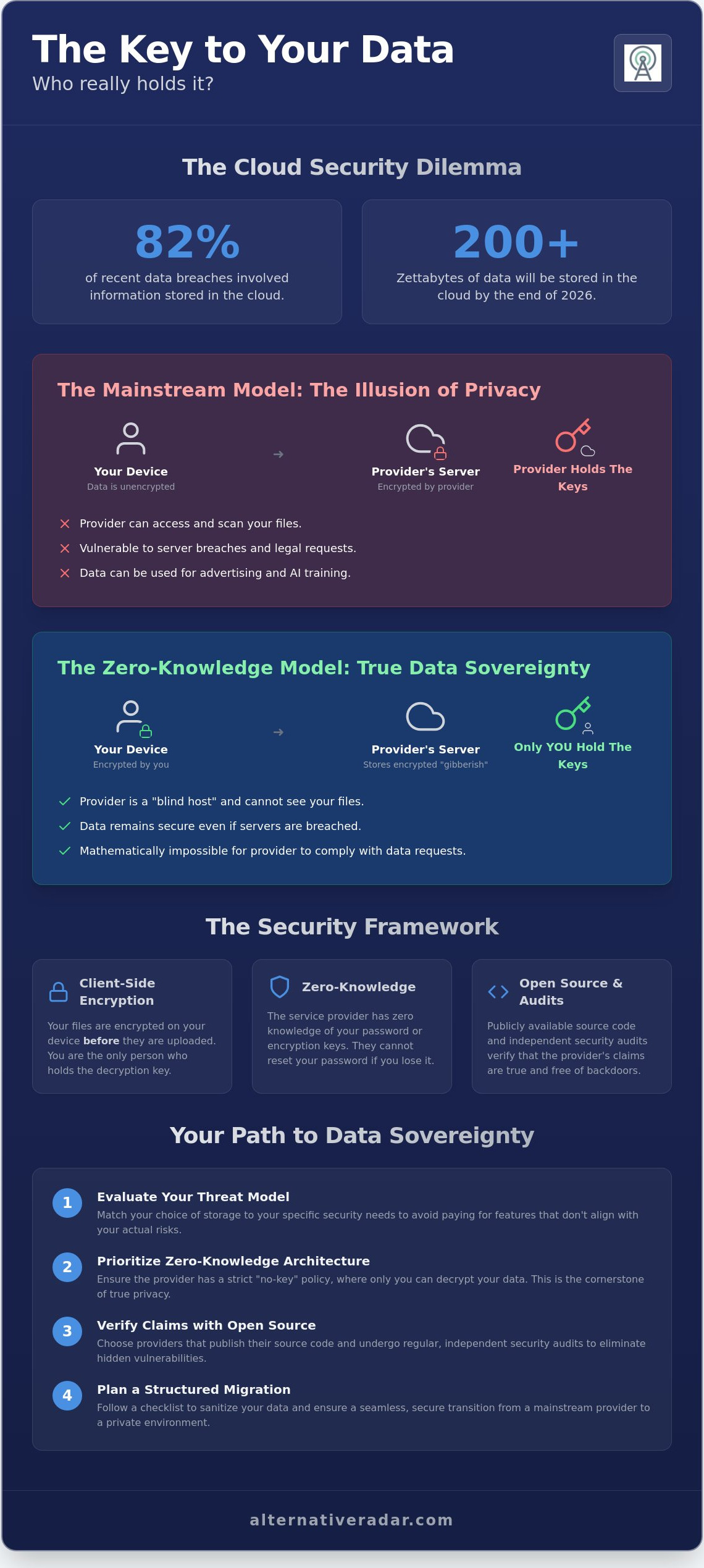
The volume of data stored in the cloud will surpass 200 zettabytes by the end of 2026. This massive migration of personal and corporate information has turned traditional storage providers into primary targets for both hackers and data harvesters. While giants like Google and Microsoft offer impressive ecosystems, they generally maintain control over your encryption keys. This means they can technically access your files whenever they choose. Real security requires a transition to zero-knowledge services. Under this model, your data is encrypted locally on your device. You keep the keys, ensuring that your information remains private even if the provider’s servers are compromised. Searching for the best secure cloud storage alternatives is the first step toward reclaiming your digital sovereignty.
The Problem with Mainstream Cloud Providers
Mainstream “Terms of Service” are often designed to facilitate data scanning for AI training and targeted advertising. While these companies promise security, they are actually referring to “security at rest,” where they manage the keys. This creates a single point of failure. If a provider faces a sophisticated breach or a legal “backdoor” request, your files are vulnerable. Relying on 2FA won’t stop a provider from accessing your files if they own the infrastructure and the keys. The risk isn’t just about hackers; it’s about the inherent lack of boundaries in centralized hubs. By 2026, the automated scanning of private documents for compliance and marketing has become a standard industry practice, making these platforms unsuitable for sensitive data.
The Rise of Sovereign Data Storage
Data residency is the next frontier of digital privacy. In 2026, 20 U.S. states have active consumer privacy laws, creating a fragmented legal environment that can leave your data in a grey area. Hosting your data in jurisdictions like Switzerland or Iceland provides a layer of legal sovereignty that mainstream providers can’t offer. Modern privacy-first platforms have evolved to provide the same seamless multi-device syncing as their competitors. You don’t have to sacrifice speed for security anymore. The best secure cloud storage alternatives now offer high-velocity transfers that match mainstream speeds while maintaining the mathematical certainty of zero-knowledge encryption. Choosing these tools empowers you to own your digital footprint rather than renting space in a transparent box.
The Security Framework: Decoding Zero-Knowledge and E2EE
Understanding the technical architecture is essential when evaluating the best secure cloud storage alternatives. Most users assume that if a service says “encrypted,” their data is private. This is a dangerous misconception. Traditional providers use encryption at rest, which means they encrypt your files once they arrive on their servers. Because they manage the keys, they have the power to decrypt your data for maintenance, scanning, or legal compliance. In contrast, client-side encryption ensures that your data is locked before it even leaves your device. You are the only person who holds the key, making the provider a blind host for your data.
How Zero-Knowledge Architecture Protects You
Zero-knowledge architecture operates on a strict “No-Key” policy. When you use these services, your password is used to generate an encryption key locally on your hardware. This key never travels to the cloud. If you lose your password, the provider cannot reset it for you because they don’t have access to the cryptographic keys required to unlock your account. This is a critical security feature. Zero-Knowledge is the inability of a provider to access user data even under legal duress. Learning how to safely store your data in the cloud involves prioritizing this specific architecture over general storage capacity or brand name recognition.
Verifying Claims through Open Source
Proprietary “black box” software requires you to trust the provider’s marketing claims without proof. Without access to the source code, independent researchers cannot verify that the encryption is actually zero-knowledge or free of backdoors. Open-source code allows for continuous public audits, which eliminates the risk of hidden vulnerabilities. You should always prioritize providers that publish their source code and undergo regular, independent security audits. If you want to expand your privacy toolkit beyond storage, explore our guide on popular open source business software 2026 to find tools that align with these high security standards.
The best secure cloud storage alternatives differentiate themselves by offering this level of transparency. Using Alternative Radar helps you filter these options by their licensing models and audit history, ensuring you don’t just follow the market leaders blindly. Focus on these three pillars of verification:
- End-to-End Encryption (E2EE): Data is unreadable from the moment it leaves your device until it reaches its destination.
- Client-Side Processing: Encryption happens on your CPU, not the provider’s server.
- Independent Audits: Third-party firms have verified the provider’s security claims within the last 12 months.
Top 5 Secure Cloud Storage Alternatives Compared
Selecting the best secure cloud storage alternatives requires balancing strict encryption with daily usability. These five providers represent the highest standards of zero-knowledge architecture available in 2026. Each targets a specific user need, ranging from individual privacy to corporate compliance.
- Proton Drive: This Swiss-based provider acts as a unified privacy ecosystem. It integrates seamlessly with Proton Mail and VPN, making it the “Swiss-army knife” for users who want to decentralize their digital life away from Big Tech.
- pCloud: Best known for its lifetime storage options, pCloud is ideal for media handling. It features built-in players for encrypted video and audio. Note that its zero-knowledge “Crypto” folder is a paid add-on, priced at $49.99 per year or a $150 one-time fee.
- Sync.com: Operating out of Canada, Sync.com is a top choice for professionals requiring HIPAA or GDPR compliance. It provides a 2 TB Solo Basic plan for $8 per month, though it’s important to note they are discontinuing unlimited plans for new users at the end of 2026.
- MEGA: MEGA offers one of the most generous free tiers with 20 GB of storage. It uses robust browser-based client-side encryption that handles large file transfers with high velocity.
- Nextcloud: This is the ultimate self-hosted alternative. It removes the third-party provider from the equation entirely. You install it on your own hardware or a private VPS, giving you 100% control over data residency and server configuration.
Privacy-First vs. Productivity-First Tools
Real-time collaboration often breaks encryption because the server usually needs to “see” the data to sync changes. Proton Drive and Sync.com have solved this by implementing encrypted document editing and granular sharing permissions that don’t compromise the zero-knowledge model. When evaluating mobile apps, MEGA and pCloud offer the most reliable background auto-sync for photos. Nextcloud provides the most features but requires a more technical setup to maintain sync stability across multiple devices.
Pricing and Value for Money
Lifetime licenses from pCloud or Icedrive provide significant long-term savings. For instance, pCloud’s 2 TB lifetime plan is currently $299, which pays for itself in less than three years compared to monthly subscriptions. If you prefer a predictable monthly cost, Proton’s $9.99 Unlimited plan includes their entire suite of privacy tools. To find the best alternative to expensive enterprise plans, look at Sync.com’s Teams Standard tier. At $6 per user per month, it offers professional security at a fraction of the cost of mainstream corporate suites. Don’t just pay for more gigabytes; pay for the architecture that keeps those gigabytes private.
How to Transition: A Migration Checklist for Data Privacy
Moving your data to the best secure cloud storage alternatives requires more than a simple drag-and-drop. It’s a strategic migration that demands verification and hygiene. Start by auditing your current data footprint. Identify sensitive documents that require zero-knowledge protection and separate them from public-facing assets. Sanitizing your local files before the first sync prevents you from uploading malware or unnecessary metadata that could be harvested later. Deleting redundant or obsolete files now saves you from paying for storage you don’t actually need.
Establishing redundancy is the next priority. The 3-2-1 backup rule for 2026 standards dictates that you maintain three copies of your data on two different media types, with at least one copy stored offsite in an encrypted cloud environment. This ensures that even if a local drive fails or a cloud provider faces a service disruption, your access remains uninterrupted. Implementing this framework creates a resilient digital safety net that survives hardware failures and cyberattacks alike.
The Step-by-Step Migration Process
For large-scale data moves, use tools that support encrypted transfers to avoid data leakage during transit. Don’t just trust the upload progress bar. Verify file integrity by comparing cryptographic hashes after the upload is complete. This step confirms that no data was corrupted or intercepted during the move from your local machine to the encrypted vault. If you’re managing a professional team, educate them on the gravity of recovery phrases. In a zero-knowledge system, losing your recovery key means permanent data loss because the provider cannot reset your access.
Post-Migration Security Hardening
Once your data is migrated, implement hardware-based security. Use security keys like YubiKey to replace standard SMS-based 2FA, which remains vulnerable to SIM swapping and phishing. Configure shared folder permissions with specific expiry dates to prevent “permission creep,” where users retain access to files long after a project ends. If your team requires integrated secure workflows, check our open source CRM software comparison to see how private storage interacts with client management tools.
Securing your files is only the first step in building a privacy-first infrastructure. Use Alternative Radar to compare these tools side-by-side and ensure your entire tech stack remains uncompromised by mainstream data harvesting practices.
Smart Discovery: Finding Your Perfect Secure Alternative
Finding the best secure cloud storage alternatives requires an honest assessment of your specific threat model. If you are a legal professional or a high-risk journalist, your requirements for data residency and zero-knowledge architecture will be much stricter than a casual user storing family photos. Security is not a one-size-fits-all solution. It is a series of calculated trade-offs between absolute privacy and extreme convenience. You must decide where your boundaries lie before committing to a long-term storage provider.
Beware of “Privacy Washing” in 2026 marketing. Many providers use the word “encrypted” as a blanket term to attract users, but as we analyzed in previous sections, encryption at rest is not the same as zero-knowledge protection. If a company claims to be secure but refuses to publish its source code or undergo independent audits, they are asking for your blind trust. Much like how Evodrop Beobachter provides clarity for consumers evaluating water filtration systems, you must look for verified technical proof before trusting a cloud service. Gartner predicts that 99% of cloud security failures will be the customer’s fault by the end of 2026. This underscores the shared responsibility model. You are responsible for choosing the right architecture and managing your keys correctly.
How Alternative Radar Simplifies the Search
Alternative Radar acts as a high-quality filter for this complex and fragmented market. We look past the top-level marketing fluff to categorize tools based on their licensing, jurisdiction, and technical architecture. Our methodology prioritizes providers that offer transparent client-side encryption and clear data residency guarantees. This approach allows you to discover niche alternatives that often get buried in mainstream search results by massive advertising budgets. We compare free and premium tiers objectively, ensuring you don’t pay for enterprise-grade features that your specific workflow doesn’t require.
Next Steps for Your Digital Sovereignty
Don’t feel pressured to migrate your entire digital life in a single afternoon. Take the first step by signing up for a free encrypted tier from one of our recommended providers to test the interface. Once you’re comfortable with the recovery phrase and key management process, you can begin moving your most sensitive vaults. To round out your private tech stack, explore other categories like secure Slack alternatives to ensure your team communication is as protected as your file storage. Join the Alternative Radar community today to receive updated 2026 software insights. Maintaining your digital sovereignty is an ongoing process of discovery, and we are here to ensure you have the most reliable data to make those decisions.
Secure Your Digital Sovereignty with Precise Tools
Transitioning to a privacy-first infrastructure is a critical step toward long-term data integrity. You now understand that the best secure cloud storage alternatives rely on zero-knowledge architecture to ensure your files remain unreadable to everyone but you. Moving away from mainstream providers doesn’t just protect your privacy; it builds a resilient digital environment that is immune to centralized data breaches and automated scanning. By applying the 3-2-1 backup rule and verifying file integrity, you can migrate with confidence.
Selecting the right tool requires a clear view of technical specifications and licensing models. Compare the top secure cloud storage alternatives on Alternative Radar to access objective, data-driven comparisons that focus on E2EE and updated 2026 security standards. Our platform filters out the marketing fluff so you can focus on utility and performance. We’ve done the scouting so you can make an informed decision in minutes rather than hours.
Take control of your information by starting with a single encrypted vault. Building a secure digital future is a series of smart, incremental choices that prioritize your sovereignty over corporate convenience. This includes managing both your private storage and your public profile; for those who need to address harmful online data, Content Removal provides professional support in identifying and eliminating unwanted content. Your data belongs to you; make sure your storage provider doesn’t have the keys to prove otherwise.
Frequently Asked Questions
Is free cloud storage actually secure?
Free cloud storage is secure only if the provider utilizes zero-knowledge encryption protocols. Many providers, such as MEGA and Proton Drive, offer free tiers that maintain the same cryptographic standards as their paid plans. While these free options have lower storage limits, your data remains private. You should prioritize the encryption architecture over the total gigabytes offered to ensure your files remain unreadable to the provider.
What is the difference between Google Drive and Proton Drive?
The primary difference lies in who controls the encryption keys. Google Drive manages the keys on your behalf, which allows them to scan files for AI training or legal requests. Proton Drive uses a zero-knowledge model where you are the sole key holder. This makes Proton one of the best secure cloud storage alternatives for users who want to eliminate the risk of provider-level data access.
Can authorities access my data if it is stored in Switzerland?
Authorities cannot access your data if it is protected by zero-knowledge encryption because the provider has no way to decrypt it. Even with a Swiss court order, a provider can only hand over encrypted blobs that are mathematically impossible to read without your private key. Switzerland’s strict privacy laws offer a higher legal barrier compared to U.S. jurisdictions, providing an extra layer of protection against mass surveillance.
Will encrypted cloud storage slow down my upload speeds?
Local encryption might cause a negligible delay depending on your device’s processing power. Since the encryption happens on your machine before the upload starts, your CPU handles the heavy lifting. Most modern devices process these calculations in milliseconds. Your internet connection remains the primary bottleneck for speed, rather than the encryption process itself. High-performance alternatives now match the sync speeds of mainstream competitors.
What happens if I lose my zero-knowledge recovery key?
Losing your recovery key results in permanent data loss. Because zero-knowledge providers don’t store your password or keys, they cannot reset your account or grant you emergency access. You are the only person responsible for your credentials. You must store your recovery phrase in a safe, physical location or a secondary encrypted vault to prevent being locked out of your digital life forever.
Which secure cloud storage is best for large video files?
MEGA is widely considered a top option for large video files due to its high transfer quotas and generous storage tiers. It handles large-scale data moves efficiently through its browser-based encryption engine. Alternatively, pCloud is an excellent choice for media because it includes a built-in player that can stream encrypted video files directly without requiring you to download them to your local storage first.
Is self-hosting Nextcloud more secure than using pCloud?
Self-hosting Nextcloud offers superior control but shifts the security burden entirely to you. You manage the server, the updates, and the firewall settings, which eliminates third-party risks. However, pCloud provides a managed environment that is often more secure for non-technical users. If you don’t have the resources to maintain a server, using a professional zero-knowledge provider is a more reliable way to protect your data.
Do secure cloud storage alternatives support mobile apps?
Yes, the best secure cloud storage alternatives provide full mobile support for iOS and Android. Apps from providers like Sync.com and NordLocker offer features such as automatic photo backup and biometric locking. These mobile applications ensure your data remains synchronized and encrypted across all devices. You don’t have to sacrifice the convenience of on-the-go access when switching to a privacy-focused storage solution.