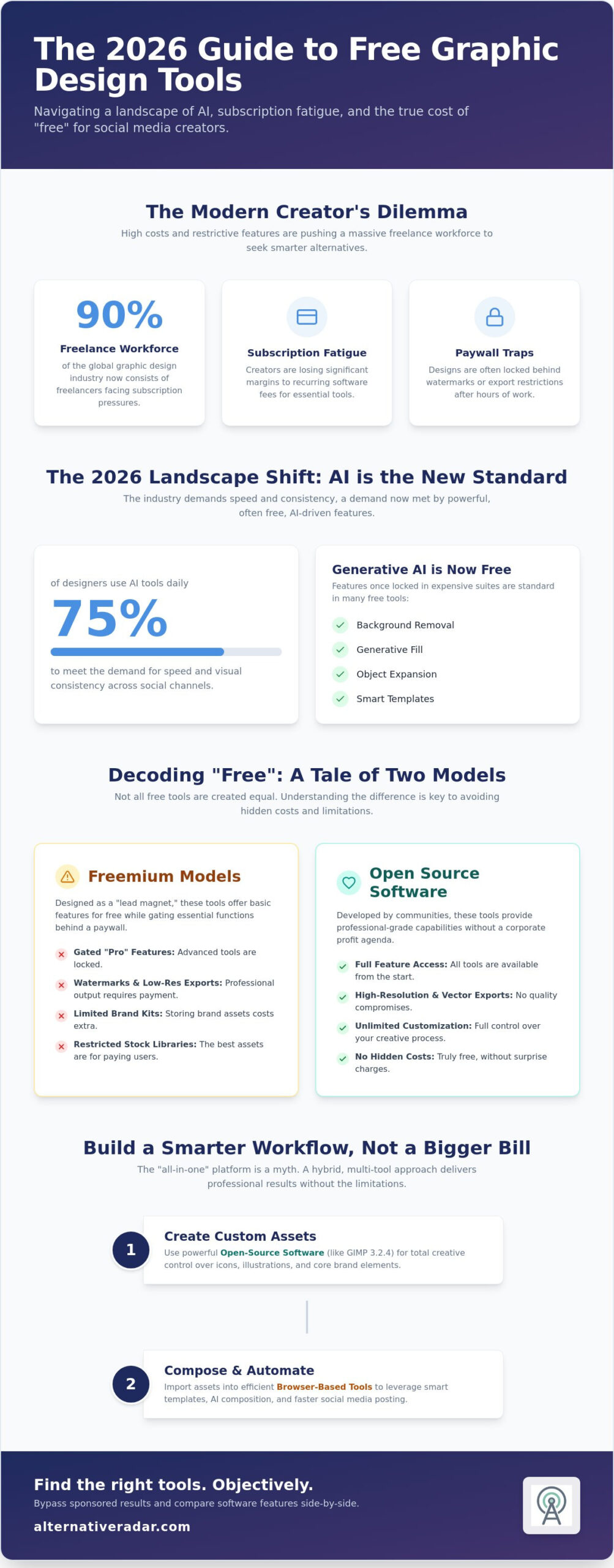
90% of the global graphic design industry now consists of freelancers, yet many are still losing significant portions of their margins to industry standard subscription fees. You’ve likely felt the frustration of spending an hour on a layout only to find your export locked behind a watermark or a sudden paywall. High costs and steep learning curves shouldn’t be the barrier between your brand and a professional online presence. Finding reliable free graphic design tools for social media is no longer about settling for less; it’s about making smarter, data-driven choices.
We’ve acted as your digital scout to filter through the noise and identify tools that actually provide value. This guide compares the top ten options available in 2026, covering everything from AI-assisted browser platforms to powerful open-source software like GIMP 3.2.4. You’ll learn how to bypass subscription fatigue and access modern features that drive engagement, such as the high-performing LinkedIn carousels currently seeing 37% engagement rates. Here is our objective breakdown of the tools that prioritize your productivity over their own profit margins.
Key Takeaways
- Adapt to the 2026 design landscape by integrating AI-assisted generative tools that maintain visual consistency across all your social channels.
- Identify the critical differences between freemium “paywall traps” and open-source platforms to find the most capable free graphic design tools for social media.
- Compare the specific strengths of industry leaders to determine whether you need Canva’s template variety or Adobe Express’s advanced AI features.
- Streamline your creative workflow by combining open-source asset creation with automated composition tools for faster, professional results.
- Utilize Alternative Radar to bypass sponsored search results and access objective, side-by-side comparisons of software features and licensing.
The Evolution of Social Media Design in 2026
The 2026 social media landscape demands speed above all else. Manual layout, once the primary task of a creator, has transitioned into AI-assisted generative design. This shift isn’t just about convenience; it’s about survival in an algorithm-driven environment where visual consistency is the key to audience retention. Recent data shows that 75% of designers now use AI tools in their daily work to meet this demand. As market leaders continue to hike prices, subscription fatigue is pushing professional creators toward a more decentralized stack. They are actively seeking free graphic design tools for social media that offer professional-grade features without the monthly overhead. This is where platforms like Alternative Radar become essential, acting as a digital scout to help you identify which tools actually deliver on their free promises.
Micro-SaaS tools are also on the rise. These platforms focus exclusively on specific formats, such as TikTok overlays or Threads-style typography. This specialization allows creators to maintain high engagement, like the 37% rate currently seen on LinkedIn carousels, without needing a massive enterprise suite. The goal is no longer to find one tool that does everything badly, but to find several free tools that do one thing perfectly.
The Impact of Generative AI on Free Tools
Generative AI has democratized features that were once locked behind expensive software. Background removal, object expansion, and generative fill are now standard in many free tiers. However, a clear divide has emerged between Cloud AI and Local AI. Cloud AI often operates on a pay-per-use or credit-based system, which can quickly lead to hidden costs. In contrast, Local AI tools leverage your own hardware, providing these features for $0. 2026 marks the era of the “Smart Template.” These aren’t static boxes; they are dynamic layouts that automatically adjust based on the content you input, ensuring your Graphic design remains cohesive across every post without manual resizing.
Why a Single Tool is No Longer Enough
Decoding the ‘Free’ Label: Freemium vs. Open Source
Most creators searching for free graphic design tools for social media eventually hit a digital wall. The software industry uses the term “free” loosely, often leading users into a tactical “paywall trap.” You usually encounter the Freemium model, where the software acts as a lead magnet. It offers just enough functionality to get you started but gates the most efficient features behind a subscription. In contrast, Open Source software is developed by communities rather than corporations, providing professional-grade capabilities without a hidden agenda. Understanding Visual Communication in the Age of Social Media helps explain why these platforms are so aggressive with their gating; high-quality visual assets are the primary currency of modern engagement, and platforms know you’ll pay to keep your feed looking professional.
Hidden costs are common in the freemium world. You might spend an hour perfecting a layout only to realize the export is restricted to a low-resolution file or branded with a large watermark. Some browser-based tools also treat your data as currency, tracking your design habits to build market profiles. If you want to avoid these compromises, you can compare software licensing models on Alternative Radar to see which platforms prioritize user utility over data harvesting.
Understanding Freemium Limitations
The most common frustration in freemium tools is stock library restriction. You’ll find that the most relevant icons or high-contrast photos are labeled with a “Pro” crown, forcing you to settle for generic alternatives. Brand kits are another frequent casualty; many “free” plans won’t let you save your specific brand colors or fonts, adding minutes of manual work to every project. Finally, collaboration caps often limit you to a single user, making it impossible to share editable files with a client or teammate without upgrading.
The Rise of Browser-Based Open Source
New SVG-based tools like Penpot are beginning to challenge the established monopolies by offering collaborative design environments for $0. These platforms are safer for long-term project ownership because they don’t lock your designs into a proprietary format that disappears if you stop paying. Open source software provides users with the original source code to study, change, and distribute, ensuring that professional features remain accessible without recurring costs or vendor lock-in. This shift allows you to maintain a high-quality free graphic design tools for social media stack that grows with your brand instead of draining your budget.
Top Free Graphic Design Tools for Social Media: A Comparative Breakdown
Selecting the right platform requires a balance between speed and technical capability. While Canva remains the dominant force with over 1.6 million templates in its free tier, Adobe Express has closed the gap by offering superior AI-driven edits and 5GB of storage for $0. To help you navigate these choices, Alternative Radar serves as your primary comparison engine, filtering thousands of software categories to find the best fit for your workflow. If you prioritize video-heavy content, VistaCreate provides a robust library specifically for Reels and TikTok. For those who need a browser-based photo editor without a subscription, Pixlr offers a functional interface that handles basic retouching well. These free graphic design tools for social media are no longer just entry-level options; they are professional utilities that cater to different creative needs.
Best for Templates and Speed
Comparing Canva and VistaCreate in 2026 reveals a distinct split in utility. Canva excels in static layouts, but VistaCreate often offers more modern motion graphic templates for free users. If your workflow requires ultra-fast creation, Snappa is the underdog that removes complex layers in favor of a streamlined interface. For creators on the move, Desygner provides a mobile-first experience that doesn’t sacrifice the precision found in desktop apps. These tools are designed for the high-velocity requirements of modern feeds where clarity often matters more than complexity.
Best for Professional Control and Vectors
For creators who need granular control, Penpot has emerged as a powerhouse. It is arguably the best free alternative to Photoshop for designers who prefer working with SVG-based layouts and collaborative files. While many academic programs in social media design still focus on the Adobe ecosystem, professional freelancers are increasingly turning to Inkscape for heavy-duty vector creation. Inkscape allows you to build unique brand assets from scratch without recurring costs. If you work primarily with raster graphics but find Photoshop too expensive, Krita 5.3.2.1 offers an advanced toolset that handles social media assets with ease. Using these free graphic design tools for social media ensures you maintain full ownership of your creative files while accessing features usually reserved for premium suites.
Building Your Social Media Workflow: From Concept to Auto-Scheduling
Efficiency in 2026 isn’t about finding one tool that does everything; it’s about building a sequence that minimizes manual labor. A professional workflow starts with asset creation where you use open-source software to build unique brand elements. By creating your core icons or logos in a vector-based environment, you ensure they remain crisp across every platform. From there, you move to composition, bringing those custom elements into template-based free graphic design tools for social media to finalize your layout. This two-step process prevents your content from looking like a generic template clone. For a brand focused on quality and uniqueness, such as Spice Rebels, this approach ensures that their digital presence is as distinctive as their curated spice blends.
- Step 1: Asset Creation. Use Inkscape to design scalable vector graphics. This ensures your brand identity isn’t tied to a proprietary cloud format.
- Step 2: Composition. Import your SVG or PNG files into Canva or Adobe Express. Use their library of “Smart Templates” to wrap your unique assets in a professional layout.
- Step 3: Optimization. Run your final exports through free compressors like TinyPNG. High-quality social media assets must be lightweight to ensure fast loading times on mobile networks.
- Step 4: Scheduling. Connect your design tool to a free management platform like Buffer or the Meta Business Suite. This automates the delivery phase so you can focus on the next creative cycle.
The Hybrid Design Stack
Adopting a hybrid stack allows you to leverage the specific strengths of different platforms. You should create your foundational logo in Inkscape for professional precision, but use Canva for daily post generation because of its speed. For background textures or unique visual elements, integrate AI generators that offer free daily credits. Managing these disparate files becomes easier with free cloud storage solutions like Google Drive or Dropbox, which offer up to 15GB of space for $0. This decentralized approach protects you from “subscription fatigue” while maintaining a high standard of production.
Automation for Efficiency
Automation is the only way to scale content for five different platforms without quintupling your workload. Use the built-in “magic resize” features found in many free tiers to adapt a single 1080×1080 square post into a 1080×1920 vertical story instantly. In 2026, maintaining a 96 DPI resolution for web assets and strictly adhering to platform-specific aspect ratios, such as 9:16 for vertical video or 1:1 for square posts, is essential to prevent algorithm-driven compression from degrading your image quality. Beyond organic reach, understanding programmatic display advertising can help you test which creative assets perform best before committing to a full campaign. If you’re ready to optimize your process, you can search Alternative Radar to find the most efficient automation tools for your specific niche.
Navigating the SaaS Landscape with Alternative Radar
Searching for software on traditional engines often leads to a wall of “sponsored” results that prioritize marketing budgets over actual user needs. Alternative Radar functions as a digital scout, filtering through thousands of categories to provide unbiased comparisons. When you’re looking for free graphic design tools for social media, you need transparency regarding export limits and hidden subscription tiers. Our platform prioritizes objective pros and cons; this allows you to see exactly where a “free” tool might eventually fail you. We act as a high-quality filter, ensuring that the software you choose aligns with your actual resource constraints and performance requirements.
Staying flexible with your tech stack is a major competitive advantage in 2026. Market leaders frequently raise prices or gate previously free features to drive revenue. If you can pivot to a new platform without a steep learning curve, you save thousands in annual overhead. This strategic flexibility extends beyond creative work and into every department of your business. You can use our database to discover popular open source business software for project management, CRM, and internal communication. Our role is to empower you to make smarter choices rather than just following the most visible market leaders.
The Alternative Radar Methodology
We maintain a strict commitment to neutrality and logic. Our reviews focus on technical labels and licensing classifications rather than marketing hype or external partnerships. We track the fast-moving AI and SaaS markets to ensure our data reflects the current stable versions, like GIMP 3.2.4 or Krita 5.3.2.1. Instead of simply listing the most popular tools based on search volume, we emphasize personalized suitability. This ensures you find the specific free graphic design tools for social media that match your hardware, skill level, and platform needs. This approach creates a sense of momentum and productivity by cutting out the trial-and-error phase of software adoption.
Your Next Steps
Identify your most significant software pain point today. Is it a high monthly cost? A restrictive brand kit that adds minutes of manual work to every post? Once you’ve isolated the problem, search Alternative Radar for a free or open-source competitor. You don’t have to follow market leaders just because they have the largest advertising budget. Take control of your creative workflow and find the best alternative to your current design suite today! By prioritizing logic over brand loyalty, you ensure your business remains efficient and profitable.
Optimize Your Design Strategy for 2026
Scaling your social presence shouldn’t depend on an ever-increasing software budget. By transitioning to a hybrid design stack that combines AI efficiency with open-source control, you bypass the common paywall traps that limit your creative output. You’ve seen how specific free graphic design tools for social media like Penpot and Krita provide professional-grade features without the recurring costs of market leaders. Efficiency comes from choosing tools that fit your specific workflow rather than settling for a single, restrictive subscription. It’s time to prioritize your margins over industry-standard convenience.
Alternative Radar acts as your digital scout in an increasingly complex SaaS market. We offer detailed comparisons across 5000+ apps, providing objective, commission-independent reviews updated specifically for the 2026 software market. This data-driven approach helps you identify the exact moment a market leader’s price hike outweighs its utility. Discover more free software alternatives on Alternative Radar to refine your toolkit today. Empower your business with logic and transparency while maintaining a professional edge on every social platform.
Frequently Asked Questions
Can I really create professional social media graphics for free?
Yes, you can produce professional-grade visuals without a paid subscription. Current free tiers offer high-resolution exports and AI-assisted features that were premium-only a few years ago. Using a hybrid stack of browser-based templates and open-source software ensures your content meets industry standards while keeping your overhead at zero.
What is the best free alternative to Canva in 2026?
Adobe Express is currently the strongest alternative to Canva for most creators. It provides a robust free plan with over 100,000 templates and advanced generative AI tools for background removal and object expansion. VistaCreate is another excellent choice if your strategy focuses heavily on video-first content and motion graphics.
Do free design tools have watermarks on their exports?
Most professional-grade free tools do not place watermarks on your final designs. You typically only encounter watermarks in freemium models if you accidentally select a premium asset, font, or template. To avoid this risk entirely, use open-source software where every feature and export is free and unbranded by default.
Is open-source software safe to use for my business?
Open-source software is exceptionally safe and offers greater transparency than proprietary “black box” apps. Because the code is public, a global community of developers identifies and patches security flaws quickly. This model also prevents vendor lock-in, ensuring you always own your creative files without worrying about sudden price hikes.
How do I choose between a browser-based tool and a desktop app?
Base your decision on the complexity of the specific project. Browser-based tools are ideal for quick, template-driven social posts and collaborative workflows that require speed. Desktop applications provide more granular control for vector creation and high-resolution photo editing, making them better for building foundational brand assets that require precision.
What are the best free tools for social media video editing?
CapCut and Adobe Express are the most efficient choices for quick, mobile-friendly video edits and Reels. If you need a more advanced desktop environment for long-form content, the free version of DaVinci Resolve provides professional-grade tools for color correction and complex transitions without a monthly fee.
Can I use free design tools for commercial purposes?
Most free graphic design tools for social media allow commercial use, but you must verify the licensing of individual stock assets. While the software itself is free, some included photos or icons may require attribution under specific Creative Commons licenses. Always check the licensing classification within the tool before publishing your campaign.
How often should I look for alternatives to my current design software?
Review your design stack twice a year to ensure you aren’t overpaying for features available elsewhere for $0. Providers often change their pricing models or gate features that were previously included in free tiers. Staying flexible allows you to adopt newer free graphic design tools for social media as they enter the market with more competitive features.